7929 comments found.

Hi,
Can you please help me with this issue. Right now if i add a product in a main category and one or multiple subcategories are all showed above product image in category listing. It’s also bad for page SEO.
I want to be showed only the category set as main for each product either is a main category or subcategory.
Can you please advise how to do that ?
Hello there,
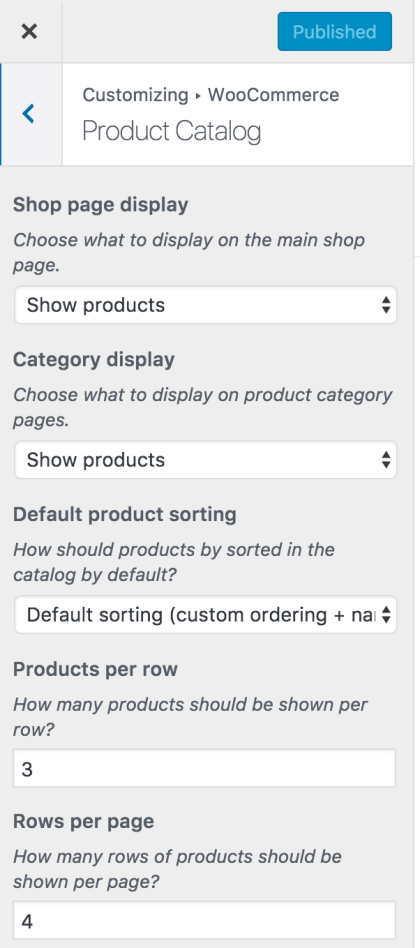
Thank you for purchasing our theme and for reaching us. You can choose what to display in shop and category page from Appearance > Customize > WooCommerce > Product Catalog and choose “Show Products” for Shop Page and Category Page. Ref : https://docs.woocommerce.com/wp-content/uploads/2018/02/customizer-productcatalog-option.png?w=421
Hope this helps. Let us know if you have any other questions or need further help.
Thanks, Ibrahim
Hi,
Thank you for the answer. I was refering to categories that are showed above product picture as in attached image in red squares.
https://imgur.com/a/LKLXjVwHello again,
It displays all the categories assigned to a product. There is no way to assign a main category. This is the function that pulls the categories list : https://docs.woocommerce.com/wc-apidocs/source-function-wc_get_product_category_list.html#1009-1020 It’s a WooCommerce default function.
If you want to override this, you can create a new function called ‘electro_template_loop_categories’ and override it.
Hope this helps. Let us know if you have any other questions or need further help.
Thanks, Ibrahim
Hi electro team.
I have a couple of questions.
1) How can i change the product´s link color? (https://drive.google.com/file/d/1zppe8sXUthABOppWAOGSpiC-lN_ZZSko/view?usp=sharing)
2) How can i show content in tabs without go to another page when i click the tab section? https://drive.google.com/open?id=1O9Eqyk990tus5Ta0Bbv6hX_g7zZYBTe-
3)Do you developed electro for shopify? https://themeforest.net/item/electro-gadgets-digital-responsive-shopify-theme/16544295?s_rank=1
I found that template for shopify with your electro mark and i see interesting features that would be nice to have in woocommerce version.
Thanks team!
Hello there,
Thank you for purchasing our theme and for reaching us.
1. Please add this custom CSS to Appearance > Customize > Additional CSS :
.woocommerce-loop-product__title { color: #dd0000; }
Replace the color hex value with your own value.
2. It is not possible. They are not tabs but merely links. Loading all these tabs with products will greatly increase the load time of your page.
3. No we did not develop Electro Shopify. It was developed by a different team.
Hope this answers your question. Let us know if you have any other questions.
Thanks, Ibrahim
the homepage serves the woocomerce products in full size 1024X1024px and then scales to 141pxX141px thumbnails. is there a way to get the homepage options to load the tumbnail images rather than full and scaling?
Hello there,
Thank you for purchasing our theme and for reaching us. The dimensions of the images to be used in loop and single product pages are set in Appearance > Customize > WooCommerce > Product Images. You can set it to any desirable image size dimension. However the image will occupy the maximum width available in a given layout. You can read more about it here : https://woocommerce.wordpress.com/2017/12/11/wc-3-3-image-size-improvements/
If you have set uncropped, then the images will be of different sizes. If you crop, then they all will be same size. The theme does not modify the behaviour of image sizes from WooCommerce.
Hope this answers your question. Let us know if you have any other questions.
Thanks, Ibrahim
Dear Ibrahim, How can i add Home v-3 style banner that says”fast delivery,best brands,secure systme etc’ on Home v-1?
Hello there,
Thank you for purchasing our theme and for reaching us. If you’d like to create your home page using blocks from different home pages, I suggest you to use Visual Composer or Elementor.
The Block you are referring to is Feature Block. Ref : https://docs.madrasthemes.com/electro/topics/visual-composer-elements/feature-block/
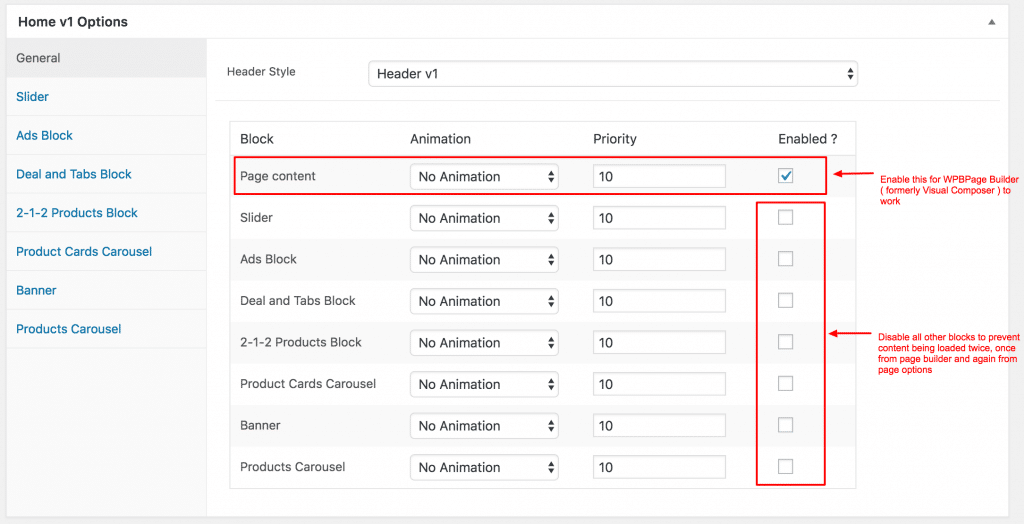
Once you’ve added the block, you need to enable “Page Content”. Ref : https://docs.madrasthemes.com/electro-v1/wp-content/uploads/sites/2/2018/03/enable-page-content-1024x524.png
Hope this helps. Let us know if you have any other questions or need further help.
Thanks, Ibrahim
hello can i try theme with multivendor? send me at arunenadar17@gmail.com
Hello there,
Thank you for your interest in our theme. We’ve emailed you the details of trial. Please check and let us know if you have any questions related to our theme.
Thanks, Ibrahim
Hello Ibrahim thank you for your valuable support. how can i modify navbar-search oval frame in rectangular frame? Thank you Frank
Hello there,
Thank you for purchasing our theme and for reaching us. Please add this custom CSS to Appearance > Customize > Additional CSS :
https://gist.github.com/ibndawood/d43c813779f8b6adcd1152b9a9932c96Hope this helps. Let us know if you have any other questions or need further help.
Thanks, Ibrahim
Hola… is it possible to show product ratings in the product sliders on desktops and mobile?
Hello there,
Thank you for your interest in our theme. It would require custom coding to modify the product items in shop loop to add ratings.
Here is custom code to add rating to grid view : https://gist.github.com/ibndawood/c2680e09264f46e91e7aa58c84232df4
Hope this helps. Let us know if you have any other questions or need further help.
Thanks, Ibrahim
Also if you are using WP Rocket I would suggest you remove optimize CSS delivery in the file optimize tab on your demo site because I have noticed it bugs out the menus upon load, and might reduce your sales when potential customers preview your themes 
Hello there,
Thank you for reaching us and I thank you for pointing this out. Let me check this and make appropriate changes.
Regards, Ibrahim
Hello I like the theme good job But before i buy it i want to be sure that i can have this option… i want the costume select number of items under the items not in the cart …
Like this exemple really i hope it’s work with your theme
Regarde
Hello there,
Thank you for your interest in our theme. Apologies for not responding earlier, we were closed during weekends. Please note our response time is 1 business day and we are closed on Saturday and Sunday which are weekends.
The feature you are requesting is not provided by the theme. If you have any third-party plugin that helps you provide this feature, we’ll gladly make it compatible with our theme ( though it is outside of support scope ).
Hope this answers your question. Let us know if you have any other questions.
Thanks, Ibrahim
What are the differences (Pros & Cons) between using WPBakery Page Builder and Elementor? How much easier is it to edit pages like the home page with Elementor?
Thanks.
Can I have some code to spread the categories equally along the main blue nav-bar (V3) so it takes up the whole width of the bar.
Thanks again.
Thirdly I would like the upper area of the product page where the images and variations are to be “Full Width | Extended”: https://i.imgsafe.org/99/99ed06bc22.png
And for the bottom part of the product page where the description, reviews and specifications are to be “Full Width | Normal”: https://i.imgsafe.org/99/99f60d0877.png
Hello there,
Thank you for reaching us. To answer your questions :
1. Different users find different page builders easy for their use. We do not have any recommendation for page builders.
2. Here is the custom CSS :
.electro-navbar-primary .nav { justify-content: space-between; }3. Please add this custom PHP code to your child theme’s functions.php : https://gist.github.com/ibndawood/be3e83b524345c486c97d05a00f93426
Hope this helps. Let us know if you have any other questions or need further help.
Thanks, Ibrahim
Hello! Great template!! Pls let me know how can i add more ads block or future block etc…. for home3 page. Regards
Im still waiting for the answer…..........
Hello there,
Thank you for purchasing our theme and for reaching us. Apologies for not responding earlier, we are closed during weekends. Please note our response time is 1 business day and we are closed on Saturday and Sunday which are weekends.
To answer your question, you can add more blocks using Visual Composer or Elementor or via custom code.
I suggest adding new blocks via Visual Composer and then enable “Page Content” checkbox. Ref : https://docs.madrasthemes.com/electro-v1/wp-content/uploads/sites/2/2018/03/enable-page-content-1024x524.png
Hope this helps. Let us know if you have any other questions or need further help.
Thanks, Ibrahim
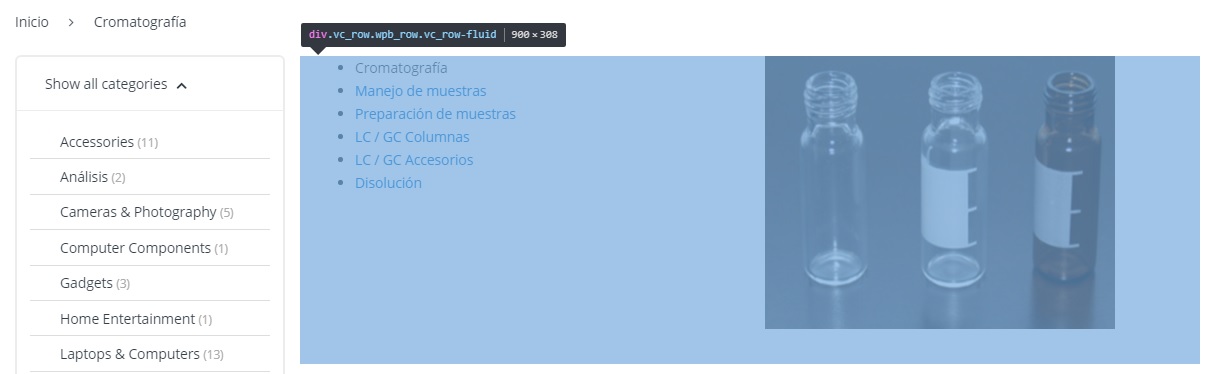
How can I edit this?https://i.gyazo.com/554e31d1d78848b9944ea5473246be68.jpg I want to change the text of “Show all Categories” and also want to edit the highlighted area.
Hello there,
Thank you for purchasing our theme and for reaching us. The area you’ve marked is part of shop jumbotron which is essentially a static block. Please make sure you de-assign it from Electro > Shop > Shop Page Jumbotron for shop level jumbotron or at category level by editing the category and removing jumbotron.
Hope this helps. Let us know if you have any other questions or need further help.
Thanks, Ibrahim
Thanks, and how can I edit the “Show all Categories” text in the aside <- ? thank you in advance.
Are you looking to translate or just change ? Please clarify.
I would like to know how to translate it and how to change it, thank you.
The theme is translatable and we have included all the strings with the pot file. You can use a plugin like loco translate to translate the theme into your language. You can find instructions here : https://docs.woocommerce.com/document/woocommerce-localization/#creating-custom-translations-with-loco-translate
Hope this helps. Let us know if you have any other questions or need further help.
Thanks, Ibrahim
Hi! Can I please get refund for this as I previously asked? Also, I wonder how I uninstall everything that came with the theme? I have uninstalled the theme, but there must have been some “extensions”/widgets still in elementor, and I may have chosen one of them, and then I got a fatal error. If I uninstall the theme shouldn’t that all go away? Thanks!
Please de-activate Electro extensions and Electro theme as well. You can raise a refund request from https://themeforest.net/refund_requests/new
Do you have a list of all the items that were installed separately, especially extensions/widgets for Elementor? I can’t reach my site anymore. Thanks!
I have raised refund request now. Thank you!
Hello, I use short description only. Any way to move the product tags under short description? Thank you!
Hello there,
Thank you for purchasing our theme and for reaching us. Please email our support from here : https://themeforest.net/item/electro-electronics-store-woocommerce-theme/15720624/support I will provide you with the custom code to achieve that.
Thanks, Ibrahim
in this theme is it possible to disable : ( whishlist icon – cart icon and vertical menu icon) ?
Hello there,
Thank you for your interest in our theme. Yes, you can disable wishlist, cart and vertical menu icon via theme options.
Hope this answers your question. Let us know if you have any other questions.
Thanks, Ibrahim
Greetings How do I get in touch with the support department?
Hello there,
Thank you for purchasing our theme and for reaching us. Please email our support from here : https://themeforest.net/item/electro-electronics-store-woocommerce-theme/15720624/support
Thanks, Ibrahim
Okay Thanks
I just purchased this great theme and I would like some CSS or php code to remove the hamburger menu from the desktop version of the site without removing from the phone header version of the site.
Thanks.
Hello there,
Thank you for purchasing our theme and being our continued customer. I sincerely thank you for this.
You can disable off-canvas menu in desktop from Electro > Header > Off-Canvas Menu in Desktop and disable it. Ref : https://docs.madrasthemes.com/electro/topics/theme-options/header/#masthead-1
Hope this helps. Let us know if you have any other questions or need further help.
Thanks, Ibrahim
Thank you very much for your reply.
1. I would also like to remove the compare icon on the main header (V3). I tried to do it with CSS but the hit-box didn’t disappear and it takes up unnecessary space.
2. I would like the blue nav-bar to also be sticky, so when I scroll down the page the categories are still visible.
https://i.imgsafe.org/6a/6aeac31c34.png3. I recently moved over to the “Electro” theme from the “Techmarket” theme. I loved the support and extended it for another 6 months. However, I am no longer using that theme and I have 5 months left. So is it possible to transfer those 5 extra months of support to this theme?
Thanks a lot for all the help, looking forward to your reply.
Hello again,
Thank you for getting back.
1. You can de-activate YITH WooCompare to remove compare icon.
2. Please add this custom PHP code to your child theme’s functions.php : https://gist.github.com/farookibrahim/8afc9f028e9060c45bb45af1f3237dd6
3. Sure. No problem.
Regards, Ibrahim
2. Do you mean I should add it to the custom CSS because once I did it started working as a pose to funtions.php
3. Thanks a lot, appreciate it.
4. How would I also make the default blue mobile header sticky? There doesn’t seem to be an option for that.
2. My apologies its a custom CSS and not custom PHP. Should be added to Appearance > Customize > Additional CSS.
4. Can you please clarify which header you are using for mobile ?
Thanks, Ibrahim
Right now I am using the “mobile header v2” but this may change in the future so hopefully I can just change out the name of the header in the code.
Please add this custom PHP code to your child theme’s functions.php : https://gist.github.com/farookibrahim/7b0657d95db75b946100943c6f143977
We’ve also included other custom codes at the bottom.
Hope this helps. Let us know if you have any other questions or need further help.
Thanks, Ibrahim
I NEED A WOOCOMMERCE THEME JUST LIKE WISH.COM… HOW POSSIBLE CAN THIS BE.???? I JUST NEED A SIMPLE THEME LIKE THAT OF WISH.COM
Hello there,
Thank you for your interest in our theme. This theme is not built like wish.com, you’ll have to look for different theme.
Thanks, Ibrahim
DO YOU HAVE A THEME SIMILAR TO WISH.COM??
Hello again,
I am sorry we do not have a theme similar to wish.com.
Regards, Ibrahim
WHAT IS YOUR BEST WOO COMMERCE THEME? THAT’S THE ONE I WANT TO BUY
Electro is our best available theme.
BUT I CAN’T FIND THE VENDORS LOGIN & BACK OFFICE
The feature you are requesting is called “Vendor Management” where different companies called vendors setup accounts and sell their products on your site.
Electro is a WooCommerce theme and it supports all the features of WooCommerce. However “Vendor Management” is not a feature of WooCommerce. There are plugins like Dokan, WC Vendors, etc that allow you to extend WooCommerce into a vendor management system.
The theme is compatible with Dokan and WC Vendors, and we provide basic compatibility support. However we do not provide support for its features or non-availability of features.
Hope this clarifies. Let us know if you have any other questions or need further help with the theme.
Thanks, Ibrahim
I TOTALLY UNDERSTAND….
BUT PLEASE, TAKE A LOOK IT THIS VIDEO https://youtu.be/smBbZWwnW6o SO THAT UNDERSTAND MY POINT… ACCORDING TO THIS VIDEO https://youtu.be/smBbZWwnW6o “VENDOR MANAGEMENT” CAME WITH ELECTRO THEME #InBuilt
Hello again,
Thank you for your clarification. Like I said, themes cannot provide vendor management function as themes can only style the output. Vendor management is provided by plugins like Dokan, WC Vendors, WC Marketplace, etc. The theme is compatible with all these plugins. You can use the theme in combination with Dokan like explained in the video to build a multi-vendor website.
Hope this clarifies. Let us know if you have any other questions or need further help with the theme.
Thanks, Ibrahim
HELLO IBRAHIM, IF I PURCHASE THIS THEME, CAN U OR UR TEAM HELP WITH ARRANGING IT OR DESIGNING IT FOR ME? BECOS AM NOT THAT GOOD WITH WORDPRESS
Hello again,
Thank you for getting back. Unfortunately we are unable to do customisations for you as it is outside of support scope. I am sincerely sorry.
Regards, Ibrahim
Hello Ibrahim, I want to purchase the ELECTRO ELECTRONICS STORE THEME in the next 12 hours. Please, can you recommend the plugins i will need ?
Hello again,
Here you go : https://docs.madrasthemes.com/electro/topics/getting-started/introduction/#recommended-plugins
Hope this answers your question. Let us know if you have any other questions.
Thanks, Ibrahim
Good theme!
Hello there,
Thank you for your kind words. Please do not hesitate to reach us if you have any questions related to our theme.
Thanks, Ibrahim
Hi! I purchased this and imported demo and expected the site to look like demo, but it showed single product page like I had it before, only with your content on it. I really hoped for this to be a quick setup, but no I have no idea what to do and how the pices fit together. I wasn’t up for a good start as it took long time before I found any evidence I had a new theme, before I found the “install plugins” in a menu. I find no theme dashboard and have no idea on how to go from here. Thanks!
Hello there,
Thank you for purchasing our theme and for reaching us. I am sorry about the disappointment. Did you follow the installation instructions explained here : https://docs.madrasthemes.com/electro/topics/getting-started/demo-content/
You found no theme in dashboard ? Please clarify this with a screenshot or email our support from here : https://themeforest.net/item/electro-electronics-store-woocommerce-theme/15720624/support and let us know your WP admin details and FTP ( or cPanel ) details. I will take a look into the issue.
Thanks, Ibrahim