864 comments found.

Hey guys,
thanks for the theme.
Is it somehow possible to automatically fetch things from YouTube as the thumbnails, title,... ?  Thanks!
Hello there,
Thank you for purchasing our theme and for reaching us. Unfortunately we do not have this feature now. We have this feature as a part of our upcoming update but I do not have a concrete time frame yet.
However if you can fetch YouTube videos into a CSV file, you can use it to import them into Vodi.
Hope this helps. Let us know if you have any other questions or need further help.
Thanks, Ibrahim
Love VODI. I bought it for the feature rich theme to not only create create a Market for Optimistic Sci-Fi but also create a collaboration tool for Optimistic Sci-Fi filmmakers. Check it out https://www.sfcfilms.com . First release is just the basic version, and what members with free membersship will see. Still lots to do, but I’m feeling excited and that’s thanks to VODI. Thank you guys.
Hello there,
Thank you for purchasing our theme and for reaching us. Glad you are happy with our theme. We looked at your website and it looks fantastic and some quality content too ( I watched Bonkus ).
Please do not hesitate to reach us if you have any questions related to our theme.
Kindest Regards, Ibrahim
hey guys, I’m interested in getting Divi with this theme but I’ve been told that the theme must be coded according to WordPress Coding Standards in order for Divi to work.. so my question is will Divi work with this theme or not?.. I’m hoping for visual page builder like Divi or Elementor to go with this theme.. thank you
Hello there,
Thank you for your interest in our theme. We currently do not have Divi or Elementor compatibility. Our theme is compatible with Gutenberg only.
Let us know if you have any other questions or need further help.
Thanks, Farook
Hi! Great theme.
Having an odd issue. On Add New Movie page, I am entering a URL instead of a video embed under “Choose Movie Method”, and choose “Movie URL” from the dropdown. When I go to the site and click on that button, it tries to open it in a modal box, just like if I had entered the embed code, and it obviously fails because the URL will not open up on the modal. What I need is that when I specify a “Movie URL”, when I click the “Watch Now” button it should just open a link in a new window.
Can you advise? Thanks
Hello there,
Thank you for purchasing our theme and for reaching us. When adding movie url in edit page general tab please check Is Affiliate URL ? to make link open in new tab.
Hope this helps. Let us know if you have any other questions or need further help.
Thanks, Farook
Thank you!
I would like to purchase this them. However; I would like to know how easy it would be to integrate “point of sale”. Those who will access the page need to register and make a 1 time payment for access.
Hello there,
Thank you for your interest in our theme. Our theme does not have any features to restrict users or content. However there are many third-party plugins like WooCommerce subscriptions or Restrict Content pro or Ultimate Membership plugins that would allow you to integrate this feature with Vodi.
If you’d like to trial our theme before purchase please email our support and we’ll help you.
Hope this answers your question. Let us know if you have any other questions.
Thanks, Ibrahim
Hi !
I would like to know if something like a video channel page for each members will be implemented soon ? Like a channel on youtube. I would love to use your vodi template with the Vodi tube layout.
Thx !
Hello there,
Thank you for your interest in our theme. We are currently working on integrating BuddyPress plugin with Vodi. It will provide some user based features and social features. However it may not have an exact channel like feature but something similar to it. Once we release an update for BuddyPress compatibility, I will invite you to try it.
Thanks, Ibrahim
Hi 1. Do you support elementor 2. Do you support RTL ? 3. Do you have a subcription plan so only members can watch movies 4. Do you have a system that can allow me to pay a commission to the movie creator based on full video view etc? Thanks Eli
Hello Eli,
Thank you for your interest in our theme. To answer your questions :
1. The theme does not have any Elementor elements. You can use Elementor for general customisations but not customising Vodi blocks.
2. Yes, the theme is RTL compatible.
3, 4. The theme does not have these features. You need to rely on third-party plugins like Restrict Content Pro or Ultimate Membership to achieve these features.
Hope this answers your question. Let us know if you have any other questions.
Thanks, Ibrahim
Hello there,
Thank you for reaching us. May I request you to post your support question from the same account that you used to purchase the theme. Support is restricted to customers only and unfortunately I cannot verify your purchase against this account.
If you believe you’ve used this account for purchase I request you to contact Envato.
If you are a developer asking this question on behalf of a client, please email our support your purchase code from your customer and the Envato account associated with the purchase.
Thanks, Ibrahim
great theme, I’m hoping to use this for my video blog where I’ll be reviewing different movies and TV shows.. I have few questions
1_ How much combustibility I can have with this template that don’t require coding (I don’t know how to code)
2_ can I remove some of the features in this theme like the upload option on top because I don’t want others to upload anything only me
3_ can I add options like comments section under each episode not only seasons?
4_ I want to know how the user profile looks like and what options they will have when they register in my website? like adding videos to playlists, watch history, liked videos ext…
5_ last question if I needed some customisation that requires some coding can I pay you guys on top of the theme price to customise it for me? you decide the customisation fee of course
thank you
Hello there,
Thank you for your interest in our theme.
1. You can get all features from our demo without any custom code. However if you have any custom requirement it may require custom code.
2. Yes, we can remove upload feature from theme.
3. Yes, we can add comments to episode.
4. User My Account page will have playlists section for Movie, Video and TV Show and option to update user profile information.
5. Please note that while customisations are outside of support scope ( Ref: https://themeforest.net/page/item_support_policy ), we do help all our customers with customisation requests that do not consume much time and based on our availability. Sometimes it also happens that we are unavailable for custom requests or the custom request would take much time. Please be aware of this clause.
I suggest that you trial the theme before purchase. Please let us know via our support for trial access.
Hope this helps. Let us know if you have any other questions or need further help.
Thanks, Farook
thank you guys, while trying this theme I had a problem.. I’m trying to add seasons and I followed your documentation but when I finish adding the season and press update to publish it, when I visit the show’s page there’re no seasons and when I go back to the shows settings and check for the season I just added it vanishes.. so how can I add a season and publish it to make it visible on the show’s page because now the show is published but it has no seasons buttons
also regarding to adding the episodes how can I link the episode to be visible only under a seasons inside a show page because now when I add an episode from the episodes settings, it adds it as a stand alone video like a movie
thank you
Also how can I remove blocks from the home page to make it simpler and have fewer elements
update! I found out that I can delete blocks by going into the pages option then selecting the block with my mouse and press delete.. thank you
Glad your issue is resolved before we had a chance to respond. Please do not hesitate to reach us if you have any other questions related to our theme.
thank you for your reply but I still need help for the comment above regarding adding episodes.. I’ll just copy and paste this again here
1) while trying this theme I had a problem.. I managed successfully to add a new show but I’m trying to add seasons for it and I followed your documentation but when I finish adding the season and press update to publish it, when I visit the show’s page there’re no seasons and when I go back to the shows settings and check for the season I just added it vanishes.. so how can I add a season and publish it to make it visible on the show’s page because now the show is published but it has no seasons buttons
2) also regarding to adding the episodes how can I link the episode to be visible only under a seasons inside a show page because now when I add an episode from the episodes settings, it adds it as a stand alone video like a movie
3) I’m struggling to change colors with this theme, when I got to the visual editor the only option I have for colors is background color.. how can I have more options for colors like changing the text color m button colors ext… I want more customisation options for colors, how can I access that
4) the navigation menu on the home page is dark and on the shows page is white, I tried to change the home menu color but couldn’t figure it out.. can I have a custom color for the menus of it’s locked for specific options
5) now regarding the language since my site will be in Arabic, I had few issues when I translate tags and genres manually they look off balances and miss up the order and appearance of information beside them, so does this theme support Arabic without missing up the presentation of the other displayed elements like dates and other numbers
6) my last question is regarding the alignment of this theme’s elements, since in Arabic everything is from right to left, is it possible to shift things from left to right to be Arabic friendly.. one example is seasons, instead of season 1 starting from the left then season 2 next to it to the right.. can I make this the opposite.. I mean same thing for the navigation menu ext…..
thank you
Hello there,
Thank you for reaching again.
1 & 2. When you adding season we need to assign minimum 1 episode for the season. Please assign episode when create season and save. We have option for assign episode under each season.
3. Currently we does not have option to change color. If you would like to change custom color please let us know your color code. We will help you with custom CSS.
4. Can you please help us understand your requirement with a screenshot ?
5. Yes, you can translate all text from theme. The theme is translatable and we have included all the strings with the pot file. You can use a plugin like loco translate to translate the theme into your language. You can find instructions here : https://docs.woocommerce.com/document/woocommerce-localization/#creating-custom-translations-with-loco-translate.
6. Yes, our theme is RTL compatible. If you change theme language to Arabic the RTL styles load by default.
Let us know if you have any other questions or need further help.
Thanks, Farook
Hello, I purchased the theme and I’m having a hardtime editing the watch now buttons.Can I remove in certain parts and edit as well??
Hello there,
Thank you for purchasing our theme and for reaching us. Can you please let us know what exactly you want to achieve? We’ll help you out.
Thanks, Ibrahim
Hello, I want to rename the buttons in specfic block as well as remove in certain blocks
Hello there,
Thank you for getting back. The Watch Now button is generated from templates that display the videos, movies, episodes, etc. If you wish to change the text in general you can use the “Say What?” plugin.
If you want to change the text in specific places, then please do let me know what those specific places are, I will help you with custom code. Also let me know what blocks you wish to remove. I will help them as well.
Thanks, Ibrahim
Hello, Is it possible to get assistance to convert this theme into a online course learning theme.. would like to use the same format but to sell online courses and integrate with an LMS.. Could you be able to assist. Please mail me..
Thanks Lawrence
Hello Lawrence,
Thank you for your interest in our theme. Vodi does not support any LMS plugins as of now. You’ll have to use a combination of plugins to achieve the features that you are trying to achieve. If you are familiar with the plugins that you intend to use, you can use Vodi.
If you’d like to trial Vodi before purchase please email our support and we’ll setup a trial for you.
Thanks, Ibrahim
Thankyou for your prompt response.. Yes i would wish to have a brief try. I would want to use the theme, but will need some assistance in the modification. To use it as a bookstore. So adding an e-commerce touch to it..
Hello Lawrence,
Vodi does not have styles for WooCommerce. You’ll have to add some minor additional CSS to match the shop pages in WooCommerce. My colleague have sent you the details to your trial. Please take a look and let us know if you have any questions.
Thanks, Ibrahim
Hi Ibrahim !
We likes to use your great looking theme.
By the way, as recent user of the theme we encounter a problem with the Vodi Blog Grid Section component: https://docs.madrasthemes.com/vodi/topics/set-up-pages/home-v3/home-v3-via-gutenberg/#8-vodi-blog-grid-section While having more than 10 elements we would like to displays them by pages of 9 elements. However the component doesn’t seem to allow us to navigate through our elements. We are really annoyed by that. Did we miss something on the component configuration? Or else could you implement this behavior as an update?Thanks in advance.
Best regards, Guillaume
Hello Guillaume,
Thank you for purchasing our theme and for reaching us. Glad you are happy with our theme. We are already working on the filter option for the video with featured video blog. We’ll update you on that as soon as possible.
As for the video blog grid section, are you asking for a pagination ? Can you please clarify? Also a URL would help us look at the issue.
Thanks, Ibrahim
Hi Ibrahim & thanks for your consideration !
Yes we are talking about paginating our elements and being able to navigate through page sets with left and right arrows in bottom on the component with page numbers inbetween the arrows.
For example we will need this ability on this page to show our other messages elements : https://essentieltv.fr/messages/
Our 10th and following elements are not reachable right now.
Thanks again, Guillaume
Hello there,
Thank you for your clarification. I understand your requirement now. Please note that the block is only for displaying a given number of posts. It does not have pagination because WordPress can only have archive pages for pagination. If you want to pagination, you need to create a page called “Messages” and assign it as your posts page. Once you do that, it will list all the posts along with pagination.
The Messages page will display all the posts but in a different style. We can help you get the same style as in the link you’ve shared.
Let me know if you are okay with this approach.
Thanks, Ibrahim
Hello again !
Thank you for your help in implementing our needs.
I’m not sure to understand everything you said, do you talk on using an automatic wordpress generated page as this? https://essentieltv.fr/category/kidz/
Actually the page I noticed you (https://essentieltv.fr/messages/) is yet a page but I don’t know how to “assign it as your posts page”.
OKay to help us in this way if it can solve our problem. Here is my developer email if required: m.guill69@gmail.com
Thanks again, Guillaume
Hello Guillaume,
Thank you for getting back. Yes, you are right. I was referring to pages that are archives of your posts like this link: https://essentieltv.fr/category/kidz/
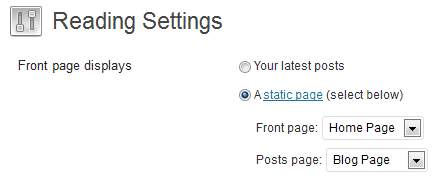
In WordPress, you can create a page like “Blog” or “Messages” and then assign it in Settings > Reading > Posts Page. Ref: https://i2.wp.com/wpscholar.com/wp-content/uploads/2017/08/wordpress_set_blog_page.png
Once you set that, all your posts will appear in this page automatically. I think that is what you wish to achieve ( but with a different layout ). If my understanding is correct, please let me know, I will get back to you with the code to change the layout like here: https://essentieltv.fr/messages/)
Please email our support from here: https://themeforest.net/item/electro-electronics-store-woocommerce-theme/15720624/support if you’d like to continue our support via email and we’ll include your developer as well.
Please let us know.
Thanks, Ibrahim
Hi Ibrahim,
Thank for your time trying to solve our matter. I understand your proposal but maybe it will be a bit difficult to handle our particular posts in this way.
Before following the way you indicate, I have a question on the “Videos Block” Vodi component, you allows to show 50 elements and on the Videos Block Section you allows to display 20 elements. Are this components implemented differently? Is there any easy way to add our own category and being able to display such an amount or more?
Thanks!
Hello Guillaume,
Thank you for getting back. Its actually only a minor change to the blog posts to display all blog posts like in the messages page of your website.
Regarding your question about Videos Block, can you please clarify which block you are referring to here: https://docs.madrasthemes.com/vodi/topics/getting-started/
In general, none of our Gutenberg Blocks uses pagination. They are meant to be standalone blocks independent of archives.
Hope this helps. Let us know if you have any other questions or need further help.
Thanks, Ibrahim
Hello there!
Thanks for your answer. To show you precisely the blocks I was spoken, I just created this temporary page to show you both: https://essentieltv.fr/components_test/ In documentation I only found the Videos Block Section: https://docs.madrasthemes.com/vodi/topics/getting-started/video-section/ but not the “Videos Block”.It looks like you have been able to handle a large amount on elements for videos, you don’t plan to give ability to paginate them?
Thanks again
Hello again,
Thank you for your clarification. The blocks are meant to display only filtered data and is different from the archive pages which display all info with pagination.
All videos, categories, movies, episodes have archive pages which have pagination and display all data.
Hope this clarifies. Let us know if you have any other questions or need further help with the theme.
Thanks, Ibrahim
is it possible to add source at bulk i dont see any mention of video source at https://github.com/madrasthemes/masvideos/blob/master/sample-data/sample_movie.csv
Hello there,
Thank you for reaching us. Apologies for not responding earlier, we were closed during weekends. Please note our response time is 1 business day and we are closed on Saturday and Sunday which are weekends.
May I request you to post your support question from the same account that you used to purchase the theme. Support is restricted to customers only and unfortunately I cannot verify your purchase against this account.
If you believe you’ve used this account for purchase I request you to contact Envato.
If you are a developer asking this question on behalf of a client, please email our support your purchase code from your customer and the Envato account associated with the purchase.
Thanks, Ibrahim
Sorry, my problem comes again, but I really can’t find a translator for this.
The character of this widget cannot be found to translate pot
I have searched for the core plug-in of Vodi and the theme (MAS static content, MAS Videos, Vodi Extensions,Vodi theme), but there is no relevant character that can be translated.
Hello there,
Thank you for reaching us. Are you asking about translating Gutenberg field names? Can you please clarify ?
Thanks, Ibrahim
Yes, I want to translate the Gutenberg module field, but I can’t find the relevant fields in the plugin and theme
Hello there,
Thank you for reaching again. We will include Gutenberg block admin text to our pot file in our next theme update.
Let us know if you have any other questions or need further help.
Thanks, Farook
It’s a great theme. I really like it. Although I ask for a lot of hahaha, but I really like it so that I put forward some requirements, I really hope your sales go well.
Hello there,
Thank you for reaching us. I sincerely appreciate your inputs to improve us. We really like working on your inputs to improve our product. Please do not hesitate to reach us if you have suggestions.
Thanks, Ibrahim
Hi there !
We just bought your theme and its pretty looking.
However we have a matter with filtering data. For this control in particular : https://docs.madrasthemes.com/vodi/topics/set-up-pages/home-v3/home-v3-via-gutenberg/#6-videos-with-featured-videoWe need to filter data displayed by the categories or tags displayed as Action Links. Does your theme allow this? And how to set it in practice?
Thanks you in advance, Guillaume
Hello Guillaume,
Thank you for purchasing our theme and for reaching us. The links in this block are action links that would navigate the user to a different URL and cannot be used as a filter.
If you allow us enough time, we’ll have this feature implemented. It would probably take 2-3 weeks. Please let us know.
Thanks, Ibrahim
Thank you for your answer. The sooner will be the best for us for we really need this capability to organize our videos. We bought the theme thinking this was yet implemented… Thank you again. Best regards
Hello, Great to know that you are adding ads to the theme. I am also waiting for ads only. I like the theme, but just that one thing is putting me off from switching over to this one. Once ads are ready, I am ready to buy!
Hello there,
Thank you for your interest in our theme. We are working on integrating ads feature. I will update you once this feature is available.
Thanks, Ibrahim
Hello, I buy into the AD idea that StarBear3 raised. Even if we can’t get the AD network option yet, it will be great to at least have user added ADs
Hello there,
Thank you for letting us know about your requirement. We are working on his suggestion. I will provide you with an update tomorrow.
Thanks, Ibrahim
Hello, I saw in the last review that the AD was mentioned, and I have an idea for the AD, which is a movie/TV cover view, which randomly exists in the following image (and indicates that it is an AD).
Such ads appear randomly on the home page.This will not make users feel tired of the advertising, to improve the user experience.And the effect is very good, hope you absorb my creativity.
Hello there,
Thank you for reaching us. I appreciate your suggestion. Its a good suggestion, it works for ads added by the user itself. However most ad networks are third-party like Google Adsense. If you are subscribing to an ad-network and need our help integrating it with Vodi, we’ll help you out.
Also we are releasing language importer today. I thank you for your patience in this matter.
Thanks, Ibrahim
Thank you very much for your willingness to help me integrate.I have my AD code ready.Want to help with integration.
Below is my AD code.
<script data-ad-client=”ca-pub-9897303194827658” async src=”https://pagead2.googlesyndication.com/pagead/js/adsbygoogle.js”></script>
Hello again,
Can you please give me the instructions to add this code?
Thanks, Ibrahim
Hi Awesome MadrasThemes team! Do you have an approximated date for the Buddypress style integration? Thank you so much. François
Hello there,
Thank you for purchasing our theme and for reaching us. I also thank you for your appreciation. I’ve passed on the design brief to our designers, we still haven’t finalised the designs for Vodi-BuddyPress. Once that is ready, we’ll have it integrated in 1 month’s time.
Hope this answers your question. Let us know if you have any other questions.
Thanks, Ibrahim
Thanks Ibrahim!