48 comments found.

Hi ,
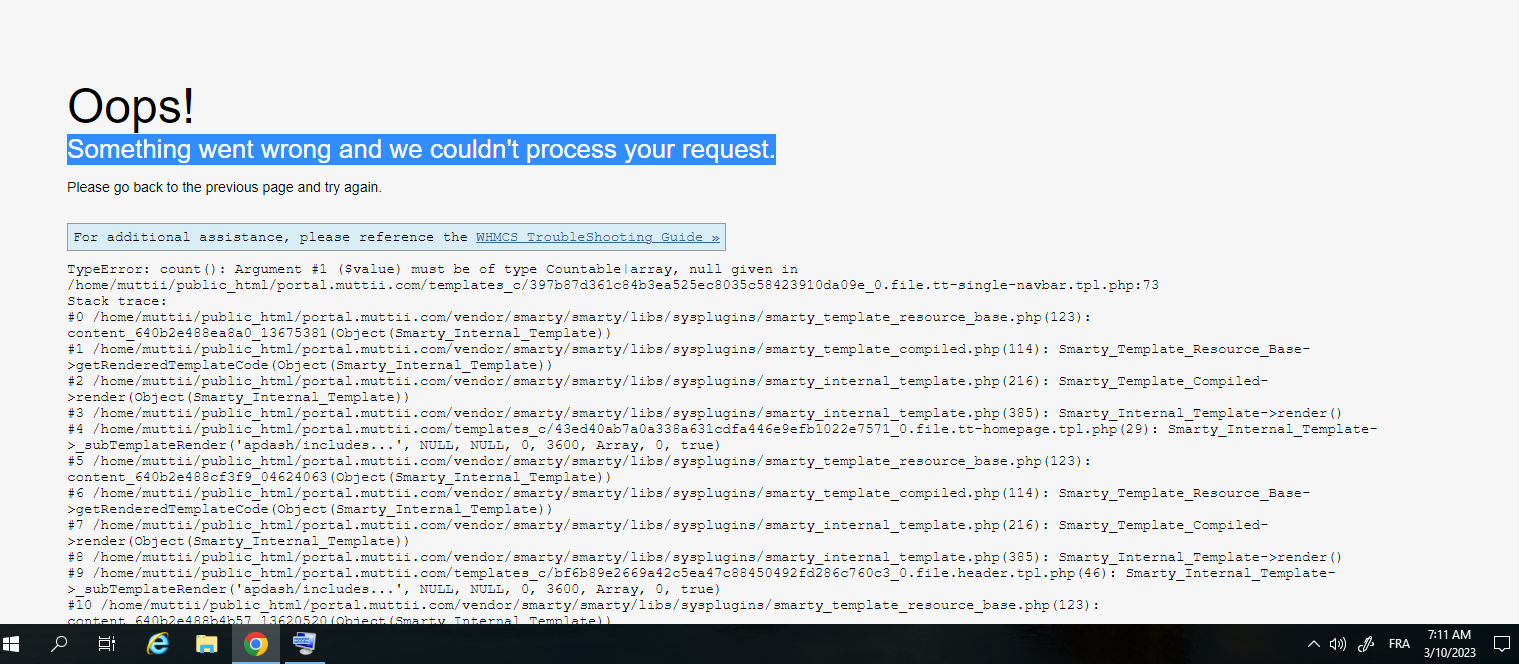
we are facing below error on WHMCS client portal, after WHMCS update to 8.12.1 Oops! Something went wrong and we couldn’t process your request.
Please go back to the previous page and try again.
Error: Call to undefined method WHMCS\Utility\Captcha\LocalImage::getSiteKey() in /home/avvaihostings/Whmcs_writeable_directories/templates_c/ed8481725bf85cfcb257dac8102c3bbac5fdd94b_0.file.head.tpl.php:80 Stack trace: #0 /home/avvaihostings/public_html/vendor/smarty/smarty/libs/sysplugins/smarty_template_resource_base.php(123): content_67e66dfc743f08_07309950(Object(Smarty_Internal_Template)) #1 /home/avvaihostings/public_html/vendor/smarty/smarty/libs/sysplugins/smarty_template_compiled.php(114): Smarty_Template_Resource_Base->getRenderedTemplateCode(Object(Smarty_Internal_Template)) #2 /home/avvaihostings/public_html/vendor/smarty/smarty/libs/sysplugins/smarty_internal_template.php(216): Smarty_Template_Compiled->render(Object(Smarty_Internal_Template)) #3 /home/avvaihostings/public_html/vendor/smarty/smarty/libs/sysplugins/smarty_internal_template.php(385): Smarty_Internal_Template->render() #4 /home/avvaihostings/Whmcs_writeable_directories/templates_c/42830af6007bdde7a6dd19bea573f5831ba54199_0.file.header.tpl.php(36): Smarty_Internal_Template->_subTemplateRender(‘hostim/includes…’, NULL, NULL, 0, 3600, Array, 0, true) #5 /home/avvaihostings/public_html/vendor/smarty/smarty/libs/sysplugins/smarty_template_resource_base.php(123): content_67e66dfc73b196_85647356(Object(Smarty_Internal_Template)) #6 /home/avvaihostings/public_html/vendor/smarty/smarty/libs/sysplugins/smarty_template_compiled.php(114): Smarty_Template_Resource_Base->getRenderedTemplateCode(Object(Smarty_Internal_Template)) #7 /home/avvaihostings/public_html/vendor/smarty/smarty/libs/sysplugins/smarty_internal_template.php(216): Smarty_Template_Compiled->render(Object(Smarty_Internal_Template)) #8 /home/avvaihostings/public_html/vendor/smarty/smarty/libs/sysplugins/smarty_internal_templatebase.php(232): Smarty_Internal_Template->render(false, 0) #9 /home/avvaihostings/public_html/vendor/smarty/smarty/libs/sysplugins/smarty_internal_templatebase.php(116): Smarty_Internal_TemplateBase->_execute(Object(Smarty_Internal_Template), NULL, NULL, NULL, 0) #10 /home/avvaihostings/public_html/vendor/whmcs/whmcs-foundation/lib/Smarty.php(0): Smarty_Internal_TemplateBase->fetch(’/home/avvaihost…’, NULL, NULL, NULL, false, true, false) #11 /home/avvaihostings/public_html/vendor/whmcs/whmcs-foundation/lib/ClientArea.php(0): WHMCS\Smarty->fetch(’/home/avvaihost…’) #12 /home/avvaihostings/public_html/vendor/whmcs/whmcs-foundation/lib/ClientArea.php(0): WHMCS\ClientArea->outputWithoutExit() #13 /home/avvaihostings/public_html/vendor/whmcs/whmcs-foundation/lib/Http/Message/AbstractViewableResponse.php(0): WHMCS\ClientArea->getOutputContent() #14 /home/avvaihostings/public_html/vendor/middlewares/utils/src/CallableHandler.php(39): WHMCS\Http\Message\AbstractViewableResponse->getBody() #15 /home/avvaihostings/public_html/vendor/middlewares/fast-route/src/FastRoute.php(96): Middlewares\Utils\CallableHandler::execute(Array, Array) #16 /home/avvaihostings/public_html/vendor/whmcs/whmcs-foundation/lib/Route/Middleware/HandleProcessor.php(0): Middlewares\FastRoute->process(Object(WHMCS\Http\Message\ServerRequest), Object(Middlewares\Utils\Delegate)) #17 /home/avvaihostings/public_html/vendor/whmcs/whmcs-foundation/lib/Route/Middleware/Strategy/AssumingMiddlewareTrait.php(0): WHMCS\Route\Middleware\HandleProcessor->_process(Object(WHMCS\Http\Message\ServerRequest), Object(Middlewares\Utils\Delegate)) #18 /home/avvaihostings/public_html/vendor/middlewares/utils/src/Dispatcher.php(76): WHMCS\Route\Middleware\HandleProcessor->process(Object(WHMCS\Http\Message\ServerRequest), Object(Middlewares\Utils\Delegate))
Appreciate your quick support, please
Thanks
Thiyagu
Hey,
Please open a ticket here https://themetags.ticksy.com/ with your issue details then our technical support team will try to help you.
Thanks
HI I tried to create the ticket , but getting below error 3.Whoops, something went wrong …
Sorry, that purchase code is for a different Envato product.Please advice, currently the portal is not working , appreciate your quick support
mail : thiyagarajan@gmail.com WhatsApp:9888429993
Thanks Thiyagu
Hi,
Seems like your support has expired. You need to renew it before you can open a ticket to receive our technical support.
Thanks
I have completed the renewal; however, I am still unable to create a support ticket. Kindly check and advise.
Please note, my production environment is currently down, so I request you to prioritize this issue on an urgent basis. Thanks
We have already send email from our support team support@themetags.com please check
How long does the Elementor last for once the theme has been purchased?
There are elements such as the carousel that no longer work.
Hello, No update long time. Can you update theme up to date ?
Hi,
We are working on updated. We will try to release it ASAP.
Thanks
can you fix this
https://prnt.sc/1cB4T9nTdADNHey,
Please open a ticket here https://themetags.ticksy.com/ and mention what you are facing while installing a plugin.
Thanks
after installation, Problem with incongruous white space on the right.
how do I solve this problem?
Hi,
Please open a ticket here https://themetags.ticksy.com/ with your issue details. Our technical support team will try to help you.
Thanks
Hi, you have a bug in apdash/inc/class/menus.php – line 182: $atts[‘title’] = ! empty( $item->title ) ? $item->title : ’’;
When you use Polylang with this theme, the ALT for link in menu will be messed up, it will show in ALT all the html code for the polylang menu link, not only “English”, for example.
Hi!
How can i test the WHMCS template?
You can test here https://whmcs.themetags.com/?systpl=apdash
i already installed theme, load demo, and setting. it works just fine until there is update for some plugins. and somehow became like this https://paste.pics/57741d98afc52780460c84d83ab5547c how to solve this ?
it seem the layout in demo preview for hosting had been updated. do i need to re import demo layout?
Is this theme compatible with Elementor 3.15.1 and Elementor Pro?
hello, i have problem in theme whmcs … please go to see url image .. https://i.ibb.co/PQ0gPZ1/Capture.png
Hey,
Maybe you have missed something. Have you updated the hooks files? Which WHMCS version do you have used?
Please create a ticket on https://themetags.ticksy.com/ and share your issue. Also, share your cPanel and WHMCS admin credentials with the login link. We will check for you.
Thanks
after click checkout is blank https://prnt.sc/PY_gBq2q1oEG
Hey,
We have fixed this issue please check it now.
Thanks
Apdash Core showing update while installing theme, but its not updating
Hey,
We have checked the issue on our end but couldn’t regenerate the issue. Have you checked the server requirements? Still does not then please email us to hellothemetags@gmail.com with WordPress admin credentials. We will check for you.
Thanks
Hi,
I once bought this theme and whenever I opened my site the header looked kind of problematic. Had a header bug whenever I disabled the preloader.
Has this error been fixed yet? because I intend to buy again.
Hey,
Could you please send your query to hellothemetags@gmail.com with your purchase code? We will send the guideline from there.
Thanks
Hi
I did a test here accessing your demo in mobile format, and there’s a bug in the header when loading, with the Preloader activated you can’t see the bug much, but if you deactivate it you will see the bug.
https://i.ibb.co/wYhycFg/apdash.pngHey,
Thanks for visiting our theme. This is not a bug, the preloader background color was opacity that’s why you saw it.
I am considering to buy the template. When checked the HTML version KHost some pages are missing here like KHost has more pricing tables. In AppDash are all feature in KHost available or not? Thank you
Hey,
We did not added our last update of Kohost HTML template in WordPress version (Apdash). We have plan to give that. It may take a bit time.
Thanks
You have hard coded the logo into the theme. Why? I cannot change the logo
Hey,
I think, we have replied to your email. It was not hard coded but you have used it through meta. We have fixed your. Please can check now.
Thanks
Hi, are you going to update the theme using the new flexbox?
Hey,
Still do not have the plan for it but if you have any requests then you can share with us at hellothemetags@gmail.com. We will try to update.
Thanks
Is it support GoDaddy reseller store?
Hey,
No, it does not support it.
Thanks
Hi,
I can’t see WHMCS demo, link is not working, Please update the link or let me see the working link.
Thank you.
Hey,
We have changed the WHMCS location and forgot to change the link. Please check now. https://whmcs.themetags.com/index.php?systpl=apdash-professional&carttpl=apdash_professional
Thanks
Hello, I just purchased your theme. The options in the demo section does not include one for WHMCS.I uploaded the whmcs template folder contents to my template folder. Is the template files only for the whmcs client area only? I dont have a whmcs demo in the wordpress demo import options section?
Hey,
You will get the things here – a WP theme and a WHMCS template.
WP Theme – you can manage the WP admin panel.
WHMCS template – to run it, you need to make sure that you have the WHMCS running. Then install our WHMCS template. You will find the installation steps in our documentation. To edit the WHMCS template, you need to know HTML, CSS, JS, Smarty, WHMCS and PHP. You can not edit the WHMCS page from WordPress. WP and WHMCS have to be 2 different URLs.
Thanks
Ok thanks. Do i need WHMCS Bridge?
You do not need to use the WHMCS Bridge.
how could i edit on client whmcs on back end like color or logos etc ?
If you buy the theme, you will get WP theme and WHMCS template. To edit any thing from WHMCS template, you need follow documentation of our’s and WHMCS. You can also email us if you face any challenges. We will help you. Thanks