36 comments found.

I’ve installed template etc and also tried importing data but for some reason the background seems to be black instead of the white like in demo. Things are not displaying correctly.
https://i.imgur.com/sC1GQtP.pngSorry, left this on wrong listing. It’s the Wordpress template I have.
i like the template but there is a really big con. As seen in the preview, when you refresh the page, the slider on top of the page is glitching like crazy. see screen: http://imgur.com/a/6HiXx pls fix.
Hi. This template is using the “Bx Slider” and if you go to http://bxslider.com/ and refresh the page several times, you’ll see the same thing there. So that is a third-party plugin related issue.
Hi. that maybe is the truth, but still it makes the product you are selling less good in the end. maybe switch fro bxslider to something else? with the same optics. greets
Hello My WHMCS Template is broken, please suggest whats wrong as i dont hv any knowledge of coding. Thank you URL: https://my.rdvservers.com
Hi. The source links from the header.tpl and footer.tpl files are not correct. Please open the footer.tpl file in a text editor and replace the links from line 93 to 98 with correct links. For example, replace: ../js/jquery-1.11.1.min.js with the full URL: https://www.rdvservers.com/js/jquery-1.11.1.min.js This problem appears because you’ve installed WHMCS in a subdomain.
I’m not sure why you don’t have a bootstrap.css and whmcs.css file in the /templates/six2/css/ directory. Could you please create another test template by following the instructions given in the documentation at chapter 7.1 ?
I have tried your given suggestion. But still its the same issue. Perhaps your given files integration are of old WHMCS version and i am using the latest WHMCS 7.1 version?
Maybe that’s the problem. Could you replace your header.tpl file with this one: http://pastebin.com/raw/zair8PsN and your footer.tpl file with this one: http://pastebin.com/raw/juuS0WDk ?
Dan, it worked, but still WHMCS is messed up. Core WHMCS is broken.
There’s a conflict with the ”#nav” element. Could you open up the style.css and responsive.css files of the Realhost template and replace every instance of ”#nav” with ”#top #nav” ? You can use the search&replace function of Notepad++ or any other similar text editor which will allow you to do this in a few seconds. After that, please add this CSS code to style.css:
.home-shortcuts .row p, .home-shortcuts .row i {  color: #fff; }
.container { width: 1100px; }
@media (min-width: 1200px) {
    .container { width: 1100px !important; }
}
done but now main site is broken. 
You replaced ”#nav” with ”#top #top #nav”. It should be ”#top #nav”.
Perfect One last thing, on https://my.rdvservers.com/clientarea.php page, “Account” showing half, seems some width issue.
This is how I see that page: http://i.imgur.com/3IO1BGO.png Have you replaced ”#nav” with ”#top #nav” in style.css and responsive.css? If you did, then does your host uses some sort of caching system? If so, then you should clear the cache and refresh the page.
Yes i Copied the whmcs templates folder as directed in the documentation added the header.tpl and footer.tpl to the copied template folder and renamed it to realhost and set it as the template to use General Settings but and all i see is a white page with links nothing like the realhost template here is my link http://bluedothost.net/clients/index.php
Hi,
Did you solve the problem in the meanwhile? I don’t see the issue you’re describing on the link you posted.
How do i line up the menu bar in black is was center before i added the template for whmcs here is the link http://bluedothost.net/clients/clientarea.php to show you what i am talking about template my email is bryanandtammystinnett@gmail.com Thank you
You need to add this code to Appearance > Theme Options > Custom CSS:
.navbar { margin-left: 0px; }
i am not using a wordpress theme this is your html template so all this remains same How do i line up the menu bar in black is was center before i added the template for whmcs here is the link http://bluedothost.net/clients/clientarea.php to show you what i am talking about template my email is bryanandtammystinnett@gmail.com i add .navbar { margin-left: 0px; } Custom CSS but black bar still not center
Open the “style.css” file from the “css” directory and search for this line:
.navbar { margin-left:90px; }
And replace it with this:
.navbar { margin-left:0px; }
I can see this page http://bluedothost.net/clients/index.php is displaying fine. If you see it blank then please clear your browser’s cache or try a different web browser.
I am curious if you have a demo WHMCS site running to display what the WHMCS template looks and feels
Hi,
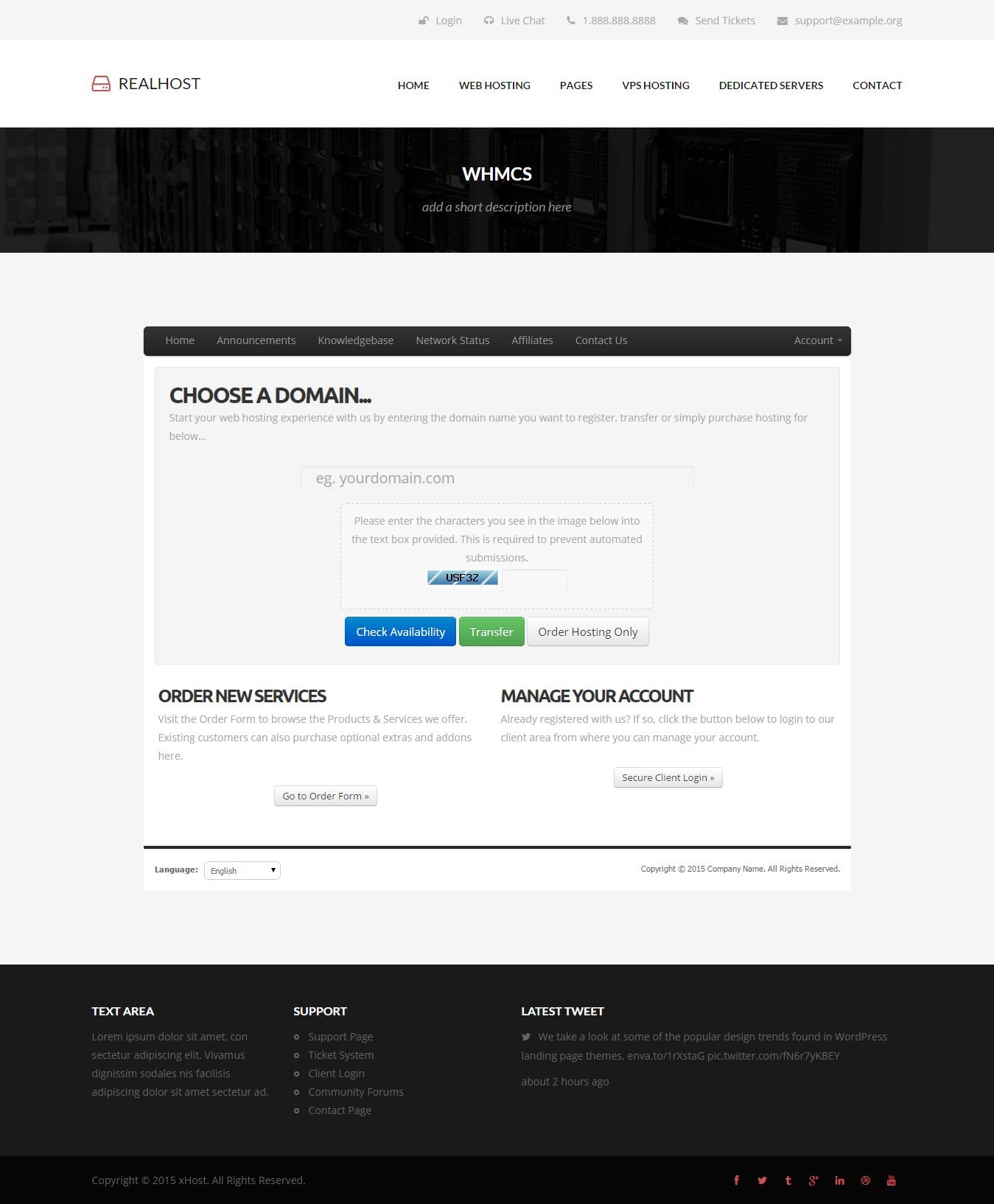
The last screenshot posted for this template is the one showing the WHMCS page. Here it is: https://0.s3.envato.com/files/117707563/24_whmcs.jpg
Thanks. With so many to click through I overlooked this one. I bet it would be a great benefit for your sales if you also had a version 6 template.
Thanks for your quick response.
I finally was able to get around to installing this, but there is something strange going on when you get to the cart.php page. http://imgur.com/CVxR6XN
Any thoughts? I followed the directions step-by-step. Copied “five” template, named it “realhost”, and then moved the custom “header.tpl” and “footer.tpl” files to overwrite the ones that existed before.
What WHMCS version are you using? I haven’t tested it with v6 yet.
It’s Version: 6.1.1 – I hope you get a chance to test it very, very soon.
how do i fix? http://www.wulfhosting.com/whmcs/?systpl=wulfhosting
Hi,
Please read “WHMCS Integration” section from page 6 of the documentation (the .pdf format of the documentation is located inside the .zip file you downloaded). No styling appears because the links in the <head> are broken. Where exactly have you placed the “css” directory? I can’t see it here: http://wulfhosting.com/css/style.css
do you guys have a skype?
and now its broke whmcs with Down for Maintenance (Err 3)
No, I don’t use Skype, sorry. This link http://wulfhosting.com/whmcs/css/style.css also leads to a “Not Found” page, which means that the “css” directory is not placed where that link expects it to be. Can you log on to your server through a FTP program or through the FileManager inside cPanel, and look to see were exactly is the “css” directory located on the server. That error has nothing to do with the 2 .tpl files provided, it’s a WHMCS-based error.
You also have a <base url="wulfhosting/whmcs"> tag somewhere between your <head></head> tags, can you edit it and add a ”.com” at the “wulfhosting” ?
where do i edit this?
and its located /var/www/html/whmcs/templates/realhost/css
Ok, so style.css is here http://www.wulfhosting.com/whmcs/templates/realhost/css/style.css . Good. Now you also need to edit the <style> tags’s url value. Replace ”../css/style.css” with “templates/realhost/css/style.css” ... do the same for the other <style> tags in the <head> of the page, while not forgetting to replace “style.css” for “font-awesome.css” or “responsive.css” at the end of the link of the other 2 <style> tags.
If you don’t know how to edit a file from your server, please read this: http://www.inmotionhosting.com/support/website/managing-files/how-to-edit-a-file
i deleted a css directory from my whmcs and it says down for maintanance can you help?
so im changing this https://gyazo.com/22bdfb4453c177930b13dab9dc7773c2 to my website? im lost
oh bro i had maintanace screen turned on by default im so sorry!!! the theme works http://www.wulfhosting.com/whmcs/?systpl=wulfhosting, how do i change the overall colour to blue though?
i deleted a css directory from my whmcs and it says down for maintanance can you help?
Why did you delete it? Try to restore it.
so im changing this https://gyazo.com/22bdfb4453c177930b13dab9dc7773c2 to my website? im lost
No, the <style> tags I was talking about are located inside the <head></head> tags of the header.tpl file. Or you can just email the header.tpl file to my email address (danthemes @ gmail.com) and I’ll send it back with the modifications done.
how do i change the overall colour to blue though?The red color used is #c65757, download the style.css file of template and, using NotePadd++ or a similar text editing software, replace every instance of ”#c65757” with your preferred color. You can get a hexadecimal code from here: http://www.colorpicker.com/
Also, the links in the navigation menu don’t work because your <base> tag has a broken link which breaks all other relative links.
Where are your html pages? They’re not here http://wulfhosting/clients/index.html or here http://wulfhosting/whmcs/index.html or here http://wulfhosting/index.html
All the information necessary to upload and set up the website are written in the documentation, so I’d advise you to read it.
I’ve seen that. Can you do what I asked, please?
i emailed you the header and i changed the hex code and it done nothing
so where are the base tags that are broken and can i just replace that file with one from the download?
1. Where are your html files located on your server?
2. You haven’t changed the hex color from style.css. If I look here ( http://www.wulfhosting.com/whmcs/templates/realhost/css/style.css ) I still see the old color code.
ive uploaded them 2x because its getting unbareable, once in /var/www/html and another in /var/www/html/index [index is WHMcs]
This ( http://www.wulfhosting.com/index.html ) isn’t the index.html page from my template.
hi, buy your template just for me to have the slider VPS.
extaire HTML and css to include on another page
Thank You
I don’t understand what you’re trying to say… could you rephrase it?
Pls when will the template add support for WHMCS Six template.
Hello, currently I don’t plan on adding support for that theme, sorry.
Ok. What about a page for domain name pricing and if possible a seachbox to search for domains.
Sorry, those are not on the to-do list.
I haven been attempting to get my site setup and I am having issues in Firefox displaying text in input boxes (so far thats all I’ve noticed).
http://www.vpssoldiers.net/clients/clientarea.php Is an example.Add this to your stylesheet (style.css):
.whmcscontainer input[type="text"],
.whmcscontainer input[type="password"] {
    height:40px;
}
Hello Guys, I would like to know where to change the main font of the template. Thanks!
Hello,
This is an HTML template, so you have to manually edit the “font-family: ‘Open Sans’, sans-serif;” lines in the “style.css” file.
Hi,
I’m Katie from Kopage (Sitebuilder for Webhosts) and I’m looking for interesting themes for our clients (webhosting companies), so they could use them to build their websites.
Is it ok if we publish a direct link to your template page + short overview? It would bring more visitors to your theme and make our clients happy 
Thanks, Katie
Hello, I bought your theme but I can somehow integrate whmcs you please help.
Hey,
The instruction on how to do it are available at page 6 inside the documentation that’s located inside the .zip file you downloaded.
I dont see please help me
You don’t see the documentation file or the WHMCS section within the documentation?
I see but looking please https://datanettr.com/ dont see all page. Help me please I give teamwiever I dont understand this themes
I’m sorry but it’s not my job to teach you basic stuff like uploading html files to your server in order to see them in a web browser. The WHMCS integration instructions within the documentation are placed under this heading “7.1. WHMCS Integration”
Hey Guys, I added a drop-down list to the form but cant give the same class style of the rest of the form. Could you help me with this? Thanks
Hello,
Are you talking about the contact form? Could you give me more details or send me a screenshot or the link to your website to see the problem? You can email me at danthemes @ gmail.com if you don’t want to post the link of your website here.
My WHMCS navbar is not in line. I tried searching for what was stated above about removing .navbar { margin-left:90px; } from the CSS but it wasn’t even in my CSS.
Please post the link to your website here or email it at danthemes @ gmail.com if you’d prefer that.
It seems like I can’t reply via email. You didn’t sent me the right file, I was talking about the style.css file from the “css” folder of the RealHost template.
Is it possible to add more packages to the VPS 8 thing. I have around 12 packages of the one category.
Great template by the way. Good work 
Well, it’s theoretically possible to make a vps slider with 12 packages, but I don’t do customizations as part of support. Sorry.
Thanks for the reply. I am terrible with CSS so I guess 12 sliders is out of the question. Thanks anyways.
.navbar { margin-left:90px; }
many thanks
Do you have any plans to integrate bootstrap elements to this? One thing the theme is lacking is customizability by means of buttons, tabs. Isnt much choice atm.
There are buttons and tabs in the template and no, I don’t plan on integrating bootstrap elements. Sorry.
My website runs on https so there is security error with fonts.googleapis.com
Everything needs to be in the server
Can u please fix this ? http://screencast.com/t/zPHziOo4NIJm<link href='http://fonts.googleapis.com/css?family=Open+Sans:400,400italic,700,700italic' rel='stylesheet' type='text/css' />
<link href='http://fonts.googleapis.com/css?family=Lato:400,700,400italic,700italic' rel='stylesheet' type='text/css'>
with this one:
<link href='https://fonts.googleapis.com/css?family=Open+Sans:400,400italic,700,700italic' rel='stylesheet' type='text/css' />
    <link href='https://fonts.googleapis.com/css?family=Lato:400,700,400italic,700italic' rel='stylesheet' type='text/css'>
thanks for the quick Fix
Actually Site fonts looks better and smooth without it.. after applying google fonts the fonts looks like rough/crumbly.
Could u tell me the benefit of using google fonts ?
There’s no benefit of using Google fonts, people use some of them because they look nice, it’s a design issue. When you use use those Google fonts, do those fonts look like mine’s here http://www.danthemes.com/html/realhost/ ?
I think without the google font it looks better. What do you think ?
This is how it looks to me in Firefox 35.0.1 http://i.imgur.com/k3cKVkB.jpg . What web browser do you use and what version is it?
yah it do looks nice. but im on same version of firefox and just updated to v36 but still. on my Firefox browser it looks crappy
is there any Font setting on firefox ?
I’m not sure. Check the best answer from here http://stackoverflow.com/questions/9272073/why-are-my-google-web-fonts-pixelated maybe it helps.
other browsers font is fine only issue with firefox..
anyways if possible can u give me the icons for Dell, microsoft, hp, IBM, CISco, VMware, Cpanel to be included under partners
I don’t have those logos.
I guess I forgot to edit those texts… here’s the icon list: http://fortawesome.github.io/Font-Awesome/3.2.1/cheatsheet/
thanks
these are Old one there is already new version http://fortawesome.github.io/Font-Awesome/cheatsheet/
hi there .. I wanted to know who to replace the Logo with a static Picture?
and also i tried to open the site on my android phone its coming in mobile version even after i checked “request desktop site”
Its not opening the full desktop version on phone.
My phone Nexus 4 Browser Chrome
<div id="logo">
                <a href="index.html"><i class="icon-hdd" /><h1>RealHost</h1></a>
            </div>
and replace it with this:
<div id="logo"><img src="path/to/the/logo.jpg" alt="" /></div>
You can then adjust the padding attribute of #logo in the style.css to vertically align the logo.
I don’t know why the browser’s settings don’t affect the template, but you can try replacing this:
<meta name="viewport" content="width=device-width, initial-scale=1" />with this:
<meta name="viewport" content="width=device-width" />
If that doesn’t fix it, then maybe you should integrate this http://filzhut.net/projects/responsive-switch/#example
thanks i will try the logo..
and about the mobile not switching to full desktop view is not solve . i tried both method but it doesn’t work..
and also VPS plan Slider doesn’t work on mobile
I tried with the second method ( http://filzhut.net/projects/responsive-switch/#example ) and it worked for me. The VPS slider also works for me on mobile, just tap anywhere on that horizontal line.
2nd method does work. but why doesn’t it show the Full Desktop view including navigation menus like the Full desktop..
and testimonials are coming as one left sided column .
Can u please fix the responsive issue in ur theme without using 3rd party scripts ?
There is no responsiveness issue in my template. The template doesn’t have the feature of changing to desktop view from mobile devices, that’s all. And I’m sorry, but I don’t do customizations as part of support, nor do I provide support for third-party scripts.
i didnt ask for 3rd party script support. i was just asking. it would be nice to have full desktop view on mobile and tablets. bcz in these days most of the people uses them..
anyways
Hi Can u help me enabling the subscription ? . i dnt see any documentation about it..
thanks
You can have full desktop view on mobile devices by removing the responsive.css file from the “css” folder (although that would disable the responsiveness completely).
This is an HTML template, not a CMS, so the newsletter field is a simple input element which is there to supply a structure for a newsletter script integration, which could/should be modified based on the subscription script you want to integrate in it.
ok thanks
Hi,
I purchased the theme but in the WHMCS part of registration the registration boxes text just shows as invisible.
How do I change this?
Thanks
Please give me the link to your website so that I can check. Or you can send it via the contact form from my profile page.
There’s an example like all text goes invisible in the boxes
Thanks
.whmcscontainer input[type="text"],
.whmcscontainer input[type="password"] {
  height: 40px;
  padding: 0 15px;
}
Also look for
.navbar { margin-left:90px; } in your style.css and replace it with this .navbar { margin-left:0px; }
Done that, text is still showing as invisible though :/
You haven’t added the css, I don’t see the new css here http://www.myvpz.net/css/style.css . Where exactly did you add it?
Ahh weird my filezilla wouldn’t overwrite the old file with the new one when I was telling it to so I updated it manually instead. All good now thanks
You’re welcome.
great theme.. good luck
Hello,
I am having some issues here: http://neonhosts.com/clients/cart.php?a=add&pid=2
The site is not displaying correctly after the domain registration field.
James
Hey,
I’m pretty sure that problem appeared because you added these 2 additional stylesheets:
<link href="templates/realhost/css/bootstrap.css" rel="stylesheet">
<link href="templates/realhost/css/whmcs.css" rel="stylesheet">
Try removing them and see if the problem persists.
Thanks for your fast reply! I’ve removed them but now it does now I have a different issue: http://neonhosts.com/clients/contact.php
Sorry, put back those 2 stylesheets from above. The issue was that the domain registration field was too small?
On the following page: http://neonhosts.com/clients/cart.php?a=add&pid=1 The ordering steps go onto two lines, i’m not sure if this is suppose to happen but I haven’t seen it before on WHMCS. On the next screen I get this: http://imgur.com/5NGGDg9
Thanks again, James
#order-modern .configtable td,
#order-modern table tr td { padding: 0px !important; }
Yes, I have added that but it is still the same.
I can’t see that code in here http://neonhosts.com/css/style.css To which file did you add it?
Looks like it was cached, thats much better! is there a way that I can change the border colour on the password indicator?
Add this to your style.css and replace “rgb(0, 0, 0)” with your new color (e.g. green, blue, #ff0000, #888888, etc)
#pwstrengthpos {
  border-top-color: rgb(0, 0, 0);
  border-bottom-color: rgb(0, 0, 0);
  border-left-color: rgb(0, 0, 0);
}
#pwstrengthneg {
  border-top-color: rgb(0, 0, 0);
  border-right-color: rgb(0, 0, 0);
  border-bottom-color: rgb(0, 0, 0);
}
Thats working thanks, I am also having an issue with the tabs on the client area of WHMCS: http://imgur.com/MrYzARG
Would you mind creating a demo account there so that I can check the source code?
I have emailed you the details to your gmail address. Thanks.
It seemed that the “tabs” ID is used by WHMCS too. I see you don’t use the template’s tabs element, so you can delete this part of your style.css http://pastebin.com/raw.php?i=EKedC6jD and the conflict will be resolved.