167 comments found.

Getting this error when attempting to import whole-content.xml: ***Sorry, there has been an error. File is empty. Please upload something more substantial. This error could also be caused by uploads being disabled in your php.ini or by post_max_size being defined as smaller than upload_max_filesize in php.ini
Hi,
Yes, as I wrote you before it’s about server settings. Please contact your server administrator.
Regards, Nat
Please help: When trying to import the WP dummy using the WP Importer, I’m getting this error: Before you can upload your import file, you will need to fix the following error: “Unable to create directory wp-content/uploads/2016/07. Is its parent directory writable by the server?”
Hi,
Yes, it’s about server settings. The writing rights must be done in accordance with WP admin needs. The owner name must match with user name. At this moment that’s not.
Regards, Nat
Hey, I’m thinking of purchasing this forum, as an extra are you able to integrate PHPBB forums for me? Could you give me a price for this feature? thank you.
Hi, and thank you for your interest. Yes, we can do it for you.
The integration will takes 3-4 working hours (120-160 usd).
Regards, Nat
Hello, thank you for your reply. Do you have an e-mail address I can contact you on? – I’d like to discuss further.
Drop us a line at info@strictthemes.com
Regards, Nat
Hey Nat,
Just wondering if you can help me with the theme. I’m having trouble setting up the menus. I’d like to be able to have the menus set out as follows: www.thegamingrow.com. Under the menu ‘Gaming’ I’d like to have: -Latest News - PS3 - PS4 - XBOX 360 - XBOX ONE - Nintendo - PC -Reviews -Previews
When a user clicks on one of the links I would like it to take the user to the relevant page with all of the content that I categorize. However at the moment I can only create a new page under those menus I cannot list the catergories.
I need it how the demo is set up where it takes you to the posts / categories but cannot seem to figure this out.
I hope this makes sense.
thanks.
Michael.
PS – Also can you help me set up the log in / register functions so that it is a single sign on for Buddypress and BBPRESS. I can give you access to wp-admin. Thank you so much in advance.
Hi Michael,
1 – You should enable ‘Categories’ on the Screen Options, see screenshot – http://c2n.me/3za5Bdl.jpg
2 – Let me know an access details (to your WP admin) through the contact form – http://themeforest.net/user/strictthemes I will take a look.
Regards, Nat
Edit:
Doesn’t matter fixed it.
Ps. thanks for the support 
Michael.
Ok
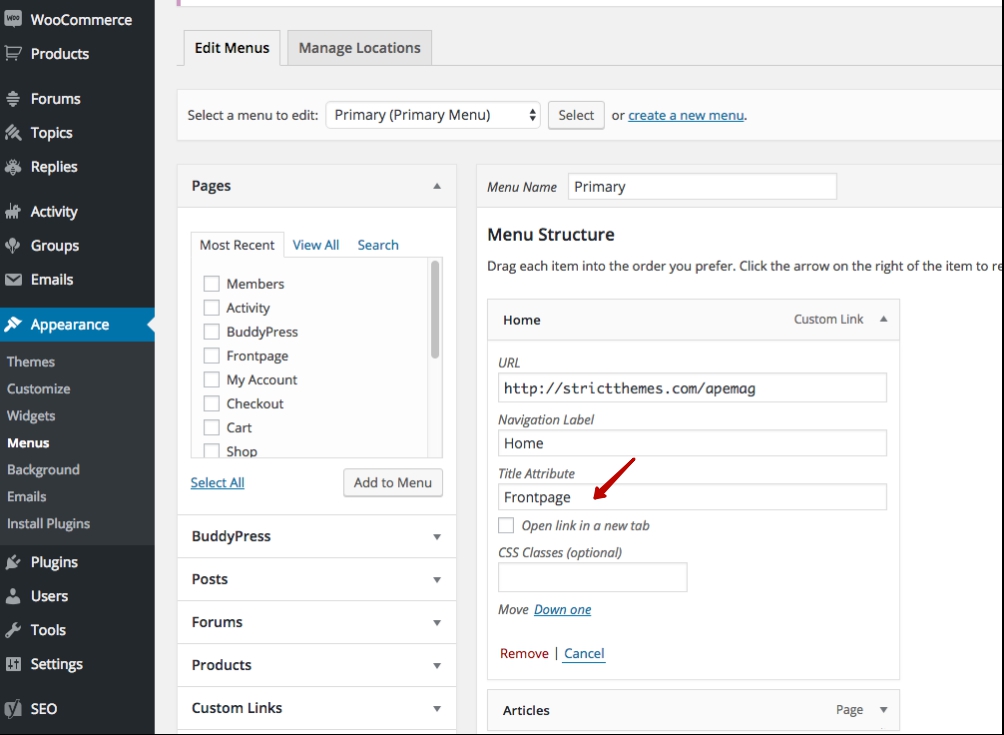
Hi, I have installed the theme here – https://botsplace.com/, let me know please how to remove this subtitle from menu – http://take.ms/b3vPg
Thank you.
Hi,
This is about the Title Attribute on Appearance > Menu Page – http://dl2.joxi.net/drive/2016/06/07/0012/0377/807289/89/cefb2db18a.jpg
In case you don’t have it you need to enable on the Screen options -http://dl1.joxi.net/drive/0012/0377/807289/160307/e7edfc2ac2.jpg
Regards, Nat
The answer has been updated.
Thank you.
Hi,
I am having trouble updating to the latest version of this theme. When going through Appearance > Themes and clicking “Update now”, I am taken to a page that says “Download failed. Forbidden.” I have verified that my username and API Key are set up correctly. Is there any known reason I might see this error?
And one more question: What is the best way to add a custom email subscription form to the left of the logo, where the icons are? I’ve tried adding the Newsletter shortcode to the theme’s layout settings, but nothing appears. Where could I add custom HTML to change this section of the header?
Thanks!
Hi,
1 – Envato API has been changed, thus you need to update the theme manually through the standard way (Appearance > Themes > Add New > Upload). Also you’ll receive update notifications by email. In future we plan to make another solution for new Envato API.
2 – You need to disable Sanitization from within Theme Panel > Miscellaneous – http://dl2.joxi.net/drive/0012/0377/807289/150812/617ed63608.jpg and drop a custom email subscription code at Custom icons area from within Theme Panel > Layout > Header – http://c2n.me/3yPg754.png
Regards, Nat
Thanks Nat. Disabling Sanitization seems to have enabled most HTML. The shortcodes I enter still just appear as text, though (and I’ve tested them on other pages); and unfortunately when I add <input> or <form>, those tags get removed from the custom icons textbox after saving. (See: intellectualmoviereviews.com) Is there anything that might be blocking the shortcodes or the input and form tags?
Hi,
Please remove and install again ST Kit plugin. And check again.
Regards, Nat
That fixed it! Thanks!
Great. You are welcome.
Rate our work – http://themeforest.net/downloads It will take 5 seconds.
Regards, Nat
Is it possible to create a two column frontpage?
Hi,
The theme concept assumes four column fronpage layout. You can also have three column by setting sidebar for frontpage.
It’s possible to create two column frontpage through the theme customization. We can create a child theme in accordance with your needs for some extra. Drop us a line at info@strictthemes.com
Regards, Nat
Hi! I am experiencing a little bug on the “Most viewed” scroller. For the reviews with stars I have a weird “O” above the title and the formating is not like your demo site. Help
Hi,
You have to have a valid support period for sending support inquiries and getting assistance.
Will be glad to take a look that and provide further assistance but at this moment your support period is expired. Please renew your support package – http://themeforest.net/item/apemag-stylish-magazine-with-review-system/11909134?s_rank=2
Regards, Nat
:/ ok.. Maybe you can help me out on something that isnt in your documentation then? I am trying to change the subtitles underneath the titles on the menu; where it says “post formats” or “most common” ? Thanks
This is about the Title Attribute on Appearance > Menu Page – http://dl3.joxi.net/drive/0012/0377/807289/160307/51e03cb597.jpg
In case you don’t have it you need to enable on the Screen options – http://dl1.joxi.net/drive/0012/0377/807289/160307/e7edfc2ac2.jpg
Regards, Nat
Thank you so much! It was driving me crazy  I will PM you about my earlier problem. Thanks again
Hi StrictThemes,
Thanks for the wonderful job you have made with the Apemag theme.
I spotted some issues on your theme so I would like to share it with you to do an update soon. Here they are:
1. WIDGET: The title of the ST Sharrre widget has an issue with special characters, like this one = ’ . For example, in French, when you type “Je m’abonne à…” (I subscribe at…) the ’ become ’\ like “Je m’\abonne à…”.
2. THEME SETTING: The blocks on : Theme Panel > Post > Above & Below Title. do not work. It displays all code language like , < img />.... There is maybe something wrong in it. It is not usable in its current state.
3. MOBILE : You have to click twice on social network buttons before really going to the app or the website. Is it possible to unable the CSS style and allow by clicking only once?
4. TABLET: On tablets like an iPad, the Menu, when you are in landscape view mode (or horizontal mode), does not display the list of the sub categories/menus on it. So you end up clicking the main one but never the subs one… Which is really annoying when you want to see specific pages.
5. SHORTCODE: Alert shortcodes. Can we translate those one in another language? (like Warning, Well done, Oh Snap…)
6. SLIDER: On the slider, when you go over the article/title with your cursor, the title disappear (normal for the theme) but nothing else is shown. For example, on the small previews of the article below, when you do it, it displays the first sentence of the article (default I guess). So why is it not set up like that for posts on the slider?
Thanks a lot again for the job you have made.
Regards,
Matt
PS: I am translating the current Apemag template in French so I can send the .po doc to you to implement it on the theme for French future customers.
Hi Matt,
First of all let me say a big thanks for your feedback.
1 – Sanitization is about security reasons. You can use a right single quote instead of apostrophe, so you can copy the line (Je m’abonne à…) and paste to the widget.
2 – It’s about another sanitization. Disable it from within Theme Panel > Misc page.
3 – Yes, there is possible to enable hovers on wide screens only – http://c2n.me/3xQNYAU.png – http://c2n.me/3xQNZU5.png
4 – I got your point. Original layout concept: 1300px+ is for monitors, 960px-1299px is for laptops, 640px-959px is for tablets, 300px-639px is for mobiles.
5 – Yes, those lines come from ST Kit plugin, so you can translate it.
6 – It’s about the different concept of hover on featured (sticky) posts and for recent posts. The sticky posts are focused on big images.
—
I truly appreciate your efforts with translation. And I’m sure other French customers will be appreciated too. Please, drop the files at info@strictthemes.com and I’ll include it on the future version of theme.
Thanks again.
Regards, Igor
Hello. It is me again. The title image is workin, but the responsive menu is not working well again. It is not leading you through the url, only opening the submenu if it exists.
Hello.
On live-preview the responsive menu works fine on mobiles and tablets. Refresh a page a few times for flushing a browser cache.
Regards, Nat
Have the same problem as the user above with images after update. Waiting for hotfix.
The theme has been updated up to v.1.0.5 Please re-install it or update with one click from within WP Admin.
Regards, Nat
Hello, i have problem with title images in posts. After update theme from all post disappears title images, i tried to re-upload images but isn´t working. Please help. Thank You in Advance
Hello,
Please update your support package – http://themeforest.net/item/apemag-stylish-magazine-with-review-system/11909134
Regards, Nat
Hello. In your Ape theme in mobile menu submenus are not working correctly. Some not understandable magic happens. Submenus are not opening by a click well, and behave differently, but still badly on differens mobile systems
Hello and thank you for your report. We’ve made a some tweaks around the responsive menu. You’ll get update notification by email within 24 hours.
Regards, Nat
Hi, this is a pre-sales question. I am currently using Valenti theme (and have a lot of posts formatted for that theme – http://nishitak.com). I’d like to try out the Apemag theme as I love the simplicity and the clean look of the post pages, but am still trying to figure out how much I can customize the home page for my requirements. It would be great if you could take a look at my current blog and advise me on the following:
- Can I have my oversize header and the menu icons in Apemag too?
- Is it possible to have a sidebar in the home page?
- Would the review scales from my current blog get migrated when I apply this theme, or would I have to manually change it? If manual, do you have some hacks you can suggest for this?
- Do you have a return policy? I would love to try out this theme and see if I like my customization results, but I am not sure how it will appear as my current theme is very different from this one.
Would be great if you can get back to me on these things. Based on that, I can make my purchase
Hi,
Thank you for your interest.
- By using Apemag theme it’s possible to set website as shown on the theme Live Preview if you going to make tweaks with theme source files by yourself you need to have required level of skills for that.
- Yes it’s possible to have Sidebar on the Frontpage – http://dl1.joxi.net/drive/2016/04/20/0012/0377/807289/89/2062c7211c.jpg
- If you currently are using WP Review plugin it won’t be problem to migrate reviews.
- Envato Market will generally only offer refunds where the item you purchased is broken, malfunctioning or corrupt, or doesn’t work as described.
Regards, Nat
So, is there any reason for the mobile version to stop working? www.menospeso.pt – I hope I don’t have to renew my support as this was a sudden change… Thanks!
Hi,
Your support period is expired. In accordance with Envato policy you have to renew support for getting assistance. Buy a new support package and will be glad to answer for your questions.
Regards, Nat
Right, all of the sudden your template cracks without any changes from my side and I need to buy more support…
Hey! I’m having trouble with the drop down menus – I can see they work properly in the demo but they’re not working on my site. I’ve set them up in the standard WordPress format with the indents for submenu items, but they aren’t displaying the sub-menu items or the (+) icon that appears in the demo to show the sub menu items.
Hi,
Let me know URL of your website and I will take a look.
Regards, Nat
Hi, any chance this theme will get a update any time ?
Hi,
There will be regular updates to support compatibility with plugins and new WordPress version. We are going to update the theme in few days because of latest version of the WP Review plugin.
Regards, Nat
So no more awesome functions or anything. ?
That’s the matter of time
Regards, Nat
I would like to display any type of advertisement in between posts in home page (i.e. after 5 or 7 post) on the Apemag theme.
Hi,
It’s about the theme customization. We can create a child theme in accordance with your needs for some extra. Drop us a line at info@strictthemes.com
Regards, Nat
Hi There,
My post title’s all turned from white to grey and I’m not sure where in the css I need to fix it. Can you take a look and help me get it back in order? Http://www.pointsuyyz.ca
Hi,
I’ve take a look and found post titles are white. Let me screenshot of area you’d like to change.
Regards, Nat
Twitter share count doesn’t work. After I share my post via twitter count of share is still 0. Can you please check this?
Hi,
Thank you for your report. We will improve the widget in the future theme updates.
For now I can recommend you to use some third-party plugin with similar functionality.
Regards, Nat
I can not find where is the next story and previous story text to translate. There is no in Theme file and st kit. How can I translate these text? thanks.
Hi,
You can translate via Custom CSS. Drop something like these lines on Theme Panel > Style > Custom CSS:
#pre_next_post .p:before { content: "Back"; }
#pre_next_post .n:before { content: "Forward"; }
Regards, Nat
The previous answer has been updated.
Thank you. It works!
Great. You are welcome