426 comments found.

Hi ! I want purchase angularjs version. but AngularJs Version is not enough pages in Live preview. Is there a way to use page pack pages in the angularjs version?
Hi, thank you for your interest in OneUI! 
You can copy-paste and use any HTML markup from the HTML version in the AngularJS version as well. The ready designed pages will render great in the latter version as well since the same styles are included in both versions. Hope that helps 
I just purchased the template and a little note on the grunt tasks. You should add grunt-contrib-connect to start a local web server to developers to start the project immediately with a local server
Hi, thank you very much for your purchase
Thanks a lot for your suggestion, too, a local server would be a nice addition to the existing toolkit!
Do you have plans to port this to Bootstrap 4?
Hi, thank you for your interest in OneUI!
This is something we are considering and if we eventually proceed with this, it will be a reboot and not just a port! Feel free to follow us on Twitter for more related updates in the future. Thank you
Is it possible to make the left sidebar the same color style as the one on the right ?
Hi, thank you very much for your purchase
Unfortunately not out of the box but we had made a small modification in the past which might help you achieve you want. Please send us a message through our profile’s contact form and we will get back to you as soon as possible
I have purchased a package for OneUI theme which is having a template with AngularJS but I need the theme on updated angular version like Angular 2 or Angular 4 so have you guys are planning to update OneUI theme for newer angular version because we need it for one of our application.
Hi, thank you very much for your purchase
There are no plans for an Angular 2+ version at the moment but we might create one in the future. Thanks for your interest.
Are there way to hide/show a field form, depending other field ? E.g. I select in a drop-down list the option “other” and only in this condition it shows a text area to write about others.
Hi Carlo, thank you very much for your purchase
Yes, you could use jQuery to achieve what you want. For example:
jQuery('#select-id').change(function(e) {
    if (jQuery(e.currentTarget).val() === 'your-value') {
        jQuery('.js-target-element-class').show();
    } else {
        jQuery('.js-target-element-class').hide();
    }
});
Hope that helps
Thank you !
hello please, i found ur theme on Progressive web app site as an example, please if u can enlighten me, how does theme helps in PWA? is there a video that can tell me what does theme exactly mean? like a dashbaord for what? is like CMS? please advise thank u
Hi, thank you for your interest in OneUI
OneUI is an abstract template and does not work with WordPress or with any other ready to use CMS. It is perfect for custom web projects (web applications/websites) where there are specific needs/requirements.
In such projects, web developers use the UI to build it from the ground up with a server side language/JS framework (or they integrate the UI in their existing project).
Creating a PWA has various requirements which many of them are not directly related to the UI itself but to the technologies and methodologies used behind it. For more info you can have a look at Progressive Web App Checklist.
Hope that helps
ok, do u mean i can use it to create a custom web project or i have to develop a website and use it on top of the site to add some extra parts?
i dont want to ask so many questions but i think this will open doors for me as i ahve so many clients i build wordpress sites for and i need a new platform. so if u can give me a video or something to see
say i want to use django, python, i can use this theme? please advise me to a link or soemthing
for PWA, so i can use this UI for creating a PWA from scratch? can u see this? https://wpengine.com/resources/wordpress-progressive-web-apps/thank u so much
Yes, you can use it to create a custom web project from scratch by using Django (or any other framework you like). OneUI can help you create the UI section of your project since it provides many UI components (HTML, CSS & JS) and a super flexible layout.
The custom functionality you want (for a web application or for a PWA) has to be custom coded by you, though. Unfortunately, we don’t have any specific video tutorials but since you are familiar with HTML, CSS and JavaScript it should be relative easy to get started!
No worries at all, feel free to let us know if you have any further questions
Hi, would you be making React version?
Hi, thank you very much for your purchase
There are no plans for a React version at the moment but we might create one in the future. Thanks for your interest.
Hi,
Just a quick suggestion. You could also add chart templates for monthly and yearly display. Similar to Google Analytics where you simply can switch within one big chart.
Cheers, J
Hi Jimmy, thanks a lot for your suggestion! Happy coding!
Hey all! We just wanted to let you know that OneUI 3.4 update just went live and comes packed with new awesome features and updates! All existing customers can download it for free from their downloads page. Changelog and update information can be found in the updated documentation!
3.4 Update – January 15, 2018
- NEW FEATURES
-
UPDATES
- 12 plugins and libraries
If you have any questions feel free to get in touch through our profile’s contact form, we’ll be more than happy to assist you as soon as possible! Happy updating and coding!
1. Do you plan to add a better support page (ie. with a left menu)? The current version makes it impossible to document/support a complexer page.
2. To update charts I guess we can simply exchange the js/css files?
Thank you.
Hi Jimmy, thank you once again for your purchase
1. There are no plans for such update but you could easily adjust the page to fulfil your requirements by using existing components. For example, you could use the grid to separate the page into 2 columns and then add a list group element for your menu in the smaller one.
2. The data can be set when the charts are initialized in the custom JS file found in each example charts page. For more info regarding each chart library you can also have a look at OneUI docs where links to their online documentation can be found.
Hope that helps, happy coding!
Hey,
let me thank you for this beautiful theme first. So at least I tried to change the form validation value but it won’t work. I changed the text “What can we do to become better?” in assets/js/pages/base_forms_validation.js to some lorem ipsum and emptied the cache but there are no changes to see.
Is this a bug?
Hi, thank you very much for your purchase and kind comments, we are very happy you like OneUI!
There shouldn’t be any issues with your change! Have you checked out your developer’s console in case there are any errors in your JS code? Moreover, have you checked out the page in another browser just to make sure it isn’t a cache issue? Please have a look and let us know or send us a link to check it out live!
Hello, Could you please add a new preview for the updated angularjs version?
Hi Steve, thank you very much for your purchase!
We wish we could but the new Angular is a complete rewrite of the original AngularJS framework and unfortunately we can’t update the existing version without building it from the ground up. We don’t have any plans at the moment but we might work on such version in the future. Thanks a lot for your suggestion!
do not support IE11,but support IE9
I got it. Need this code.
<meta http-equiv=”X-UA-Compatible” content=”IE=edge,chrome=1”>
Hi, thank you very much for your purchase! It should work great out of the box without that line (of course, no harm is done at all by adding it!). Can you please let us know which Windows version are you using?
Win 10
It has been tested on Windows 10 and it works great on IE9/IE10/IE11 & Edge by default without that line. It must be some specific setting but we will have a better look into just in case it is something others might experiencing as well. Happy coding!
Thank you for this version(3.3), it solved the problem I was looking for. Before this version,the footer will be bounced, this version of the perfect solution!
You’re welcome, we are very glad you like the update! If you ever come across any issues and would like assistance, feel free to directly contact us through our profile’s contact form and we will get back to you as soon as possible! Happy coding!
Hey all! We just wanted to let you know that OneUI 3.3 update just went live and comes packed with new awesome features, improvements, updates and optimizations! All existing customers can download it for free from their downloads page. Changelog and update information can be found in the updated documentation!
3.3 Update – October 24, 2017
-
NEW FEATURES
- Dashboard v3 Page
- AutoNumeric (number formatting library)
- 20+ Backend Pages (Added/Migrated)
-
IMPROVEMENTS
- Improved functionality in footer’s copyright element with js-year-copy class. If you leave the element empty, it will always get populated with current year. If you add a past year, then it will include it as well along with current year. Thanks to Niko Hal. for his suggestion/code!
-
FIXES
- Fixed dropdown menu z-index issue when the horizontal navigation is in a static header
-
UPDATES
- 20 plugins and libraries
If you have any questions feel free to get in touch through our profile’s contact form, we’ll be more than happy to assist you as soon as possible! Happy updating and coding!
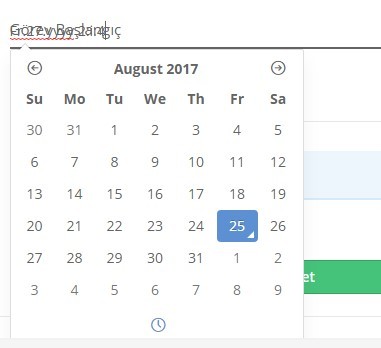
First i want to saying thanku for such a nice HTML code i have ever seen. I just notice one thing on this page: https://demo.pixelcave.com/oneui/frontend_travel_agency.php
If you add datetimepicker instead of daterange then the “date popup doesn’t show properly. it hides when trying to goes out the container. Seems like z-index problem”.
I am trying to fix it but can’t succeed. Can you please help me?
Thanks
Hi, thank you very much for your purchase and kind comments!
Please send us a message from our profile’s contact form, from the account the purchase was made, and we will get back to you as soon as possible
Actually i have purchase with another account which is company account and i forget his password. 
No worries, just ask your client to send us a message from his account including your username for the first time confirmation
is this only for AngularJS usage?
Hi, thank you for your interest in OneUI
No, it is not only for AngularJS since in the package you will also find HTML and PHP versions as well to use it with the tools/language/frameworks of your preference! Hope that helps but let us know if you need any further info!
Hi, thank you very much for your purchase
Yes, unfortunately the Datetimepicker plugin is not compatible with the floating material inputs. Due to the way various third party form plugins work, it was not possible to make them compatible and this is why by default examples with floating labels are not included in the template. Hope that makes sense!
Is there an easy way to get the white side-bar (left) color like in your other theme? https://themeforest.net/item/codebase-bootstrap-4-admin-dashboard-template-ui-framework/20289243
Hi, thank you very much for your purchase
Unfortunately, there isn’t an easy way to change the sidebar to white because such feature is not included in OneUI. Of course, it could be done but custom CSS should be created and applied to both sidebar and main navigation styles.
If its not too much work, may I request you to give me custom css to match the side-bar (left) with the other theme side-bar? I don’t need the nav bar style. Let me know! on a side note, amazing documentation and soopr amazing code style.. was very easy to jump into integration!
Thank you so much for your kind comments, feedback and rating, we are very glad you like OneUI! Unfortunately we can’t provide customizations but the good news is that we found an older CSS snippet we had created which can come in handy! Please send us a message from our profile’s contact form and we will get back to you as soon as possible! Thank you!
will you be updating to Bootstrap 4 beta? if so, when?
Hi! Due to the recent drop of IE9 support and big breaking changes in BS4, we’ve decided to keep supporting BS3 with OneUI for now. We might release a separate BS4 version in the future though but there aren’t any plans at the moment. Bootstrap 3.4 version is under development, so stay tuned for more OneUI updates in the future!
gotcha! Thank you always for the quick and detailed responses : )
You’re welcome! Happy coding!



This item was featured on ThemeForest

Elite Author
Contact the Envato Market Help Team