782 comments found.

Hello, I would like to add a embeded window for a discord chat using this tool: https://titanembeds.com/ It generates a direct link and an iframe code for a simple integration in any website: iFrame Embed <iframe src=”https://titanembeds.com/embed/683812071376420875” height=”600” width=”800” frameborder=”0”></iframe>
But I don’t know where should I add this code for getting the discord chat window on the main page: below the header and above the forum categories (with collapse option if possible),but only for logged in users ? could you please help me ?
Hello;
1- In addition to my previous question, what I mainly need is to have a nice integrition of Discord chat in the forum, so any other solution is more than welcome.
2- I would like to have a Grid diplay when on large screens (PC , Tablet), but automatically toggle to List display when on mobile (smaller display), because the grid display on mobile is too big and makes a lot of scrolling . Is it something possible ? or may be throug a switch if not possible automatically ?
3- Ho do I add icons to each topic ?
4 – One last question: I don’t get the same font colors as on your demo when applying the Dark Base + Grid + Parallax Header configuration. in my case: Category one is in Red, and Topic title an all the details are in White, which is not the case on your Demo. how can I get the same result ?
This is my test website: https://pizzapassion.myddns.me/index.phpHi there,
The best option for integrating that iframe code would be to paste it directly into the template file:
either:
overall_header.html or sidebar_right.html
After saving, click ‘purge cache’ on the front page of your ACP.
You can use the following IF statement wrapped around your code to show only to logged in users:
<!-- IF S_USER_LOGGED_IN --> *only visible to logged in users* <!-- ENDIF -->
As for your other questions:
1) There might be some extensions available on phpBB.com, I would suggest asking in the ‘extensions in development’ section there
2) That’s not possible at the moment, as it would require extensive refactoring of code. Maybe in the future.
3) Not sure if I understand the question 
4) Coloured grid titles are only possible when option: “Fill grid tiles with background image?:” is set to “No”. Otherwise there is too much opportunity to blend into the background image
Hello there,
A user noticed a problem. If you use the URL button to insert a link, the window opens. However, everything turns gray immediately and you cannot enter anything. If you click anywhere on the gray, the window disappears. That happens with every browser.
However, if you first select text and then press the url button (my normal way), the tags in the text are set normally without the window and you can insert a link between the url tags. So the problem is only when this little window opens.
If you switch to the Style ProSilver, the window works properly. That’s why I think that this behavior is related to Milk.
https://s19.directupload.net/images/200302/txivmcri.png
Hello,
What extension is this? Can you share the link?
Thanks
https://github.com/VSEphpbb/abbc3
https://www.phpbb.com/community/viewtopic.php?t=2414676
Here someone has exactly the same problem … unfortunately without a solution
https://www.phpbb.com/customise/db/extension/advanced_bbcode_box/support/topic/209346
Thanks. It’s probably an easy fix, I’ll look into it soon
Once again, many thanks for all your hard work and efforts
A fix for this issue has been identified.
Open: /styles/milk_v2/theme/milk.css
Find:
#inner-wrap {
    background: #FFFFFF;
    position: relative;
    margin-top: -50px !important;
    z-index: 3;
}
Change the z-index value to 45
Great ! It works 
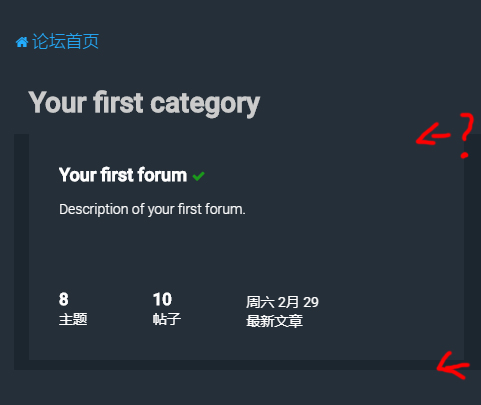
If turn “Content Block Headers” to “Stripe” ~
No gap on top…
Screenshot:
https://i.loli.net/2020/03/01/8EvV3UZ97BgdTKr.jpgThanks for reporting, will fix this in time for the next release
I got html 500 error in my server after installing the 3.3 RC1 version in the new phpbb 3.3. Is there a new 3.3 version coming soon?
Hello,
There were no front-end changes between 3.3-RC1 and 3.3.0, so that shouldn’t be a problem.
Can I ask what version of PHP is running on your server?
How can i set forum title vertical align in center?
Screenshot: https://puu.sh/FcBL6/aa756945a7.png
Hi,
That’s not possible without some pretty complex CSS changes.
Best option is to add a forum description to fill the space.
Hi! I’ve had the Milk theme installed since 2018 and love it! Just recently updated it on my test forum to make sure all would go well, and it seem to have with PHPBB 3.3. Only thing I’m noticing is that the font, font colors, and the ‘drop shadow’ behind the different forum titles is missing? Can’t tell if this is a bug or a re-design. I’ve checked my settings from the live board and this test board and they are the same. Thanks!
It may also help to know that I’m comparing the new version to existing version 2.0.6. Main differences I’m seeing are with the ‘Titanium’ colorset. Small description text under forum titles is now gray, is a blue color on 2.0.6. Also titles are not bold anymore. If selecting ‘Dark’ as the base, the descriptions are blue in the new version. I’m sure this is just a CSS change.
Hi there,
There were a number of design changes that occurred between 3.2x and 3.3, although I don’t remember intentionally changing the parts you mentioned.
Can you link to screenshots outlining the differences?
Thanks
Thanks for the quick response! The live 2.0.6 can be seen here: https://gentekpower.com/images/milkv2.png The newest version is here: https://gentekpower.com/images/milkv2-1.png I don’t really care one way or the other about the padding around the different forums, looked kinda cool with the space, but no big deal. I do miss the colored text though, gave it a little character. Same with the bold headings.
Thanks, yes these were all intentional changes. Generally I try not to tinker with the theme too much, as customers generally buy it based on the impressions they had at the time of purchase.
Having said that, there was lots of feedback sent through our email address regarding padding and colours specifically.
We need to collect more feedback before determining whether they were the right changes to make and thinking about the next iteration.
Alright, I can certainly understand that.
Well, I guess that leaves me with a question then… Can we either chat via email, or some other method and I can make the changes to the appropriate CSS files to get me back to where I started when I purchased the theme? If this requires a renewal of my support, I can certainly do that as well. I would just really like the font and colors to remain how they are now. Padding I can take or leave. I personally liked the small spacing, but I can understand that it would push certain content further down the page on certain devices depending on the number of forums…
Thanks again for the help!
Hi again,
Changes of that nature would need some kind of agreement beyond the item support price, which is generally a pretty naff deal for authors.
Ping me a message through the ‘support’ tab above with a numbered list of the changes you’d like, and I can get back to you with a quote
I appreciate the response. I actually have found and ‘fixed’ the colors and font weight that were in the previous version, which was only a matter of changing about 4 things in the CSS files.
I would like to point out what I think is a ‘bug’ after playing around with the new theme update for a while.
When a new post/topic is present, from the index page, that forum is highlighted with a green check mark just as before with a nice animation to it. When you enter that forum to view the actual topic, what used to be also a green check mark is now the minus sign showing as if it were already read, however the minus sign is still flashing green because there is actually a new topic there. I think that should still be the green check mark as it was in the previous version?
https://gentekpower.com/images/green-check.png https://gentekpower.com/images/green-check1.pngYeah that doesn’t look right.
I’m on the case
Fix:
Open: /milk_v2/theme/icons_forums_topics.css
Find:
.topic_unread:before                        {content: "\f068";}
.topic_unread_mine:before                    {content: "\f068";}
.topic_unread_hot:before                    {content: "\f068";}
.topic_unread_hot_mine:before                {content: "\f068";}
Replace f068 with f00c . Save file and purge cache.
Fix will be pushed to the themeforest download at some point today
Thank you!
Have this slick way to show images using the forum grid been scraped from the latest version? I only get tiny tiny images to show in top left corner of the grid. https://camo.envatousercontent.com/c5572893a198ab2abbecf09f060b3242dc5252cd/687474703a2f2f7777772e706c616e65747374796c65732e6e65742f6272616e64696e672f6d696c6b2f76322f332e6a7067
Hi there,
Yes, the full-size grid images were removed in 3.3x
We’re still collecting feedback before deciding whether to re-develop the grid layout to support full-size background images again.
That is a bummer, but hands up on getting them back again I loved them on our old forum which was scraped for another platform. Now when setting up a new forum I thought I’d lost it when looking to place those full size images again. And for the record – I love this theme!
Thanks for your feedback and support, it’s much appreciated.
Your feedback re the full-size images has definitely been noted
how can I use your theme colors from demo ?
Hi there,
They can be selected in the ACP, using the flightdeck extension. Choose an option from the ‘preset colour’ list
Hey Christian,
I’ve been using this style for quite a while now and I love it! Simple, and elegant. Here are some bugs I noticed:
- When hovering over the search widgets, the right border for the left button and the left border for the right button are not properly focused (the middle button is on top).
- When switching the postprofile to the left side, the “quick reply” block do not follow and remains on the right side.
- When the width of your logo exceed the width of the device browsing the forums (e.g. 512×128 on xs-phone), it isn’t properly scaled. Seems like the height do not take into consideration the margins, and that the width is maxed at 85% resulting into the logo being “squeezed”.
- When you view the profile of a user that have a rank, the rank title is centered with the rank image, but the user’s avatar isn’t and is displayed on the far left of the block rather than being aligned with his rank.
- The <head> code do not seems to work. Is there anything special to do to activate it?
Here are some features I would like to request:
- Every time there is an update, I find myself adding back my custom.css import into stylesheet.css, would it be possible to have a block for style customization directly in the panel instead?
- I’ve got used to store sidebar’s custom content codes, etc. that I rotate from time to time depending of events and whatnot into the #4 block. But now that it has been re-purposed into the <head> block, I need to keep these codes externally. Would it be possible to have a block in the panel that is not used for anything where we could store any text we want?
PS: I’ve been looking into your H2O theme, and I really like the direction it took! I’m considering purchasing it as well, and allow my users to switch between the two (Milk as light, and H2O as dark) but are they compatible or will they conflict with each others?
Thanks,
Jordan
Hi there,
Thanks for your support of the Milk theme, and taking the time to share this feedback.
- Re: Search widgets. This is known but pretty low priority. It’s definitely on the backlog to fix, I have a tendency of forgetting to do it with each update.
- I wasn’t able to replicate the quick-reply issue. Can you link a screenshot?
- I will investigate the responsive logo issue
- Re: The rank alignment, is this for image-based ranks or text? or both?
- Re: <head> code, the output variable was accidentally left out for the initial 3.3 release, although should be present in the current version
Regarding the suggestions:
- Despite improvements in recent versions, phpBB’s methods for updating styles are still old fashioned. The same can be said for some extensions. We could easily add a custom CSS block to flightdeck, however you’d need to back this up and re-add it after every flightdeck update. Maybe we’ll add this feature anyway just to make the process more convenient.
- Re: Text storage. Technically possible, but not something we would develop in unless there was wider support.
- Re: Other styles, yeah we were glad to get the new H2O update out too – the old version was kind of nasty. H2O comes with its own unique control panel, so won’t conflcit with Milk
Hey again,
> – I wasn’t able to replicate the quick-reply issue. Can you link a screenshot?
Postprofile right: https://i.imgur.com/PcvslPz.png
Postprofile left: https://i.imgur.com/DvS9yqH.png
The empty space (marked by red rectangles) that is there to align the quick reply editor with the post content rather than the posters profile is not switching side and make it look diagonal (especially on ultrawide monitors combined with the fluid option).
> – Re: The rank alignment, is this for image-based ranks or text? or both?
When you have both, the title is centered with the image, but the avatar isn’t:
https://i.imgur.com/lHXtVxN.pngAnd by making the image bigger, you can see better what I mean:
https://i.imgur.com/0OhlYTE.pngThe title follow, but the avatar remains on the left side which looks rather inconsistent with the aligned view displayed in a post for example.
> – Re: <head> code, the output variable was accidentally left out for the initial 3.3 release, although should be present in the current version
Ah, alright. Pretty sure I was using the latest download available but I will have a look.
- Re: Other styles, yeah we were glad to get the new H2O update out too – the old version was kind of nasty. H2O comes with its own unique control panel, so won’t conflcit with Milk
Awesome! I was afraid they would conflict behind the scenes.
Hi again,
Re: Quick-reply editor: You know, I’m sure if it was designed to align with the postbody width. In the full posting editor the reply textarea is 85% width , where the remaining 15% is reserved for the smiley box. As far as I can see, the quick-reply editor uses the same code but just deletes the smiley stuff, which is why a gap is present.
Granted it does look a bit odd being a different width to the postbody, although no one else has reported this in 3.5 years of selling this theme. I’ll add it to the backlog, but it’s probably not going to be prioritized very highly unless there’s wider demand.
Re: Rank, this is occurring because the rank image shares the same container as the rank title. What’s the best outcome for you here? Center-align everything in that part of the profile (inside a visible fixed-width container), or left-align the title?
Hey,
> Re: Quick-reply editor
Right, makes sense. I assumed prosilver was purposely aligning the editor with the posts, but your theory of it being the smiley box makes more than sense. And no worries, that was one of the first thing I’ve noticed and customized on my side. To be honest, I’ve customized everything that was mentioned above for my needs, so don’t go out of your way to patch any of these just for me. I just wanted to report what seemed to be details that were overlooked as you seemed to be back actively trying to improve your theme.
> Re: Rank
On my live board, I have the users avatar centered with the rank and title. I preferred that over pushing the title to the left because it felt overall more consistent with how profiles are displayed when reading a topic, etc.
> – Re: <head> code
I’ve confirmed that I’m using the latest download available (v2.1.2) and it doesn’t seems to work for me (mainly just prettifier script). No big deal though, I will just continue to add that directly in the templates.
Thanks,
Jordan
Hi again Jordan,
Thanks for following up.
For the head output variable, just place {STYLE_SETTINGS_HTML_4} in the overall_header.html and overall_header_simplified.html template files, anywhere before the closing </head> tag
Thanks, it works!
Hi i installed the milk theme but even after clearing cache, the theme is still not showing
Hi there,
If the theme is installed and showing in the installed styles list, what number is showing in the ‘users’ column?
Usually you need to deactivate any old themes temporarily, this forces users onto the new theme
Hi now it’s giving me 500 errors
Hi again,
500 errors are server-side. What version of PHP is running on your server?
7.3
Or what it the latest version, I just upgraded last week
this is the error im getting Fatal error: Uncaught Twig\Error\LoaderError: Unable to find template “ajax.js” (looked into: /home/jiujitsu/public_html/forums/styles/Milk_v2/template, /home/jiujitsu/public_html/forums/styles/Milk_v2/theme, /home/jiujitsu/public_html/forums/styles/all/template) in “overall_footer.html” at line 90. in /home/jiujitsu/public_html/forums/vendor/twig/twig/src/Loader/FilesystemLoader.php:250 Stack trace: #0 /home/jiujitsu/public_html/forums/phpbb/template/twig/loader.php(135): Twig\Loader\FilesystemLoader->findTemplate(‘ajax.js’, true) #1 /home/jiujitsu/public_html/forums/vendor/twig/twig/src/Loader/FilesystemLoader.php(150): phpbb\template\twig\loader->findTemplate(‘ajax.js’) #2 /home/jiujitsu/public_html/forums/phpbb/template/twig/environment.php(313): Twig\Loader\FilesystemLoader->getCacheKey(‘ajax.js’) #3 /home/jiujitsu/public_html/forums/cache/production/twig/5c/5c0851226260ff74ac23b74435250da56bacdb90f7a12207932ec1f4d6c820f1.php(333): phpbb\template\twig\environment->findTemplate(‘ajax.js’) #4 /home/jiujitsu/public_html in /home/jiujitsu/public_html/forums/vendor/twig/twig/src/Loader/FilesystemLoader.php on line 250
That specific error message is caused because Milk inherits unmodified template files from prosilver.
It sounds like prosilver might not be installed. Install prosilver to remove this error.
Pro silver is pre installed, that’s the default template of phone
Right, but this error is being shown because phpBB can’t find the files for it.
As well as being installed, the files need to be present.
Hi i reinstalled everything fresh, added theme again. everything is working properly. its just the theme milk is not coming out https://www.jiujitsutimes.com/forums/index.php
Can you send me ACP and FTP login details through the ‘support’ tab above? I’ll be happy to investigate.
sent
Dear Christian
The above replies from bhanu2217 and email bhanu2217@yahoo.com are sent by me. I am the original purchaser of the theme.
Please respond to my email/ticket.
Thank You.
Hi,
How do i change the coloured username in navbar_header with the same colour of the other links?
]https://www.imgdumper.nl/uploads9/5e35697f58642/5e35697f569ff-Screenshot_2020-02-01_-_Index_page.png
Hi there,
That’s the default group colour for admins. You can change it in ACP > Users & Groups > Manage Groups > Administrators > Settings
Thanks,
I thought maybe this could also be changed in the style sheet. But I also have another question.
With Milk_v2 as default theme (phpBB 3.2.9) all registered users are showed on the index page instead of the forum that the user is watching.
See this topic with the same problem and workarround. https://www.phpbb.com/community/viewtopic.php?p=15270511#p15270511With other styles is copying the dutch (nl) language folder to ”../Stylename/theme/” the solution to fix this problem.
But in Milk this workarround does not work?
Hello
Google Search Console has displayed an error since the last update.
The console reported a missing ID in the breadcrumb navigation / navigation paths. At phpBB the problem is known and there is a verified fix until the next update >> https://github.com/phpbb/phpbb/pull/5836 (the section is in the overall_header in Milk)
It works … now everything is green again in the Search Console.
Just for notification 
Hi, the future of “Collapsible Panels” cannot work when I set “Forumlist Display:Grid” in Milk version 3.3.0
Hi there,
That’s correct. Collapsible panels aren’t currently supposed on the grid layout.
Can you support the feature of “Collapsible Panels” on the grid layout? Because the version of 3.2.x has supported it. My forum designs with the feature.
It’s technically possible, I’ll look into it for a future update
Do you know any single sign on plugin free or paid that is supported with this theme, where i don’t have to customize the theme to integrate the single sign on with login page of the theme
That will support login via Facebook, Google, Linkedin, Twitter?
Hi there,
Sorry about the late reply, the ThemeForest notifications have been broken for a while.
I’m afraid I don’t; I’d recommend asking in the ‘extension requests’ section of the phpbb.com forums
None of the social login plugins work on Milk custom login/register page
They should do. Do they work on prosilver?
Works on Prosilver
This page the plugin doesn’t show https://forums.faveohelpdesk.com/ucp.php?mode=login&sid=fe003c3cc0d9cb43eefb9fe865dae4b0
Social login has become very basic and important part in today’s world. You can suggest any paid or free plugin that will work with this theme, we can use that.
Hi again,
Please can you send me a message through the ‘support’ tab above? I’ll be happy to look into this, but can’t do so through the item comments section as your purchase is currently unverified.
Thanks
Hi. I really enjoy this theme and I’m enjoying the support so far. One way you can improve it, I wish there was a way to change the default text color using a color table and maybe the default font size as well through the extension. Thank you!
Hi there,
Sorry about the late reply, the ThemeForest notifications have been broken for a while.
Thanks for the suggestion. I agree, this won’t be too difficult to add. It could make it into a future update.
Is there any way to change the font to Arial?
Certainly is.
In flightdeck set the font style to Roboto, then in overall_header, find:
<style type="text/css">body {font-family: "Roboto", Arial, Helvetica, sans-serif; font-size: 14px;}</style>
Replace with:
<style type="text/css">body {font-family: "Arial", Helvetica, sans-serif; font-size: 14px;}</style>
Latest MilkV2 version installed on PHPBB 3.3.0.
Forum Icons not working as the shoot only a light grey circle and flashing green circle is showing at the left of the forums. The icons “subforum” is not showing. Switching to “replaces the CSS icons with images from /theme/images/icons/” also not working. The icons are almost invisible (very light grey).
Hi there,
Sounds like a local caching issue. Please can you send screenshots & more info through the ‘support’ tab above?
Thanks
I have no support left, but still have a non working latest version of Milkv2. I don’t want a personal problem fixed.
I only want a good working Milkv2 version that’s compatible with PHPBB 3.3.0. The older version was working well on phpbb 3.2.9 but now i have to install the latest version because this version must by compatible with phpbb 3.3.0., but only i can’t switch back to my personal set of icons. This is not working in the latest version.
Hi again.
Interesting. I’ve replicated the problem and will follow up with an icon switch fix within the next 12 hours or so.
You don’t need support for bug fixes
Hi again,
This has now been fixed, and updated theme files have been published to ThemeForest.
Download the new files, then replace overall_header.html and icons_forums_topics.css
You’ll need to purge cache and also clear your browser cache
The option to use personal icons is working now, Thanks for that Quick update. I can now switch between CSS icons and my personal iconset.
The only thing is that the icons “icon_read_subforum.svg” and “icon_unread_subforum.svg” not been displayed on forums with subforums.
Is that function deleted in the latest version of MilkV2? It worked well in the version before this latest version.
Update: I have fixed that myself. The two icons where replaced in the icons_forums_topics.css by the standard read and unread icons. After adressing the right icons the problem was fixed.
Hi There,
First: I have the problem that the file attachments are shown on the right side although the forum is set to the left side.
https://s19.directupload.net/images/200118/68vcoedh.jpg
Linked images and file attachments inserted in the post are correctly displayed on the left.
I temporarily solved the problem because I changed the css position for the “attachbox” myself.
Second: Can I also use the update 3.3.0 RC for the current, final version 3.3.0 of phpBB?
Hi there,
Thanks for raising this, we’ll roll the fix out in the next update (re: Attachment alignment).
Re: Version number, yep. There were no front-end changes between RC1 and 3.3.0 final, so it’s safe to use
I have a problem with stylesheets not loading on Apple devices. The error is “Refused to apply style from … because it’s MIME type (‘text/html’) is not a supported MIME and strict MIME checking is enabled”. Any advice how to fix it ?
Hi there,
Interesting, Milk was developed on a Mac and tested on iPhone, and didn’t come across this error.
Can you send me more information (including screenshots) through the ‘support’ tab above? I’ll be able to take a closer look.
Thanks!
Hi, I don’t have screens. Just log from devtools:
[Error] Refused to apply a stylesheet because its hash, its nonce, or ‘unsafe-inline’ appears in neither the style-src directive nor the default-src directive of the Content Security Policy. (index.php, line 26) [Error] Refused to apply a stylesheet because its hash, its nonce, or ‘unsafe-inline’ appears in neither the style-src directive nor the default-src directive of the Content Security Policy. (index.php, line 35) [Error] Failed to load resource: the server responded with a status of 404 (Not Found) (stylesheet.css, line 0) [Error] Failed to load resource: the server responded with a status of 404 (Not Found) (blank.css, line 0)
Hi again,
Please can you send me a screenhot of this error message through the support tab above?
I haven’t been able to replicate on the newest macbook pro, so am keen to see in what context this is being generated.
Thanks
Hi,
Maybe you can try for yourself ? The link https://wawarium.pl. That should be the easiest way.
Hi again,
I see the console messages you’re referring to. In both cases the files don’t exist, so nothing is broken.
Everything is worked as expected. Those messages can be ignored