32 comments found.

does it support rtl?
No 
Hello again, I would like if you make any modifications to the bar,(main menu) so that it continues to look like scrolling … like this example. Thanks https://epiktheme.com/demos/html/Animado-Theme/demos/index2.html
I will add option for sticky menu in the next update. Mostly likely within a week 
Mars already supports sticky menu. To activate it. Go to Theme > Customize > Advanced > Add CSS. In the box, paste the below code.
.head2 {
    z-index: 99;
}
.tophead.sticky {
    position: fixed;
}
Then click save button.
I did it works normally … thank you !!!
Hi . I have purchased this theme today. But I can not change the background image and about image please help me with that
Go to Theme > Customize > Change Image > Upload. You can upload it from there.
OR
If for some reason if have any issue uploading it from the dashboard, you can do it manually. First Backup your template.
Go to Theme > Click the arrow beside Customize > then click EDIT HTML
In the search box type {name=”body.background”} without brackets and hit Enter. You will see this code –
<Variable name="body.background" description="Header Background" type="background"
       color="#272727" default="#272727 none no-repeat scroll center center" value="#272727 url(https://1.bp.blogspot.com/--PgU08qAgok/X7zvY-OrRrI/AAAAAAAAFPw/rK0a33HkFX4vf0qeTAzbB5s6WGNYG0RmQCLcBGAsYHQ/s0/header.jpg) no-repeat scroll center center"/>
Simply replace the image url ( https://1.bp.blogspot.com/--PgU08qAgok/X7zvY-OrRrI/AAAAAAAAFPw/rK0a33HkFX4vf0qeTAzbB5s6WGNYG0RmQCLcBGAsYHQ/s0/header.jpg ) with your own. Then Save the Theme.
I have mentioned all of this in the installation guide.
Hello Salman,
I’m Nicolás León, and I bought your theme “Mars” on themeforest.com 3 weeks ago. I have been editing my blog but now I have a problem when I try changing the background image. When I upload the new image, this is in very poor resolution and I don’t know why, because I was trying with different images and they were in very poor resolution, too.
I would like to know, how can I fix that matter. I attach my blog link’s as a proof.
https://leoynico.blogspot.com/I hope your answer as soon as possible,
Kind regards,
Nicolás León
Go to Theme > Click the arrow beside Customize > then click EDIT HTML
In the search box type {name=”body.background”} without brackets and hit Enter. You will see this code –
<Variable name="body.background" description="Header Background" type="background"
       color="#272727" default="#272727 none no-repeat scroll center center" value="#272727 url(https://1.bp.blogspot.com/--PgU08qAgok/X7zvY-OrRrI/AAAAAAAAFPw/rK0a33HkFX4vf0qeTAzbB5s6WGNYG0RmQCLcBGAsYHQ/s0/header.jpg) no-repeat scroll center center"/>
Simply replace the image url ( https://1.bp.blogspot.com/--PgU08qAgok/X7zvY-OrRrI/AAAAAAAAFPw/rK0a33HkFX4vf0qeTAzbB5s6WGNYG0RmQCLcBGAsYHQ/s0/header.jpg ) with your own. Then Save the Theme.
Also turn off your Navbar widget from Layout. Simply click edit link in your Navbar widget and choose the option ‘Off’ and Save
563fecd8-9942-426f-8b1e-5903c4715d38 – 2 Φεβ 2021 Hi, I recently bought the theme and I was very happy I just would like a solution as far as blog posts (https://marsdemo.blogspot.com/search/label/blog) are concerned showing the whole text per article … this can be corrected like your first article. Thanks.
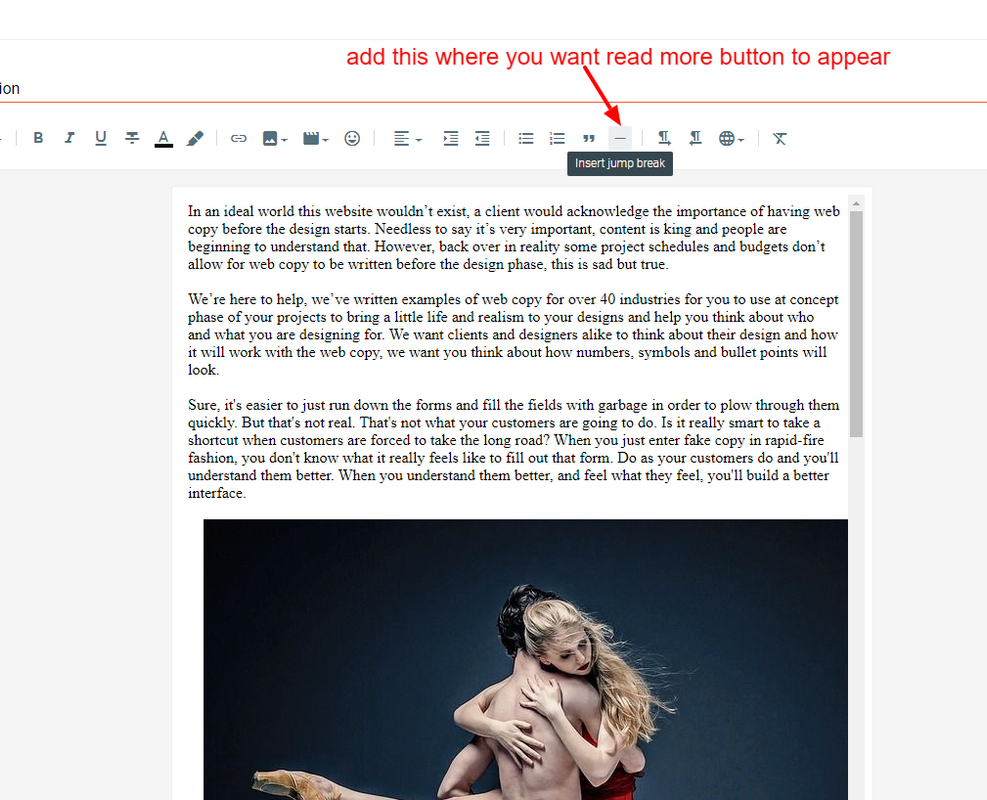
In your post editor, click where you want ‘Read More’ button to appear, then click on the ‘Insert Jump Break’ icon. That’s it.
https://i.postimg.cc/90b7LFfD/Post-Edit.png
Hello team,
I purchased this product about an hour ago and I cannot find the html files within the download.
Can you please share the html files with me (index.html, etc)?
Thanks
This is a blogger theme and will only work on blogger.com
Installing and using it on blogger is pretty easy. It includes a detailed guide to help you to setup everything. Feel free to contact me if you need any assistance.
Hi TemplatesZoo team,
Thanks for your response.
I believe there was some confusion while buying the theme. There was no mention of the website blogger.com and I interpreted ‘blogger theme’ as a website based blogger theme (and not blogger.com).
Can I please request a refund as this does not meet my needs? I have no intent of using blogger.com as my domain/hosting is with godaddy.com.
Looking forward to your response.
We would only be able to provide refund if you had not downloaded the file. Once the file is downloaded, we won’t be able to provide refund. https://themeforest.net/page/customer_refund_policy
For the record, you can use godaddy domain with blogger and everything is free. You can email me for any further assistance or discussion. My email address is mentioned in the installation guide.
How to install this theme
Please follow the guide that came with the template to install the theme. Let me know if you need any help
Great Work, Congratulations GLWS
Congratulations…Nice work..GLWS
Great work!
Awesome design!
Nice work, GLWS