12893 comments found.

Hi Team,
I have purchased your theme. Really nice theme.
But got few issues after updating the theme and plugins, WooCommerce 5.5.2, WPBakery Page Builder 6.7.0.
(It was working fine before updating)
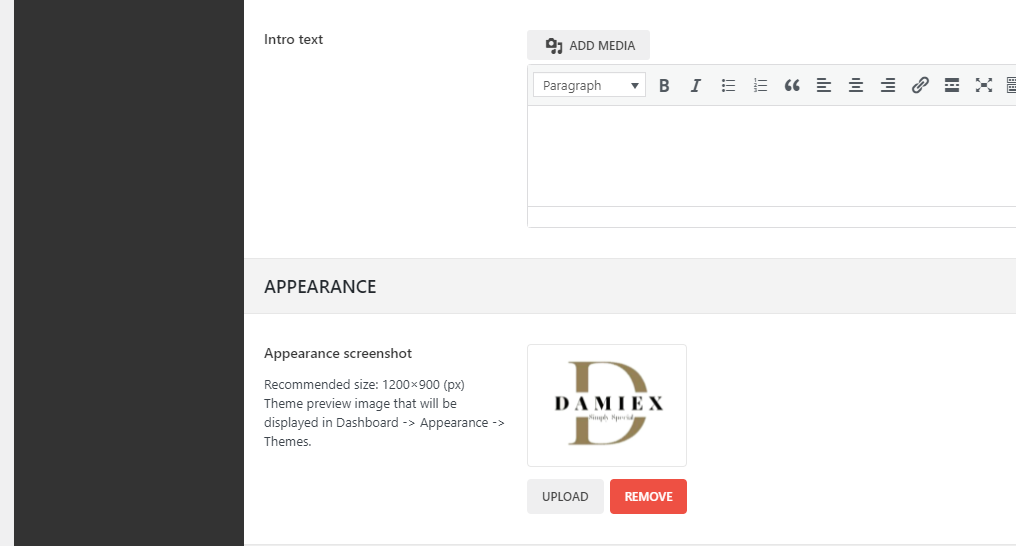
1. Even though I have changed the appearance screenshot, it’s not working.
https://i.snipboard.io/lIPFtm.jpg
https://i.snipboard.io/8AeyNm.jpg
2. Theme information does not show.
https://i.snipboard.io/BWJayK.jpg
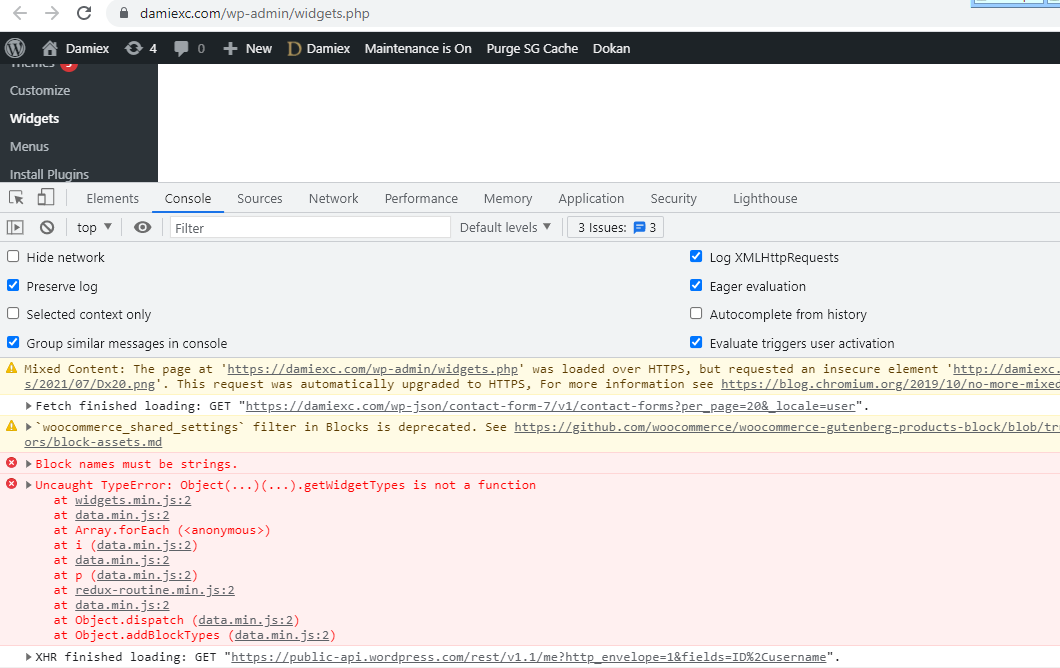
3. Widget page is not loading. It’s empty. Error is display in the console.
https://i.snipboard.io/rOg8Ju.jpg
https://i.snipboard.io/9cp5ix.jpg
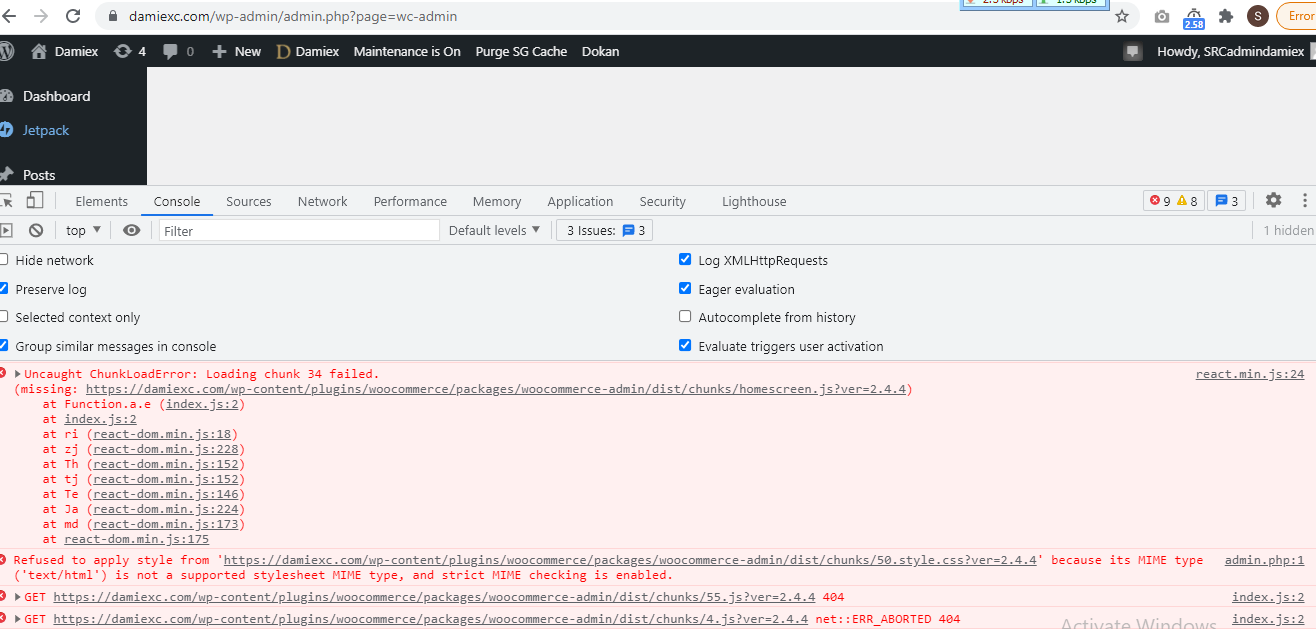
4. Woocommerce home & customer pages are not loading. Empty. Same error displaying.
https://i.snipboard.io/SZe4pK.jpg
Current WF version is 5.8. Could you please support me urgently as this is very critical and I have to submit this site to customer immediately?
Thanks in advance.
Hi,
Please, create a topic on our support forum and provide us all the necessary details about the request with some screenshots and including your admin access so we can help you https://xtemos.com/forums/forum/woodmart-premium-template/
Regards
Hi, Support ticket created. #308861.
Thank you! We can continue the conversation there.
Hello!! You are making a great work with the theme… I would like to ask you if it’s possible for you to share the WP Rocket pluggin configuration file to add to my site or if you have any documentation about how to configure it?? Thank you in advance. Regards!
Hello,
Thank you very much for your comment. Here are all the screenshots from our WP Rocket configuration on our demo
https://gyazo.com/3748a5ffe1c639d2c06e727ff974ecc5 https://gyazo.com/1f7fdf7841e1fb6f8f355d91fe9a1be1 https://prnt.sc/116hw2p https://gyazo.com/3ab580f67ab3f8e1c537802dedaba102 https://gyazo.com/e1efab49d86f29a0a5e6d0f8e760157a https://gyazo.com/a96745aaa24ef73019f25373513e81c7 https://gyazo.com/8de556cb3811007cdae2aa4703341b82Kind Regards
pls check this site https://www[dot]brandztory[dot]com/en then try to scrolling down.. can this template provide left side navigation? can adding logo too on the right top with sticky while preserve left side navigation
Hello,
Unfortunately, our theme doesn’t provide such ability.
Kind Regards
Hello. How can I disable the initially active menu on the main page? I want the menu to open when I click on it. Otherwise, it turns out that the drop-down menu overlaps the slider.
And how to make the images in the slider located in the center of the carousel? Now they are pressing against the left side
Hi,
Please, create a topic on our support forum and provide us all the necessary details about the request with some screenshots and including your admin access so we can help you https://xtemos.com/forums/forum/woodmart-premium-template/ If your support is already expired then you need to extend it on ThemeForest first.
Regards
Hello,
I am developing my wordpress/woocommerce site for a customer on a local docker environment. After finishing I transfer my project to a remote server (I therefore upload wp-content folder and import db dump on remote server) but there are several issues:- page shows the default header (not my custom one); also, when trying to access my header in Woodmart Header builder it only loads the default header (no matter which header I want to load and adapt)
- hover settings of products (woocommerce) don’t work
- footer section is missing completely
- custom html blocks don’t show up
- variant prices don’t work at all (it seems that some .js is not loaded correctly)
- and many other things, that don’t work like they do on my local environment
Am I missing something here? Is there a guideline how to transfer a complete project with all settings, customizings?
Regards, Michael
Hi,
Please, create a topic on our support forum and provide us all the necessary details about the request with some screenshots and including your admin access so we can help you https://xtemos.com/forums/forum/woodmart-premium-template/
Regards
Hi, is there a way to add multiple map pins on the map?
Hello,
Unfortunately, there is no such option in our theme. We will consider adding it in our future updates.
Kind Regards
Hi, I wanto to hide the empty product for home, and other page… I choose from woocommerce page’s settings > “out-of-stock-products-woocommerce” checked
But when a User search a product, I want to allow to find it
Hello,
You can hide any product from the search using the visibility option while editing the product https://gyazo.com/9097cabb20f1758a5f1513667fdd3f92
Kind Regards
Hello, Very good WooMart theme which offers a multitude of possibilities … 1. Colored navigation tab upon opening a submenu I would like the color of the main menu tab to be displayed when choosing a submenu for this tab. Example in your demo site, choosing “Elements / Titles ” colors the” Elements ” tab in order to better visualize the navigation. What would be the Css code ? 2. Automatic update of the contents of the cart Is your response to Mylaibala a year ago still relevant? No auto update of the modified cart without the “update cart” button? Thank you for your reply
Hi,
Please, create a topic on our support forum and provide us all the necessary details about the request with some screenshots and including your admin access so we can help you https://xtemos.com/forums/forum/woodmart-premium-template/
Regards
Hello,
Editor role users can’t edit HTML Blocks with Elementor. I get a dark screen with Error 500 message.
I have no problem with the Administrator role. I mean, I can use Elementor in HTML Blocks without problem with a Administrator user role.
Can you help?
Hi,
Please, create a topic on our support forum and provide us all the necessary details about the request with some screenshots and including your admin access so we can help you https://xtemos.com/forums/forum/woodmart-premium-template/
Regards
I just created the ticket: https://xtemos.com/forums/topic/editor-role-users-cant-edit-html-blocks-with-elementor/
Hello, you DEPRECATED the option to disable the sticky notifications, how can we disable that option now? it causes issues with so many plugins that use notices in the cart. thank you.
Hello,
This option is deprecated but still can be disabled in Theme Settings -> Other.
Kind Regards
Do you have any plans of supporting Gutenberg as third page builder for the theme (for increased performance)?
Hello,
Yes, we have such plans for our future. But is not quite correct that Gutenberg would be faster. The main advantage here is that it is a core WordPress functionality and doesn’t require additional plugins. But in general, Elementor is also well optimized and doesn’t have any critical problems.
Kind Regards
Hi, I want to add custom content in Thank you page but it displays at the top start of the page. I want to show my custom content at the end of the page after the order details.Is there any way ?
Hello,
You can copy the file “woodmart/woocommerce/checkout/thankyou.php” to your child theme “woodmart-child/woocommerce/checkout/thankyou.php” and move the following part to the bottom
<?php if ( woodmart_get_opt( 'thank_you_page_extra_content' ) || woodmart_get_opt( 'thank_you_page_html_block' ) ) : ?>
    <div class="wd-order-extra-content">
        <?php if ( 'text' === woodmart_get_opt( 'thank_you_page_content_type', 'text' ) ) : ?>
            <?php echo do_shortcode( woodmart_get_opt( 'thank_you_page_extra_content' ) ); ?>
        <?php else : ?>
            <?php echo woodmart_get_html_block( woodmart_get_opt( 'thank_you_page_html_block' ) ); ?>
        <?php endif; ?>
    </div>
<?php endif; ?>
Kind Regards
Thanks
i did the same as you said in child theme but it still displays on the top and when i change it through parent theme thankyou.php it works. Why it is not overriden by child theme?
Please, send us your admin access using the contact form on our profile page and also a link to some complete order (thank you page) so we can check.
Hi, is Woodmart compatible with Wordpress 5.8.? I got some problems after the installation of WP 5.8. with some Woodmart widgets ( Recent post and Recent reviews). Best regards!
Hi,
Our theme is fully compatible with WordPress 5.8. Please, create a topic on our support forum and provide us all the necessary details about the request with some screenshots and including your admin access so we can help you https://xtemos.com/forums/forum/woodmart-premium-template/
Regards
Just updated now – looks like is compatibile with 5.8
when you will release next woodmart update ?
Hello,
There are no critical issues that have to be fixed at the moment. So the next update will be released in at least a few months.
Kind Regards
Hi, is this compatible with WP 5.8?
Hello,
Thank you for your question. Yes, our theme works with the latest version of WordPress.
Kind Regards
Hello good day.
woodmart still has the same problem.
CUSTOM CSS section does not work. Please fix this.
Already and tried everything but it still does not work, and eliminated browser cache, and disabled redis cache, also all the wprocket caches, also the cache and all of cloudfare, also the cache of my internet router, there is nothing else left to do.
Even after all this this section of woodmart still does not work.
My website is in ubundu with nginx, built with easyengine.
Please tell me what else I can do or fix this soon.
I need this section to work to customize with css and also to solve the problems that your css has for WCFM,
Thank you in advance.
Regards.
Hello, today I also dedicated myself to finding out the problem, and I think it may be the fact that my website is made in nginx and ubundu, since I tested on a site made with apache and windows and it worked without problem , but on my official website it doesn’t work.
this is my website with woodmart.
arteanc.com
Please fix this problem or find out where the problem is and ask.
The truth is that I have always seen this problem long before, but I did not pay attention to it because I did not need it, but now I need that functionality. Previously I used jquery media from css, but for continuous work it is very tedious and I see it more practical to use the woodmart functionality.
Thanks a lot for everything in advance.
Greating and my best wishes.
Hi, I found the solution. all these problems have been solved after resetting the thema from the new Import / Export / Reset section.
After doing this twice, many of the problems I had have been solved. These two problems that have always bothered me have been solved. behavior of the products tab on mobile has been fixed.
The section to put css in woodmart has also been fixed, although this has been solved after formatting twice and after deleting the styles that I added in the section that woordpress offers to put css.
Please I would like to know why this happened or why this happens, and how to avoid it, so as not to have these problems in the future.
Or maybe always but always it is necessary to reset the thema every time it is updated?
Please help me clarify this, to be prepared for the future.
Thank you in advance.
A friendly and affectionate greeting.
woodmart is the best theme they ever created.
thank you
Hello,
We don’t know why it happened to you. Please, contact us next time when you will have any of the mentioned problems. We will review it and let you know how to fix it. Also, you don’t need to reset our Theme Settings after every update.
Kind Regards
hi xtemos,
this license themes only for one website or unlimited website?
Hello,
Thank you for contacting us.
One regular license allows you to use our theme for one website. Multiple projects require one regular license per website/domain.
Kind Regards
Hi Guys, I finished the website fully functional, but it was on localhost, when I changed the URL to the correct domain I lost all images, resources. etc. Is there a way to change the url correctly?
Hi,
Could you please send us a link to your website where we can see this issue?
Kind Regards
hello, is this compatible with wordpress 5.8?
Hello,
Thank you for your question.
Yes, our theme is compatible with WordPress 5.8.
Kind Regards
After theme update to v6.1.4 the mobile menu doesn’t work. Can you please help
Hi,
Could you please send us a link to your website where we can see this issue?
Kind Regards
I must to update from v5.3.6.
If you are going to update from 5.3.6 version, please, read our 6.0 update information here https://xtemos.com/docs/woodmart/faq-guides/woodmart-update-6-0-explained/
Sorry about my delay. I’ve followed all steps described on your 6.0 update information, and we are still getting the issue.
We made a public copy of our website, so you can check it the bug to display properly the mobile menu -> https://copia.montsebetanzos.com/
Could you tell us how to fix this bug to update the theme properly and still keep working with all the plugins and configurations allaready installed?
Thanks 
Hello,
It looks like the mobile menu is overridden in the child theme. Could you please temporarily switch to the parent theme and check how it works?
Kind Regards
I did it, and now it’s working fine.. but how we can enable the child theme?
You need to review your customization made in the child theme. Copy new functions related to mobile navigation from the latest version of the theme and then apply your customizations.
It is true, I forgot that in your day you had helped us to change the text of “categories” in the mobile menu for the text of “creations”.
The function that you indicated to us was this:
if( ! function_exists( 'woodmart_mobile_menu' ) ) {
    function woodmart_mobile_menu() {

        $menu_locations = get_nav_menu_locations();

        $location = apply_filters( 'woodmart_main_menu_location', 'main-menu' );

        $menu_link = get_admin_url( null, 'nav-menus.php' );

        $search_args = array();

        $search_form = true;

        $settings = whb_get_settings();

        if( isset( $settings['search'] ) ) {
            $search_args['post_type'] = $settings['search']['post_type'];
            $search_args['ajax'] = $settings['search']['ajax'];
        }

        if( isset( $settings['burger'] ) ) {
            $mobile_categories = $settings['burger']['categories_menu'];
            $search_form = isset( $settings['burger']['search_form'] ) ? $settings['burger']['search_form'] : true;
            $position = $settings['burger']['position'];
            $mobile_categories_menu = ($mobile_categories) ? $settings['burger']['menu_id'] : '';
        } else {
            return '';
        }

        echo '<div class="mobile-nav slide-from-' . esc_attr( $position ) . '">';

            if ( $search_form ) {
                woodmart_search_form( $search_args );
            }

            if( $mobile_categories ) {
                ?>
                    <div class="mobile-nav-tabs">
                        <ul>
                            <li class="mobile-tab-title mobile-pages-title active" data-menu="pages"><span><?php esc_html_e('Menu', 'woodmart'); ?></span></li>
                            <li class="mobile-tab-title mobile-categories-title" data-menu="categories"><span><?php esc_html_e('Shop', 'woodmart'); ?></span></li>
                        </ul>
                    </div>
                <?php
                echo '<div class="mobile-menu-tab mobile-categories-menu">';

                if( ! empty( $mobile_categories_menu ) ) {
                    wp_nav_menu(
                        array(
                            'menu' => $mobile_categories_menu,
                            'menu_class' => 'site-mobile-menu',
                            'walker' => new WOODMART_Mega_Menu_Walker()
                        )
                    );
                } else {
                    ?>
                        <span class="create-nav-msg"><?php esc_html_e('Set your categories menu in Theme Settings -> Header -> Menu -> Mobile menu (categories)', 'woodmart'); ?></span>
                    <?php
                }

                echo '</div>';
            }

            echo '<div class="mobile-menu-tab mobile-pages-menu active">';

            if( isset( $menu_locations['mobile-menu'] ) && $menu_locations['mobile-menu'] != 0 ) {
                $location = 'mobile-menu';
            }

            if( has_nav_menu( $location ) ) {
                wp_nav_menu(
                    array(
                        'theme_location' => $location,
                        'menu_class' => 'site-mobile-menu',
                        'walker' => new WOODMART_Mega_Menu_Walker()
                    )
                );
            } else {
                ?><span class="create-nav-msg">
                    <?php
                        printf(
                            wp_kses( __('Create your first <a href="%s"><strong>navigation menu here</strong></a>', 'woodmart')
                                , array(
                                    'a' => array(
                                        'href' => array()
                                    )
                                )
                            )
                        , $menu_link);
                    ?>
                    </span><?php
            }

            echo '</div>';

         ?>

        <?php if( is_active_sidebar( 'mobile-menu-widgets' ) ): ?>
            <div class="widgetarea-mobile">
                <?php dynamic_sidebar( 'mobile-menu-widgets' ); ?>
            </div>
        <?php endif;

        echo '</div><!--END MOBILE-NAV-->';
    }

    add_action( 'wp_footer', 'woodmart_mobile_menu', 130 );

}
Could you help us to update this function? It’s the main reason to use a child theme. Thanks in advance!!
Without this function the mobile menu work fine, so the bug is here.
Sure, you just need to copy this function from the latest version of our theme in the file “inc/template-tags/template-tags.php” and apply your changes. Sorry, but we don’t remember what exactly were changed there.
Ready! Thanks a lot, your support is always 5 stars!
Great, you are welcome!