12796 comments found.

Presales question: Is there a way that attributes can be displayed as icons on single product page. Can I choose position of certain attribute on page and style it with elementor?
Hello,
Thank you very much for being interested in our theme.
Could you please send us some screenshot or example so we can better understand what you mean?
Kind Regards
The theme is great! Thank you for your work and updates.
Recently found an error: displaying products version 7.0.3. If you select “display 1 product” for phones (less than 425 px), and “display 2 products” for tablets (more than 425 px, but less than 769px), then there will be only 1 product in a row for these variants. Check on the page https://woodmart.xtemos.com/megamarket/product-category/flooring/tiles-and-porcelain/
Hello,
This page has 3 products on desktop and tablets and 2 products per row on mobile devices. Could you please clarify what is wrong here?
Kind Regards
Try changing the output. Two products on a tablet, one on a phone. In the old version, two products are displayed on screens with a resolution of more than 576 px with these settings. On screens with a resolution of less than 575 px, one product is displayed. In the new version with these settings, two products are not displayed on the tablet. On screens with a resolution of less than 768 px, one product will be displayed. In other words, the tablet uses the same setting as the phone. My support period has expired and I can’t pay. If you have email, I can send screenshots.
Send us your website access and screenshots using the contact form here https://themeforest.net/user/xtemos
One more thing. I drew attention to one point. If a product is in several different categories, the breadcrumbs of the product may change when the page is reloaded. This happens about 2 out of 10 times. But here is possibly a bug in woocommerce.
Problem solved. Thank you! You are the best!
You are always welcome!
Small Bug in Megamarket Demo – Resposive Layout Shop Page
https://woodmart.xtemos.com/megamarket/product-category/flooring/tiles-and-porcelain/Reproduce:
1. Open URL above in Desktop Browser maximized
2. Make Browser window Small -> responsive design -> left Navigation is hidden
3. Make Brwoser windows big/maximzed -> responsive design but left Navigation is missing -> see screenshot: https://ibb.co/R4pPpP6
in other demos its working, the left sidebar is appearing after making the browser window bigger
greetings!
Hello,
Yes, it might happen after the browser resize so you need to refresh the page. It will not be a problem for real customers because they don’t resize to mobile version and back intentionally.
Kind Regards
hmmm. actually many resize windows on a desktop just to have other windows beside (for example whatsapp client oder calculator) an if then the window gets maximized the user wonders why he has to reload. the general user doesnt even know and is just wondering…
why is it working on the other demos?
It depends on the layouts builder. So pages built with custom layout may have such issue.
Hi,
Please, create a topic on our support forum and provide us all the necessary details about the request with some screenshots and including your admin access so we can help you https://xtemos.com/forums/forum/woodmart-premium-template/ If your support is already expired then you need to extend it on ThemeForest first.
Regards
Header Builder Issues in v.7.0.3
Everything was working Fine I was using the older Version. I am not able to change the logo or Edit the Header Builder. Buttons are not responding in the same.
Hello,
Try to disable all external plugins that are not related to our theme, clear your browser cache, and test how it works.
Kind Regards
Hello ,
When i update to woodmart 7
My add to cart sidebar function can’t work,
Console show “deprecated since 3.1.0 – Use `elementorModules.utils.Scroll` instead blabla”
May you help me? My support is expired.
Hi,
Could you please send us a link to your website where we can see this issue?
Kind Regards

Please, update the theme to the latest version 7.0.3 and check how it works.
Kind Regards
Hello , It’s work.
Thank u
Great, you are welcome!
Hello, Since updating the theme, I have a huge problem on my site. The Contact Form 7 plugin no longer works. It breaks all my pages on my site, nothing is displayed correctly. I disabled each plugin one by one, and found out that it’s Contact Form 7 that’s creating the error. Is it possible to look why it no longer works since the update please ? I need the forms on two of my pages. I would like this problem to be solved as soon as possible, it is for a customer. Thanks in advance
Hi,
Please, create a topic on our support forum and provide us all the necessary details about the request with some screenshots and including your admin access so we can help you https://xtemos.com/forums/forum/woodmart-premium-template/
Regards
Hello, congrats on your great theme, we have it for a long time with 0 issues.
You have no obligation to reply. since our support has expired long time ago.
Just a notice for a potential fix in the future. On the new feture for linked products, still didn’t managed to use it.
woodmart/inc/integrations/woocommerce/modules/linked-variations/class-frontend.php
We keep getting this error!
Thank you!
Hello,
Thank you for your comment.
Could you please clarify what error you keep getting?
Kind Regards
Thank you for your reply
Warning: Invalid argument supplied for foreach() in /home//public_html/shop/wp-content/themes/woodmart/inc/integrations/woocommerce/modules/linked-variations/class-frontend.php on line 235
Notice: Undefined offset: 8814 in /home/....../public_html/shop/wp-content/themes/woodmart/inc/integrations/woocommerce/modules/linked-variations/class-frontend.php on line 253
Warning: Invalid argument supplied for foreach() in /home/...../public_html/shop/wp-content/themes/woodmart/inc/integrations/woocommerce/modules/linked-variations/class-frontend.php on line 235
Notice: Undefined offset: 8814 in /home/..../public_html/shop/wp-content/themes/woodmart/inc/integrations/woocommerce/modules/linked-variations/class-frontend.php on line 253
Notice: Trying to access array offset on value of type null in /home/.....s/public_html/shop/wp-content/themes/woodmart/inc/integrations/woocommerce/modules/linked-variations/class-frontend.php on line 171
Warning: Invalid argument supplied for foreach() in /home/.../public_html/shop/wp-content/themes/woodmart/inc/integrations/woocommerce/modules/linked-variations/class-frontend.php on line 171
Please, send us a link where we can see the error with your admin access so we can check. Use the contact form here https://themeforest.net/user/xtemos
Thank you, sent!
where can I translate the section “People watching this product now!”?
Hi,
Please, create a topic on our support forum and provide us all the necessary details about the request with some screenshots and including your admin access so we can help you https://xtemos.com/forums/forum/woodmart-premium-template/ If your support is already expired then you need to extend it on ThemeForest first.
Regards
Thanks you for for taking on board some of my past suggestions and feedback and adding it to the latest woodmart 7.0
A few questions and suggestions for the future
Q1. Is it possible to have Google fonts locally stored, I have found disabling Google fonts speeds up sites.
Q2. Will you be adding Gutenberg & Block Themes (or Full Site Editing Themes) support?
Q3. Can this theme be used as a multipurpose theme like vault, Jupiter, The7, this theme does not have many demos outside the ecommerce side to show.
Q4. is the new Linked Variations feature same as this https://iconicwp.com/products/woocommerce-linked-variations/
Q5. Does the update add full Global Styles (like Astra, blocksy & generate press)
Suggestions for next updates S1. Add Gutenberg Blocks (or Full Site Editing ) support?
S2. Make the theme more multipurpose S3. Add full support for Rank math
Hello,
Thank you for your comment.
1. Yes, you can disable Google fonts in the theme completely and upload your custom fonts.
2. We have such plans for our future updates but it will take time so we can’t say that this will be implemented in the next 3-6 months.
3. Of course, you can use it for non-ecommerce projects as well.
4. It looks similar to this plugin, yes.
5. Could you please clarify what you mean here?
Thank you for your feature requests.
5. This link would explain better than I could https://wordpress.com/go/web-design/everything-you-need-to-know-about-wordpress-global-styles/
Ok, thank you. We will review this also.
Kind Regards
Hi,
Please, create a topic on our support forum and provide us all the necessary details about the request with some screenshots and including your admin access so we can help you https://xtemos.com/forums/forum/woodmart-premium-template/ If your support is already expired then you need to extend it on ThemeForest first.
Regards
When creating a HTML Block and insert Products (Grid or Carousel) and turn on Countdown timer for product, then add this HTML Block as dropdown i menu, the countdown timer wil not show. It showing in the preview, but not on the dropdown.
Hi,
Please, create a topic on our support forum and provide us all the necessary details about the request with some screenshots and including your admin access so we can help you https://xtemos.com/forums/forum/woodmart-premium-template/ If your support is already expired then you need to extend it on ThemeForest first.
Regards
Why isn’t the selected header showing up on the homepage but only on product pages. All I want is for the demos to work properly. Nothing works. The burger menu and menu grey out and nothing shows on mobile. It’s definitely not a out of the box theme.That’s it. the cart doesn’t work. It brings me to a 404 not found page. What is this?
The check out and the view cart doesn’t work. Guys I just want to be able to use the demo as it is but nothing seems to work
Why isn’t the check ou and go to cart buttons redirecting to their corresponding pages?
The show more on the product page doesn’t work on mobile. Seriously all I want is to be able to use the theme I payed for.
Only two categories are being displayed out of many on the front page. The demo is completely broken. I am unable to use it.
Hello,
Could you please disable all plugins that are not related to our theme and provide us your admin access so we can check it? use the contact form here https://themeforest.net/user/xtemos
Thank you in advance
When will you be able to fix these issues? Issues that shouldn’t be there in the first place, since I’d like to start using your theme as soon as possible. Thanks.
Hello,
We have answered your email about the issue. Feel free to contact us if you have any further questions.
Kind Regards
None of the imported demo’s properly work on mobile.
Hello,
We have answered your email about the issue. Feel free to contact us if you have any further questions.
Kind Regards
I’ve also imported the demos and tried them out on mobile. None of them work. The burger menu is inactive. It’s impossible to see the categories….
Hello,
We have answered your email about the issue. Feel free to contact us if you have any further questions.
Kind Regards
Guys why isn’t the header builder working? I am trying to switch it to an other one but the changes are not being processed for some reason. Where will I find the Json’s to all the headers that you offer? I’m trying to find the one you use in megamerket, black friday, main, retail, marketplace, electronics, etc.. Cheers
I’ve imported them but even after I make them default they don’t work.
Hello,
We have answered your email about the issue. Feel free to contact us if you have any further questions.
Kind Regards
After last updating the compare and wishlist pages don’t work anymore .. they don’t render the page. I can see only the text “woodmart_compare”.. can you help? thank you
the problem was fixed by updating the wood mart core as well
Hello,
Yes, you need to always keep this plugin up to date. Feel free to contact us if you have any further questions.
Kind Regards
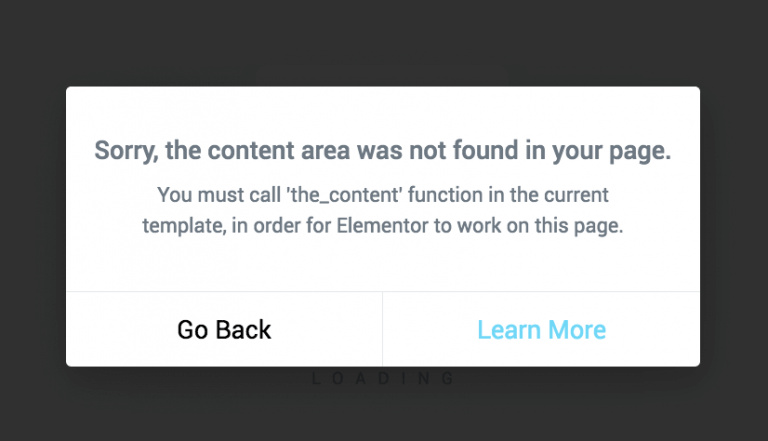
Hello, could you please point me in right direction how to solve this issue when I try to edit product that I created special Layour, I have Elementor Pro and it does not allow me to edit Sinple product when I use the Layout I created https://elementor.com/cdn-cgi/image/f=auto,w=768/marketing/wp-content/uploads/sites/14/2020/04/error-massage-768x441.png
Hello,
Please, check how it works without Elementor PRO. If you still see this error, please, send us your admin access using the contact form here https://themeforest.net/user/xtemos
Kind Regards
After theme update to 7.0.x I got an issue, where page background (random image from gallery) is reapearing randomly. When I check Theme settings -> Styles and colors -> Pages background, settings have not changed nor is any picture selected. I click “save sattings” (without any change) and backgrounds disaapear…
Hello,
Please, send us your admin access when the issue appears again so we can check. Use the contact form here https://themeforest.net/user/xtemos
Kind Regards
This is annoying again.
But don’t know how to reproduce in develop enviroment and I cannot leave production page with this issue. After cache clear it works all fine (same issues with WP Fastest cache and WP-Optimize)
Hello,
We need to be able at least to see the issue once to understand where is this image coming from.
Kind Regards
Images are random (or not, at least every time there is a different image). I’ll try to remove all the code that generates background images and see from there.
If you can help me to find all the code, I would appreciate it.
Hello,
We need to see it at least once to understand which code adds this image background.
Kind Regards
As mentioned I’m not able to leave production site like this. But did copy code.
It’s inside generated css file /wp-content/uploads/2023/02/xts-theme_settings_default-1675432870.css?ver=7.0.4
Lines: .page .main-page-wrapper{ background-image: url(/wp-content/uploads/2023/02/Screenshot.png); }
.woodmart-archive-shop .main-page-wrapper{ background-image: url(/wp-content/uploads/2023/02/Screenshot.png); }
.single-product .main-page-wrapper{ background-image: url(/wp-content/uploads/2023/02/Screenshot.png); }
.woodmart-archive-blog .main-page-wrapper{ background-image: url(/wp-content/uploads/2023/02/Screenshot.png); }
.single-post .main-page-wrapper{ background-image: url(/wp-content/uploads/2023/02/Screenshot.png); }
.woodmart-archive-portfolio .main-page-wrapper{ background-image: url(/wp-content/uploads/2023/02/Screenshot.png); }
.single-portfolio .main-page-wrapper{ background-image: url(/wp-content/uploads/2023/02/Screenshot.png); }
(just removed domain name) Meanwhile if you check settings and section Pages background, there is no image selected. My guess, something is strange in CSS procesor (no idea if FPC plugin is an issue here, because we are using it all the time.. But same issue with 2 different plugins WP-Optimize and WP Fastest Cache)
Try to add the following custom CSS to override this code
.main-page-wrapper {
  background:none!important;
}
This is what I did, but it’s not a proper solution
CSS minify is disabled
Sorry, but why it is not a proper solution?
What if a client desides he wants to use page backgrounds? This should be checked and fixed where issues comes and why does it generated CSS with this lines despite not in database.
Yes, we understand but how can we check this if it doesn’t apper on our website. That is why we asked you to contact us once it appears on your website.
Hello, I can’t find invoce for my purchase. Can you help me please
Hello,
You can find it in the Downloads section of your account on ThemeForest. https://help.market.envato.com/hc/en-us/articles/202822600-Where-Is-My-Purchase-Code-
Kind Regards