12918 comments found.

Hi there I have seen the slider range selector bar for the price criteria on the left side of page navigation. For my question, Is it possible to use the same way to limit the search result for other itme criterias, such as item weight and etc. Many Thank
Hello,
Thank you for your question.
The range slider filter works for the price only. It can’t be added for other product attributes, unfortunately.
Kind Regards
PRE SALES QUESTION: can I stage this on my spare domain whilst i work on it then move it to my real domain once I’m sure it’s ready to go public (both domains are my business name, the staging one is .co.uk and when it goes live it will the .com)
Hello,
Thank you for being interested in our theme.
Of course, you are free to install our theme on your development domain as well as on the production one.
Kind Regards
Dear Woodmart Support I have clients who use iPhone and Safari browser When they add a product to the shopping cart Sometimes the shopping cart is suspended and the shopping cart page cannot be accessed Does the problem lie with WooCommerce or with the template? Note that the problem was repeated by more than one customer within one day Please, I want a solution
Hi,
Could you please send us a link to your website where we can see this issue?
Kind Regards
I want to send it to you privately, how is it going?
You can use the contact form on our profile page here https://themeforest.net/user/xtemos
I’ve sent
Please…please consider adding Gutenberg as a building tool. Pagebuilders are too bloated and really really slow down the website. We bought this theme because we are building ecommerce where every ping MS counts.. So we need Gutenberg for faster website loads.
Thanks
Hello,
Thank you very much for using our theme and contacting us.
We are working on full Gutenberg support and it will be a part of our 8.0 update next year.
Kind Regards
Wow.. eagerly waiting for it. Thanks.
I have a critical problem.
I just bought your theme. As soon as I unzip it in the WordPress admin panel and click “activate theme”, I get a critical error:
” Parse error: syntax error, unexpected ‘array’ (T_ARRAY), expecting function (T_FUNCTION) or const (T_CONST) in /home/xe469823/obzor.shop/new/wp-content/themes/woodmart/inc/admin/options/controls/icons-font/class-icons-font.php on line 26 “
I tried uninstalling Wordpress and reinstalling it – I get the same error
P.s. Before installing your theme, I removed all plugins, it was a clean site
I found a fix, it was necessary to upgrade the PHP version on the hosting
Hello,
Yes, you need to have PHP version 7.4 or higher to make it work.
Kind Regards
Good afternoon
Do I need to activate the theme license in the WordPress panel on the test subdomain? Or do I activate it on the main domain when I transfer the site?
Hello,
Thank you for contacting us.
Yes, you can activate your purchase code twice: on your test website and production one.
Kind Regards
Hello, Please guide me where to write a description for any product Thanx
Hello,
Thank you for reaching out to us with your question. We appreciate that you use our theme and are happy to help you in any way we can.
To ensure that we are able to provide you with the best support possible, we encourage you to create a new topic on our support forum with your question or issue. Our support team actively monitors the forum and will be able to provide you with a prompt and thorough response.
To create a new topic on our support forum, please follow these steps:
1. Visit https://xtemos.com/forums/forum/woodmart-premium-template/ and sign in with your account.
2. Click on the “Create New Topic” button and provide a descriptive title and detailed description of your question or issue.
3. Click “Submit” to post your question.
Once you have posted your question on the support forum, our team will review it and provide a response as soon as possible.
Thank you for your cooperation, and we look forward to hearing from you on the support forum.
Best regards
Hey! I’m sorry to post here. But I have the same problem as this user. https://xtemos.com/forums/topic/category-extra-description-ignore-line-breaks/ When I create an html block it does not respect line breaks. Unfortunately there is no answer in the post and I have already applied the patch that was mentioned, but unfortunately the problem persists. If there’s anything I can do, I’d appreciate your help!
I temporarily solved the problem by using the
element to skip lines. An important piece of information is that when I open the block preview, everything is ok, but when I associate it with the product it loses its formatting. Thanks!
Hello,
Please, send us your admin access so we can check the issue on your website.
Kind Regards
Hi! I´m sorry! Where do I send access data?
Use the contact form on our profile page here https://themeforest.net/user/xtemos
Hi! Sent. Thanks!
Could you please temporarily disable all plugins that are not related to our theme?
Ok! Disabled! Only woodmart, woocommerce, temporary login and wp-bakery is enable.
You can check this product that has this problem /produto/tag-de-identificacao-ninoca/
Hello,
You can fix it by applying patch # `495888 `. To do this, go to Dashboard -> WoodMart -> Patcher, find the corresponding patch and click on the “Apply” button. Let us know if it works for you.
Kind Regards
Hi! Problem has solved! Thank you very much!
Great, You are always welcome.
How I remove the price at the homepage, cause when i remove it with css, also the price is moved away in the product page see https://ibb.co/3pj6CNm
I want to remove €397.03 – €12,208.79 ex.btw
Regards, Tonius
Hello,
Thank you for reaching out to us with your question. We appreciate that you use our theme and are happy to help you in any way we can.
To ensure that we are able to provide you with the best support possible, we encourage you to create a new topic on our support forum with your question or issue. Our support team actively monitors the forum and will be able to provide you with a prompt and thorough response.
To create a new topic on our support forum, please follow these steps:
1. Visit https://xtemos.com/forums/forum/woodmart-premium-template/ and sign in with your account.
2. Click on the “Create New Topic” button and provide a descriptive title and detailed description of your question or issue.
3. Click “Submit” to post your question.
Once you have posted your question on the support forum, our team will review it and provide a response as soon as possible.
Thank you for your cooperation, and we look forward to hearing from you on the support forum.
Best regards
Hi, we have some problem with Woodmart core plugin:
Plugin Name: Woodmart Core Current Plugin Version: 1.0.35 Details: To protect your site from this vulnerability, the safest option is to deactivate and completely remove “Woodmart Core” until a patched version is available. Get more information.(opens in new tab) Vulnerability Information: https://www.wordfence.com/threat-intel/vulnerabilities/id/60f043e9-7947-4fff-a9a8-94a1f421db7c?source=plugin(opens in new tab) Vulnerability Severity: 9.8/10.0 (Critical)
Could you provide a patch?
Hello,
This bug has been already fixed in our theme. Make sure that you are running the latest version of the theme. Also, the WoodMart core plugin needs to be updated to the latest version 1.0.39 too. You can do this in WoodMart -> Plugins.
Kind Regards
Hi, after updating theme and woodmart core to the latest version, it showing a bug for mobile device. When someone add first product in the cart, screen goes blank until someone either refresh or goto the top. Instead, it should automatically show sliding cart bar from right to left. I am using WPBackery plugin. My support is expired so can not create topic on forum. But I think you would like to know about this bug to resolve it. Thank you.
Hi,
Could you please send us a link to your website where we can see this issue?
Kind Regards
Thank you so much for quick reply. It’s really appreciable. My site is 3sista.com Kindly open the website on mobile device, click on “our products”, open any of the product, and from single product page click on “add to cart” button…and screen will go blank. It happens for the first product added to the cart. If there is any product already in the cart, it’s working fine for second product.
We just tested this using a real mobile device but didn’t see any problems with the “add to cart” process. Here is a screenshot https://gyazo.com/2c33a6d6ac77571cd2f9a7e85f97bab0
Yes, I checked it. Error is happening on mobile device having older version of android system. On the latest android system, it is working fine. You would like to note this down to resolve in the future update as it is always better to have software/theme which is platform and version independent as we can not tell someone to update their OS or to buy new mobile to access website. Hope team will consider this positively. Thank you for the quick response. TC.
Hello,
Please, clarify your OS and browser version so we can test this and see what is wrong.
Kind Regards
Hello, Our site is very slow after updating to your latest release. I uninstalled all plugins and belive it is some issue with your latest update. I cannot see any error messages but the site is not loading as it should (far too slow backend and frontend). I see that other people have also mentionned the same in the support forum. Can you please check this ASAP your end (check your staging site without cache). Thanks
We are loading far more page requests on each page load after your latest update than before, and each request is affected by blocking time. This is why the site is so slow. You have somewhere a big issue with the latest update. How do we revert to previous version?
Hello,
Please, disable all plugins that are not related to our theme and provide us with your admin access. We will log in and check what is wrong there. You can leave only the following plugins that are required for our theme: WoodMart core WooCommerce Elementor/WPBakery page builder
Thank you in advance
OK but this is not an issue on just my website. It is an issue on all sites that have updated to your latest version. I am not happy to provide access to our site via a public message board, for security issues. Can you offer another option?
Sure, send us your information via this form https://themeforest.net/user/xtemos Also, specify some requests that were added after the update.
Thanks. Firstly I see there are 90 css files loading, of which 50 are from Woodmart (previously there were 30 or so). I don’t use many of your ecommerce extra features either and have not added any new ones recently. Can I frst ask you to check your staging site WITHOUT CACHE. Thank you
You can see here the issue: https://ibb.co/RTj6HQp All files are affected by long “sending” and “blocking” times. This is not normal. Even to click away our cookie consent popup takes over a second – usually it is milliseconds.
how to revert from a patch? i installed patch 494884 for Elementor but the template I am using is on WP Bakeryand after applying that patch variations are not working properly and keep showing flase “please select an variation for product…”
Hello,
Thank you for reaching out to us with your question. We appreciate that you use our theme and are happy to help you in any way we can.
To ensure that we are able to provide you with the best support possible, we encourage you to create a new topic on our support forum with your question or issue. Our support team actively monitors the forum and will be able to provide you with a prompt and thorough response.
To create a new topic on our support forum, please follow these steps:
1. Visit https://xtemos.com/forums/forum/woodmart-premium-template/ and sign in with your account.
2. Click on the “Create New Topic” button and provide a descriptive title and detailed description of your question or issue.
3. Click “Submit” to post your question.
Once you have posted your question on the support forum, our team will review it and provide a response as soon as possible.
Thank you for your cooperation, and we look forward to hearing from you on the support forum.
Best regards
I need a simple answer: how to revert from a patch. that might be useful to anyone here. in your documentation I could not find anything about it. is it possible that we have to open a ticket when we could work first hand on it just by following a guide?
on your forum in order to post it’s mandatory to have a valid purchase code. my license expired already, so I cannot post there.
To revert a patch you will need to reinstall the theme completely. You can always download the latest version on ThemeForest.
so you mean, just delete theme folder, and reinstall it. via ftp is ok? or reinstall it means via zip and it should show the First Steps walktrhough?
You can either reinstall it via FTP or Appearance -> Themes -> Add new. It doesn’t make any difference.
in mobile device Mobile menu, product filter sidebar and some element are not clickable, pls help me
Hi,
Please, create a topic on our support forum and provide us all the necessary details about the request with some screenshots and including your admin access so we can help you https://xtemos.com/forums/forum/woodmart-premium-template/ If your support is already expired then you need to extend it on ThemeForest first.
Regards
Wishlist button not loading when products loaded through ajax (load more, infinite loading) I use yith wishlist premium Enable AJAX loading option is checked as it works fine when we have enabled our cache plugin wp-rocket
When the products are loaded for the first time, there is a mini delay in the add to wishlist button but it works as expected.
On archive products, we want to use the load more products or infinity loading theme function but in this case, the add to wish list button doesn’t display.
What can we do to fix this issue? is there any JS trigger after the products load via ajax in the DOM?
Hi,
Please, create a topic on our support forum and provide us all the necessary details about the request with some screenshots and including your admin access so we can help you https://xtemos.com/forums/forum/woodmart-premium-template/ If your support is already expired then you need to extend it on ThemeForest first.
Regards
Welcome
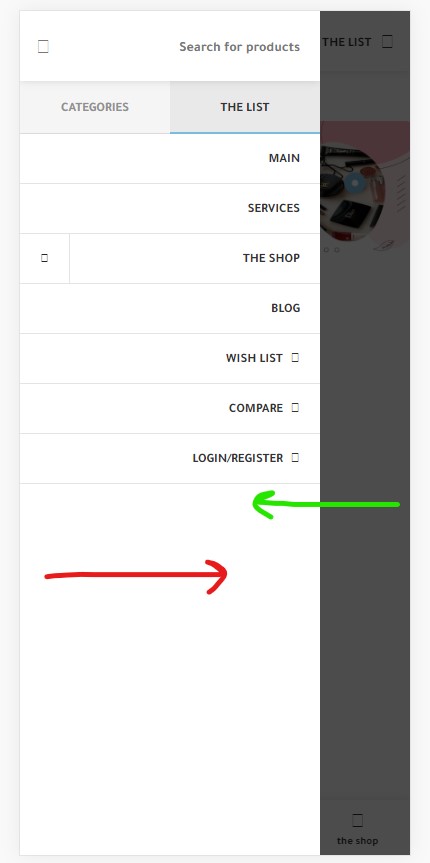
How can I move the menu on the mobile from left to right?
https://www12.0zz0.com/2023/09/11/17/482181921.jpgHello,
Thank you for reaching out to us with your question. We appreciate that you use our theme and are happy to help you in any way we can.
To ensure that we are able to provide you with the best support possible, we encourage you to create a new topic on our support forum with your question or issue. Our support team actively monitors the forum and will be able to provide you with a prompt and thorough response.
To create a new topic on our support forum, please follow these steps:
1. Visit https://xtemos.com/forums/forum/woodmart-premium-template/ and sign in with your account.
2. Click on the “Create New Topic” button and provide a descriptive title and detailed description of your question or issue.
3. Click “Submit” to post your question.
Once you have posted your question on the support forum, our team will review it and provide a response as soon as possible.
Thank you for your cooperation, and we look forward to hearing from you on the support forum.
Best regards
Hello,
Why is not possible to translate the sold counter ? using strings – loco translate
Hi,
Please, create a topic on our support forum and provide us all the necessary details about the request with some screenshots and including your admin access so we can help you https://xtemos.com/forums/forum/woodmart-premium-template/ If your support is already expired then you need to extend it on ThemeForest first.
Regards
Hello friends, how can I change the twitter social network icon to the current one? thanks
Hi,
Please, create a topic on our support forum and provide us all the necessary details about the request with some screenshots and including your admin access so we can help you https://xtemos.com/forums/forum/woodmart-premium-template/ If your support is already expired then you need to extend it on ThemeForest first.
Regards
Hi, I meant update the icons that come in Woodmart for the social networks, the twitter icon (X) is outdated.
Hello,
We will update the icon in our theme in our next release.
Kind Regards
Hello all i am facing and error with woodmart theme when i try to run “Elementor Pro Data Updater” i get the following error “Fatal error: Uncaught Error: Call to undefined function XTS\Elementor\woodmart_get_button_content_general_map() in /home/keyhubstore.com/public_html/wp-content/themes/woodmart/inc/integrations/elementor/elements/button/class-button.php:95 Stack trace: #0 /home/keyhubstore.com/public_html/wp-content/plugins/elementor/includes/base/controls-stack.php(2304): XTS\Elementor\Button-”
Knowing that i tried all possible solutions from my side: 1 – Theme and plugins are uptodate including all patches. 2 – Disabled all plugins and error still appears. 3 – I have latest version of PHP 8.1 (even tryied to downgrade php version)
any help please ?
Hello,
Please, disable all plugins that are not related to our theme and provide us with your admin access. We will log in and check what is wrong there. You can leave only the following plugins that are required for our theme: WoodMart core WooCommerce Elementor
Thank you in advance
i can’t do that it is a live website with ongoing sales, could i reblicate the website on a subdomain ?
i sent you a message with required logins on a subdomain
Hello,
You can fix it by applying patch # `494884 `. To do this, go to Dashboard -> WoodMart -> Patcher, find the corresponding patch and click on the “Apply” button. Let us know if it works for you.
Kind Regards
worked like a charm, thank for your support.
You are always welcome.
Hello, I found someone using my purchase code to their support account and I wasn’t able to recover it. My purchase code is: ***-563630cbf541 It says: This key is already in the database. registered for e-mail *anmou at g-mail.com which is not my gmail.
Hello,
Please, send us your purchase code using the contact form on this page so we can help you https://themeforest.net/user/xtemos
Kind Regards
Done