12912 comments found.

hi, im acutally working on a customer page, where the agency before, used your theme for the site. but there are some several provlems, first of all on the single product page there is no prive – what can this be – i followed the instruction in – https://xtemos.com/docs-topic/single-product-page-builder/
but there is no section layouts in this page – does that mean the theme is not proparly installed or something- is there a newer troubleshoot documentation for your theme… thanks for providing service -.
Hi,
Please, create a topic on our support forum and provide us with all the necessary details about the request with some screenshots and including your admin access so we can help you https://xtemos.com/forums/forum/woodmart-premium-template/ If your support has already expired, you must extend it on ThemeForest first.
Regards
Hello! Demo: https://woodmart.xtemos.com/home-cars/demo/cars/ is it built with Elementor?
Hello,
Thank you for contacting us. Our demo is built with the WPBakery page builder. But all prebuilt websites are available both on Elementor and WPBakery during import. It will look the same.
Kind Regards
When I activate this theme, it shows this notice. However, if I activate WordPress or any custom theme, this notice doesn’t appear. How can I solve this? It is visible at the top and bottom when I log in and go to the edit order page. I need a solution; please don’t suggest just turning define( ‘WP_DEBUG’, true ); to false.
Notice: Function post_type was called incorrectly. Order properties should not be accessed directly. Backtrace: do_action(‘woocommerce_page_wc-orders’), WP_Hook->do_action, WP_Hook->apply_filters, Automattic\WooCommerce\Internal\Admin\Orders\PageController->output, Automattic\WooCommerce\Internal\Admin\Orders\Edit->display, Automattic\WooCommerce\Internal\Admin\Orders\Edit->render_meta_boxes, do_meta_boxes, Automattic\WooCommerce\Internal\Admin\Orders\Edit->render_custom_meta_box, Automattic\WooCommerce\Internal\Admin\Orders\MetaBoxes\CustomMetaBox->output, Automattic\WooCommerce\Internal\Admin\Orders\MetaBoxes\CustomMetaBox->render_custom_meta_form, Automattic\WooCommerce\Internal\Admin\Orders\MetaBoxes\CustomMetaBox->render_meta_form, apply_filters(‘postmeta_form_keys’), WP_Hook->apply_filters, THWCFE_Admin_Utils->postmeta_form_keys, WC_Abstract_Legacy_Order->__get, wc_doing_it_wrong Please see Debugging in WordPress for more information. (This message was added in version 3.0.) in /home/u493491799/domains/novena.lt/public_html/wp-includes/functions.php on line 6031
Hello,
Thank you for reaching out to us with your question. We appreciate that you use our theme and are happy to help you in any way we can.
To ensure that we are able to provide you with the best support possible, we encourage you to create a new topic on our support forum with your question or issue. Our support team actively monitors the forum and will be able to provide you with a prompt and thorough response.
To create a new topic on our support forum, please follow these steps:
1. Visit https://xtemos.com/forums/forum/woodmart-premium-template/ and sign in with your account.
2. Click on the “Create New Topic” button and provide a descriptive title and detailed description of your question or issue.
3. Click “Submit” to post your question.
Once you have posted your question on the support forum, our team will review it and provide a response as soon as possible.
Thank you for your cooperation, and we look forward to hearing from you on the support forum.
Best regards
Hi there, since the drill down menu feature, some of my submenus categories are not showing. I deactivated all plugin except the woodmart core, i also checked that the categories are not empty. deleted custom css code. changed to another prebuilt. Cleared cache and everything. Nothing works. finally it is working only when i change to a default wordpress theme. can you take a look at it please.
Hello,
Please, disable all plugins that are not related to our theme and provide us with your admin access. We will log in and check what is wrong there. You can leave only the following plugins that are required for our theme: WoodMart core WooCommerce Elementor/WPBakery page builder
Use the contact form on our profile page https://themeforest.net/user/xtemos
Thank you in advance
Hello,
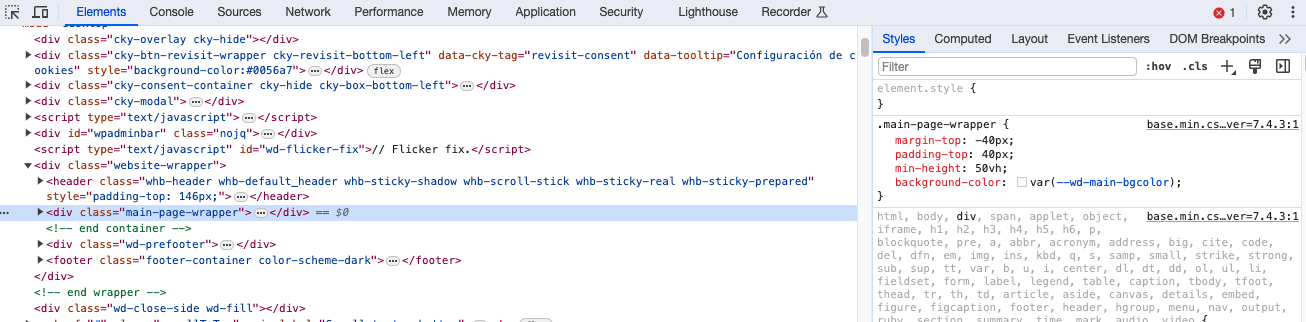
What is the right way to disable the padding-top 40px set for every page to #main-page-wrapper? Take a look at the capture to see what I mean: https://i.gyazo.com/8ac850539a1aad839814be6303e05c34.png
Hello,
Thank you for reaching out to us with your question. We appreciate that you use our theme and are happy to help you in any way we can.
To ensure that we are able to provide you with the best support possible, we encourage you to create a new topic on our support forum with your question or issue. Our support team actively monitors the forum and will be able to provide you with a prompt and thorough response.
To create a new topic on our support forum, please follow these steps:
1. Visit https://xtemos.com/forums/forum/woodmart-premium-template/ and sign in with your account.
2. Click on the “Create New Topic” button and provide a descriptive title and detailed description of your question or issue.
3. Click “Submit” to post your question.
Once you have posted your question on the support forum, our team will review it and provide a response as soon as possible.
Thank you for your cooperation, and we look forward to hearing from you on the support forum.
Best regards
HI Team, There was an issue with respect to YT video was not shown on the mobile version as there was some confict with Google tag manager plugin. It was fixed as part of issue (#466810) through the patch number: 473619. But after the update to latest version of your theme,the issue is coming again. That bug was already fixed but now it is again coming in the latest release of woodmart. My support is expired but this still remains a bug and needs the team attention. Can you please look into it ?
Hello,
Try to add the following code snippet to the Custom JS area in Theme Settings to fix this issue. Let us know how it works
window.addEventListener('load',function() {
    if ( document.querySelector('.woocommerce-product-gallery .wd-carousel-item.wd-with-video') ) {
        let tag = document.createElement( 'script' );
        tag.src = "//www.youtube.com/iframe_api";
        let firstScriptTag = document.getElementsByTagName( 'script' )[0];
        firstScriptTag.parentNode.insertBefore( tag, firstScriptTag );
    }
});
Kind Regards
Hi Team, You have been nothing short of amazing. Yes this code fixes it partly. So once you open the video on the product page(ISSUE ON MOBILE ANDROID AND IOS) for the first time it gives error “This video is unavailable” but after refreshing the page again it shows the video properly. This issue is also reported by one of the member aswell(#529373). I am using Lightspeed cache with lightspeed server. This plugin is present on more that 2 million sites. Is this issue related to caching ?? This issue is still in INCOGNITO mode as well.
Hello,
To check if it is related to the Litespeed plugin you can turn off it temporarily and test how it works. Let us know about the result.
Kind Regards
Hello! Please help me with a solution: How can we add search button in Mobile bottom navbar? For viewing on the phone, I think a search button close to the finger you use to navigate the display is much more handy. Thank you very much in advance!
Hello,
There is no option to add the search button to the mobile navbar in our theme. But you can place the search form before the mobile menu so it can be easily found.
Kind Regards
i am getting this error when trying to import the prebuilt template:
The import could not be completed due to a low timeout limit on the server. You need to contact your hosting provider and ask them to increase it to 300 seconds.
i have been trying to fix for 8 hours now, please help me.
just so you know i have already increased the php.ini file variables
Hi,
Please, create a topic on our support forum and provide us all the necessary details about the request with some screenshots and including your admin access so we can help you https://xtemos.com/forums/forum/woodmart-premium-template/
Regards
Hi, the text swatch shows the slug instead of the name e.g. my attribute has name 140/152 but it shoes 140-152 as it is the slug. How can I change that?
Hi,
Please, create a topic on our support forum and provide us all the necessary details about the request with some screenshots and including your admin access so we can help you https://xtemos.com/forums/forum/woodmart-premium-template/ If your support is already expired then you need to extend it on ThemeForest first.
Regards
Hello! I’m interested in not having two sections on the mobile phone menu, but only one. How can I do this? I tried to disable the second tab but I can’t. Thank you!
Hi,
Please, create a topic on our support forum and provide us all the necessary details about the request with some screenshots and including your admin access so we can help you https://xtemos.com/forums/forum/woodmart-premium-template/
Regards
Fluid Checkout for WooCommerce is fully compatible with Woodmart, the functions and appearance of the checkout page are pleasing, is it possible to implement something like this without using a third-party plugin?
Hello,
Currently, we don’t have such plans for the near future. But we will consider this as a feature request. Thank you.
Kind Regards
Hello, we are getting an error, just so you know 2024-02-02T12:24:57+00:00 CRITICAL No Opauth strategies defined в /var/www/fastuser/data/www/auhouse.ru/wp-content/plugins/woodmart-core/vendor/opauth/opauth/lib/Opauth/Opauth.php на строке 181
Hello,
It might be a conflict with some of the installed plugins. Try to disable them temporarily and monitor your website logs for a few hours.
Kind Regards
On the Checkout page, click “Have a coupon? Click here to enter your code”, but there is no response and the box for filling in the discount code cannot be displayed. But it is normal on the cart page. How to solve?
I have also tried to close a series of plug-ins, but the discount box on the checkout page still does not work, and the url changes to with a #. I saw other users had similar issues just now.
I use your template on another website and it works fine. At the same time, I checked the console prompt on the browser of the discount code box problem for this site, and it prompted:
Uncaught TypeError: Cannot set properties of null (setting ‘value’) at n (order-attribution.min.js?ver=8.5.2:1:603) at document.body.oninit_checkout (order-attribution.min.js?ver=8.5.2:1:723) at Object.trigger (jquery.min.js?ver=3.7.1:2:70175) at HTMLBodyElement.<anonymous> (jquery.min.js?ver=3.7.1:2:70726) at Function.each (jquery.min.js?ver=3.7.1:2:3129) at e.<computed>.each (jquery.min.js?ver=3.7.1:2:1594) at e.<computed>.trigger (jquery.min.js?ver=3.7.1:2:70701) at Object.init (checkout.min.js?ver=8.5.2:1:1878) at HTMLDocument.<anonymous> (checkout.min.js?ver=8.5.2:1:14721) at e (jquery.min.js?ver=3.7.1:2:27028) rest-proxy/?v=2.0:16 WebSocket connection to ‘wss://public-api.wordpress.com/pinghub/wpcom/me/newest-note-data’ failed:
In the backend of the website, Layouts – Select Checkout layout Accessories, I see that this functionality is normal. But the discount box cannot be opened on the front end of the website.
There is also a problem with the search, which jumps directly to the shop page instead of the specified product with keywords.
Support subscription has been renewed. Looking forward to your prompt processing.
Hello,
Thank you for extending your support period. We have answered your topic on our forum. Please, continue the conversation there.
Kind Regards

Regarding the fact that the homepage on the mobile phone loads very slowly, the navigation menu on the mobile phone does not function. As well as the two problems that the slider motion effect of the products or articles on the homepage does not work, can you help me solve it quickly? The topic I submitted has not been responded to and processed yet? These 2 problems have seriously affected my website business. Very anxious.
We have recently had some updates and now our search and cart button dont work?
Hi,
Please, create a topic on our support forum and provide us all the necessary details about the request with some screenshots and including your admin access so we can help you https://xtemos.com/forums/forum/woodmart-premium-template/ If your support is already expired then you need to extend it on ThemeForest first.
Regards
Hello,
Please, add a feature to “display Google Reviews”. I mean a feature to avoid this kind of plugins: https://es.wordpress.org/plugins/wp-reviews-plugin-for-google/
Hello,
Thank you for the feature request. We will consider implementing this in our future updates.
Kind Regards
I have a problem with the template, having a clean installation of wordpress only with the plugin that installs the template, the page has an excessive consumption of server resources, especially when I modify a page with wpbakery. how can I fix this?
Hello,
Thank you for reaching out to us with your question. We appreciate that you use our theme and are happy to help you in any way we can.
To ensure that we are able to provide you with the best support possible, we encourage you to create a new topic on our support forum with your question or issue. Our support team actively monitors the forum and will be able to provide you with a prompt and thorough response.
To create a new topic on our support forum, please follow these steps:
1. Visit https://xtemos.com/forums/forum/woodmart-premium-template/ and sign in with your account.
2. Click on the “Create New Topic” button and provide a descriptive title and detailed description of your question or issue.
3. Click “Submit” to post your question.
Once you have posted your question on the support forum, our team will review it and provide a response as soon as possible.
Thank you for your cooperation, and we look forward to hearing from you on the support forum.
Best regards
Possible Bug ?
When you disable Flex Container in Elementor the Home Page becomes blank.
Hello,
Thank you for reaching out to us with your question. We appreciate that you use our theme and are happy to help you in any way we can.
To ensure that we are able to provide you with the best support possible, we encourage you to create a new topic on our support forum with your question or issue. Our support team actively monitors the forum and will be able to provide you with a prompt and thorough response.
To create a new topic on our support forum, please follow these steps:
1. Visit https://xtemos.com/forums/forum/woodmart-premium-template/ and sign in with your account.
2. Click on the “Create New Topic” button and provide a descriptive title and detailed description of your question or issue.
3. Click “Submit” to post your question.
Once you have posted your question on the support forum, our team will review it and provide a response as soon as possible.
Thank you for your cooperation, and we look forward to hearing from you on the support forum.
Best regards
will you provide html file separately also??.. because i don’t want to go with wordpress
Hello,
Thank you for your question. Our theme is available for WordPress only. It doesn’t have an HTML standalone version.
Kind Regards
Hi
is there any option to remove the stock status from product page? I mean the stock status showing 10 in stock, 5 in stock etc while selecting the variation in product page
Regards
Hello,
Thank you for reaching out to us with your question. We appreciate that you use our theme and are happy to help you in any way we can.
To ensure that we are able to provide you with the best support possible, we encourage you to create a new topic on our support forum with your question or issue. Our support team actively monitors the forum and will be able to provide you with a prompt and thorough response.
To create a new topic on our support forum, please follow these steps:
1. Visit https://xtemos.com/forums/forum/woodmart-premium-template/ and sign in with your account.
2. Click on the “Create New Topic” button and provide a descriptive title and detailed description of your question or issue.
3. Click “Submit” to post your question.
Once you have posted your question on the support forum, our team will review it and provide a response as soon as possible.
Thank you for your cooperation, and we look forward to hearing from you on the support forum.
Best regards
Hello,
Thank you for your comment.
Sure, you use our custom layout functionality with any of the prebuilt websites and customize it to your needs.
Kind Regards
Do you have documentation on how to do this?
Sure, you can find documentation on how to use our custom layouts functionality on this page https://xtemos.com/docs-topic/shop-page-builder/