12912 comments found.

Hi, I want to set up the category page filters in a way that:
✅ When I click on the filter button, the filter panel should slide in (off-canvas / sidebar slide) ✅ The filters should show these options:
Price filter
Out of Stock / In Stock filter
Color filter
Size / Variant filter (if available)
Please guide me on how to enable this in the Woodmart theme, or let me know if custom code is required.
https://prnt.sc/nXCqnCJWM11G https://prnt.sc/blQ7Ns3PUO-1Hi,
Could you kindly create a topic on our support forum and share all the necessary details about your request, including some screenshots? Please also include admin access so we can assist you more efficiently: https://xtemos.com/forums/forum/woodmart-premium-template/
Thank you!
Best regards
Hi, did updates the menu in few places even in Headers builder but your menu from demo is still stack in there. how to i remove it – it is super annoying considering it need to be simple
Hello,
Thank you for reaching out and for choosing our theme! We truly appreciate your support and are here to help you in any way we can.
For the fastest and most effective assistance, we kindly ask you to create a new topic on our support forum. This way, our dedicated team can review and respond to your question in a timely manner.
Here’s how you can do that:
1.    Go to https://xtemos.com/forums/forum/woodmart-premium-template/ and log into your account.
2.    Click the “Create New Topic” button.
3.    Provide a clear title and a detailed description of your question or issue.
4.    Finally, hit “Submit” to post your topic.
Once your post is up, we’ll be able to take a closer look and provide you with the support you need.
Thank you for your understanding, and we look forward to assisting you on the support forum!
Best regards
Hello, could you please cancel the code on my website walessan.com so I can use it on another site? I can’t access the site; the domain has expired.
Hello,
Thank you for using our theme and reaching out to us!
You can manage all your purchase codes in your account on our website: https://xtemos.com. From there, you can remove old activations for domains that are no longer in use, allowing you to activate the theme on a new domain.
If you don’t have an account yet, you can create one using your purchase code here: https://xtemos.com/my-account/
Let us know if you need any further assistance.
Kind Regards
Hello,
I am having issues with the layout on my homepage using the WoodMart theme and the Gutenberg editor.
Even though I have set my Page Template to ‘Full Width’ (where available) and configured the ‘Site Width’ to ‘Full Width’ in Theme Settings, my content remains boxed with white spaces on the sides.
Specifically, I am experiencing the following:
Slider: I have enabled the ‘Stretch Slider’ and ‘Full width content’ options, but it remains centered.
Sections/Containers: I have used WoodMart Section/Container blocks and enabled ‘Force full width’, but they do not stretch to the edges of the screen.
Sidebar: I have confirmed that the Sidebar is set to ‘Without’ in both Theme Settings and Page Options.
The Header and Footer are working correctly at full width, but the main body content is not. I do not want to use Custom CSS to fix this; I want the theme’s built-in options to work as expected.
Could you please check why the theme is not allowing the content to break out of the container in Gutenberg?
I am using the WoodMart Child theme (but the issue persists on the Parent theme as well).
Thank you for your help.”
Hello,
Thank you for reaching out with your issue regarding the WoodMart WordPress theme. To provide you with the best support, we kindly ask that you create a topic on our support forum.
If you don’t already have an account, you can easily register using your purchase code from ThemeForest. Here’s how:
1.    Visit our support forum: https://xtemos.com/forums/forum/woodmart-premium-template/
2.    Register: Click the “Register” button and fill in your details, including your purchase code.
3.    Need help finding your purchase code? Here’s a guide: https://help.market.envato.com/hc/en-us/articles/202822600-Where-Is-My-Purchase-Code
Once you’re registered and logged in, feel free to create a new topic in the relevant section. Please provide as much detail as possible so we can assist you more effectively.
We look forward to helping you on the support forum!
Best regards
Hi there , I get this error : Uncaught Error: Call to undefined function XTS\Elementor\woodmart_get_button_style_icon_map() in \app\public\wp-content\themes\woodmart\inc\integrations\elementor\elements\infobox\class-infobox.php on line 1049
Call stack:
XTS\Elementor\Infobox::register_controls() wp-content/plugins/elementor/includes/base/controls-stack.php:2435 Elementor\Controls_Stack::init_controls() wp-content/plugins/elementor/includes/base/widget-base.php:1049 Elementor\Widget_Base::init_controls() wp-content/plugins/elementor/includes/base/controls-stack.php:570 Elementor\Controls_Stack::get_stack() wp-content/plugins/elementor/includes/base/widget-base.php:185 Elementor\Widget_Base::get_stack() wp-content/plugins/elementor/includes/base/controls-stack.php:315 Elementor\Controls_Stack::get_controls() wp-content/plugins/elementor/core/files/css/post.php:332 Elementor\C\F\C\Post::render_element_global_styles(XTS\Elementor\Infobox) wp-content/plugins/elementor/core/files/css/post.php:296 Elementor\C\F\C\Post::render_styles(XTS\Elementor\Infobox) wp-content/plugins/elementor/core/files/css/post.php:226 Elementor\C\F\C\Post::add_controls_stack_style_rules(Elementor\Includes\Elements\Container, array, array, array, array) wp-content/plugins/elementor/core/files/css/post.php:313 Elementor\C\F\C\Post::render_element_styles(Elementor\Includes\Elements\Container) wp-content/plugins/elementor/core/files/css/post.php:297 Elementor\C\F\C\Post::render_styles(Elementor\Includes\Elements\Container) wp-content/plugins/elementor/core/files/css/post.php:226 Elementor\C\F\C\Post::add_controls_stack_style_rules(Elementor\Includes\Elements\Container, array, array, array, array) wp-content/plugins/elementor/core/files/css/post.php:313 Elementor\C\F\C\Post::render_element_styles(Elementor\Includes\Elements\Container) wp-content/plugins/elementor/core/files/css/post.php:297 Elementor\C\F\C\Post::render_styles(Elementor\Includes\Elements\Container) wp-content/plugins/elementor/core/files/css/post.php:226 Elementor\C\F\C\Post::add_controls_stack_style_rules(Elementor\Includes\Elements\Container, array, array, array, array) wp-content/plugins/elementor/core/files/css/post.php:313 Elementor\C\F\C\Post::render_element_styles(Elementor\Includes\Elements\Container) wp-content/plugins/elementor/core/files/css/post.php:297 Elementor\C\F\C\Post::render_styles(Elementor\Includes\Elements\Container) wp-content/plugins/elementor/core/files/css/post.php:178 Elementor\C\F\C\Post::render_css() wp-content/plugins/elementor/core/files/css/base.php:687 Elementor\C\F\C\Base::parse_content() wp-content/plugins/elementor/core/files/base.php:180 Elementor\C\F\Base::update_file() wp-content/plugins/elementor/core/files/css/base.php:133 Elementor\C\F\C\Base::update() wp-content/plugins/jet-popup/includes/elementor/manager.php:108 Jet_Popup\Elementor::elementor_clear_cache(’’) wp-includes/class-wp-hook.php:341 WP_Hook::apply_filters(’’, array) wp-includes/class-wp-hook.php:365 WP_Hook::do_action(array) wp-includes/plugin.php:522 do_action(‘elementor/core/files/clear_cache’) wp-content/plugins/elementor/core/files/manager.php:130 Elementor\C\F\Manager::clear_cache() wp-content/plugins/elementor/core/base/db-upgrades-manager.php:82 Elementor\C\B\DB_Upgrades_Manager::clear_cache() wp-content/plugins/elementor/core/base/db-upgrades-manager.php:163 Elementor\C\B\DB_Upgrades_Manager::start_run() wp-content/plugins/elementor/core/base/db-upgrades-manager.php:234 Elementor\C\B\DB_Upgrades_Manager::__construct() wp-content/plugins/elementor/core/base/module.php:86 Elementor\C\B\Module::instance() wp-content/plugins/elementor-pro/plugin.php:354 ElementorPro\Plugin::on_elementor_init(’’) wp-includes/class-wp-hook.php:341 WP_Hook::apply_filters(NULL, array) wp-includes/class-wp-hook.php:365 WP_Hook::do_action(array) wp-includes/plugin.php:522 do_action(‘elementor/init’) wp-content/plugins/elementor/includes/plugin.php:632 Elementor\Plugin::init(’’) wp-includes/class-wp-hook.php:341 WP_Hook::apply_filters(NULL, array) wp-includes/class-wp-hook.php:365 WP_Hook::do_action(array) wp-includes/plugin.php:522 do_action(‘init’) wp-settings.php:742 require_once(‘C:\Users\herle\Local…blic\wp-settings.php’) wp-config.php:103 require_once(‘C:\Users\herle\Local…public\wp-config.php’) wp-load.php:50 require_once(‘C:\Users\herle\Local…p\public\wp-load.php’) wp-admin/admin.php:35 require_once(‘C:\Users\herle\Local…c\wp-admin\admin.php’) wp-admin/index.php:10
Hello,
Please send us your admin access so we can check what is wrong. Use the contact form on our page here https://themeforest.net/user/xtemos
Kind Regards
Hi I have purchased this script, I have Installed in my Host plan, In app.. I have only option register with mail but dont have password in the register form, I need both in the form, is there any option for this in the dashboard
Hello,
Thank you for reaching out with your issue regarding the WoodMart WordPress theme. To provide you with the best support, we kindly ask that you create a topic on our support forum.
If you don’t already have an account, you can easily register using your purchase code from ThemeForest. Here’s how:
1.    Visit our support forum: https://xtemos.com/forums/forum/woodmart-premium-template/
2.    Register: Click the “Register” button and fill in your details, including your purchase code.
3.    Need help finding your purchase code? Here’s a guide: https://help.market.envato.com/hc/en-us/articles/202822600-Where-Is-My-Purchase-Code
Once you’re registered and logged in, feel free to create a new topic in the relevant section. Please provide as much detail as possible so we can assist you more effectively.
We look forward to helping you on the support forum!
Best regards
Thankyou I seen this option and enabled, thankyou so much, one question Iam using this script for my domain, how can I use the same purchase code for demo versions for checking purpose.
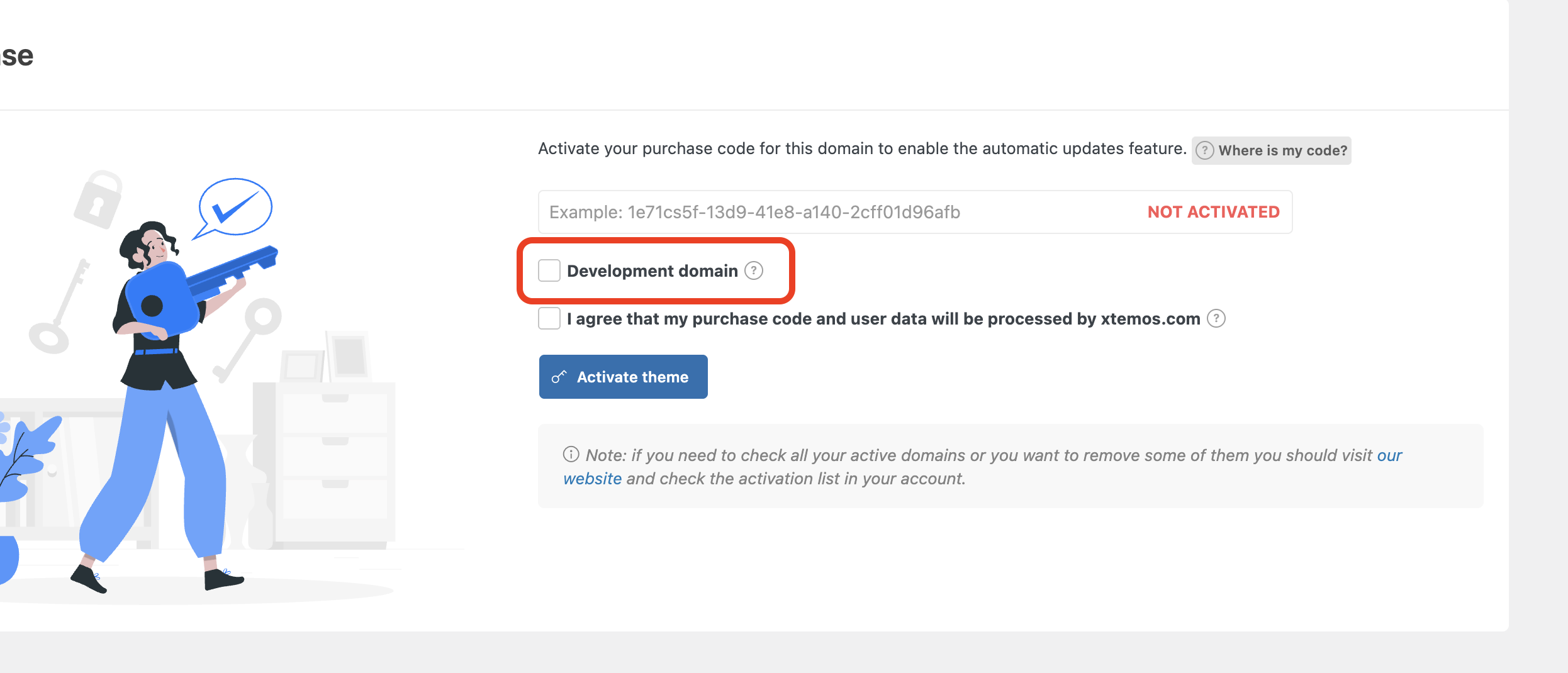
One regular license allows you to use our theme for a single project/website. And you can activate the purchase code both on staging and production websites at the same time using an appropriate checkbox for “Development domain”.
Can i activate this in other dimain for development purpose if so please will you guide how to activate this purchase code for development d
Domain and production domain
Yes, you need to check the “Development domain” option before the activation as shown on the screenshot https://xtemos.nyc3.digitaloceanspaces.com/scr/2026/02/23/shot-1771833975-fde2de002e3a1894.png
Hi as you said, i have checked this option for my live website, can i change?? and do i need to purchase separate domain(s) for development and live purpose.
You can deactivate now on your live website and activate again without “Development domain” option. No, you don’t have to purchase two separate licenses for live and production. You can use one purchase code for both.
Sir I have asked you, do i need to purchase other domain name for development purpose.
You don’t have to purchase other domain for this. You can do this on a subdomain or inside the subdirectory like mywebsite.com/staging/
Thankyou so much sir.
Despite correctly implementing all structural and individual settings, the slider icon appears compressed on the sides. It doesn’t close completely.
Also, the items in the top filters in the store appear corrupted. The “Show as list” and “Show as grid” buttons appear to be stacked one below the other.
I have another site using the same theme, and the settings there are exactly the same, but the problem persists.
Hi,
Could you kindly create a topic on our support forum and share all the necessary details about your request, including some screenshots? Please also include admin access so we can assist you more efficiently: https://xtemos.com/forums/forum/woodmart-premium-template/
Thank you!
Best regards
Hello, check new woocommerce update 10.5.1, after this update abandoned cart sale coupon stop creating and sending to emails. It sends only abandoned information without coupon, even if its enabled.
Hi,
Could you kindly create a topic on our support forum and share all the necessary details about your request, including some screenshots? Please also include admin access so we can assist you more efficiently: https://xtemos.com/forums/forum/woodmart-premium-template/
If your support period has expired, please make sure to renew it on ThemeForest before reaching out.
Thank you!
Best regards
I found that abandoned cart percentage coupons weren’t being generated. However, when I switched the coupon discount type from Percentage to Fixed amount (e.g., 50 CZK), coupons started generating immediately. After that, I switched back from Fixed amount to Percentage, and percentage coupons started working as well — it looked like the toggle “reset” a stuck state in the abandoned cart coupon generation.
Does Woodmart have Product Addons built in ? or is a plugin like https://wordpress.org/plugins/advanced-product-fields-for-woocommerce/ or https://wordpress.org/plugins/woo-custom-product-addons/ needed ?
Hello,
Thank you for the question. Unfortunately, there is no such functionality built in. You may try to use the mentioned plugins.
Kind Regards
Hello,
Congradulations for this awsome theme.
I need to point out a problem that has been arised, after the release of woocommerce 10.5. After updating woocommerce “Add to Cart” button no longer works for variable products. I have tested all other factors that could be responsible for the problem and I can confirm that the problem lies in woodmart theme. The only way to make the “add to cart” button work again is implementng custom js code.
Please consider to include a fix to your next update.
Thanks.
Hello,
We have just tested this on our website and it works well with the latest WooCommerce version. Please create a topic on our support forum so we can check this on your website.
Kind Regards
Hello, I have recently purchased your theme. It is beautiful and very well made, congratulations!
I would like to report a minor display issue. When I load the site, it initially appears at full width, but then it suddenly shrinks, leaving about 10px of space on both the left and right sides. This creates a jumping effect (layout shift) that is quite distracting for users. This gap remains visible on every page.
I have noticed that this happens on Chrome but not on Firefox, and it occurs even on your official demo layouts.
Could you please let me know how I can fix this and ensure the site stays at full width without this flickering movement?
Thank you in advance!
Hello,
Could you please record a short video demonstration of the problem on our demo? Also, please specify what version of Google Chrome and your OS (Windows or MacOS).
Kind Regards
Hello! I started to use your theme with the Elementor builder plugin – how I can to change for the WPBakery without lost my data on website?
Hello,
Thank you for reaching out and for choosing our theme! We truly appreciate your support and are here to help you in any way we can.
For the fastest and most effective assistance, we kindly ask you to create a new topic on our support forum. This way, our dedicated team can review and respond to your question in a timely manner.
Here’s how you can do that:
1.    Go to https://xtemos.com/forums/forum/woodmart-premium-template/ and log into your account.
2.    Click the “Create New Topic” button.
3.    Provide a clear title and a detailed description of your question or issue.
4.    Finally, hit “Submit” to post your topic.
Once your post is up, we’ll be able to take a closer look and provide you with the support you need.
Thank you for your understanding, and we look forward to assisting you on the support forum!
Best regards,
Hi, A clean and minimal website I prepared with Woodmart for a corporate porcelain kitchen countertop and table manufacturing company, created for catalog purposes.  https://www.granitstone.com/
Hello,
Thank you very much for sharing your website with us. It looks great! Well done 
Kind Regards
Hi guys. I have a pre-sales question. On the shop page itself ( where all the products are shown), is there an option to add a quantity button? I want the customer to have the option to add the quantity on the shop page as well as on the product page. I know the product page has that option as that is standard but I would require it on the shop page. Thanks
Hello,
Thank you for your interest in the WoodMart theme. We’re here to assist you with any questions you have about using it for your projects.
Yes, you can see how the quantity button looks on our demo here https://woodmart.xtemos.com/megamarket/
Kind Regards
Hello.
Do we own the image licences when we buy the theme? Can we use it freely without fear of legal issues?
I’m referring to hero images, background images, deals box background images, etc.
Hello,
We don’t include any licenses for images with our theme. All images are used for demo purposes, and you need to replace them with your own.
Kind Regards
Will you guys ever integrate a dark and light switch? You have all of the code built in to switch over to dark very easily. Even when there’s lots of customizations to the website already. I can go into my website and click on the dark version in the settings in the back and it works perfectly well on the front. Why not create a dark and light switch for the front end to allow users to switch between dark and light when they visit your website? Lots of popular websites have been doing this for a while. It’s the one thing your website does not have that I’ve been trying to get you guys to do for years now. Could you please please integrate this into the theme?
You can see how many licenses I’ve purchased of yours over the years. I’m a big supporter of yours. Please integrate this for us.
Hello,
Thank you for using our theme and for your question. Yes, we already have a dark mode option, but it differs from the dark/light mode found on modern websites. The primary challenge with this switcher is determining how to switch colors for specific elements within the builders. For instance, if you add a title element using WPBakery and set a custom color and background using color pickers, which colors should be set when you switch the dark/light scheme? To address this issue, we would need to add additional color pickers to all elements and options, resulting in significantly bloated settings and potentially requiring considerable effort from all current customers. Consequently, we currently lack a solution to this problem. However, we have included this feature request in our list and remain hopeful that we will find a solution in the future.
Kind Regards
Even with all the customizations, my site looks perfect when I switch it from light to dark. Maybe I am just lucky. But I am sure there are others like me. For me, the default dark mode you have works. And anything that needs changing, I can just change with a little CSS. All I need is the option to switch to the current dark mode you provide on the front end.
Custom colors and everything else you mentioned, you could make that argument for just about anything. If a customer does something custom to their site, it could affect the website in many ways, both good and bad. You know what I mean?
No dark modes are perfect. Trust me. I have purchased all 12 different dark mode plugins and tried them all. And none of them works properly or efficiently.
Can’t you make it an option for us who are lucky enough to switch between dark and light modes in the back end without any issues?
I don’t need any customizations. I just need a switch on the front end to match what you already have on the backend.
Thank you for your feedback. Unfortunately, introducing an unstable feature that requires additional code adjustments and only works for those who is “lucky” is not feasible. It would not be well-received by other customers. We consistently strive to add stable features that are accessible to everyone. While we do not decline implementing a dark/light switcher, we hope to find a way to make it properly functional in the future. However, unfortunately, there is no immediate solution at this time.
I have one that works almost perfectly. Would that be helpful?
Sure, you can send it so we can check. But anyway, it is still a feature request and we can’t guarantee that it will be implemented in the nearest future.
I am having extreme high load as well. Latest version is installed, Both Theme and Woodmart Plugin
Hello,
Please send us your admin access so we can investigate the issue. Use the contact form on our profile page here https://themeforest.net/user/xtemos
Kind Regards
Are there issues with the google map API within the theme?
Hello,
Thank you for reaching out and for choosing our theme! We truly appreciate your support and are here to help you in any way we can.
For the fastest and most effective assistance, we kindly ask you to create a new topic on our support forum. This way, our dedicated team can review and respond to your question in a timely manner.
Here’s how you can do that:
1.    Go to https://xtemos.com/forums/forum/woodmart-premium-template/ and log into your account.
2.    Click the “Create New Topic” button.
3.    Provide a clear title and a detailed description of your question or issue.
4.    Finally, hit “Submit” to post your topic.
Once your post is up, we’ll be able to take a closer look and provide you with the support you need.
Thank you for your understanding, and we look forward to assisting you on the support forum!
Best regards,
Why cant you reply if there is an issue,like a simple yes or no . so i know whether i need to purchase more support, ( and this isnt snarkey or and angry text just more of a statement)
There is no similar issues reported. So it might be a problem on your website only. If there is a bug with the theme, we will return your money for the support extension.
Hi, I have big issues with last theme update, extreme high load (> 15) with your theme, even when I disable all plugins. When will you relase a fix for that? thank you
and: as it seems that with Version: 8.2.7 and wp 6.8.3 I do not have this problem; can I replace last version with the oder Version: 8.2.7 – or is this risky?
Hello,
Please send us your admin access so we can investigate the issue. Use the contact form on our profile page here https://themeforest.net/user/xtemos
Kind Regards
Thank you, please wait a moment, the server has been isolated by the hoster due to extreme Load, so at the moment it’s all deativated and the webshop unfunctional. That’s why I am asking about replacing the woodmart versions, hoping to have less issues.
And: does your theme work with php 8.5 and woo 10.5? thank you
Yes, WoodMart is compatible with the latest versions of PHP and the WooCommerce plugin.
Hello team XTemos,
I am facing a little bug related to the sticky navigation setting. I have enabled it and disabled after but it is still displaying on some pages (observed only on mobile device). The pages where it is still displaying are related to only Tutor LMS pages (Dashboard and Courses pages).
I tried to desintall and reinstall Woodmart theme but the sitcky navigation is still displaying on mobile device (Tutor LMS pages only: Dashboard and courses). So can you show me how to proceed to disable the sticky navigation menu on mobile device?
Here an image link where you will see the sticky navigation i want to disable: https://jumpshare.com/s/ldbq7EHvRj9J3lVpoaQ0
Thanks Best regards
Hi,
Could you kindly create a topic on our support forum and share all the necessary details about your request, including some screenshots? Please also include admin access so we can assist you more efficiently: https://xtemos.com/forums/forum/woodmart-premium-template/
If your support period has expired, please make sure to renew it on ThemeForest before reaching out.
Thank you!
Best regards
Hi, thanks for your reply. I finally found how to disable the sticky navigation from Mobile device.
Thank you Best regards