178 comments found.
it’s working now thanks for letting me know.

Hi,
Is there a possibility to use second and third levels menu in left menu?
Thanks
Can we modify the vertical menu to horizontal menu? how?
The template is designed in vertical menu so I can say no
if the sidebar is closed, the first large buttons are locked.
have any solution ?
For bugs please signup and report to our customer support site – http://themepixels.com/support
Hi,
I’m trying to implement a JQuery Autocomplete with a json call and .net. It works fine when I do it in a separate page but it breaks when I use it in the template. I’m think it is because of the $(document) call because it already does that on general.js. But I have no idea how to fix it.
Code:
<script type=”text/javascript”> $(document).ready(function () { $(”#<%=TextBox.ClientID %>”).autocomplete({ source: function (request, response) { $.ajax({ url: ’<%=ResolveUrl(”~/WebServices/WebServiceName.asmx/methodname”) %>’, data: “{ ‘myText’: ’” + request.term + ”’}”, dataType: “json”, type: “POST”, contentType: “application/json; charset=utf-8”, success: function (data) { response($.map(data.d, function (item) { return { label: item.split(’-’)[0], val: item.split(’-’)[1] } })) }, error: function (response) { alert(response.responseText); }, failure: function (response) { alert(response.responseText); } }); }, select: function (e, i) { $(”#<%=TextBox.ClientID %>”).val(i.item.val); }, minLength: 1 }); </script>
});I would like to move it to a .js as well.
Thanks!!
Don’t use $ instead use jQuery.
jQuery(document).ready()
Thanks
It works I leave the code in the page, but if I try to move it to a .js file it breaks. Any ideas??
Thanks!
I also had to do a change, due to a partial page loads. So now my code looks like:
jQuery(function () { Sys.WebForms.PageRequestManager.getInstance().add_endRequest(PostBack); PostBack(); });
function PostBack() {
////PREVIOUS CODE HERE
}
Again, it works fine when I have the code embedded in the page but breaks when I try to put it in a .js include. It’s not super important, I just to make code modular and reusable, specially since I’m using the autocomplete in a few pages.
Thanks!
Hey, i was trying to do the “Quick View” event in tables using Asp.Net MVC4, but this event do nothing when clicked. I already tryed with other languages, like with .html or .php and works fine. This problem occurs when I use Asp.Net MVC url routing.
I use this url like: ~/Module/Edit/1.
Hey, where are the layered psd files there is only 2, one with the login page and one with icons?? i bought this template for the psd files because you said that it includes the psd files and this is not true  . So give me my psd files…
Yes it mentioned that there is PSD files and it doesn’t mean all PSD page files.
<ul>
   <li><a href="#" class="bla"><span>Item 1</span></a></li>
   <li><a href="#" class="bla"><span>Item 2</span></a></li>
   <li><a href="#" class="bla"><span>Item 3</span></a></li>
   <li class="current"><a href="#" class="bla"><span>Item 4</span></a>
      <ul>
         <li class="current"><a href="#" class="bla"><span>Sub 1</span></a>
         </li><li><a href="#" class="bla"><span>Sub 2</span></a>
      </li></ul>
   </li>
   <li><a href="#" class="bla"><span>Item 5</span></a></li>
</ul>
This results all child items to look like selected.
Any ideas on how to resolve it?
Hi, I need to use an input with type=”file”. The text right to the “select file” button is not alligned properly, do you have a quick css tip for that?
Do you have a screenshot for this?
sorry for the delayed response, here it is
<span style="margin-top:3px">your text</span>
If the value is not enough to align the text then adjust it to higher value
But this text is not placed by me, it is the default text that inputs with type=”file” have. The above screenshot is from Chrome
lightbox cant work in datatable dynamic with server-side data. local works fine like this : test
but under datatables not work. 
what happens?
thanks
Let me check on this one
it´s fine now. need to redraw datatable in dom: “fnDrawCallback”: function() { $(”#table”, oTable.fnGetNodes()).colorbox({ width:”980”, height:”800”,iframe:true }); },
now charts not work: u can see: http://www.primercontrol.com.br/marketview/empreendimentos/det_emp.asp?id_empreendimento=1i find other posts for one solution . i have downloaded you sample page chartable.html . works fine. but if i remove right div chart other charts desapears . u can see sample here:
work: http://www.primercontrol.com.br/marketview/empreendimentos/chartable-ok.html not work: http://www.primercontrol.com.br/marketview/empreendimentos/chartable-problem.htmldatatables not work too.
what i make wrong?
u can help me?
Kind regards
Davis

i think found a solution.
charts.js make reference to all divs whith charts. so if i delete one div, charts.js break . i simply make other charts.js with only needed chart an works fine.
i read de documentation and not found any reference for this. u can take one note in documentation for next update ? i home helpfull this suggestion from other users.
thanks for you attention.
regards
Davis
Hi, thanks for the suggestions, yes I will take note on that. Are you the one purchasing the template?
not directly to me. I pointed out the template for a great friend who wants to do an internal website. he acquired in 06/2012 or 07/2012. I do not remember exactly now. I’m helping him in developing this site.
you need some information from him? I can arrange. do not worry, I’m not pirated edition
ok good to know. thanks and thanks for your suggestions
Hello, Is it possible to style the simple chart with CSS rules?
I want that the x-axis get the style border: 1px dotted #000; and for the y-axis border:1px solid #000;
Thanks
Havent tried this one let me check
Or how can I do this in the javascript file?
Hi, is there a css style (class or something) for input type=file ?
Thanks
In this template, I didn’t add style for type-file
Hi! We are using this great template in a commercial customer panel.
We have found a bug in the collapsible menu. It is easily reproducible in any browser (even in the demo live page):
1) Open the template normally (full size) 2) Resize window to a width in which the menu is collapsed 3) Maximize window (menu remains collapsed) 4) Uncollapse menu 5) Resize window as in 2)
Now the menu is kind of messed up. “menutip” elements are not available and you can’t choose any element from a submenu. (They don’t show up in the hover event)
If you maximize again and uncollapse, the submenus will have lost its style.
I tried looking in general.js to find out but I only got it worse. Any help would be greatly appreciated.
Can you show me your page? or do you have a screenshot?
Ok I saw what you mean. Let me see what I can do on this to fix. Actually that collapsible menu thing is intended in tablet and mobile not for desktop. Before that I don’t see any badge that you purchased this template.
Hi friend, please tell me: Can I use this template to admin online a HTML5 (Kallyas template, from themeforest) website, just to change texts and images???
I need it for a customer, who need an admin panel to just edit text and images.
Many thanks in advance
yup
I am also having the same problem I do?
Hi, first of all – Great Work! I need your help in two css/html bugs in the form.html > “Just another form style” 1.Put ... in all the labels …strange behaviour 2.also if you put more text in the ... it overlays on the next
Thanks! Ps.tested in Chrome and IETry changing the padding of .stdform2 label element like in below
.stdform2 label { padding: 20px 0 0 20px; }
Hey,
This template is arguably one of the best admin templates on themeforest. Well worth the 15$ !
I have a few questions about the template. Did you use a css helper library like lesscss, sass, compass, stylus, etc? If so, would it be possible to acquire those files? I have to make some modifications, and working with one of those helper libs is easier than manually modifying css directly. I noticed that this template is xhtml, and you have another template (am.anda I think) that is html5. But the markup is still xhtml. Have you considered using something html5 boilerplate as the basis for a template? It handles a lot of issues very elegantly: http://html5boilerplate.com/
Anyway wanted to say thanks again for an incredible admin template. I really love the look, the documentation, and the modifiability of it!
kind regards,
-Mike
no fix to my above problem?
regards
Check my reply above
i did not ask for bootstrap…
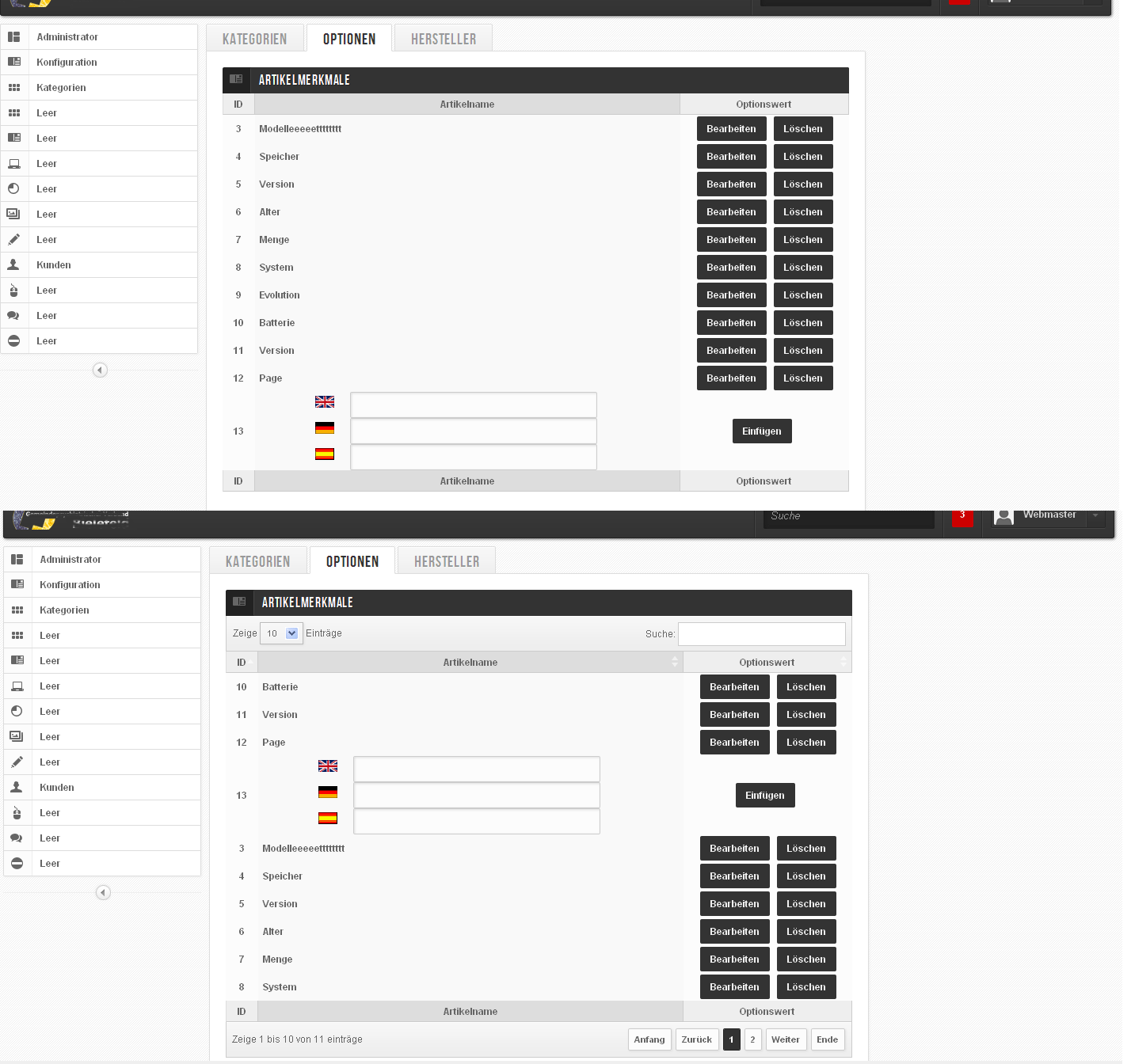
i still have a problem with the tables… using the class=”stdtable” everything is okay… using the class=”stdtable” id=”dyntable” it shows me the form in the wrong position and the sort order is wrong… as i have over 200 values in the long run i cannot just use the class=”stdtable, i alos need id=”dyntable” i also tried changing the sort order to the colums recomended in here from 0 to 1 and so on… http://pc-4-you.de/Unbenannt-1.gif
regards
Hi, any update with Bootstrap Framework?
I have no plan in switching the code into bootstrap sorry
Do you have a live page for this? Seems to have problem with the plugin code. Things like this need to ask for the plugin author not the design author (that is me). I can only give support for the design related not the bug for plugin but I can help you on this if you can give me what’s the exact error or show me the live page so that I can debug. Thanks
@grandmasterICE many tanks