316 comments found.

Hi there! I’m trying to edit the home section and just update the background image and take off the buttons. I purchased this back in 2020 and can’t find where to edit this for the life of me. Any help would be greatly appreciated!
I changed it so much since 2020. I don’t remember its old version, too.
Where I can change this SUBTITLE content where is in the Recent Project. Plz… check the attached link
https://soc2023.cafe24.com/TMP/RP_Subtitle.pngYou can change it by Visual Subtitle field.
https://prnt.sc/eEpvcEycN5FxI finished your theme on my site. Thanks for the design. The last question is about the LONGITUDE of the design.
Two types of clicking exist on the layout. 1. With Scrollbar on clicking 2. No Schrollbar on clicking which makes a popup menu error.
Please… the image I attached is the information :
https://soc2023.cafe24.com/TMP/No_Scrollbar.jpgAlso, I attached the original site bellow :
http://schoolofcolor.orgIt’s not my theme related plugin named “Popmake”. So, I can’t help you. Sorry!
OK Then what popup plugin for your theme? There is no POPUP function on you theme even though there is menu related the popup. Could you let me know what plugin recommend for you theme without popup?
I don’t have a popup plugin.
There is another bug…
in the blog page there are two Navigation arrow at the bottom. plz… check the link
https://soc2023.cafe24.com/tmp/Navigating.pngYou should remove external plugins you used:
https://prnt.sc/Xz7mQqXiCBO8I don’t know why it happened because what you suggetst me the way of showing the blog contents, I used the blog page, however, it shows twice of the nevigation menu.
I don’t see that issue on my demo blog page.
If you mail your website info, I can have a look which plugin generates that issue.
But, you can disable plugins which aren’t used by Angora theme at 1st.
Also plz… check the below link. it has very strange layout display for the blog layout.
https://soc2023.cafe24.com/tmp/Err_1.png https://soc2023.cafe24.com/tmp/Err_2.pngI’d like the get rid of [About me] profile. Plz… let me know how to fix those.
Thx.
PS. I ready sent ID / PW for checking banner Error and for these Errors as well.
I fixed it by limiting blog posts to 4.
I removed unnecessary blocks from “Blog Sidebar” widgets area. You can find it at Appearance / Widgets.
You should update Angora theme or copy “angora/assets/js/main.js” for intro slideshow issue.
You should edit Angora Addons plugin to make it, so. I can’t modify the source code in that way! Sorry!
Um…. display BLOG Post is very basic function ALL WORDPRESS “THEME”! You should provide the basic function with your theme. Don’t you think? Ummm… Anyway, what is the Addon plugins name? And… which part I have to fix it let me know.
You can link to “Blogs” page for it.
It’s not a MUST to show all posts at home!
OK then… If I make the blog post for R&D page then, you think it works without any previous bug?
You should link to Blogs page.
Hi, I intend to buy this theme, Can I use the use the single license for all the staging website or is there any certain conditions for this ?
You can buy it in that way.
So, If I buy a single license we can use it for all the staging website right?
Yes.
I made 3 slider titles… however, once I played it, it only shows 2 titles of them. soc2023.cafe24.com is the address.
Plz… check it.
It seems that cd-headline clip not working. Please, make animation of the 1st slider as the same of others.
I’ve tried but… it’s not working. Can you make the same title in order to fix it later by myself? I”m jusg sending the login Info though the PM.
I didn’t receive your mail. Please, PM again!
I just resent the login info through PM. Plz… check it.
I updated Angora theme to fix that bug. It was JS error. I can copy new codes there. But, it’ll be better if you update it.
It has the same bug !!! There is no text info on the first slide !!!
I just tested on Chrome Browser. Plz… put some any text on the first slide in order to fix it by myself.
As I said, I updated theme a few days ago.
You should clear the browser cache & purge CDN if you use after the update.
You can have a look the demo. All slides have texts, too.
I just worry about changing all the setting and designing of this webpage. If the design will be the same with new CODE, then I’m goining to replace the code with new uptated theme.
You can unzip angora.zip and copy “angora/asset/js/main.js” only. I couldn’t as a result of you disabled “Theme File Editor” on WP admin panel.
I’d tried… what you mentioned… through Filezila… >>> “angora/asset/js/main.js” only. However, it didn’t work. T.T
The login infor what I sent is Administrator ID/PW. I’m sure the disabled “Theme File Editor”. Plz… let me know how to enable Theme File Editor.
It seems that you disabled “Theme File Editor”. I can’t help you about it!
It seems that you disabled “Theme File Editor”. <<<<< Where is it?
I don’t know which security plugin you used.
You can update the file via FTP, too.
I was just googling and, now make the “Theme File Editor” now working…
Plz… check it.
I was just googling and, now make the “Theme File Editor” now working…
Plz… check it.
I’m not available. You can open the new main.js file and copy its content.
What do you mean “copy its content”? um…. full of bugs!!!
can’t help you, if you changed main.js file. You can combine them to see where the changes done. It’s your business!
I think, I helped you much more! It’s not my issue!
I fixed it. It was my last help!
You should make changes if you want different design styles.
I fixed it. <<<< What do you mean? It doesn’t show any text on the first slide on top of sco2023.cafe24.com. As I mentioned before, It has to be shown THE TEXT ON THE FIRST SLIDE of the webpage. There is no text !!!
What do you mean that you fixed it ?? I need text info in the first slide! What is the point of showing the image without a title ???
I’m using Chrome browser, I cannot see the title on the first slide! Plz…
I solved by myself. After delete caches on both web and browser, now i’ve got the title. Anyway, thanks!
Ok.
Could you recommend… Any plugins for Animating of rescaling the main Head title of top banner area.
Because if I made title for iPhone then it’s so small on a pc browser. If I make title opposite way then the title is so big on iPhone.
So I’d like to have the “Rescalable Head Title” for both iPhone and PC.
You can add custom styles for different screen resolutions by “assets/css/media.css”
How to change the bottom line of these info…
Contact Info 1650 Lombard Street, San Francisco, CA 94123 +1 (415) 876-3250 email@sitename.comUseful Links Support Privacy Policy Terms & Conditions Affiliate Program Careers
....
Plz… let me know.
You can change them by Appearance / Widgets. I used “Classic Widgets” plugin to make it easier.
https://prnt.sc/2ok4kn0AMu1xThx! And one more thing….. how to change ” Useful Links ” list ? Plz… Let me know !
You can change by adding new “menu”.
Hello,
Theme : angora-responsive-one-page-parallax-wordpress-theme
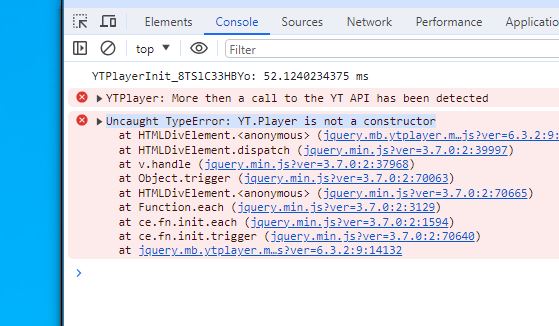
I regularly get this error: uncaught TypeError: YT.Player is not a constructor uncaught TypeError: YT.Player is not a constructor
Can you help me ? THANKS
Can you write a demo url?
the error appears from time to time, I have a black page with loading that loops
YTPlayer tries to load Youtube video as background of intro section.
I checked that you don’t use video BG. You can remove YTPlayer by “Appearance / Theme File Editor”. Edit, “inc/register.php”. Comment out line 66 and 133.
yes I use the background video, I just put it back, I removed it because it prevented me from developing the website, it does not work intermittently. you can connect, there is the video
I couldn’t see an error. But, as I saw, you used an external plugin named “Gravity Forms” which generates deprecated method warning:
https://prnt.sc/SfQw1AGWrrhdsoc2023.cafe24.com
Can you write the issue, too?
Have you fixed the FULL-PAGE-LAYOUT-White-Bar error on iPhone with chrome browser?
Plz… let me have solution!
PS. I ready attached the layout bug image through your PM.
Can you PM it again? I’ll be available on Weekend.
I found the inicial problem of the layout error on iPhone Chrome !!! Plz… check your PM!
I checked your website.
It’s not my theme related issue:
https://prnt.sc/6DMxz7rB6HhZYou should remove “column-gap-35” style.
You can find in WP admin panel:
https://prnt.sc/D_pjUDdCmCM8I changed it to zero (0) and no issue! Please, check your site settings before writing here!
GREAT !!!!! Finally !!!! Do you have the additional service for the price popup email registration function?
No.
Sure !!! Anyway thx for the fantastic design !!!
I’m trying to find the css about this…
Where is the file location of wpb_text_column web_content_element and wpb_wrapper ???
Plz… let me know where the css file is. And is there any ways to find searching class function on FTP server?
They’re WPBakery files which aren’t in my theme CSS. You can add custom CSS by Appearance / Customize / Additional CSS.
How to change the list of “TEAM SNS” list. Plz… check the DM link.
Thanks!
I just solved the above TEAM SNS customization! Thx anyway!
Plz… let me have FULL iPhone website layout on CHROME browser!!! Thx…
Ok. I’m on holiday. I’ll have a look asap.
Unfortunately, it didn’t work even worst than before.
Now at the bottom it has the problem as well. Plz… check the link. I’m going to send the image through PM.
Please, send the site url!
I sent the url. Have you check the layout design on iPhone with Chrome browser?
I’ll be available on Saturday. I’ll reply your email.
Sure!!! Thx!!
Any update yet?
Replied on your other comment.
And… one more thing…
Can you let me know how to change the RIBBON COLOR on price tag? Thanks in advance!!!
You are great man!
You can add the following styles by Appearance / Customize / Additional CSS:
.price-table .card-ribbon span {
  background-color: #23292c;
}

.price-table .card-ribbon:before,
.price-table .card-ribbon:after {
  border: 5px solid #0c0c0c;
}
Great !!! Finally I got what I want! Thx… but… as i mentioned before, after applying the changing color of ribbon then the layout even worst. T.T Plz… let me have th solution. Thx in advance!!!
You can !important after the color.
On iPhone 14 Pro, the design is not full layout! There is always the white area on right side vertical.
Plz… let me have the full beautiful image!
Thx in advance!
Can you share a screenshot and test url if available? And, make sure that you only used my components.
I just sent the screen capture image through PM. Plz… let me know…
I got your mail. I’ll check it and reply by the email.
No bug fix ?
I ready asked about the below…
////
Thanks for your instant support! I really got impressed!!! Anyway, I want to have RESPONSIVE page like the “Projects” menu for the “Team” menu.
For example, once I click the Projects icon then I have the detailed page below the Projects part.
So what I want have is… Once I click the “Team” icon then the detailed page below the Team part will be shown like the Project menu.
Please… help me in order to have perfectly working a webpage for mobile environments!!!
Thanks in advance!
No way to do it as you want without changing source code. So, you should give it someone as a freelance work.
Elemento Section Title: se nel testo vengono inseriti degli “a capo” (cioè dei “br”) non vengono presi. Grazie
Please, write in English!
“Section Title” element: if “br” are inserted in the text, it doesn’t work. Thank you
Because, it’s a text field.
Is there a way to change this setting? We need to start a new paragraph. thanks
Open Appearance / Plugin File Editor. Select “Angora Addons”.
Edit shortcodes/section-title.php
Replace:
wp_kses( $title, ‘strong’ )
With:
wp_kses( $title, ‘strong’, ‘br’ )
https://prnt.sc/2IEEg0IcrkZYModification made as indicated but it doesn’t work. https://co23.sereno.agency/. As you can see, in the “test” paragraph there are more “new lines” but they are not displayed.
Can you wrtie which text did you changed?
We need the change in the first paragraph you see below the initial image. In the text field under the title we insert the br (new line) from the wp editor, but it is not visible from the frontend
I tried it. Text field allows “strong” tag. But, new line not works.
So, I used following method:
I wrote br tag like that:
About{br}Us
Then, I replaced the following shortcode:
wp_kses( $title, 'strong' )
With:
str_replace( "{br}", "<br>", $title)
the problem is in the “slogan” field of the section title and not in the “title” field
It allows bold, italic or underline. No way to add new line.
Thanks for your instant support! I really got impressed!!! Anyway, I want to have RESPONSIVE page like the “Projects” menu for the “Team” menu.
For example, once I click the Projects icon then I have the detailed page below the Projects part.
So what I want have is… Once I click the “Team” icon then the detailed page below the Team part will be shown like the Project menu.
Please… help me in order to have perfectly working a webpage for mobile environments!!!
Thanks in advance!
It’s so much work. I can’t modify theme like that.
But, you can give it as a freelance work to someone.
Sure! I do understand!
Could you let me know which part I have to change if I want to have different aspect of the Project list which is square? I’ll change it by myself even though I’m not good at programing.
Thx.
PS. Have you checked my PM? colortive@gmail.com is mine.
You should add a page template. And also, you should modify assets/js/main.js and other things..
I resent PM again. Plz… check your PM. Thx!
Ok.