102 comments found.
Hello, Can you send the Slider images PSD files?
http://wedesignthemes.com/html/multihost/index-v3.htmlHi.,
Thank you for contacting us.
The PSD files are not included in the template package.
Regards., BuddhaThemes Support.
I know it is not included. But I would be happy if you send
Hi.,
Sorry we do not have PSD files for this template.
Hi,
First of all many congratulations for amazing hosting template, I could not find all the features in one anywhere else.
I am interested to purchase this theme, before proceeding, I if I have a few questions as follows:
1) Does this template support WHMCS [I am not asking for support to integrate but just for my information, I will make the change in code if required].
2) What kind of support / assistance you provide.
3) How often you update the template and does it require to make any payment.
Awaiting for the detailed answer.
Thanks & regards, Mitesh Ganatra
Hi.,
Thank you for contacting us.
1) This is the link to purchase multihost wordpress theme. http://themeforest.net/item/multi-host-whmcs-hosting-wordpress-theme/11571734 The one you are adding comments in just html version. Also our theme is integrated with WHMCS.
2) We support theme related issues.
3) We often update the theme with wordpress releases.
Regards., DesignThemes Support.
Hi,
Thank you very much for your answer.
I purchased a WordPress theme 
Will contact you, If I need any help or assistance.
Thanks & regards, Mitesh Ganatra
Hi.,
OK, Thank you.
Regards., DesignThemes Support.

Hello, will you create a WP version ?
Kind Regard.
Hi.,
Thank you for contacting us.
Yes, We are working on it. Will release the theme soon.
Regards., BuddhaThemes Support.
Hi,
I have a question.
How can I take out the zoom in the slider?
http://wedesignthemes.com/html/multihost/index-v2.html- Jan
Hi.,
Kindly, Remove the code shown in the screenshot to remove the zoom effect.
http://prntscr.com/7b19mhRegards., BuddhaThemes Support.
Hi,
thanks, perfect. In your Template is a Twitter Function. How can I integrate there my Twitter Account?
- Jan
Hi.,
Thank you for contacting us.
We do not have Twitter Function integrated with our template.
Regards., BuddhaThemes Support.
Hi.,
Sorry for the last reply. We already have the twitter function integrated. Just enter the consumer key, consumer secret, user token, user secret in the file js/twitter/index.php and also the change shown in the screenshot and then have a look.
Refer : https://www.dropbox.com/s/l119gpt0hdrx66v/customjs.png?dl=0
Regards., BuddhaThemes Support.
Hi,
no problem, thanks
- Jan
Hi.,
OK, Thank you.
Hi,
I do, what you say, but when I change the Name, all Javascripts do nothing any more. – Do you know what happend?
- Jan
Hi.,
Please mail us your FTP access logins immediately via the right bottom form located @ http://themeforest.net/user/buddhathemes So that, we can check and have a clear look form our end. Then we’ll help you to get rid of it ASAP!
Regards., DesignThemes Support.
Hi,
ok I send you the Mail
- Jan
Hi.,
The side-navigation.html page is not working in your site. Please undo the changes that you have done and let us know.
Regards., BuddhaThemes Support.
Hello,
ok… – but my Twitterfunction work. Thank you
- Jan
OK, Thank you.
Hi, i just purchased this template but what i cannot find is boxed version :/ and style chooser is not even included . so how am i going to get boxed working?
/Thanks
Hi.,
The option to change boxed and full width and style picker is included in the template itself. Just once again download the files from themeforest and check it. If you still have any issues, let us know the FTP details so that we can check it.
I have now re-downloaded the template but i still not seeing the style chooser as it shows up in demo version :/
you can check it yourself here http://xenionode.se/Test/ it just shows up fullwidth without any style chooser thing :/
Hi.,
Oh sorry for the trouble caused, the themeforest version does not have the style picker option. Send us a message through the right bottom form @ http://themeforest.net/user/buddhathemes so that we will send you the full version.
Regards., BuddhaThemes Support.
okay well i have now sent a e-mail
Hi.,
Sorry we have not received any email. Let us know your email id so that we can send it to you.
Regards., BuddhaThemes Support.
you may send it to templates@xenionode.se
Hi., OK, we will reply to your mail.
I have now recived the mail thanks next question is where do i change width between fullwidth and boxed if i decide to not add the style chooser?
Hi.,
By default, our template comes in “Wide (Fullwidth)” layout. If you want to change it to the “Boxed” layout, just add the class “boxed” in the body tag of all your pages as shown below.
<body class="boxed">
Regards., DesignThemes Support.
Hi, I’m thinkin of buying this but question is does this come with pricing tables? if so could you send me a pic of how they look? since pricing tables under features page isnt showing any :/ it just shows demo pic of template itself instead of pricing tables.
/Thanks
Hi.,
Thank you for contacting us.
You can check the pricing table from this page http://wedesignthemes.com/html/multihost/shortcodes.html
Regards., DesignThemes Support.
Hello,
how can I change the background? I want to integrate a picture in the background, but I dont know, where I have to integrate the code. Can you help me, please?
Can you also create this Template for WHMCS?
- Jan
Hi.,
1) You can find the entire package for patterns from images/patterns directory.
Change the pattern image, by editing the below line in “style.css”
`.boxed { background:url(images/patterns/pattern1.jpg) repeat; }`
2) It just a html template and we do not have option for WHMCS
Regards., DesignThemes Support.
Hey,
thanks for answer. I did what you say, but it doesn´t work:
Screen1: http://666kb.com/i/cyjed7hrru2s0gvo3.jpg Screen2: http://666kb.com/i/cyjednmznw8492lw3.jpg
- Jan
Hi!.,
Please mail us your site credentials FTP access logins immediately via the right bottom form located @ http://themeforest.net/user/buddhathemes So that, we can check and have a clear look form our end. Then we’ll help you to get rid of it ASAP !!
Regards., BuddhaThemes Support.
Hi,
I send you a E-Mail.
- Jan
1) To remove the preloader from the site, remove this line from all the html files.

<div id="loader-wrapper"> <div class="loader"> <div class="pre-loader" /> </div> </div>

Also remove this line from all html files.

<script type="text/javascript" src="js/pace.min.js"></script>

Remove the below code from custom.js

Pace.on("done", function(){ $("#loader-wrapper").fadeOut(500); $(".pace").remove(); });

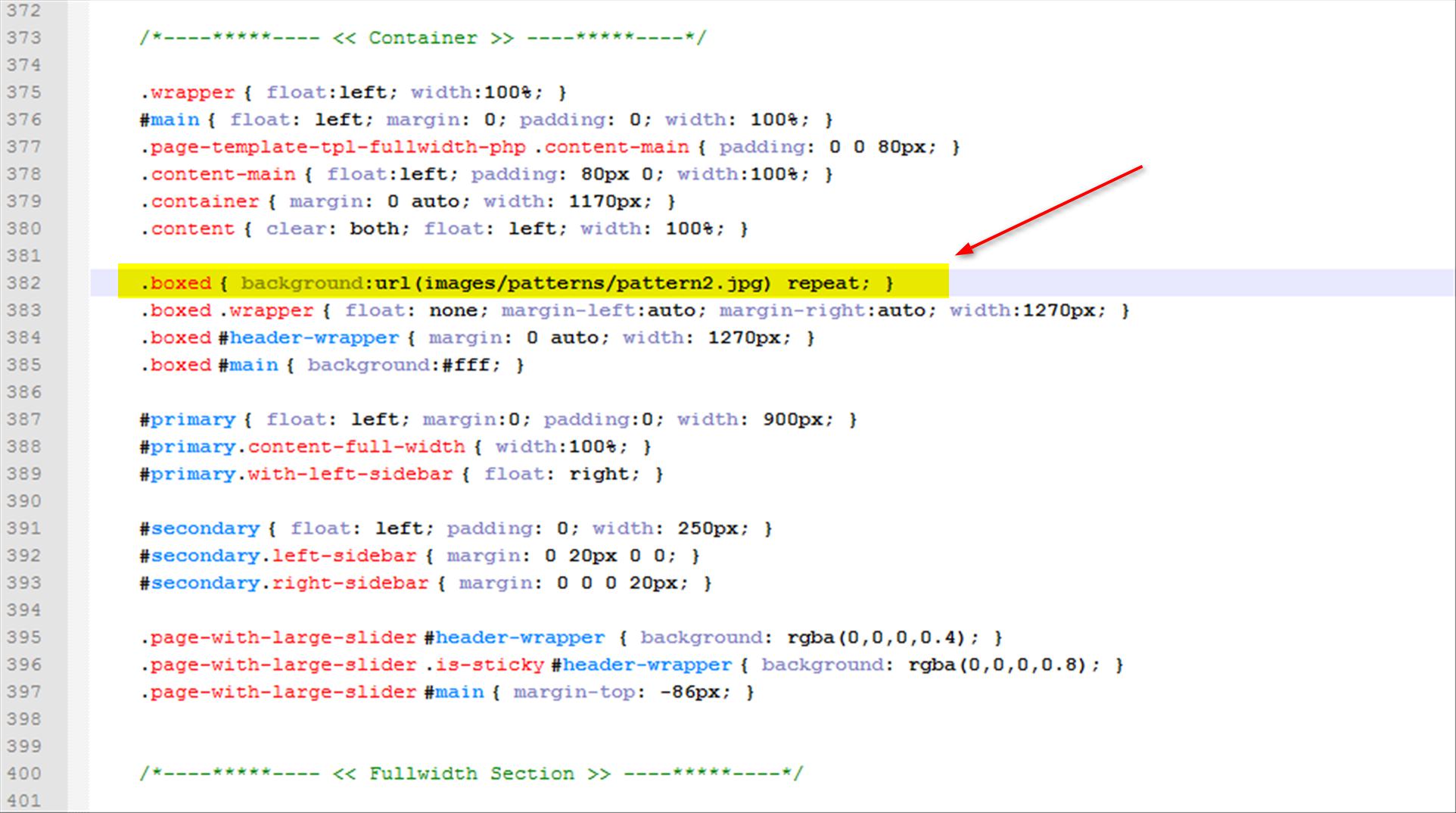
2) For boxed version only the pattern will display. To change boxed version.

<body class="boxed">

To change pattern go to style.css line no 382.

.boxed { background-image: url("images/patterns/pattern3.jpg"); }
Regards., DesignThemes Support.
Hello, thanks. But it is not possible to change the Background when you didnt use the boxed version? And is it possible to get the main slider smaller?
Hi.,
1) You can change the background only if you are using the boxed version.
2) Kindly, Check the screenshot for having the main slider smaller – http://prntscr.com/74pu18
Hey,
one last question. I use this Slider: http://wedesignthemes.com/html/multihost/index-v2.html
How can I get this Slider smaller?
- Jan
Hi.,
Kindly, refer the attached screenshots that will help you get a clear view.
- https://www.dropbox.com/s/2yleggivtejyqsu/change_height1.png?dl=0
- https://www.dropbox.com/s/v6li8kmhmj60bhs/change_height2.png?dl=0
Regards., BuddhaThemes Support.
Hello,
thanks for the great support.
- Jan
Hi.,
Thanks Let us know, if you find any issues in future..
Note: If you like our theme and support, please feel free to give us your best rating (5/5 stars)!!
Please visit this page to get a clear idea of rating a theme – http://themeforest.net/forums/thread/how-to-rate-a-file-template-download-it-now-/58963 . Hoping for a 5 star rating from your end
Regards., BuddhaThemes Support.
Dear Customers,
We will be on Holiday for Next 3 Days! Thank you Very Much for Understanding…Team will be back on Monday.
Regards., BuddhaThemes Support.
Hi,
I have a strange issue with LS (layerslider_6) – I am ok with how it works but if you have a button on the slide it will blink very shortly when it moves to the next slide.. I think is quite annoying
I have checked with different browsers and also in your examples (http://wedesignthemes.com/html/multihost/ see how Start Now button will blink on slide 2 at the beginning and how View Plans will blink on slide 1) .. Is just me or this is an issue ? Is there a way to fix this?
where is the ls-button class defined?
Thanks,
Hi.,
We will fix this issue in our next update. Thanks for letting us know.
Regards., DesignThemes Support.
Until the next update can you please advice me what should I change? Or where should I look for the issue?
Thanks,
Hi.,
Get into your index page (Index-v1 with LayerSlider) template, and find the element “ls-l ls-button” from the slider section.
Then you can replace or change the following value into the selector “data-ls” as shown below,
Slide 1:
<div class="ls-l ls-button" style="top:360px;left:700px;font-size:26px;white-space: nowrap;" data-ls="offsetxin:0;offsetyin:100;delayin:4000;durationout:450;scalexout:0;scaleyout:0;">

Slide 3:

<div class="ls-l ls-button" style="top:470px;left:807px;white-space: nowrap;" data-ls="offsetxin:0;offsetyin:100;delayin:7000;durationout:450;scalexout:0;scaleyout:0;">

<strong> Regards., DesignThemes Support. </strong></div></div>
Wonderful solution !
Thank you for your support
Regards,
Hi.,
Thanks Let us know, if you find any issues in future..
Note: If you like our theme and support, please feel free to give us your best rating (5/5 stars)!!
Please visit this page to get a clear idea of rating a theme – http://themeforest.net/forums/thread/how-to-rate-a-file-template-download-it-now-/58963 . Hoping for a 5 star rating from your end
Regards., BuddhaThemes Support.
You site is down and I cannot view the Live Theme?
The issue has been fixed…Sorry for the in coveniance!
Hi,
I purchased this theme and it works fine on my local pc but when i add it to the server it then doesnt load layerslider.
I have added it to 2 different servers with different software and it still doesnt work.
I have also changed iages etc around and nothing happens. I have now downloaded the images on your demo and it still doesnt work.
Please assist here http://relimail.com/
Hi.,
Thank you for contacting us.
Kindly, Send us your FTP details via the right bottom form located @ http://themeforest.net/user/buddhathemes . So that, we can check the issue.
Regards., BuddhaThemes Support.
Its funny how author keeps stating that this theme cannot be integrated with WHMCS??? You should research this topic before trying to sell a hosting theme.
Hi.,
Thank you for contacting us !
It is just a html template and it cannot be integrated with WHMCS as of now.
Though, we’re in the progress of making it a Wordpress theme as compatible for this WHCMS.
So please be patient, and we’ll let you know once if it is ready for the release..!
Regards., BuddhaThemes Support.
Will you be able to include the images for some bundled price?
Hi.,
Thank you for contacting us.
No, The images are not included in the html template. If you need we can send you the purchase links of the images.
Regards., DesignThemes Support.
html link is not working in accordion of faq page. How to insert link between faq answer.
Hi.,
Thank you for contacting us.
As we checked here by adding a hyperlinks in between the FAQ answers, it just works in the right way as it needs to be.
Hope you’ve tried adding the links properly. Please be sure to add “http://” or “https://” before the links while adding any of your own.
Regards., DesignThemes Support.
is includes the 6 demos templates ?
In this theme: http://wedesignthemes.com/html/multihost/index-v4.html are include the banner head are include in PSD?i’m waiting for u
Hi.,
Thank you for contacting us.
Please note that we’ve included 4 demos of home page templates along with an One page version.
And we didn’t included any PSD files of banner head of home layout 4 as you asked.
But if needed, we’ll send you the link of that image, where you can make a purchase and proceed using it on your own.
Regards., BuddhaThemes Support.
i just purchased this template:
themeforest-9575930-multi-host-responsive-hosting-template
but none of the images appear, just shows there size in large font
Hi.,
Please note that we won’t provide any of our demo images along with the downloadable template package.
Instead, you just have to purchase them online, to proceed using those images on your own.
Regards., BuddhaThemes Support.
Why aren’t photo’s included this is a rip off
Hi.,
Please note that we won’t provide any of our demo images along with the downloadable template package.
Instead, you just have to purchase them online, to proceed using those images on your own.
Regards., BuddhaThemes Support.
Nice theme. But could you tell me how to change layout from Full-width to Boxed?
Hi.,
Thank you for contacting us.
By default, our template comes in “Wide (Fullwidth)” layout. If you want to change it to the “Boxed” layout, just add the class “boxed” in the body tag of all your pages.
Refer the screenshot given below:
http://snag.gy/2CZEf.jpgRegards., BuddhaThemes Support.
nice theme.
Hi.,
Thank you very much for your appreciation
Regards., BuddhaThemes Support.
Please may i have an email address to report issues? I’ve noticed a few styling issues. I’m very impressed with this overall, but i would like to get these issues resolved if possible. They are definitely issues with the template as they occur on the live demo, and the downloadable template. Thank you very much
Hi.,
Thank you for contacting us.
Kindly, send us your issue through the right bottom form located @ http://themeforest.net/user/buddhathemes
Regards., BuddhaThemes Support.
One of the issues with the template you can download is that the first time you load a page, or press ctrl+F5 on any of the blog pages the layout removes all the text and spacing… you can’t recreate this on the live preview.
The fix is to paste the following into custom.js: setTimeout(function() { jQuery(’.apply-isotope’).isotope(‘reLayout’); }, 500);
paste it under this bit:
jQuery(".apply-isotope").isotope({ itemSelector : '.column', transformsEnabled:false, masonry: { gutterWidth: $gw } });which should be around line 520 under the commented section //BLOG ISOTOPE…
or alternatively just copy the custom.js from here: http://wedesignthemes.com/html/multihost/js/custom.jsHi.,
We have already fixed the issue and you can download the latest version tomorrow, after the approval.
Regards., BuddhaThemes Support.