188 comments found.

Somebody please help! My purchase code for the slider is invalid it says BUT I can’t even submit a ticket to Themepunch because you have to put in the code and when I do I get an “OOPS” invalid!!! How can I get help to fix the issue if I can’t even get the support ticket out? And there is NO contact info anywhere.
 ):
http://support.progressionstudios.com
):
http://support.progressionstudios.com
I am getting this error message when trying to add demo: This does not appear to be a WXR file, missing/invalid WXR version number. Please advise.
never mind sorry it was my fault!
you guys are so fast! and i love the video tutorial
I did just get this message after uploading demo: Failed to import Failed to import “Renovation Contact Form”: Invalid post type wpcf7_contact_form
Note: Make sure to check the documentation if you have any questions about the installation. We have a video covering this as well as the demo content import.
Hi there! Besides the theme, Do you provide a simple content? As the demo. XML or SQL? We did not like how the components set demos?
Yeah, we provide demo content for all of our themes. We provide the demo content as XML file that you can import via Tools > Import. We also provide the widgets and the slider you see in the live preview.
Let me know if you have any other questions.
support rtl ?
We currently don’t offer built-in support for R-T-L. If you needed this, it would require following these directions: https://codex.wordpress.org/Right-to-Left_Language_Support This plugin allows for easy RTL testing: https://wordpress.org/plugins/wp-rtl/
Is it compatible with yoast seo?
Yeah, this theme is compatible with Yoast SEO. All of our themes are actually compatible with the Yoast SEO Plugin.
Let me know if you have any other questions.
Whats the CSS to change the menu hover colour. My drop down menus are always yellow, no matter what colour I change the rest of the theme from.
Note: This is the item comments for the WordPress version. You do not need to adjust any CSS on this version.
hi. I am very not familiar with css web design, I was just wondering if I could change the colors of in the theme? should I go through the code doing that or there is a simple way ? I would be really appreciated if someone could help me
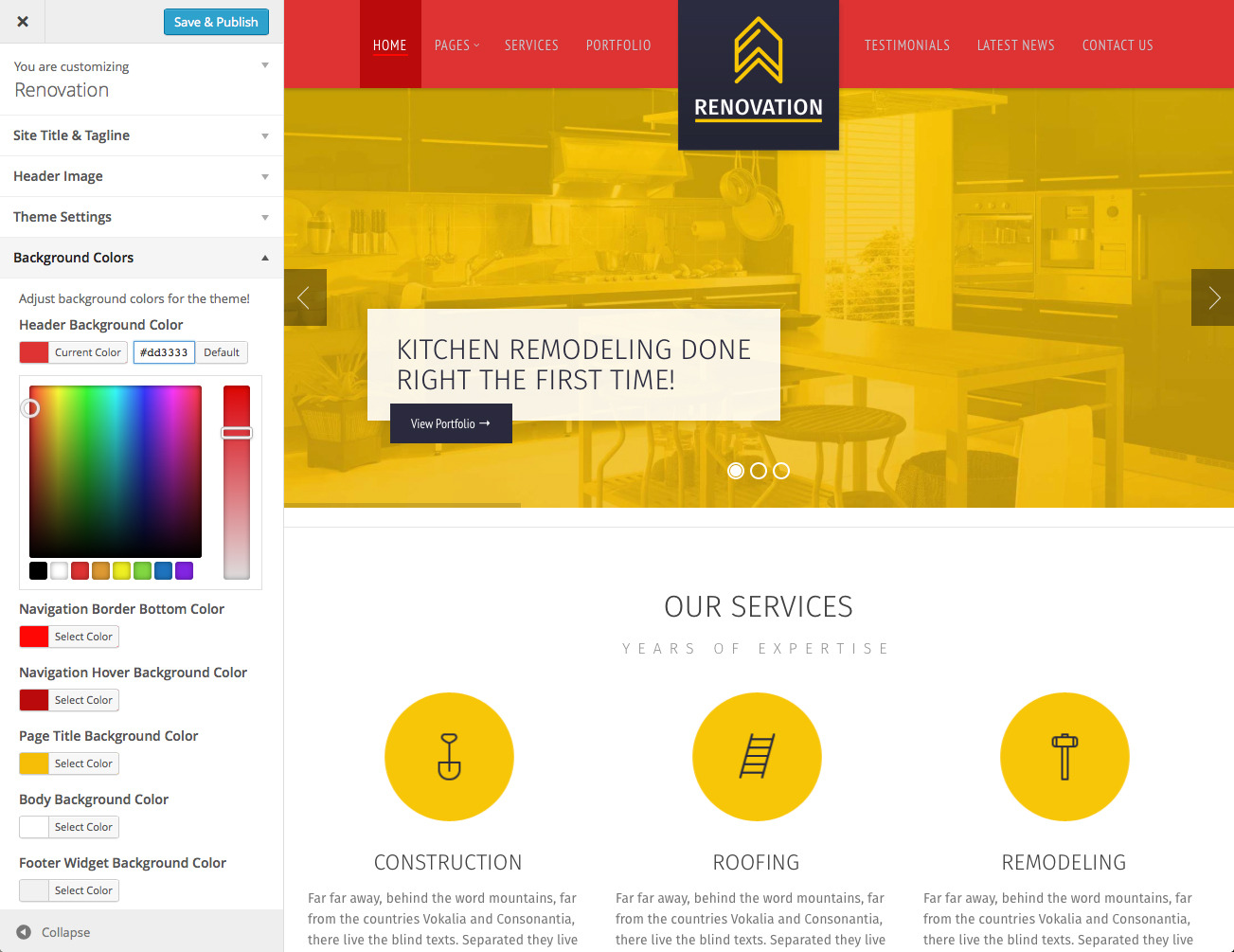
You can easily adjust the colors of the theme via the theme options. Here is a screen-shot: https://0.s3.envato.com/files/106449255/Screenshots/4-Theme-Customizer.jpg You can preview your changes while you make them with no coding required.
Let me know if you have any other questions.
Hi, where can I see the updates? can you please enumerate if what are the updates? I bought this theme last 2014. Thanks!
We have s changelog on the product page at the bottom. It will list out the version number and what files were edited. You can download the free updates at anytime under your downloads.
If you have any questions about updating, feel free to post in our support forums here: http://support.progressionstudios.comThanks! just 1 question, how can I enable comments in my posts in this template? Thanks!
Hello. How can I separate 3 services on homepage from all services in “Services” full page? I dont want to have same 3 services again from homepage in full page “Services”. Is it possible?
Mr. screen shot is here and wainting for your reply: http://imgur.com/vg7Zauwbest regards, Adam.
Please take a look at this pictures with comment http://imgur.com/a/PSvry
We will respond in the support forums shortly
Ok thank you I will wait
Hello, i get this error code in the Revolution Slider on my Homepage “Revolution Slider Error: The param navigaion_type not found in slider params.” Any tips to fix it?
We can help you out with any questions in our support forums. Feel free to post in the forums and include a link with your theme: http://support.progressionstudios.com
Talking about translation and the theme, before buying I’ve read “Translation Ready: Translate to any language easily” ... well, the way you’ve made it doesn’t seem to be that easy !
Usually, and according to Wordpress Codex, translation is easy with .po/.mo files, edited with specific editor (poEdit for exemple). There is actually a .po file in the theme (progression.po) but it doesn’t contain everything at all, and normally, the files are named with the language (en_EN.po, fr_FR.po, ru_RU.po, etc …).
Did I miss something with the install or ??
Anyway, so far and without any more clue, I’m a bit disapointed with that, and “Translation Ready” shouldn’t be a “You need a plugin to make the job” ...
Make sure to post in our support forums if you have any questions. We can walk you through how to translate the theme or any questions: http://support.progressionstudios.com
Note: You can translate the theme a number of ways. If you prefer the manual translation, you can use PoeEdit. We recommend using a plugin like Loco Translate because it allows you to translate the theme in the WordPress Dashboard so you don’t have to edit any .po files or .mo files: https://wordpress.org/plugins/loco-translate/
Hello,
When I try to make a page a child of another page, it does not appear in the parent page as a sub-page. Instead the child page is isolated in its own page. I wish to have many sub-pages like you have on your live preview site (Home Page), but it is not working!
Hi,
Is it possible to change logo on different pages?
i.e:
logo 1 on homepage logo 2 on about us logo 3 on service A logo 4 on service B
Thanks
I set this up for a client and REALLY love it. Very simple and easy to use. I would like to use it for one of my sites though and I would like it to have some other features. Could you contact me via email and discuss what tweaks I would like so that I could purchase another copy please… Thank you!
Glad you enjoy working with the theme. Feel free to e-mail us via our profile page contact form in regards to any tweaks you need (Your profile contact form is hidden so I can’t e-mail you): http://themeforest.net/user/ProgressionStudios#from
done
Hello, I’m a WordPress beginner, do you sincerely believe that the Renovation theme is easy to set up ? (I’m not speaking english very well, so the support and documentation won’t be helpful). Thanks Webludi
Yeah, this theme is easy to setup, even for a beginner. We also include videos that walk you through setting up all the sections of the theme. This is helpful if english is not your first language.
Let me know if you have any other questions.
Really awesome theme ,,,,,,,,,,,,
Thanks !
I tried searching so apologies if this has already been discussed. The images in the Slider Revolution are jumping when transitioning. Any thoughts?
Ok will do, thanks.
Agh, I have to create a new account to access support 
Yeah, we are happy to help but you will need to register to post in the forums. In a few months this will go away as Envato is updating their purchase API. This will allow users to use our forums with their Envato login instead of having to create a new one and using the purchase code.
Hi, I’m looking at the demo on my iPhone 6 and there are some problems with the layout. It is loading wider than viewport causing scrolling issues.
Is this just a problem with the demo, or will I need to fix CSS to make it work fully?
Thanks, John
Make sure to close the iFrame window when viewing on mobile/tablet. This will sort out any issues with the viewport being wider: http://renovation.progressionstudios.com
Let me know if you have any other questions.
Thanks. It’s a different issue, but I just figured it out…
When you bring up the mobile menu the page zooms in slightly. If you select ‘Done’ without changing the page then it hides the menu but doesn’t zoom the page back out, so the viewport is off.
Yeah, this is a default function in iOS. You can easily disable this by following this thread: http://stackoverflow.com/questions/11064237/prevent-iphone-from-zooming-form
We normally don’t over-ride default iOS functionality so we let iOS adjust the size as needed. If you need any help with this, feel free to post in our forums. We can provide you more details and information: http://support.progressionstudios.com
Ah ok. I’m not a fan of using native drop-downs for menus. I’d rather see a proper mobile menu on themes. But it’s not a big issue – I can work around it. Thanks!
Right on, feel free to post in our forums. We are happy to provide recommendations and work-arounds for different solutions.
Sounds good. Thanks for the support so far.
I am a potential buyer, a friend of mine purchased the theme, and installed it, each page takes a minimum of 4 seconds to load. How does one go about fixing this. This is a fresh install with nothing else being added.
There are easy ways to make your site load quicker. Here is a great tutorial on how to speed up your site: http://www.sparringmind.com/speed-up-wordpress/
Note: If a site is loading that slow, it is most likely an issue with the hosting provider. I would contact them and ask for help if the above steps do not get you a super fast loading site.
Thank you, It works perfect now. Does the purchase come with the Construction icons used in your home page? if so, where can i find them?.
Yes, we include the construction icons with the item. They are included under a folder “Additional Files / Photoshop Files”.
Let me know if you have any other questions.
Where is the option for making the menu always appear at the top, even when you scroll down. I cant find anything about it.
Also, are there options for changing the menu in mobile devices.
The options for making the menus appear is in the Theme Options panel under Appearance > Customizer. You just check the box to set it. The mobile menu is automatically created for you. If you wanted a different menu on mobile, that would require customizing.
Let me know if you have any other questions.
Hello, I am a potential buyer. I noticed that there was not a sticky menu. Is this an option?
Yeah, we have a sticky menu built-in. You can turn this on/off easily via our theme options panel.
Let me know if you have any other questions.
Thank you!