245 comments found.

Hi,
I’ve updated the theme to the newest version but I don’t see any changes in terms of RTL, do I need to switch that “RTL-mode” on somehow?
Also Is it possible to get the serach-bar back into the hero content, just like it was some version before?
Thanks!
Hello,
Which RTL language are you using?
It’s not possible anymore. Now we have the filters for recipes, and it’s logical to have the keyword search with the other filters. Otherwise it could be confusing for the visitor.
Hi,
mostly kurdish but also arabic. Also the search function for these doesn’t really work. When we try to search for items which are clearly there, it shows 0 results.
Thats too bad, because we disabled the filters and the search bar being at that row by itself deosn’t look really good… we all in our team thougt it looked much better and was way more user-friendly within the hero image.
This is the website so you can get an idea: http://7tam.net/
Hello,
Have you set up Relevanssi plugin following the documentation? Also remember to rebuild the index in Relevanssi settings.
I would also recommend using more SEO friendly and user-friendly URLs. You can set those at Settings > Permalinks.
What do you mean by you don’t see “any changes in terms of RTL”? Surely there are changes.
Hi,
It might be the Relevanssi plugin which cause the search bug, I might take a look at that. Thanks for the SEO advice.
About RTL: The way the site looks like today in RTL is exactly the same as before the RTL Update came out. I installed the WMPL plugin to get RTL and it worked pretty well, despite the fact that the theme was not supporting RTL. However the bugs I had then and which I thought were because of the lack of RTL support are still there. Some examples:
- You see the 3 thin green lines which should be under the the heding text of the plugins in the footer? They still are LTR.
- Now everything isn’t fully translated by our team yet, but if you look at some of the filters, you’ll see that the dropdown content is also LTR.
- At first the hero text wasn’t centered and even outside its green box, I could fix that one with some css changes.
I hope you can see what I mean.
Hello,
Theme is made RTL compatible according to the instructions by WordPress found over here: https://codex.wordpress.org/Right-to-Left_Language_Support
When testing with the plugin recommended in the article none of the issues you pointed out do not appear.
Actually it looks like WPML does not activate rtl.css stylesheet, which obviously includes all the styling making the theme RTL. So, you should take a look at WPML documentation.
Could you please reply via my profile page’s contact form. I think it’s better if we continue via email 
Does the theme support RTL?
Not currently, but I will add support for RTL in the next version
That you for your reply. That would be fantastic, any idea when will be the release of the next version?
I’m working on it at the moment Should be available by next week.
Hi,
The new version with RTL support is now available
Great work. Just a few things:
Recipes should be searched by ingredients selected from a dropdown. more style 
Your single recipe page margins are a little big
THere is not place to manage own recipes, right?
Maybe, you can make directions in front end be clickable too
Ok, thanks
Front-end recipe management will be added in the future.
Few Questions -
> is it possible to change colour of theme, if i don’t know much of coding? > is it possible to change height of Leading Image on Home page ? > is it possible to have a Youtube/ Vimeo video in place of the image on Recipe Detail page? > If above is yes, where does the Recipe name goes ?
Thanks in advance.
Hello,
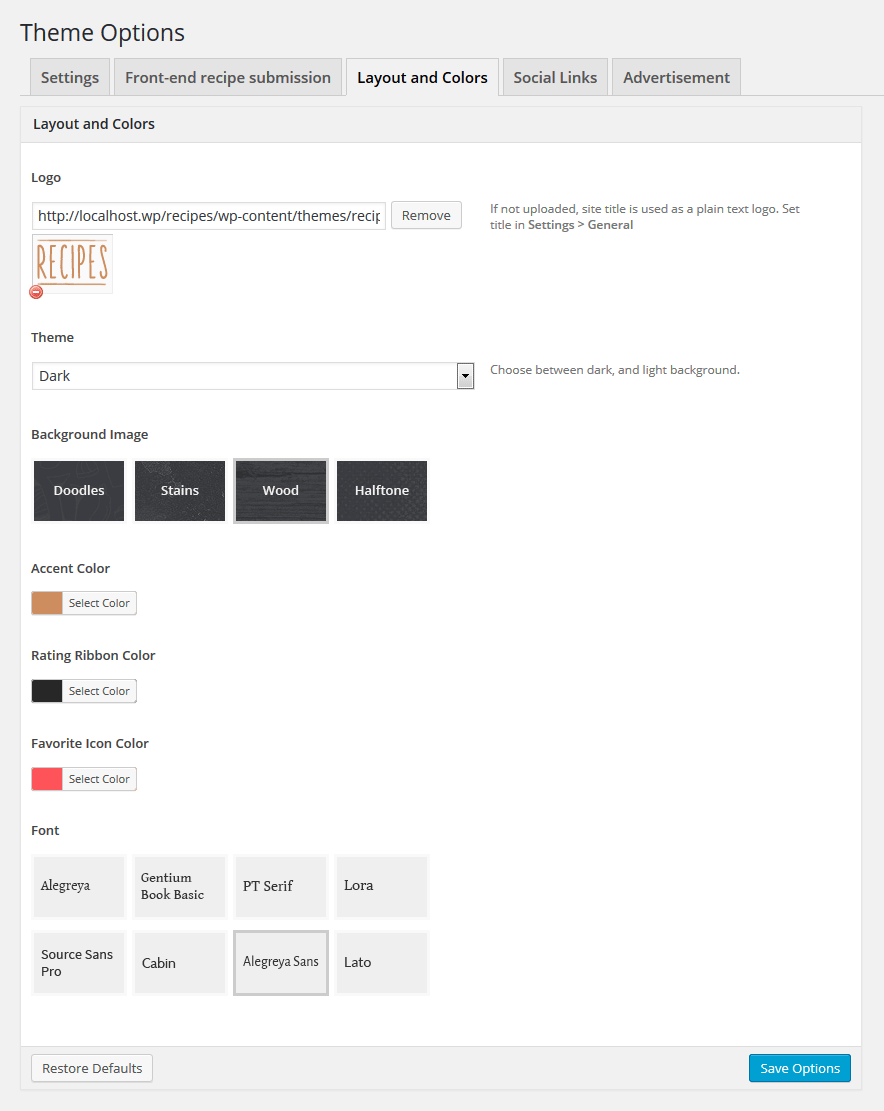
1. Yes, it’s possible. You can change the color scheme, and accent colors in the Theme Options. Screenshot: https://0.s3.envato.com/files/163705748/screenshots/5_Screenshot-4.png
2. It’s possible, but requires decent knowledge of PHP, and CSS. You will have to edit the theme files manually.
3. There isn’t a built-in feature for this.
Thanks for reply. Regarding point 3 and 4 – can it be done using some Plugin or Changing the code little bit ?
For plugins, take a look at this: https://wordpress.org/plugins/
Changing the code little bit is not enough. You would have to edit multiple theme files. PHP, and CSS skills are required.
Hello, Your theme looks nice. Does it manage rich snippets ?
Hello,
Yes, it does. Search site:live.bobosh.com/recipes/recipe/ on Google to view the demo recipes.
Great theme.
A few pre-sale questions:
Would it be possible to easily customise many of the filter categories or remove from search completely? I ask this because I’m looking for more of a food/restaurant review theme not recipe theme and with a few customisations this design would be perfect.
For example, we wouldn’t need the “course” , “cuisine” , “skill level” categories etc. They could be turned into other categories such as “location” “cost” etc.
Additionally we’d need to get rid of the cooking times, ingredients, servings etc. and replace with other key features.
Is any of this possible? Even if necessary, with a couple of hours spent customising css?
Hello,
Filters can be removed via Theme Options.
Converting filters into other categories (or taxonomies) is little harder, and would require knowledge of WordPress.
Customizing CSS is obviously not enough. You would need to edit PHP files of the theme.
If you have a developer with decent WordPress and PHP skills, customizing is possible in a couple of hours.
How can I make one of my website pages fullwidth? The page that hosts the recipes takes up the whole width of the content area, but on all other pages the content gets pushed to the middle. Thank you!
Hi Sarah,
Please check your email
I like the design of the recipe entry frontend form because it provides users with a choice (add recipe or link to existing blog recipe). I only wish it allowed users to copy and paste ingredients and instructions and use line breaks to separate them on the recipe display page.
I’m a beginner when it comes to WP development but wondering how difficult you think it would be for someone to modify the form to have a text form for the ingredients instead of the separate ingredient text boxes?
Hello I would like to use other fonts then you have in the theme. One for the content and one for the headings. Is this possible?
Hello,
You could try this plugin: https://wordpress.org/plugins/easy-google-fonts/
Hi, is there more than english language for this theme? I am looking for Czech, I can translate it by myself, but would be really great to know if it’s already translated before I will buy it.
Hello,
Only English is included.
Theme is translatable with for example free Poedit. With it you can translate the theme line by line. Documentation helps you with the translation process.
Hello, the theme is great and i will buy but where to set google adsense?
Hello,
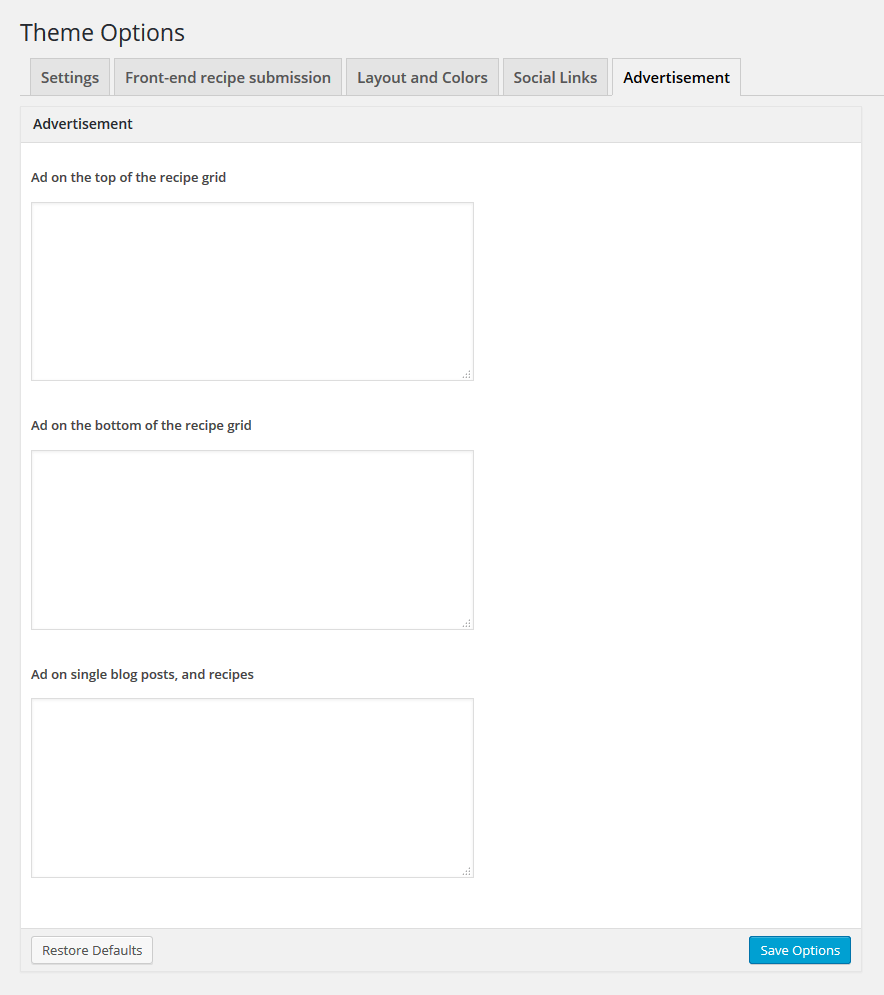
See the item screenshots. Here’s the advertisement tab: https://0.s3.envato.com/files/154783038/screenshots/7_Screenshot-6.png
You can use plugins to place ads elsewhere, for example on the recipe content etc.
Hi there. First : Awesome Theme you created here. Second: Iam searching some Information.
My Favorite Button is not appearing. I translated the Theme with Poedit just like you described but when i try i get no fav buttons in the recieps, even when i activate the option in the plugin its not working. 
There is also a problem with the ingredient groups. The first is displayed but if i add another one or two. They will not appear.
And a wish. May be its already somewhere… but is there an option to CSS the print settings of the recipes ? I don’t want that my users print much more than they want to. recipes must fit on one paper.
a big thanks and regards Manni
—Favorites -- FIXED!
—Ingredient Groups -- FIXED!
CSS for Print still on my schedule.
Hello,
Activating favorites, and adding multiple ingredient groups should be clear following the documentation.
And the print styles are already included. Click the print button on the recipe to test it
Excuse me,Could I ask you how the way to divide Blog page into two or three columns? thanks
You can use a plugin for this.
Here’s one for example: https://wordpress.org/plugins/smpl-shortcodes/
Thanks you,but it’s wrong mean, in my opinion,it’s here
https://www.tumlumtalaquan.com/blog/It’s page,not post
This theme doesn’t come with a column layout for blog posts.
That’s great !
Hello, Pre sale question: Is this theme Woocommerce compatible?
Hello,
No, it is not.
Where exactly are the ad spaces? Can you point me to a screenshot with ads added? thanks.
Hello,
I enabled the ads on the demo site: http://live.bobosh.com/recipes/
Disable the ad blocker if they are not showing for you
I seem em now. thanks. Only one spot within posts though. I need additional spots. How do i add those? I have a 20,000 uniques per month food site and don’t want to take a huge hit in revenue. I LOVE your work with this theme though… better than newer ones – by far!
Using ads won’t be a problem. There are loads of plugins which allow inserting ads for example in the post content etc.
For example: https://wordpress.org/plugins/insert-post-ads/
Hi Theme is excellent im looking for purchase, before that i have some clarification 1. is it supports google adsense? 2. Multilingual translation or have any plugin ? 3. If i use 3rd party plugins like Referral, Offers or any other plugins have your theme compactable ?
Hello,
1. Yes, there are built-in ad spaces available. Just insert the ad snippets in the Theme Options panel.
2. Yes, theme is ready for translation. Multiple languages require a plugin, like WPML.
3. If the plugin is well coded, there will be no problems
On the homepage of the update the search is moved and stuff, are those just options or has the layout of the homepage just changed?
Hello,
Yes, the layout has changed a little
As there are now filters for searching recipes, it’s logical to have the keyword search in the same location. Otherwise it could be confusing for the users.
I love the new update but I can’t figure out how to update it on my wordpress site. All my plugins let me know when there is an update, please let me know if there is a simple way to update to the new version.
Did you read the documentation, readme.pdf? There you will find instructions for the update
I think it is awesome how much you listen to your customers about improvements and how involved you are in keeping the theme up to date and evolving over time. I just wanted to let you know that!! It is much appreciated Keep it up!
Thank you! I will do my best in the future as well