4747 comments found.

Hi, I have installed the latest version 1.0.5, in that i am not able to add floorplans and gallery in property submission. Browse button was not appearing. Thanks
Hi,
All you need to do is go here: Appearance > Reales WP Settings > General Settings > Maximum number of uploaded photos
and set the value.
Best regards!
Hello, is there short code for buttons yet?
Hi,
sorry, there is no shortcode for buttons. Added to my list for the next update.
Best regards!
hi, could you possible tell me how I can open and view/edit the files that form part of the download of the purchase a9023c9d-29b2-4537-9a39-87cbc690bb0c
thanks Kind Regards Andre Berlouis
Hi,
Did you install the theme and want to open the files in wordpress?
Best regards!
Salut Marius, 1. Spune-mi si mie te rog ce se poate face ca userul sa poata posta proprietati fara a se inregistra ca agent? 2. Ce trebuie sa fac ca websiteul sa aiba translate? 3. Cum pot schimba denumirea din zip code in postecode?
Cu stima,
Salut,
Trimite-mi te rog un mesaj privat cu ceea ce vrei.
Numai bine!
Hello, I have purchased your Reales WP theme, (Great Job BTW) I am having a little issue with finding out how to make the logo on the site bigger.
I want to make the LOGO on the top left to be 150px in height (auto scale) I changed it in the style.css, but it does not seam to respond to that.
what location am I missing to change it?
Thank you in advance
Never mind.. I re-searched in here, and found the issue, I was for certain my cache was updating, but it seems it wasnt.. err… thanks again
Hi,
I am glad you managed to solve it.
Best regards!
I’m not sure how to get the posts to come up by property category. I have created a few, but when you do a search of them, they don’t come up: like here I have about 4 or 5 that are listed as “Land” http://elrenorealestate.net/listings/land/
Hi,
What you should do is use the search functionality and choose Land as Category. I also noticed on your website that you have a different page template for the search results page. The correct template should be Property Search Results.
Best regards!
When you say I have a different page template for the search results page, should I specify it somewhere else? I have the Property Search Results the default Posts page under Appearance – Customize.
Hi,
I was referring to this page: http://elrenorealestate.net/search-results/The correct page template for this page should be this one: Property Search Results
that you can set in admin when you edit the page for Edit (the option is on the right side.)
Best regards!
i wanna show desktop version when i connected my mobile. how can i fix that ?
never mind. i solved it. 
Awesome 
I want to change the permalink of the properties into kinderfeestjes. So instead of having /properties/ I want /kinderfeestjes/. Could you please help me with that.
When I am using a parent page, the breadcrumbs don’t show the parent page. It’s directly home->current page in stead of home->kinderfeestje->current page.
Also I get an error everytime I try to send a contact form: “Your message failed to be sent.” What could be the issue?
On mobile something goes wrong when you search a city. The city suggestions show behind the search button.
On the preview category you see “Nederland, Netherlands”. It’s shown twice. How can I delete one?
The video’s don’t work in property single page. I get an error (grey youtube screen).
Could you please help, the normal wait is 48 hours. I’m waiting for a week now.
Hello??!
I can’t even send email with this template. Please help.
Hi Omar,
Pleas see my email, I will also answer you shortly to your latest email.
Best regards!
Hi, I want to update my application template 1.0.3 to current version(1.0.5).How can i update Automatically through wordpress ? I just want to know How to update my templete. Thanks
Hi,
All you need to do is deactivate the theme, Delete it from wordpress admin and install the new version.
Best regards!
Hello. Love the theme. I’ve got it on a site we did at www.hrehome.com but when looking at it on mobile, the responsiveness is not working correctly. It’s cutting off 1/3 of the page on the right side. Will you Please view it on a mobile device and let me know how it can be resolved? Thank you!
Hi,
Could you please send me a screenshot so I can see what are you referring to?
Another thing: I would not recommend to use the logo like you did.
Best regards!
It’s not a logo. It’s just text. What should I change? How do I submit a photo of screen shots from my phone?
Hi,
Maybe you can use a service like dropbox and share the image with me?
Best regards!
Here’s the screen shot examples of how the mobile responsive side of the site isn’t working correctly. Thank you! Looking forward to getting this fixed. https://www.dropbox.com/sh/ypugfs4ijfd8lk5/AACtirJT-Cj3xl9x-ArguQMOa?dl=0
Hi,
That is because of the long ‘logo’ that you used. But I have a solution for you. Please open this file: /realeswp/style.css and add these lines:
.home-logo {
    float: none;
}
.home-logo img {
    width: 60%;
}
inside this block:
@media screen and (max-width: 767px) {
.......
}
Best regards!
Hey! How can I change the avatar for the testimonial area? Im trying to upload new image but it never appears… Don’t know why! thanks
Hi,
Could you please send me a private message with your website URL and admin access?
Best regards!
All fixed now! thanks a lot, great theme! My website is www.vivenciainmobiliaria.com
Hi, great! Thanks!
Hi! I just need to show a couples of countries and cities in the home drop down menu. Could you tell me how please?
Hi,
The country list can be changed from code inside these files:/realeswp/functions.php (2 places) /realeswp/admin/sections/general.php /plugins/short-tax-post/libs/custom_post_types/property.phpwhere you find this:
$countries = array("Afghanistan", "Albania", ......... );
The city only works with Google autocomplete and cannot be set as a pre-defined list.
Best regards!
I have purchased the theme and it is really amazing!! Really nice theme. But I have a problem with the paypal payment. I have setup the app and API in Paypal and inserted al the correct data in the setting but when I press the paypal button it doesn’t do anything it just keeps saying “please wait”. Could you guys help me out with this issue this is very important! Thank you …
Hi,
Could you please send me a private message with your website URL and admin acccess?
Best regards!
Hello, when i connected my wordpress site on mobile. template was not working. so i click “request desktop site” button. then working.
how can i fix this situation? i think this is problem about “user agent string”. but i don’t know how to fix it.
never mind. i solved it.
Great
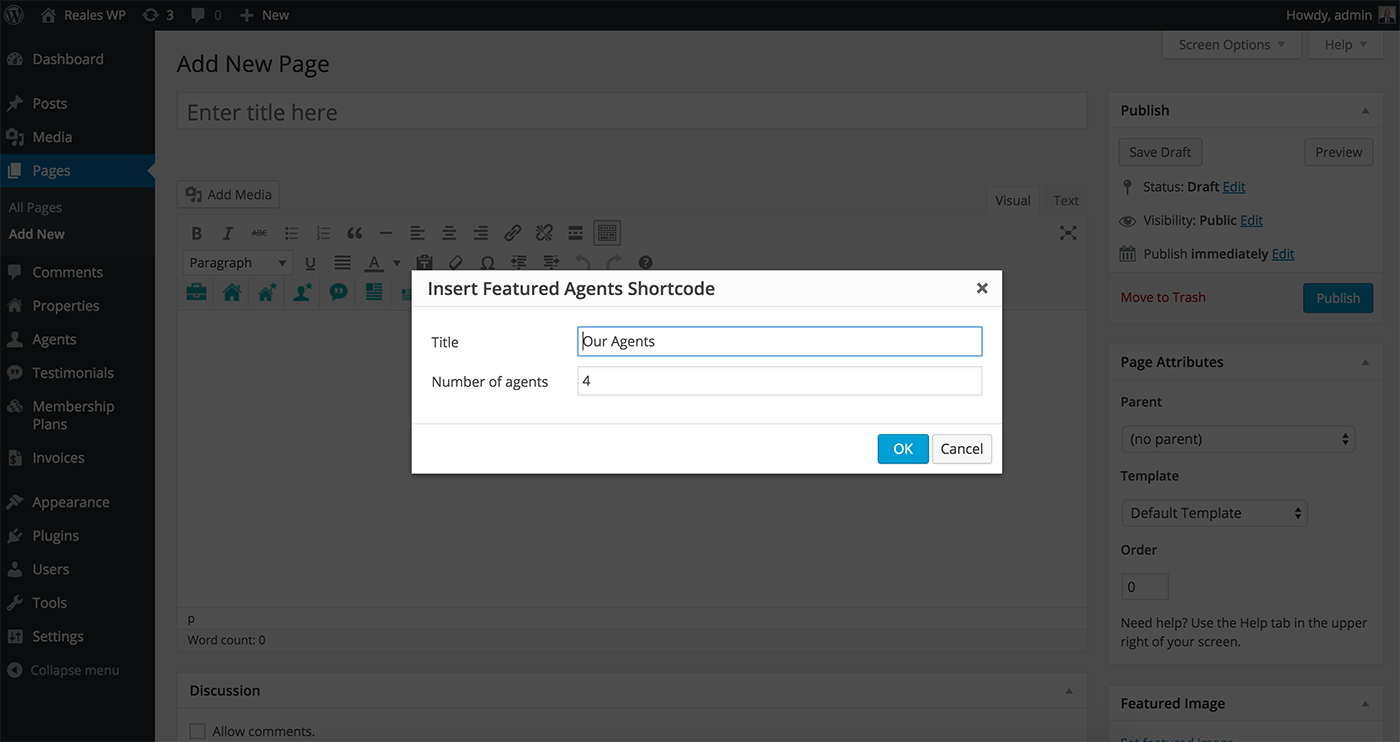
Hello, I only have three agents and I need to center them on the home page. How do I do this without messing up the rest of the homepage?
Here is my purchase code: fbf8264e-9bcc-4d82-9244-ae5e7124491a
Hi,
When insert the Agents shortcode, a popup message is displayed where you can choose the number of agents. See here: http://mariusn.com/themes/reales-wp/documentation/assets/images/26.png
Best regards!
Hello, I have been unable to list the agents in any other order than alphabetical. I really need the owner to appear first. How do I fix this?
Here’s my purchase code.
Hi,
There could be a solution, but you will loose the alphabetical order:
Open this file: /realeswp/agents-list.php and replace these lines:
$args = array(
    'posts_per_page' => 9,
    'paged'          => $paged,
    'post_type'      => 'agent',
    'orderby'        => 'title',
    'order'          => 'ASC',
    'post_status'    => array('publish')
);
with these:
$args = array(
    'posts_per_page' => 9,
    'paged'          => $paged,
    'post_type'      => 'agent',
    'post_status'    => array('publish')
);
After that you change the publish date of the owner to be the newest. The above code will change the order to By Date.
Best regards!
Hi, I purchased your theme a couple of month ago and it is working great since! Thanks for that (: Now I have some questions: 1. Is it possible to to change the property field on the start page so it looks like the property search filter. For example I want to have a bar where customers can adjust the budget range like it is in the search filter. 2. Is it possible to change the propertys which are shown on the start page from “recent” to something else or choose them manually?
Thanks already! Greetings
Hi,
1. Unfortunately this is not possible.
2. You can choose to use the Featured properties shortcode and choose the properties that you need. (Open a property for Edit and check the “Set as featured” option)
Best regards!
Hi there,
Would like to check a few things before i buy 1) Can I customize the Property submission field. I need to add somethings 2) can I customize the property filter field? 3) Can I Favourite a location or save a location? I see that now I can save favourite property 4) Do i need to subcribe dsidxpress plugin? If I din’t then, the how would it be? 5) At contact agent page, can I at a date to view field there?
Thank you.
Hi,
1) There is a section in theme settings: Property Custom Fields where you can add your own custom fields. But in the current version you cannot use them in search and filter forms. The next version will have this feature.
2) Yes, there is a predefined set of fields from which you can choose.
3) You can save a search result and can favourite a property. I don’t know what you mean by location.
4) You don’t need dsidxpress plugin, this feature is optional.
5) Sorry, could you please be more specific?
Best regards!
Hi,
I want the Amenities check marks color to be green in the properties page, http://prntscr.com/9ok85a while the main color remains to be my orange color. I just want only the amenities to be green. Appreciate your suggestion regarding this.
Thanks
Hi,
All you need to do is go in admin here: Appearance > Reales WP Settings > Custom CSS and add this:
.amItem span {
    color: #b4b4b4;
}
And change the color to the desired one.
Best regards!
For the services section on the homepage—I want to change some of the icons. What is the correct way to do so?
Hi,
Please read this section of the documentation: http://mariusn.com/themes/reales-wp/documentation/#shortcodes
Best regards!