7062 comments found.

I had the same issue with scrolling on mobile device in version 1.5.1 and fixed it by disabling the last function in /shopkeeper/js/scripts.js:
function fix_double_tab_touch_devices(selector) {
        $(selector).on('touchend', function(e) {
            var el = $(this);
            var link = el.attr('href');
            if ( (typeof link !== 'undefined') && (link !== '') && (link !== '#') ) {
                // window.location = link;
            }
        });
    }

    // fix_double_tab_touch_devices(".woocommerce .products a, .site-header .tools_button");
    // fix_double_tab_touch_devices(".site-header .tools_button");
The version 1.5.1 comes with a huge bug in mobile devices. When you scroll over the product listing in the category page you are sent to the link you are scrolling over. Usually you have to tap a link to get to it but in this case you can’t even scroll through the page since you are being directed to other pages when scrolling over links. The demo environment has the version 1.4.9 so it doesn’t feature the same bug.
Hi there,
Our developers just finished working on the new theme update which includes the mobile scrolling fix. The new version should be available any time now.
Have a good one! Alex.
Hi There,
Whey will you release a new version compatible with woocommerce?
I have this message all the time: Your theme (Shopkeeper) contains outdated copies of some WooCommerce template files
Also, a small issue regarding your theme compatibility with other plugins. Is it possible to include somewhere inside the documentation (or anywhere else) – what woocommerce plugins shopkeeper supports ?
I see that people ask, for example, @babzzz asked two comments above, if it’s compatible with woocommerce subscriptions.
I would like to know if it’s compatible with woocommerce reviews pro plugin. When I installed the plugin – navigation in Firefox and IE has disappeared. Support won’t help much here due to the problem, that I’m dealing with 3rd party plugins. It’s not directly connected with your theme.
Another example, is Yith Wishlist, in your documentation it is written that in order to have “add to wishlist” functionality I need to install Yith Wishlist plugin – That worked. Awesome!
But, did you know that there is also Yith Wishlist Pro version of the plugin – the same, only with more features. This Pro version is not compatible with the theme. Heart icon and “add to wishlist” disappear when I install the Pro version. Free version however works fine.
This is why, if it’s possible, can you include info, which kind of plugins the theme supports?
Those plugins cost money, when I discover that they don’t work with your beautiful theme – I wanna cry.
Despite all the plugin issue, Love this Theme! Thank you for your time!
Hey there,
I’m Alex, a member of the support department at Get Bowtied, happy to talk to you today!
We’re going to release a new version of the theme which includes the fixes for the outdated templates later today.
I think having a list of compatible plugins is an awesome idea although it involves many outlines that need to be reviewed by our team. The best I can do at the moment is to make sure this request will get to our team.
Thanks for making time to write this feedback!
Cheers, Alexandra
Purchased this theme, requested support 4 days ago no response.
Please get back to me as I have found a bug in your theme!
Hey,
Alex here  Happy to be talking to you today!
I just checked your request and my colleague Adrian replayed a few days ago. I’ll tell him to reopen this ticket.
Cheers, Alexandra
Pre-sales questions : 1 – does this theme will work with the “Woocommerce subscription” plugin? 2 – if yes, does the “Account” page will remain the same ? ( i have a problem to understand if the “subscription” plugin will add a new account page or no!?
Hope you guys can help! Thank you 
Hi there,
We haven’t tested with this plugin yet so regretfully I won’t be able to help you with an answer right away. I’ve added it to our list of plugins to test with.
Is there’s anything else you’d like to know about Shopkeeper?
Cheers, Alexandra
Hi, really like the look of this theme and have been considering buying. Am worried though because when I open up the demo on my phone (brand new iPhone 6) it really lags and the menu function kinda doesn’t work properly (keep having to press it even though it visually indicates that it’s been activated) Will this be an issue? Cheers!
Hi there,
Happy to know you consider choosing Shopkeeper 
We haven’t managed to update our demo yet but we released a new version of the theme which includes this fix for the menu double tap thing.
I’ll be around if you have other questions.
Have a good one! Alex
Hi, I just purchased the theme and trying to st my products up. The quantity increase and decrease tab before you add to cart is not visible. How can this be fixed?.
Hey there,
Please reach out to the support team by opening a new request: https://my.getbowtied.com/
This needs further investigations.
Cheers, Alexandra
Hello,
Where can I add a product sidebar?
Thank you,
Hey thre,
Happy to be talking to you today!
Regretfully the product page doesn’t come with such option. The sidebar is for the product catalog/archive only. You’re not the first one asking so I’ll +1 the existing request.
Cheers, Alexandra
VERY BAD THEME WITH MOBILE DEVICES!! How can people leave 5 stars?!!
Scrolling down a category page on mobile will act as a MOUSE CLICK and not A SCROLL!
What a joke!! How can you convert any sales like this and how can you not know about this BIG ISSUE?
Hi there,
Our developers will take a closer look at this issue and help you find a solution right away
Cheers, Alexandra
Hello, I found this bug: if the item quantity of a product is more than 1, the quantity input in the cart is always set at 1, even if the total prices are correct.
If I change the quantity from the cart and update the cart, the prices change accordingly but the input remains at 1 after the update. If I update the cart again, the item quantity is set to 1 again.
This doesn’t occur with the Storefront theme.
Could you please check this and let me know?
Thank you, Best regards
Hi there,
We clearly need to take a closer look at this issue. I just got to your request and I saw Adrian already replayed.
Cheers!
Any news on this?
Hi, any news on this? I don’t see any reply by Adrian…
Hi, any news on this? I don’t see any reply by Adrian…
Hello @o-zone,
It should no longer be an issue. It is no longer happening at our end so please make sure you’re using the latest version of the theme and the latest version of WooCommerce.
If there’s anything else you need help with, please reach out to the support team.
Cheers! Adrian.
Hello,
I have just updated WooCommerce with this theme. It has been working fine all along, however now my options for each product are not display and then simply say “Choose an option”
How can I fix this problem ASAP?
Example: http://daisyfayeonline.com/shop/dresses/dress-kallie/
Hey
Please reach out to the support team by opening a new request: https://my.getbowtied.com/
This needs further investigations.
Alex
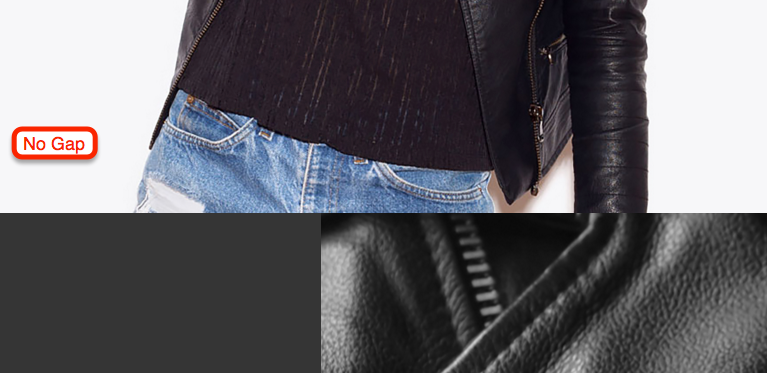
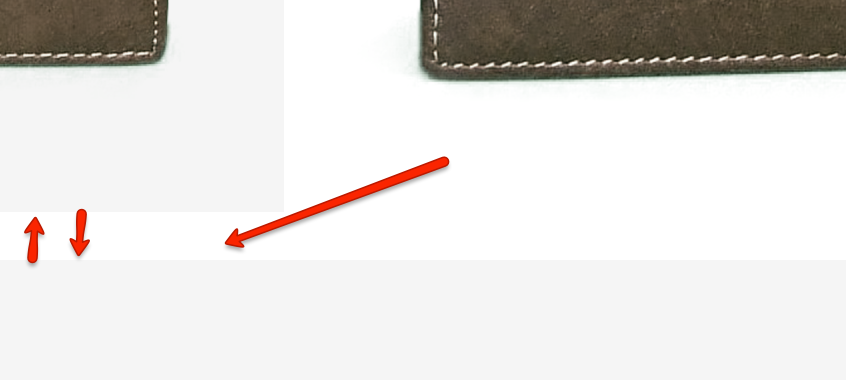
Removing the Gap between rows
I can’t seem to find the option where I can remove the gap between the rows, your sample data has a simple product here with the rows fitting together with no padding.
https://i.gyazo.com/0d5b0892958e3794ed8ea3b5d886daf9.pngBut when I do something similar in Visual Composer I have gaps there, I think I’ve tried every setting but can’t seem top remove them.
https://i.gyazo.com/0723561ba09035144b1258f953664893.pngThanks
Hi there,
Alex here Happy to be talking to you today!
Please reach out to the support team by opening a new request: https://my.getbowtied.com/
This needs further investigations.
Cheers!
From the Blog: Google Analytics for Beginners and WordPress Users
Everything you need to know to get started with Analytics. Strap on your data nerd hat and read on.
Google Analytics is easily one of the most indispensable tools available to you as a webmaster. It unlocks a veritable treasure trove of information that can help you to optimize your site to increase traffic, engagement, conversions and sales. Learn how to get it on your WordPress site and what to do once you have properly installed it. Go to our blog to read the entire post.
Pre-sale questions:
1. Does your theme work with any front-end editors like Beaver Builder and Visual Composer?
2. There are some woo-commerce product page features that I like (zoom image, wish list, custom product tabs, ect) and I was wondering if these add-ons are included in the download or if I will have to get them separately?
Hi there,
1. Shopkeeper works great with Visual Composer front-end editor and this is the plugin we recommend. We haven’t tested yet Beaver Builder but I’ll submit a request to our developers to bear in mind testing it.
2. Product image zoom can be enable from the theme options and the wishlist/tabs can be used by installing two plugins.
Have a good one! Alexandra
Hi, I’ve uploaded my Light Transparency logo which has brown text and have set my Shop page’s Header Transparency to Light but the logo is not showing up properly. Can you help me please? Thanks!
Hi there,
Alex here Happy to be talking to you today!
Please reach out to the support team by opening a new request: https://my.getbowtied.com/
This needs further investigations.
Cheers!
Hi guys, I also commented on one of your other themes. Can this one be used without VC?
Hey ,
Yes, you can use the theme without Visual Composer but we recommend this plugin.
Alex
brother how to install xml file / demo content file help me
Hi there,
Alex here Happy to be talking to you today!
This is our recommendation on importing the demo content: https://shopkeeper-help.zendesk.com/hc/en-us/articles/206678079-4-4-Demo-Content-Import
You can alternatively import the demo content manually by going to Tools > Import.
Cheers, Alexandra
hi,
You guys have wonderful collection of themes. Must admit, I’m really having a hard time to decide whether to go with Shopkeeper or Mr.Tailor .
I do have a question this theme.
Does it support WPML?
Thanks
Hey,
Thank you!
Both themes are compatible with WPML. As far as the eCommerce functionality should concern you, both themes are running on the same engine: WooCommerce, so there won’t be difference in this matter. The decision should be made considering the style your looking for.
Cheers, Alexandra
Right, thanks Alexandra for clearing that up!
Rizki
Hi, Pre-Sales Question here;
In the Demo, I am try to view the ‘Centered Logo above Navigation’ option under ‘Header Options’, but unable to view it. I require this for a project. How can I view it in Demo. Please do let me know. Thanks, regards, Prash.
Hey Prash,
Happy to be talking to you today!
I can see what you mean our developers will fix the demo as soon as possible. Until then here’s a screen shot of the homepage using the Centered Logo above Navigation option: http://screencast.com/t/qD8oh1OsNN
Cheers, Alexandra