485 comments found.

hello , following the update of wordpress and the theme for visual composer works … I do not have access to the page structure that I built with visual dial …
How to access my pages edited again ?
I re-download the theme and I will try to put the new plugin
It’s good here worked well ! Sorry and thank you for this great theme!
Yes, after updating WP to 4.5 you also need to update theme to the newest version to have the newest VC. Thank you for the information that you’ve solved the issue. By the way – If you would like to give a feedback on theme, please take a moment and rate it in your Downloads section. I’ll be grateful!
Hi there,
Very nice theme, but i have a pre-sales question. If you are on a single project page, is there an option to activate, so you can click a “next >>” button to the next single project page? Now it looks like you have to go back trough your browsers back button. That doesn’t feel so user friendly to me. Many Thanks.
Hi,
To have next, previous buttons you’ll probably use some external plugin, theme doesn’t provide such a functionality. But you can create a sidebar with menu like in services: http://quanticalabs.com/wp_themes/carservice/services/engine-diagnostics/
Hi Quanticalabs, That’s possible, but i would like to keep this layout to my service page alone and not copy it to my “portfolio/single project” pages aswell. UX is one of my focuses. Any change you could implement this soon in your template? I really would appreciate this a lot. It would lift up your excellent work even higher, and make me buy your work. The external plugins providing this are rare and mostly outdated ore new with no skoop of long live. Feel free to PM me to discuss this further. Thanks.
Hi,
You can controll the single project page layout with drag&drop editor, so you will be able to edit it easily and you don’t need to use default one. Anyway we can prepare next/previous functionality as a custom job. Please contact me via contact form in my profile if you’ll be interested.
how to update theme. please provide video or print screens.
You can find instructions on our support forum here: http://support.quanticalabs.com/forum/topic/14923/faq-frequently-asked-questions#question_11
“You don’t have permission to view this topic.” can you help me to open this page. I’m already login to my account but no permission to read this one.
Do you have account on our support forum? If not please register one here: http://support.quanticalabs.com/account/create if yes and this is not your first purchase from us, please verify the Renovate purchase here first: http://support.quanticalabs.com/account/verify_purchase/ then you’ll be able to open the link from my previous comment.
my account verify purchase one but i cant access that post same error coming to me. if you want i can send my purchase code.
Probably your support period has expired. Anyway to update theme please download the newest version from your Downloads section: http://themeforest.net/downloads/ remove current version and install the new one. If you will need more help on that you’ll need to extend support period to get access to support forum.
ok Thanks for your reply.
the Purchase code doesnt work!? what can i do?
Please send me your purchase code via contact form in my profile, I’ll check it.
Does the cost calculator form also include the selections made within the calculator in the form submission?
Yes, all data from the form are submitted.
Hi there ! I am having a problem with Visual Composer – it just doesn’t load and therefore I cannot edit any pages, projects and services. I looked at the VC settings and cannot tick any boxes as they are not there ! I can’t work out how to resolve this issue, which just occured recently, most likely after the lastest wordpress update. Can you have a look into this without losing the content of my website and let me know how to email you my credentials in private ? Many thanks.
After doing a search on the Internet, it appears that lots of other wordpress and VC users are having the same problem : https://wordpress.org/support/topic/wordpress-45-and-visual-composer-49-issues. As VC has been built into your theme and is not a plugin, I cannot update to the latest VC version. Whether this would do the trick, I have no idea. I look forward to hearing from you with a prompt resolution of this issue ! Many thanks !
After doing a search on the internet, it appears that other Visual Composer and Wordpress users are having the same issue : https://wordpress.org/support/topic/wordpress-45-and-visual-composer-49-issues Whether updating VC to the latest version will do the trick, I have no idea. This raises a problem as VC is already built into your theme and is not a plugin. How do we get VC up to date without asking you to do it ? Can you please look into this quickly and get everything working properly as I need to launch my new professional project ! Many thanks !
I found the solution and solved the problem. I have updated the VC plugin zip and re-installed it by ftp on my server. It now works fine.
Yes, when having issues with VC, please update it. Simply remove current version and theme will ask to install the newest one, just follow screen instructions then. Updating via FTP is fine too.
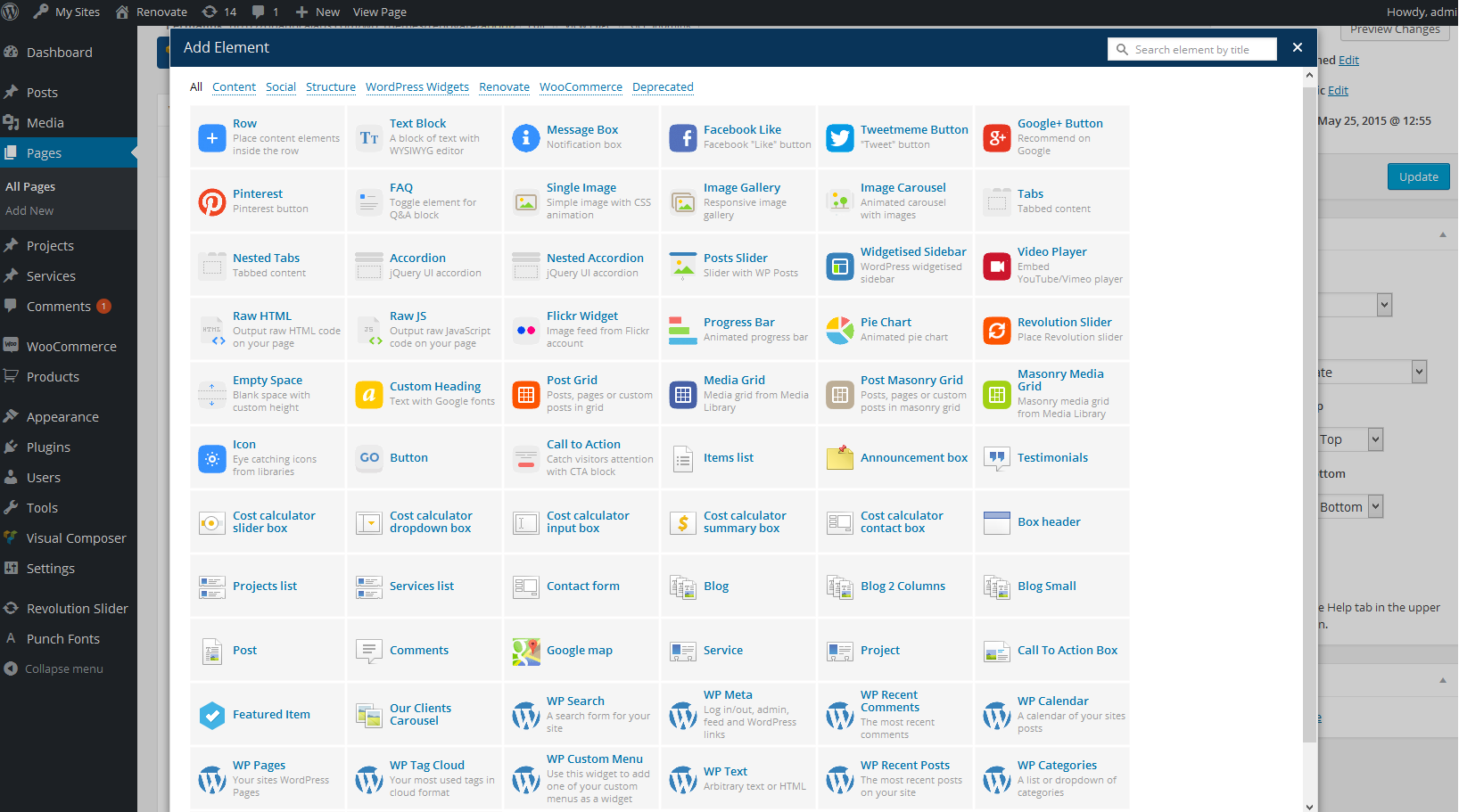
can you send me a link where i can check out the different page elements that are available?
You can check most elements in live preview on different pages: http://quanticalabs.com/wp_themes/renovate/ We unfortunately don’t have shortcodes page with all elements available to show you. Here is the screen of all available components from admin area: http://support.quanticalabs.com/wp-content/uploads/2015/09/renovate_theme_components.png
In regards to a support ticket that you helped me fix awhile back, I was wondering if you could help me with one last thing. If you take a look at my site, the .header from below causes the very top nav with the social icons and email address to be covered up and none of the links work. Is there a way to make the -92px transparent so that they can be seen. You can compare my page to your demo and see the issue:
http://gtconcepts.co/rw/.header-container { margin-top: 0px; } .header { margin-top: -92px; }
Thanks, Tammi
Support for all our items is conducted through our Support Forum. Please register an account and search the forum or create a new topic, we’ll answer as soon as possible. Thank you!
Is there any way you can help me thru here?
We’re providing support only via support forum, so only way to get it is to create new topic on the forum.
Hi, I am currently trying to modify the cost calculator and am experiencing trouble with multiplying the slider value by another value. For example, if someone moves the slider, the number on the slider should be multiplied by 12. Is this possible?
Thanks, A
Hi,
Yes, it is possible. Please register an account on our Support Forum and create a new topic, our support team will help you. Thank you!
Enjoying the theme, thanks. However, in mobile view, the menu button (with 3 lines) is covering a bit of our logo. How can we just push that up a bit higher so it’s out of the way? Can you provide that css and I can mess with it? Thanks!
Support for all our items is conducted through our Support Forum. Please register an account and search the forum or create a new topic, we’ll answer as soon as possible. Thank you!
Hello i like your theme is posible use in renovate template the slide design as soon as car service template slide ?
Hello, The slider layout from Car Service is not included in Renovate theme.
Hi QuanticaLabs, i want to buy your Renovate Wordpress theme, but before i want to know if can change the ‘projects’ url name. Thanks
Hi,
Yes, it’s possible. Let me know if you’ll have any issues with that and I’ll help.
This problem already had with the Media Center template with the word ‘doctors’ and I do not have a solution.
Please create a topic on our Support Forum and our support team will help you to set this.
Hi quanticalabs, is there a way to copy the content inside the page to another page, like i want to transfer the cost calculator to hompage?
Hi,
Support for all our items is conducted through our Support Forum.
Please register an account and search the forum or create a new topic, we’ll answer as soon as possible. Thank you!
Hi,
Support for all our items is conducted through our Support Forum.
Please register an account and search the forum or create a new topic, we’ll answer as soon as possible. Thank you!
Hi! For some reason I do not have any widgets and I can’t find anywhere to activate the top-bar over the header. Can you help?
Hi,
Support for all our items is conducted through our Support Forum.
Please register an account and search the forum or create a new topic, we’ll answer as soon as possible. Thank you!
Hi there,
I have a quetsion, i am not the designer of the website but i do the maintaince. So i ask it this way:
When i make a 4 column row and leave the left and right column empty my content is still alligned left instead of in the center. For example, i made a 4 column row with 2 images i want at the center but it alligns to left.
You can see here: http://www.359.world/fit-2
Same issue with buttons 4 column row only used the 2 center columns but it still get alligned to left like the 2 other columns dissapears? This is not normally with VC the case. This issue you can see at:
http://www.359.world/home-2-2How can this be solved so i can center 2 elements? Thanx a lot!
Hi,
Support for all our items is conducted through our Support Forum.
Please register an account and search the forum or create a new topic, we’ll answer as soon as possible. Thank you!
Hi! How do I have to update the theme?
Hi,
Please check update instructions here:
http://support.quanticalabs.com/forum/topic/14923/faq-frequently-asked-questions#question_11 (Q: What is the correct way to update the theme?)
and for Visual Composer here: http://support.quanticalabs.com/forum/topic/14923/faq-frequently-asked-questions#question_12 (Q: How can I update the Visual Composer plugin?)
I am having challenges installing the logo on my site under theme options. I can import the logo to the media library but when I click “insert into post” i get a white screen and nothing happens. I have uninstalled and reinstalled wordpress and the theme 3 times and that didn’t help. I have all required plugins active and no other plugins installed. Please help.
Support for all our items is conducted through our Support Forum. Please register an account and search the forum or create a new topic, we’ll answer as soon as possible. Thank you!
thank you going to do that right now!
Hi, I have been trying to instal the theme (renovate.zip) via the wordpress admin panel using the upload theme option but nothing loads. Please advise. Thanks.
Hi,
Support for all our items is conducted through our Support Forum.
Please register an account and search the forum or create a new topic, we’ll answer as soon as possible. Thank you!
I purchased this Theme but never used the demo content installation until now. So support has expired, I understand that but I see nowhere in your documentation how to edit / modify the Cost Calculator. Where do I edit this? I’ve seen other people ask the same question here and you direct them to your support forum. Which forces people to waste more time. Can you please enlighten me on where to edit this elusive calculator? I’m sure other people want to know. You know!
Just FYI, I’m sure other developers agree with me: Its much more convenient to search Envato comments to find quick answers to questions (especially when documentation is lacking)
You can edit it on ‘Cost Calculator’ page in page content editor. We’re providing support only via our forum, as you can see at the bottom under Support tab. So to get more help you’ll need to have valid support.