696 comments found.

Visual Composer- how to update it?
Hello,
You should able to update via Appearance -> Install Plugins page. If you get any problem with the tool, you can update by manually via FTP or plugins page. http://docs.rtthemes.com/#article-3340 http://docs.rtthemes.com/#article-11324If you have any further questions regarding this theme, please let us know by opening a support request on our support forum at http://support-rt.com
Thank you for purchasing our themes.
Best Regards
An error occurred while updating Visual Composer: To receive automatic updates license activation is required. Please visit Settings to activate your Visual Composer.
Please just delete the plugin then install again via Appearance -> Install Plugins page. You don’t need to purchase anything else to update Visual Composer plugin that bundled with the theme.
Hi
We have about this on our forum.
http://support-rt.com/forums/topic/visual-composer/http://support-rt.com/forums/topic/plugins-that-come-with-the-theme/
If you have any further questions please create a account at our forum with your purchase key. http://support-rt.com
Best regards,
Theme support
how to update RT-Theme 19 | Extensions Plugin?
Hello,
You should able to update via Appearance -> Install Plugins page. If you get any problem with the tool, you can update by manually via FTP or plugins page. http://docs.rtthemes.com/#article-3340 http://docs.rtthemes.com/#article-11324If you have any further questions regarding this theme, please let us know by opening a support request on our support forum at http://support-rt.com
Thank you for purchasing our themes.
Best Regards
The old version won’t be removed.
An error occurred while updating Visual Composer: To receive automatic updates license activation is required. Please visit Settings to activate your Visual Composer.
Please just delete the plugin then install again via Appearance -> Install Plugins page. You don’t need to purchase anything else to update Visual Composer plugin that bundled with the theme.
Hi
We have a thread about this on our forum.
http://support-rt.com/forums/topic/visual-composer/
http://support-rt.com/forums/topic/plugins-that-come-with-the-theme/
If you have any further questions please create a account at our forum with your purchase key.
http://support-rt.com
Best regards,
Theme support
Hey, I have installed the new Wordpress Update 4.5, but now the Visual Composer not working anymore. Do you can place the new Visual Composer Update within Theme?
Hello, The theme will be updated in 24 hours and the most recent version of the plugin will be included. You can see the previous comment if you need have hurry.
If you have any further questions regarding this theme, please let us know by opening a support request on our support forum at http://support-rt.com
Thank you for purchasing our themes.
Best Regards
Hi
the answer to fix this is right above your question in here
http://themeforest.net/item/rttheme-19-responsive-multipurpose-wp-theme/10730591/comments?page=16&filter=all#comment_12925900Best regards,
Theme support
The theme has been updated! Please download version 1.9.1 via your account / downloads page.
After updated Wordpress 4.5, Visual Composer is not working anymore. Do you have any fix for this?
-I have the latest version 1.9 of the theme. -
Hi
We state in our support forum that users should wait updating until the developer says it is ok todo so. So far i have no green light on that.
http://support-rt.com/forums/topic/wp-4-5-wait-with-updating-until-we-say-its-ok/Please revert to the complete wordpress backup you created before updating to the latest wordpress.
The developer is working on the theme for wp 4.5 and did not yet whitelist the themes for wp 4.5
I also updated but could not find any issues so far. Its working fine. We have only two users reporting this issue and are investigating it.
If you dont have a backup then create a forum user account post a thread and in the second reply to that thread which you need to add yourselves post a private replay with wp-admin logins, urls, and ftp logins and url.
If you have any further questions please create a account at our forum with your purchase key.
http://support-rt.comBest regards,
Theme support
Hi
I did some investigation on this and If you cant revert to a previous backup can you try and replace this file by ftp /wp-content/plugins/js_composer/assets/js/dist/backend.min.js with the one in this zip file and let me know if that works?
http://support-rt.com/wp-content/uploads/2016/04/backend.min_.zipNote i grabbed it from the latest VC version and it seems to fix the issue. The theme will be updated soon as we have to prepare the theme for the VC version 4.11.2 and cannot update out of the box to that version.
Let me know if that works for you.
If you have any further questions please create a account at our forum with your purchase key.
http://support-rt.comBest regards,
Theme support
Hi, The theme will be updated in 24 hours.
Hi, replacing the backend.min.js fixed my issue. Thank you very much for your prompt interest and kind support.
FYI, The theme has been updated and available to download.
Hi there, Move logo position to the right menu to the left….it’s possible??? thanks
Hi
Would you be so kind and post your support questions in the forum and include a url to the website so we can see your design your are using.
You can create a user account on our forum with your purchase key and post your question(s) / issue(s) in there.
http://support-rt.com/Thank you.
Best regards, Theme support
Hi boys!
Excellent work (as always), but you are preparing a new theme? I need theme for my customer. I do not know – buy RT-Theme 19, or should I wait for RT-Theme 20?  (one month).
Hi
I cant answer this as i dont know what your plans are. RT20 is a completely different theme and layout and abilities then rt19. RT20 will release within this month if all is ok.
Best regards, Neo Theme support
Hi,
I look forward to RT20
And if I’m not appropriate for my customer, so I buy one to my RT collection
Hello, Hopefully the new theme will be available in two weeks. Thank you
Hello, Just wanted to let you know that RT-Theme 20 has just released http://themeforest.net/item/rttheme-20-corporate-catalog-and-medical-wordpress-theme/15198936 Thanks!
Nice theme, good work, clean code. Thanks!
Hi there, Is there a way to disable the grey borders in each product for the product showcase categories?
Hello,
We don’t have an option for it but i can provide you a custom css code that removes those borders. Paste the following code into the Custom CSS box inside the Customize -> Custom CSS page.
.product-showcase .vertical_line {
  display: none;
}
.product-showcase .product_item_holder::after {
  border-color: #ffffff !important;
}
If you have any further questions regarding this theme, please let us know by opening a support request on our support forum at http://support-rt.com
Thank you for purchasing our themes.
Best Regards
Hi there, thanks. But there’s still the horizontal line. How can it be removed all together? Thanks again!
Hi, You can add this one too
.product-showcase > .row {
border-width: 0 !important;
}
Is it possible to have a list view option for products, so without images?
Hi
Not out of the box by a setting, but you can recode a file that comes with the theme and remove the image code. But it will apply to all listing pages.
The idea of having a setting for this is great. I will forward to add it in a future update. I cant however control if the theme author will add the option as that is his decision.
Best regards,
Neo
Theme support
Hi, Is there a way to show only selected products (not categories) in the product showcase? Tried using the product ID but doesn’t work…
Hi
No we only support category selection and show the to that categorie attached products.
Just create a category and attach only those products to that category you want to list/show.
If you have any further questions please create a account at our forum with your purchase key.
http://support-rt.comBest regards,
Theme support
Ok thanks. Another question, I am using a product show case categories and turn off the product short desscription, and it hides the product categories descption but when i click into a category, the individual product short description are still shown, How can i hide it??
Hi,
You can find the answer to your question n our support forum
http://support-rt.com/forums/topic/disable-short-descriptions-in-the-default-category-view/If you have any further questions please create a account at our forum with your purchase key.
http://support-rt.comBest regards,
Theme support
Hocam Merhaba, öncelikli olarak tema için te?ekkürler ellerinize sa?l?k temay? dun sat?n ald?m bugun kurdum ama beraber gelen iki eklentide slider revolution ve visual composer guncelleme ve lisans ile ilgili sikinti yasiyorum bu hatalari duzeltmem konusunda yardimci olursaniz sevinirim iyi çali?malar
Hi
You can find the answer to your question in our forum
http://support-rt.com/forums/topic/plugins-that-come-with-the-theme/If you have any further questions please create a account at our forum with your purchase key and post your issues in English please.
http://support-rt.comBest regards,
Theme support
Is it possible to print the images that shows when you add a product showcase and the images that popup in the modal window? If not, will you then include a print button in the next update that is shown beside the Facebook and Twitter share on the modal popup image window?
Hi,
I am sorry, but it is not available by the developers design. I will bring this thread to the developers attention and if he decides to implement the suggestion you will see in one of the next updates.
However if you see no further information on this here or in a future update release overview of what has been added. adjusted or fixed, then he has decided against.
Best regards,
Theme Support.
Hi there just a short one. I want to change the menu hover arrow in another symbol. How can i do this ?? thank you
Hi
You need to rewrite the navigation css which you can find in the rttheme19/css/layoutX/style.css
its a Arrow shape created by css not a icon. If you want something different you need to rewrite that css to another shape.
https://css-tricks.com/examples/ShapesOfCSS/If you have any further questions please create a account at our forum with your purchase key.
http://support-rt.comBest regards,
Theme support
Hi,
I’m from Argentina, I have a machine shop and I wonder if the design is customizable for the repair of cars, turbocharguers and lubricants. thank you very much.
Hi
The theme supports the woocommerce plugin which is the plugin to use for a shop integration within a theme and wordpress.
Best regards,
Theme support
Thank you very much.
Hello, nice theme! I have a little question: is better use your shortcode for create the page or is better use the visual composer? (I mean will the site be faster using your shortcode?)
Thank you
Hello,
It is the same! Even you can disable Visual Composer plugin when you done as long as you stick with the elements that comes with the theme. Visual Composer is just creates the shortcodes we need. You can check the source by clicking “text view” tab after in classic mode.
If you have any further questions regarding this theme, please let us know by opening a support request on our support forum at http://support-rt.com
Thank you for purchasing our themes.
Best Regards
Hi there,
Using the Google Map Location element, all was working fine until I added another element below and then the map disappeared on the page. Even when the ‘new element’ was deleted, the map is still not appearing. Any quick fixes?
Thanks
Hello,
A shortcode might be corrupted when you updating. Would you please move this issue to our support forum and provide us more details about it. Live URL, the source of the page would help.
If you have any further questions regarding this theme, please let us know by opening a support request on our support forum at http://support-rt.com
Thank you for purchasing our themes.
Best Regards
Does it have any random product widget
Hi,
For product showcase, you can use the theme’s product_box shortcode of the theme within a text widget. So basically;
- Add a text widget into a sidebar position - Create a shortcode like this
[product_box list_layout="1/1" layout_style="grid" pagination="false" list_orderby="rand" list_order="DESC" item_per_page="1" categories="" ids="" ]
Note that this shortcode has many more parameters that can be found inside the “Shortcode Helper” by clicking the “Shortcodes” button where top of the screen in the admin panel.
For WooCommerce it is similar just use woo_products shortcode of the theme instead.
If you have any further questions regarding this theme, please let us know by opening a support request on our support forum at http://support-rt.com
Thank you for purchasing our themes.
Best Regards
Hi, how can I have the number animation displayed .99%? Thanks
Hi
You can add a RT animated number element into the visual composer row or column or use a theme animated number shortcode
You can find more info on the visual composer here
http://docs.rtthemes.comI also suggest you install a test wordpress install and import all demo content of the demo of your choice. This way you can examine how stuff is done.
If you have any further questions please create a account at our forum with your purchase key.
http://support-rt.comBest regards,
Theme support
Hi, You can use Visual Composer’s Pie Cart element in order to display percent values. The animated number element of the theme doesn’t support decimal numbers.
Thanks
Quick Q re your logo in the demo’s.
Your Jane’s logo in demo 11 is 580×303 but is not displaying that big in the actual website. Is the size to account for retina displays?
Thanks for another great theme! My 3rd from you guys.
Hi
Yes it is twice as big for retina.
If you have any further questions please create a account at our forum with your purchase key.
http://support-rt.comBest regards,
Theme support
Great theme, I’m interested in purchasing the theme for a immediate project but want to know if the theme has OnePage Scroll features. I couldn’t see that in any of the theme demos. If it does, please direct me to the demo so I can take a look and make the purchase. Thanks
Hello,
Yes it does support one page scroll. We have this demo http://rt19-demo6.rtthemes.com/ the menu position can be vertical or horizontal.
Please feel free to ask if you have any further questions. Thank you for interesting in our themes.
Best Regards
Thanks for the information. Can the Onepage Scroll be adapted to the Demo 10 ?
Yes, the both menu location supports one page scroll.
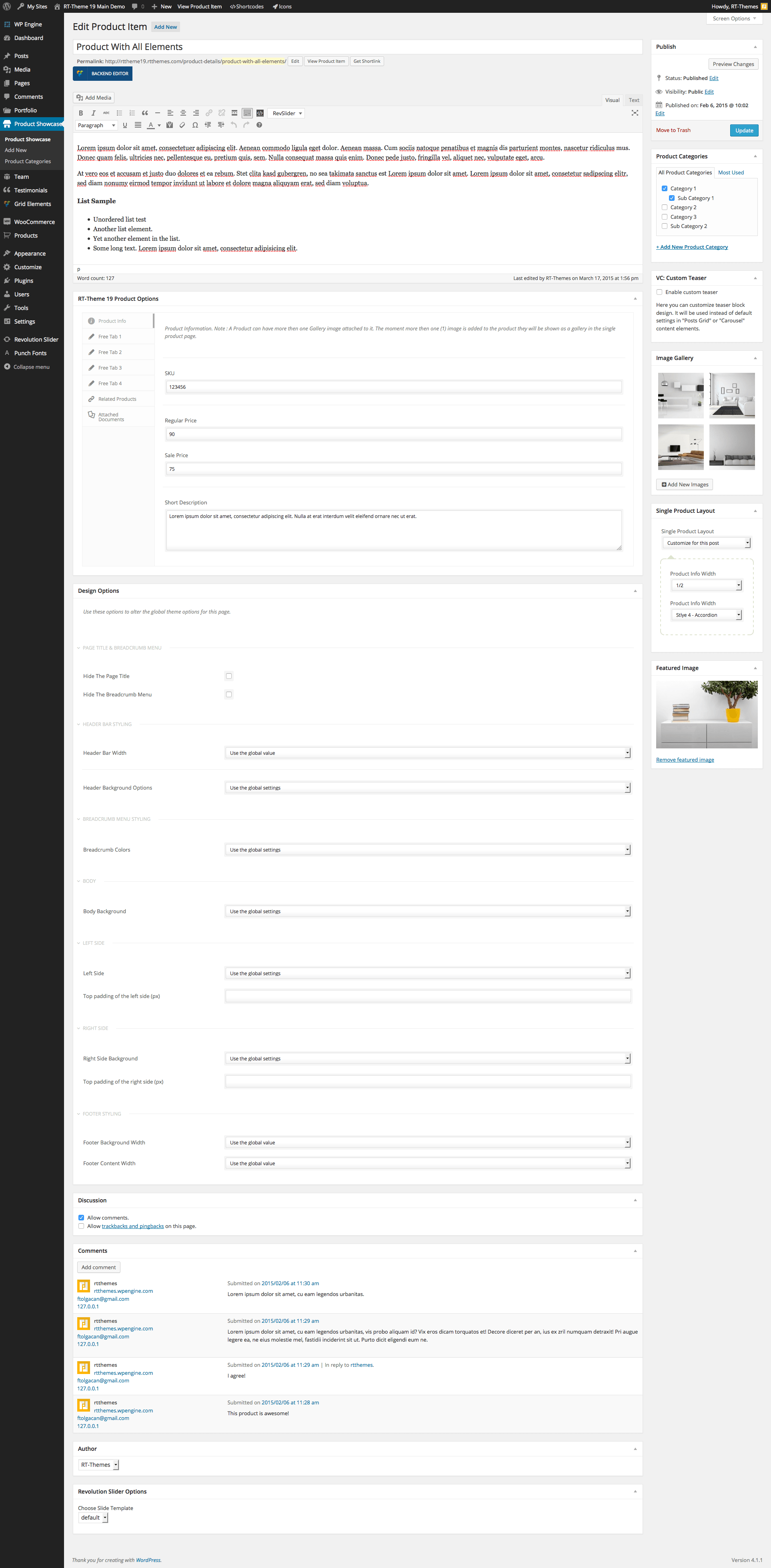
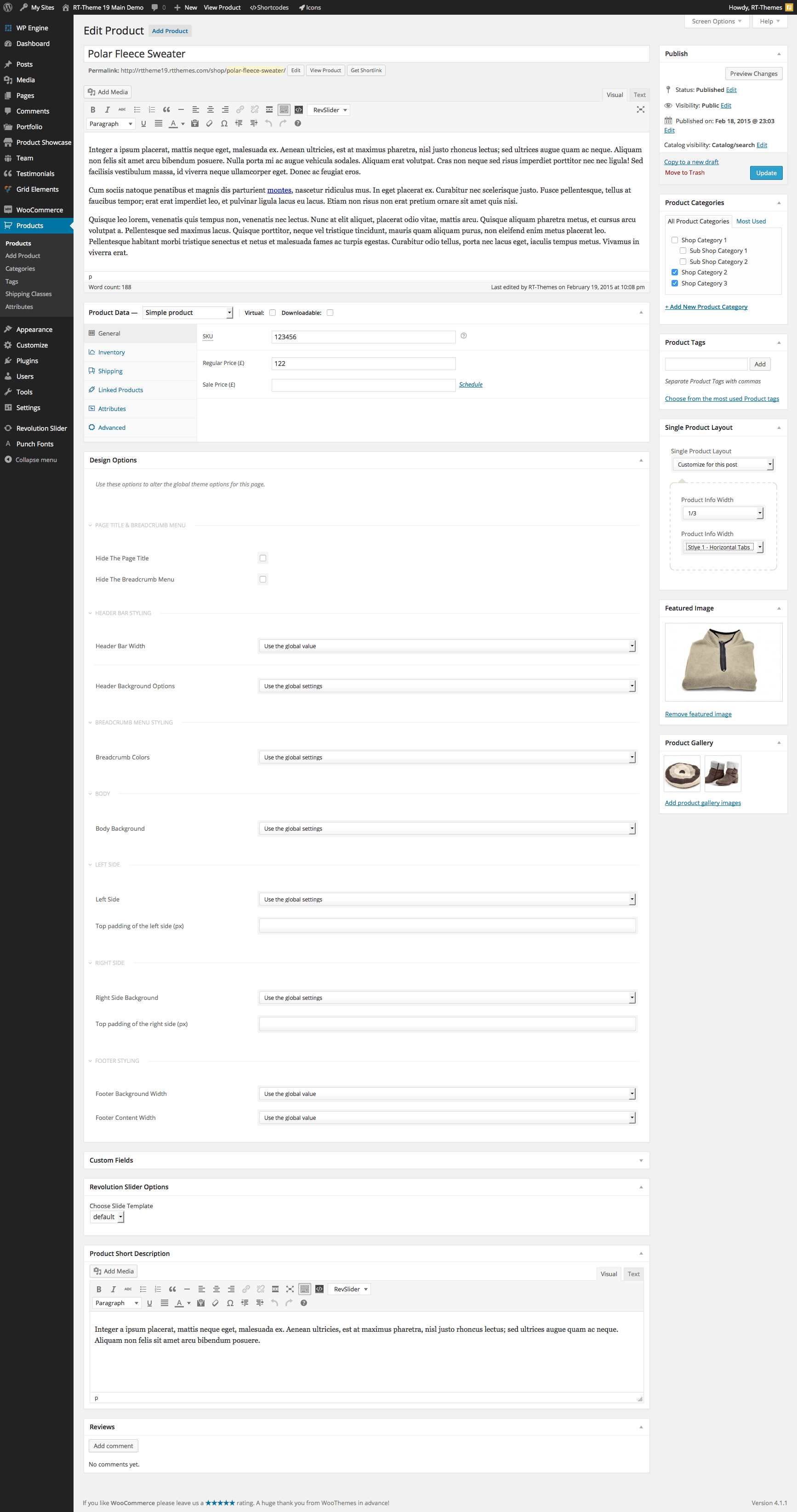
I have a question about concept of catalog and shop – As one can see, the catalog is showing prices and info, which can be same as Shop articles. Is there any connection between catalog content and shop. Or is this just an option, using catalog or shop. If both is present, price at catalog can be switched off, or just ignored? And is structure and design for shop designed like catalog, or even same same?
Hi,
They are two different tools that using the same design. The price etc. is optional on the catalog ( Product Showcase ) and it depends according the product type on the shop ( WooCommerce plugin )
Both tools are pros and cons. If you want to have an online product catalog for a detailed product presentation then use Product Showcase. But if you’re planning to sell the product online then go with WooCommerce. The catalog has a couple of more option for the single page and bit more flexible than WooCommerce single pages in the theme.
All screenshots http://rttheme19.rtthemes.com/admin-panel/
Edit Product Showcase product http://rttheme19.rtthemes.com/wp-content/uploads/sites/5/2015/03/edit_product_showcase.png
Edit WooCommerce product http://rttheme19.rtthemes.com/wp-content/uploads/sites/5/2015/03/edit-product.png
Please feel free to ask if you have any further questions. Thank you for interesting in our themes.
Best Regards