84 comments found.

Hi ! I can’t find my demo.xml file. Where do i have to search ?
Hi,
Please read the help documentation; http://help.wp4life.com/2014/08/20/where-is-the-help-documentation/
If you still have a question; http://themeforest.net/item/oriel-responsive-interior-design-wordpress-theme/11160898/supportHello – Some of the pictures in the portfolio galleries are turning sideways or upside down when being viewed on a tablet or iphone. Do you know how to correct this? Thank you!
Hello, I would like to buy theme, but first I want to ask: is it child theme available and is it easy to customize? Best regards Sari
Hi,
You can use the child theme to customize the theme;
http://help.wp4life.com/2013/11/13/how-to-translate-a-wordpress-theme/There is a demo xml file in the download. You can use it to upload the demo content to your website with ease. If you need a feature which you don’t see on my demo, you may need to buy a customization service from Envato Studio after purchasing the theme…
Hello, I would like to know if I could add bookmarks on galleries pages. Etc: I have 50 photos and I would like to separate 25 photo for each pages. It is possible? Thanks
Hi, I replied to your email.
Hi, if I buy the theme, will it look exactly the same as your demo? if not, would you help to program it so it looks the same?
Hi,
There is a demo xml file in the download. You can upload it to your website ( pages,posts,menus etc. demo images are not included in the download). If you are an unexperienced WordPress user, I suggest you to buy a theme installation service from Envato Studio after purchasing the theme; http://studio.envato.com/explore/wordpress-installation
Demo installation is not included in item support; http://themeforest.net/page/item_support_policy#whats-not-included-item-support
thanks for your reply, for the contact page, is it possible to add images on it? as now it only has a map
It is a standard wp page with a map and a contact form 7 shortcode. You don’t have to use them. It is only a sample.
I see, If I want to use the page design but I wish to add some images, is it easy or you can guide me?
Hello I am very keen to buy this theme, but I just need info on the contact form before I make a purchase, thanks
no reply?? Makes me worried about buying this
Carousel navigation button for out partner, testimonial, and our team seems not responsive. Auto play is woking but when I try to move forward or backward manually, I couldn’t do that. Please guide me how to make this navigation button to work. Thanks
1) I don’t see any problem on my demo website. Carousels are responsive. Also you don’t need to use arrows on touch devices. Just touch+drag to change the item. http://www.tecs.jp/seg_manual/kalos/img/touch/touch_drag_2x.jpg
2) Your item support is expired; http://themeforest.net/page/item_support_policy#whats-included-item-support
So, if you have any other question, you should renew your item support and you should use the contact form on the support page; http://themeforest.net/item/oriel-responsive-interior-design-wordpress-theme/11160898/support
Could you provide your live example .xml file please, so I can use it as my website template?
Hi,
There is already a xml file in the download. Please read the help documentation; http://help.wp4life.com/2014/08/20/where-is-the-help-documentation/
If you have any other question; http://themeforest.net/item/oriel-responsive-interior-design-wordpress-theme/11160898/support
Hi! Can I put Numeric List in columns? Thank you
Hi,
Yes, you can but it may not look well in a small column. It is designed for large columns.
And how can I do it? I have tried it, but I can’t. Thank you!
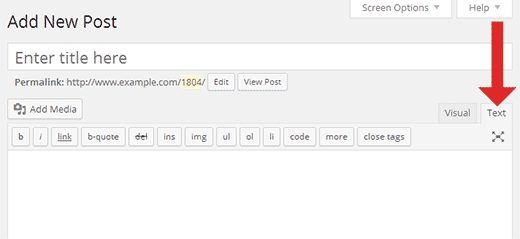
Just add the numeric list shortcode into a column shortcode…; https://wordpress.org/plugins/column-shortcodes/faq/
Use the text mode of the editor during editing the codes;
http://cdn3.wpbeginner.com/wp-content/uploads/2014/07/wp-text-editor.pngCan I send you images?
Hello again!  Where can I change “read more” in the blog? And I would like to remove author. Thank you!
I have done it! Thank you very much!
Hello! I would like to change “previous” and “next” in Projects, where are theme? I woul like to write “anterior” and “siguiente”. Thank you
You should translate the theme and oriel features plugin; http://help.wp4life.com/2013/11/13/how-to-translate-a-wordpress-theme/
If you have any other question, please use the contact form; http://themeforest.net/item/oriel-responsive-interior-design-wordpress-theme/11160898/support
Hi! I need to put a link in the footer. How can I do it?
Thank you
When my site is rendered using internet explorer… the entire left side menu bar is shifted down below the content of the page. This leave a huge blank area in the menu bar next to the content.
Also, I have a touchscreen laptop, I can use my finger to swipe and move the carousels, for instance “partners’ but the controls below that you click on to move the carousels do not work.
My site is jkbremodeling.com
Also, when the site is viewed on a tablet, the logo isn’t responsive so it bleeds over into the header on the right side.
Thanks for your help…
I think there is a problem on your explorer settings because I don’t see any problem on explorer or on any other browser (also make sure that you are not using ie8…); http://postimg.org/image/56885g48l/
I also checked your website on an ipad and on a samsung s4 phone. There isn’t any problem on them too. Carousel navigation is working properly and your logo looks normal.
I am using IE 11… what settings would cause this problem? Is there some way for me to send you a screen shot?
Also… the controls for the carousels DO NOT WORK in chrome or IE…
Thanks, Heather
There may be a problem on the explorer security settings. It may block javascript.
As I said I checked your website on two different computer (one of them is windows other one is mac) on all major browsers (ie,firefox,chrome,safari) and I don’t see any problem on carousels or on any other thing. Everything is working properly. It should be related to your touchscreen laptop. Try it on another computer.
The sidebar still isn’t showing until below the content… can I send you a screen print? If it doesn’t work on this laptop, doesn’t it make sense that it probably doesn’t work on other laptops as well?
Maybe this helps figure this out… your example live theme looks fine in my IE http://themeforest.net/item/oriel-responsive-interior-design-wordpress-theme/full_screen_preview/11160898 IF the frame is around it…. BUT as soon as I click “remove frame” the navigation shifts down so that it doesn’t start until below the body.
Here is a screenshot of the missing sidebar…
http://jkbremodeling.com/sidebarmissing.htmlThis is what I see; http://postimg.org/image/gizy89tv1/
I don’t want to repeat myself. I don’t see any problem on your website or on my demo. There should be a problem on your browser or on your computer.
If you don’t believe me you can test your website on https://www.browserstack.com
I don’t want to repeat myself either… Here is a link to what I see…
http://jkbremodeling.com/sidebarmissing.htmlwhich browser setting would cause the problem with the sidebar?
Thanks…
I don’t know. It can be anything.
If you have any “other” question, you should use the contact form on the support page.Thanks.
http://themeforest.net/item/oriel-responsive-interior-design-wordpress-theme/11160898/supportok, thanks
How I know the number of flaticon that I need?
Please read the help documentation (Shortcodes);
http://help.wp4life.com/2014/08/20/where-is-the-help-documentation/Hello, Where Pictures ? http://i.hizliresim.com/JnVP2Y.png
Appearance->Theme Settings->Footer
Please read the help documentation;
http://help.wp4life.com/2014/08/20/where-is-the-help-documentation/Hello egemenerd, Do you address the demand for support ?
The answer came by e-mail
Okey THANKS
Hi egemenerd,
“Update History – Version 1.3 January 8th, 2015” – is already the year 2016
Apropo, verry nice theme, good work!.
I think to buy it for my customer.
Hi,
Thanks for pointing out this mistake. I edited the date.
Hi, My website link http://ri.co.ae/
1)Website is not well on mobile resolution specially menu. 2)I want to remove this http://prntscr.com/9faxw5 white color background from slider. please solve this issues asap.
Please tell me one more thing homepage slider images size http://ri.co.ae/ my images size is 1100X380.On different resolutions homepage slider images stretch tell me solution asap.
Hi,
1) I don’t see any problem on your website. Try it on another device (and browser). The problem may be related to your mobile device (or your browser).
2) Appearance->Theme Settings->Homepage Slider->Remove Transparent Bg
3) It is a responsive slider. There isn’t any specific image size. Your images are too small for the slider. I used 2000×1000 px images on my demo
Please read the help documentation;
http://help.wp4life.com/2014/08/20/where-is-the-help-documentation/If you still have a question, you should use the contact form on the item support page;
http://themeforest.net/item/oriel-responsive-interior-design-wordpress-theme/11160898/supportI do not know why.. somehow the main font was changed.. How can I main font back as default font? also, I cannot see the icon as well. you will see three icons on front page at www.bnkworks.com. looks like white square into red round.
Hi,
1) Go to theme settings, delete everything on the following fields and click save changes; http://postimg.org/image/c7d1q4eiv/
2) There is a server error on your website. You should contact your hosting provider; http://postimg.org/image/ifydjpc3r/
Pre-sale ?... can the gallery DV Gallery Plugin support ANY type of watermark plug-in. I will need my images with this. can your theme/plug-in support this with any third party?
Sorry but I don’t know, I didn’t test any watermark plugin with dv gallery
Hello, I am interested in your theme just need to know do you have PO file for translating ready because I don’t want to use WPML plugin? Regards
Hi,
Yes, there are .po files in the theme and in the plugins which are in the theme package;
http://help.wp4life.com/2013/11/13/how-to-translate-a-wordpress-theme/Hello How can I move the red box in the middle of main slide to bottom of main slide? And Also I would like to slide change smoothly.
Hi,
1) Sorry but there isn’t any option like that
2) All available slider settings are at Appearance->Theme Settings->Homepage Slider
If you need a customization; http://help.wp4life.com/need-a-customization/
Can I add top menu bar ?
Like this site, I would like to add contact number on the top menu http://www.kbrkitchenandbath.com/deals/kitchen-remodeling-va.html?gclid=CMLCx-3GjckCFYkBaQodNE0K_gSorry but there isn’t any feature like that. As I said you can buy a customization service to add features which are not included in the theme;
http://help.wp4life.com/need-a-customization/Hi, I have created DV Gallery but i want to show only pictures not title or gallery info when i remove gallery info and title it display like http://prntscr.com/91alps I want to remove grey box or decrease space between two rows. Please solve this issue asap.
Hi, I want to remove title on Gallery mention in Link http://prntscr.com/91gqz9
Hi,Please tell me when i upload my residential images it shows images descending order but i display in ascending order website link http://ri.co.ae/grid-style/ 2: My categories also show descending I want to show asending order.
1) There isn’t any option to remove titles
2) You can use the following plugins;
http://help.wp4life.com/2014/02/14/how-to-change-orders-of-my-gallery-items-easily/ https://wordpress.org/plugins/taxonomy-terms-order/If you have any other question, you should use the contact form;
http://themeforest.net/item/oriel-responsive-interior-design-wordpress-theme/11160898/support