201 comments found.

Hi There,
Do you have HTML5 theme, without wordpress?
Thanks
Anil
Hello, no unfortunately there’s no ready HTML version. However we can provide you with PSD files with theme purchase you can use to code HTML template with.
I can’t install the demo. HELP!!!
In theme options there is no button “install demo”
Dear Pvanrossum,
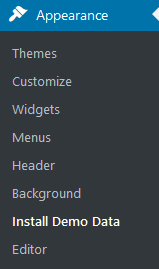
If you want to make the theme look exactly like the demo you should install the dummy data, there should be an option in Theme Options -> Install Dummy Data in your admin: http://kidsplanet.ancorathemes.com/doc/images/install-demo-menu.png . Please note that the dummy data will overwrite the existing content on your site.
If you are still experiencing any issues with that, please contact us via ticket system. It will be faster and more effective. Most probably, your request requires the access to the website, so comments are not good for that.
Just click on banner “Support Sys” on the item page to get some qualified help from our support operators. Enter your purchase key and fill out the ticket form.
All information on our support team working hours is available in Support section on the theme page.
Thanks,
Hi, I’m working for a client using the ‘Kids Planet’ theme, apparently, the VC frontend editor just keeps loading and I can’t continue working on the site. Can you please update the VC for the theme so we can get back to working as the site urgently needs to be launched. If the issue has nothing to do with the update, can you please tell me what I can do to make the frontend editor accessible?
Hello. Please submit a ticket at https://ancorathemes.ticksy.com with plugin request, our support team will gladly provide you with link to download. Thank you.
Hi, I already tried submitting a ticket but it won’t submit as they’re saying that the support has already expired. Is there any way I can have the plugin updated without renewing support?
Please submit the ticket at Presales category – it should not ask you for key. Thank you.
Thanks a lot, they have already sent me the download link.
Sounds good! We are glad it has been sorted out!
Best Regards,
Hi, visual composer maps no longer working as Google stopped maps api without an api key from june 22nd…. what is the workaround for this please as maps no longer work in this theme?
Hello, the theme will be updated soon, we are working on this. Thank you.
Hi, my theme is not fully stretching, I have been told its a Visual Composer issue and I need to ask what settings you have to do to stretch the background image etc
Hello. Please check the Row elements settings – stretch option. Also make sure your layout in Theme Options is not boxed, but fullpage or wide. Another hint – if this issue came with WP update – check if there extra plugins installed with new version (e.g. Mega menu can cause the issue – deactivate it). For further support please submit a ticket at https://ancorathemes.ticksy.com once required. Thank you.
Hi, How do you change the number of subcategories displayed in woocommerce? It is currently showing one huge image per row instead of 3 or 4?
Hello. Please check settings in Theme Options -> Woocommerce -> Shop columns. http://prntscr.com/b5ozov
For further support please submit a ticket at https://ancorathemes.ticksy.com once required.
Hello. Like this theme but it’s been bug. Main issue is that after I updated to the latest version but theres only one header option?
Hello. There’s no bug, the extra headers were just excluded. If you require the ones, please get templates\headers\ folder from previous theme version and use it in new one.
Thank you.
This worked! Thank you! didn’t think you’d have made it so simple to use them! Great!
Hello. I really love this theme and I’ve been using it very happily until the latest Godaddy update. Since that update my visual composer has not been working properly – even though I updated it to the latest version – and I cannot do anything without VC add-on, which is very frustrating. Up to now, I have been using it so well that I didn’t feel the need to extend my support license, and now it has expired and I really don’t want to pay that much for a support license that I shouldn’t even need as a customer! I don’t know how long it will take for you to fix it with these new updates, or if you’ll ever fix it, but I’m about to give up on this theme.
Hello. If you require VC plugin new version, please submit a ticket at https://ancorathemes.ticksy.com (presales category will work for you if support expired). Thank you.
I completed the form and clicked on “submit” but it didn’t accept my ticket, stating that my product license has expired. How do I contact the presales team?
Please submit a ticket in category of Presales Questions. Thank you.
How do I add the logo?
Please check Theme Options -> Header -> Main logo section.
I have purchased your theme and im using homepage 2 as my homepage. However, every time i choose to hide the side sidebars and I update the changes, it goes back to how it was and the sidebar won’t go away. What should I do?
Please submit a ticket at https://ancorathemes.ticksy.com and elaborate on the problem. Thank you.
I can’t edit the address on the contact page. Where do I go to change “123, New Lenox Chicago, IL 60606” ?
Please find that text in the Appearance -> Widgets
Hello. I am loving working with your theme. I have one small problem though: when I turn on Blog titles in Theme Options > Global Options > Blog and Single > Single Page they are showing on all pages, but when I turn them off here they don’t show on single blog pages at all?
If I go into Theme Options > Blog Options > Blog and single > they display as being turned on, but are not showing up in the single blog post pages unless I turn them back on in Global Options!
Many thanks. Abby
Hello Abbystorey !
Thank you for choosing our theme.
If you turn off Blog titles in the => Theme Options > Global Options > Blog and Single > Single Page => they don’t show on single blog pages at all.
Please, contact us via ticket system. It will be much faster and more effective. Most probably, your request requires access to the website, so comments are no good for that.
https://ancorathemes.ticksy.com/Just click on banner “Support Sys” on the item page and get qualified help from our support operators. Enter your purchase key and fill out the ticket form. All information on the work of our support team you will find in the Support section on the theme page. Thanks
Best Regards!
Thank you Eugene, I have submitted a ticket but it wouldn’t accept my purchase verification so I had to submit it as a ‘pre-sales’ enquiry. Hope this doesn’t cause a hassle!
Thank you, we’ll check the one shortly. It’s ok even if it’s presales one.
Hello there, please I rebuilt my website and Visual Composer key seems not be working, I am not able to activate the license.
Please submit a ticket at https://ancorathemes.ticksy.com to get provided with a link to updated version of VC plugin. Thank you.
I am getting support code expired
pls I need solution to this as soon as possible as I cannot do anything on the site
I cannot activate the plugin downloaded from your site getting this error “Invalid data. Check your information or open support ticket at support.wpbakery.com.”
Hello. You can submit pre-sales ticket with no purchase code; please do to get helped asap. Thank you.
Hello, I have imported the dummy data and everything seems to be fine. But when I look in the backend it the visual composer element of the page seems empty. If I click classic mode I can see that the elements are there but i just can’t edit them as you normally can in Visual Composer. Could you please help me fix this? Thanks.
Hello, please submit a ticket at https://ancorathemes.ticksy.com to get another version Visual composer plugin to reinstall one.
Thank you.
Does the Kids Planet theme include a license for WPBakery Visual Composer?
Hello WebLabs2_0 !
Thank you for your interest in our theme.
The plugin are included in the theme but the license key you need to buy separately.
Best Regards.
If you’d like to get the newer version of plugin, please submit a ticket at https://ancorathemes.ticksy.com. Thank you.
Hi,
can you give me advice please? I have problém with hompage. I would like to have last news from blog like this: http://screencast.com/t/yyBuvc9Kr5 , but I cant set it. I see it in visual composer, but not on the homepage.
The second problem I have with menu. I am not able to set menu like this: http://screencast.com/t/N3pnsNQkUz8E
Thanky you
Hi, Please submit a ticket at https://ancorathemes.ticksy.com with this request to get helped. Thank you.
Hi,
I have problems, when I try to install two plugins: Visual Composer and WooCommerce for theme Kids Planet.
I see information: “Fatal error: Allowed memory size of 67108864 bytes exhausted (tried to allocate 1048576 bytes)...” or something similar. Can you help me please? Where is the problem?
Vanda
Hello Vanda,
This error related to your server settings, please contact your hosting provider to increase memory_limit value for your site.
Hi! I’ve a problem with Services style. I choose a different style in service (Homepage) but it’s ever the same. And is not the style of the default homepage (Style 3). Thanks in advace!
Please submit a ticket at https://ancorathemes.ticksy.com with all the details to get helped with this.
How difficult would it be to add a membership plugin, into this theme. And if so is there one you would recommend?
Hello. It depends on plugin you will install. Unfortunately we cannot recommend any; hope you can find some fits your needs among https://wordpress.org/search/membership
How do I install the demo data? Sorry for the stupid question, but I’m new here…
Forget it! I got it!!!! OMG, so happy!!
Hello. Thank you for update. Glad, you have found it. In case tech-support required, please feel free to submit a ticket at https://ancorathemes.ticksy.com