328 comments found.
Hello i have a question, i want to use other service for the fonts of my website that by default is OPEN SANS, but i want to use other font that is available in the service of http://www.typography.com/cloud/welcome/ its possible to use the fonts of this service? because i want to be sure that shockmag theme will let me do this, because i need to but a monthly subscription to use the font i want, and i want to be sure first that it will be possible, thanks !!!
Hello,
Yes, disable the custom front from within Theme Panel > Fonts page and you’ll can try to use alternative solutions for webfonts.
Follow their instructions – http://www.typography.com/cloud/how-it-works/
You might also will need a helper tool like this – https://wordpress.org/plugins/wp-header-footer/
Regards, Nat
THANK YOU for the fast answer, i appreciate this, but i am having a similar problem that i had, i cant change other font even using google fonts, i only can use open sans, i tried to use open sans condensed but is not working, i can only use open sans, not other font, what can be? I recorded a video for you : https://drive.google.com/file/d/0BzG1myyWZXL_ZHAtUkY0bmVlaEE/view?usp=sharing
please i want to be sure everyting will work because i will pay for this service in typography.com but i need to be sure that will work fist. Also i found as i told you OPEN SANS CONDENSED in google fonts and i liked but as i showed you in video is not working, also i have tried with other fonts and only open sans seems to work in my website. I really appreciate your help. thanks
Hi,
I’ve checked some source of your website. Such issue exists because of vary kinds of optimization. Disable those plugins and restore default functionality (wp actions, script registrations etc.). That optimizations are recommended after site development only.
Also I see unexpected registered fonts.
Regards, Nat
I AM SORRY for bother you again Nat, but nothing worked, i disabled almost all plugins fromy my webiste, there are only plugins that make the theme works good that come with the package, but not only times new roman is showing and the same, i cant change the font, even if i select opens sans i cant : http://www.imparable.tv/
i am sending you to info@strictthemes.com my login to wordpress if you have some time to check what is going on i would be very thankfull!!!
thank you
Hi,
I’ve checked your website. It seems you’ve installed your custom font correctly. Gotham font is used on your website right now.
As for google fonts, the issue is caused by third-party plugin or the theme customization you’ve made. In case of you’d like to use google font on your website you have to restore original theme files.
Let me know if you need more assistance.
Regards, Nat

Hi,
Thank you for your feedback.
Please, remove this part – http://c2n.me/3za4a1r.png – It mustn’t be there.
Regards, Nat
Thank you for your response. I removed that part but the background image wasn’t appeared. Is there any other solution?
Hi,
Please use this way:
.header-5 #header-holder {
background-image: url(http://speaq.jp/wp-content/uploads/2016/06/Shockmag-header-image.png);
background-position: top center;
background-repeat: no-repeat;
background-color: #000000;
}
Regards, Nat
Thank you so much! It works.
Great. You are welcome.
Let me know if you need more assistance.
Rate our work – http://themeforest.net/downloads It will take 5 seconds.
Regards, Nat
how to setting this menu ? https://i.imgur.com/kAbA4NK.png i want add more link
Hi,
I’m not sure. Please let me see full screenshot.
Regards, Nat
at facebook button, i want add more button like youtube, how ?
Hi,
Enable social icons and drop links on social profiles from within Theme Panel > Layout > Header tab – http://dl1.joxi.net/drive/2016/06/20/0012/0377/807289/89/3cde7f71bd.jpg
Regards, Nat
iframe not working on our page, why?—> https://www.blazersland.com/sportsoverdose/
Hi,
It’s about third-party source. There is no content in that – http://c2n.me/3yW1Mi4.jpg
You need to check around the third-party site you’re trying work with.
Regards, Nat
Sure there is, this is the code that is saved on that page—so why is it being stripped when the page is published to the live site?
<iframe style="width:300px;height:460px;display:block;" scrolling="no" src="http://www.sportsoverdose.com/team-widget/nba/portland-trail-blazers?size=300" frameborder="0"></iframe> <div class="link" style="width: 300px;"> <div style="border:solid 1px #ccc;padding:5px 10px;background:#f1f1f1;font-size:11px;font-weight:bold;color:#105daa;font-family:arial;line-height:120%;"> <a href="http://www.sportsoverdose.com/nba/portland-trail-blazers" style="display: block;">Portland Trail Blazers Rumors & News</a> </div> </div>
Hi,
Probably it’s because of the auto-formatting, you should avoid breaking lines. Whole code should be on one line.
Regards, Nat
It is on one line - your reply is no help - does your theme support iframes? It appears that the contents are being stripped out once the page is posted live.
Hi,
I’ve checked the iframe and there is no content within it. For a some reasons the content wasn’t delivered on your site. I’ve tried to use your code (taken from source of your page) – http://pastebin.com/ww8tfJtZ – and that works fine on demo-site – http://c2n.me/3zufSPY.jpg Try to insert the code – http://pastebin.com/ww8tfJtZ – using the Text-mode – http://c2n.me/3zug1WY.png
The text formatting is the default function which comes from WordPress core. The theme doesn’t handle such functionality. But some third-party scripts are available for tweaking standard formatting process.
Regards, Nat
That is exactly how I have the code saved - this makes absolutely no sense as to why it will not showup - it might have something to do with our HTTPS vs the iframe’s HTTP
Hi,
Yes, HTTPS protocol assumes all assets must be delivered through HTTPS only. Otherwise it will bring a vary kind of conflicts.
Regards, Nat
all new post fail to center the all image inside the post, how to fix it look this https://i.imgur.com/2hhGkKR.png and my post http://megachannelz.com/sejarah-si-bongkok-pahlawan-johor/
Hi,
You can drop this line on Theme Panel > Style > Custom CSS:
.wp-caption.aligncenter,
img.aligncenter {
margin-left: auto;
margin-right: auto;
}
Regards, Nat
not working
I’ve checked the code works fine – http://dl2.joxi.net/drive/2016/06/07/0012/0377/807289/89/354473f86f.jpg
Make sure you’ve aligned images to the center http://dl1.joxi.net/drive/2016/06/07/0012/0377/807289/89/974b672b3a.jpg
Probably it’s about cache settings.
Regards, Nat
that is not my post, look my website, is still not working, im follow all your setting
It works on your website too – http://dl2.joxi.net/drive/2016/06/08/0012/0377/807289/89/7a5fda3247.jpg
Regards, Nat
Hi. I need that in the Post (when use full page, without bar) the content keep boxed, not fill all the page, can i do it with percentage?
or if isn’t posible, I need when i use the columns Shortcode, the typography doesn’t become smaller.
Thanks
Hi,
You can drop these lines on Theme Panel > Style > Custom CSS:
@media only screen and ( min-width: 1320px ) {
.single .sidebar-position-none #content-box {
width: 80%;
}
}
Regards, Nat
Hi Nat, i do it and clean all caches but doesn’t work. i try the code to remove the next-prev on post but i don’t know what happens. (i’m working on a 1366*768 Laptop and my public have similars resolutions)
And another question, the search bar, doesn’t work since last update.
ohh sorry it works, but now i need ther go centered, and fix the search problem.
Hi,
Let me know URL of your website and I will take a look.
Regards, Nat
1pcgamer.com
i try with margin: 0 auto; to center but dont work
1 – This code:
#comments-wrapper {
max-width: 80%;
padding: 25px 0;
}
2 – Use search widget on the Top Sidebar
Regards, Nat
but coments wraper is for comentes? i need it for all the content
Use the two?
@media only screen and ( min-width: 1320px ) { .single .sidebar-position-none #content-box { width: 70%; } }
pre_next_post { display: none; }
comments-wrapper {
max-width: 80%; padding: 25px 0;
i like the comments bigger, but what i need is to center the box content that i reduce with this code
@media only screen and ( min-width: 1320px ) { .single .sidebar-position-none #content-box { width: 70%; } }
I need to center that
ohh, the margin: 0 auto works. Thanks
Great. You are welcome
Regards, Nat
hi, how to remove this menu ?? http://prntscr.com/b932gh
Hi,
Drop this line on Theme Panel > Style > Custom CSS:
#pre_next_post { display: none; }
Regards, Nat
NOT WORKING
NOT WORKING, MEGACHANNELZ.COM
Hi,
It works fine – http://dl1.joxi.net/drive/2016/05/30/0012/0377/807289/89/c40fb4e7dc.jpg
Regards, Nat
hi, how to remove this menu ?? http://prntscr.com/b932gh
First, just want to say what a great theme. Visual engagement and customization is phenomenal. Hope you can help with several issues.
1) I have at least six posts each stickied from my slider categories (Sports, Music, Culture) and can only get two to display at a time. I’ve tried removing and re-ordering the category names, but even if I just use Sports and Music, posts categorized as Culture are the only ones that appear under Music. I know in a prior comment you noted that sometimes the issue was having enough posts stickied in any given category, but I believed six was sufficient for each category before bringing up the issue.
2) I’ve noticed from time to time that my primary sidebar overlaps with images further down the page in the “You Might Like” section, and even is overlapped by the bottom four custom bar widgets. I’ve noticed sometimes on the slider that the bottom-right hand story is cut off at times as well.
3) I saw a recent comment asking for help on pull quotes, but when I tried that code, it was all aligning to one side or another rather than simply indenting.
My site is located at PressRowSports.com. Appreciate all your help!
Hi,
Thank you for your feedback.
1 – I’ve checked your website and sticky posts look fine. If the mentioned issue still exists please make sure you’re using a valid slugs of preferable categories. In case no luck please let me an access to WP Admin (through the contact form – http://themeforest.net/user/strictthemes). I’ll take a look.
2 – Please let me URL of that posts. I’ll take a look,
3 – The original concept of pullqoutes assumes alignment, so if you need to have a pullquote aligned by center you can do it by this way:
<div class="pullquote pullquote-center">Text Goes Here</div>
And drop these lines on Theme Panel > Style > Custom tab:
.pullquote-center {
float: none;
margin-left: auto;
margin-right: auto;
}
Regards, Nat
Hello, lately i’ve faced few bugs with Shockmag.
For example – If an image in post with 400×400 px dimension is aligned to center, it will still show up on the left side and not center.
Second bug i found on pull quotes.Even though i alight the quote to right, it will still end up showing on the left when the post is published.
Is there a shortcode to add Videos (Youtube / Vimo etc).
Can you please tell me CSS that will enable square ad (besides title) to show up in mobiles?
Hi,
1 – You can drop this line on Theme Panel > Style > Custom CSS:
.wp-caption.aligncenter {
margin-left: auto;
margin-right: auto;
}
2 – Use the pullquotes shortcode by this way:
[pullquote align=right]Text Goes Here[/pullquote]
3 – By default WordPress allows to insert YouTube videos by pasting URL into the body of post.
Please note you have to have a valid support period for further support assistance.
Regards, Nat
1. CSS to Center image does not work., Images are still aligned to left and not center. You can check out at http://www.techandroids.com/acer-liquid-zest-plus-5000mah-battery-13mp-tri-focus-camera-launching-july/
Hi,
That one works:
.wp-caption.aligncenter,
img.aligncenter {
margin-left: auto;
margin-right: auto;
}
Regards, Nat
thanks, last one did work.
Sorry to disturb you again.. I just noticed that in Image Post, the featured image is aligned to left instead of center. How to fix that?
very nice theme, i cant tested the search filter in your demo? thanks
Hi,
Thank you for your interest.
We’ve dropped the Search widget on the Top sidebar so you can test it – http://dl1.joxi.net/drive/2016/05/24/0012/0377/807289/89/3a378c5708.jpg
The page with search results – http://strictthemes.com/shockmag-1/?s=lorem
Regards, Nat
Hi,
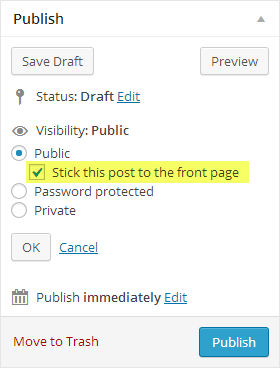
You need to enable Sticky posts from within Theme Panel > Blogroll – http://strictthemes.com/shockmag/how-to-set-a-slider-on-frontpage-as-on-live-preview/
And then mark some posts as Sticky – http://strictthemes.com/wp-content/uploads/2013/12/doc_featured_posts.png
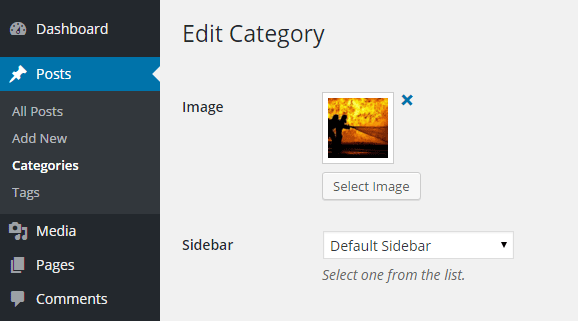
Set an images for preferable categories to display on the slider – http://strictthemes.com/shockmag/wp-content/uploads/sites/19/2015/09/category-1.png
Please take a look the manual how to make build website like on Live Preview:- http://strictthemes.com/shockmag/how-to-build-a-site-from-scratch-like-on-live-preview-3/
- http://strictthemes.com/shockmag/?s=demo
Regards, Nat
Let me know URL of your website and I will take a look.
Regards, Nat
megachannelz.com
You can drop this line on Theme Panel > Style > Custom CSS:
.post-t6-yes-thumb .post-t6-details p { background: none; }
Regards, Nat
is not working, can send me screenshot
is not working, can send me screenshot
damm over 10x try.. now is working
why is not working in chrome, other browser is ok. how to fix it
Please use this line:
.post-t6-yes-thumb .post-t6-details p { background: none !important; }
Regards, Nat
still not working i need screenshot
Hi,
I’m not sure which screenshot you are asking for – http://dl2.joxi.net/drive/2016/05/24/0012/0377/807289/89/dadaca440a.jpg
Let me know an access details (to your WP admin) through the contact form – http://themeforest.net/user/strictthemes I will take a look.
Regards, Nat
done sent wp admin
Hi,
I’ve checked your website using Chrome and found that code works fine, take a look the screenshot – http://c2n.me/3yqZBuE.jpg
Regards, Nat
mybe my chrome problem, tq
Probably it’s about cache on your browser.
Regards, Nat
Hi,
You need to install WP-PageNavi plugin which is listed as recommended.
Regards, Nat
Hi,
If you’re using https protocol on your website, then all third-party assets must be loaded by the same protocol.
Regards, Nat
i have shock mag theme, but i like to use news template at shock mag theme, can u show me step by step to make it please
Hi,
Please follow these steps – http://strictthemes.com/shockmag/how-to-build-a-site-from-scratch-like-on-live-preview-3/
Regards, Nat
i have shock mag theme, but i like to use news template at shock mag theme, can u show me step by step to make it please
Hi,
Please follow these steps – http://strictthemes.com/shockmag/how-to-build-a-site-from-scratch-like-on-live-preview-3/
Regards, Nat
Hi,
If you’re using https protocol on your website, then all third-party assets must be loaded by the same protocol.
Regards, Nat
fail to upload theme, can give me other way to upload this theme ??
Hi,
You need to upload the theme zip only, not whole package. Take a look the instruction – http://strictthemes.com/documentation/getting-started/installation/
Regards, Nat
Pre-Sale Q: how your theme will handle RTL language website? I want to use it for an Urdu website, so want to know if I’ll need any further customization to make it Right-to-Left?
Thank you
Hi,
Thank you for your interest.
Currently it’s LTR only. By default the theme has been created for LTR-languages. RTL-languages aren’t supported at the moment.
Regards, Nat