143 comments found.

Does Haswell come with all of the one page and multipage templates that it shows?
Hello
Thanks for your interest. Yes, all the pages that are in live demo are included in this HTML template Haswell.
Kind regards
I have trouble with google maps API with your theme. I can get it to show my map and a marker, but no matter how I try the marker is not draggable. I even tried not using any of the google maps part of your theme (i.e. created my own #map style, created a separate div and separate script for initializing the map and adding a marker + draggability with event attached to it). Said maps code on a vanilla HTML page created just for it works just fine and I get a map and can drag the marker getting an alert box when I drop the marker to a new location. But Inside your theme the map is drawn, but the marker is not draggable. Ideas?
Hello
Thanks for purchase.
Google update 22.06.2016 requires API keys to be used from now on. For more information please read this post – https://googlegeodevelopers.blogspot.com.by/2016/06/building-for-scale-updates-to-google.html
It’s a Google requirement. You simply need to input an API key for your Site Google Maps widget and it’ll work 100% as desired. To create an API key please navigate to this page – https://developers.google.com/maps/documentation/javascript/get-api-key and press the blue “Get a Key” button and follow the prompts.
The Google Maps HTML code:
<div data-address="555 California Street, San Francisco, CA" id="google-map" />
Replace the value of attribute data-address with your own address.
Please don’t forget to connect the necessary Javascript files.
  <!-- GOOLE MAP
    !!! To setup Google Maps, please, see the documentation !!! -->
  <script  type="text/javascript" src="https://maps.googleapis.com/maps/api/js?key=YOUR-API-KEY" ></script>
  <script type="text/javascript" src="js/gmap3.min.js"></script>
Example
Your address – 182 Duke’s Ride, Berkshire, Crowthorne, UK and your API key – AIzaSyDzf6Ghbcv4c4HijOERAmC_j0g2c (this is only example API key, it’s not working)
Change this address
    <div data-address="555 California Street, San Francisco, CA" id="google-map" />
to this address
    <div data-address="182 Duke's Ride, Berkshire, Crowthorne, UK" id="google-map" />
And this API key
  <!-- GOOLE MAP
    !!! To setup Google Maps, please, see the documentation !!! -->
  <script  type="text/javascript" src="https://maps.googleapis.com/maps/api/js?key=YOUR-API-KEY" ></script>
  <script type="text/javascript" src="js/gmap3.min.js"></script>
To this API key
  <!-- GOOLE MAP
    !!! To setup Google Maps, please, see the documentation !!! -->
  <script  type="text/javascript" src="https://maps.googleapis.com/maps/api/js?key=AIzaSyDzf6Ghbcv4c4HijOERAmC_j0g2c" ></script>
  <script type="text/javascript" src="js/gmap3.min.js"></script>
How to change the location marker
You can simply replace the marker ( located images/loc-marker.png) to your file with the same name or can customize the initialization of the plugin for google maps (icon: “images/loc-marker.png” row) to another file in main.js file (see below)
How to change map style (color, line thickness, etc.)
In order to change the map style (color, line thickness, etc.) you need to customize the “styles” settings in initializaion of the plugin for google maps in main.js file (see below)
Google documentation for google maps styles here – https://developers.google.com/maps/documentation/javascript/styling#overview Many examples of google maps styles you can find here – https://snazzymaps.com/
For map in template used Google Maps GMAP3 6.0 Plugin for jQuery, documentation of this plugin and examples you can find here – http://v6.gmap3.net/en/
Initialization of plugin for google maps located in main.js file
Example (initialization google maps plugin is in main.js file)
/* ---------------------------------------------
 GOOGLE MAP
--------------------------------------------- */
var gmMapDiv = $("#google-map");

function initMap(){
  (function($){

      var gmCenterAddress = gmMapDiv.attr("data-address");
      var gmMarkerAddress = gmMapDiv.attr("data-address");

      gmMapDiv.gmap3({
          action: "init",
          marker: {
              address: gmMarkerAddress,
              options: {
                  icon: "images/loc-marker.png" /* Location marker */
              }
          },
          map: {
              options: {
                  zoom: 17,
                  zoomControl: true,
                  zoomControlOptions: {
                      style: google.maps.ZoomControlStyle.SMALL
                  },
                  mapTypeControl: false, /* hide/show (false/true) mapTypeControl*/
                  scaleControl: false, /*hide/show (false/true) scaleControl */
                  scrollwheel: false, /*hide/show (false/true) scrollwheel*/
                  streetViewControl: false, /*hide/show (false/true) streetViewControl*/
                  draggable: true,
                  styles:[ { stylers: [{ invert_lightness: true }, { saturation: -100 }, { lightness: 10 }] } ] /*CHANGE STYLE (colors and etc.) */
              }
          }
      });

  })(jQuery);
}
For map in template used Google Maps GMAP3 6.0 Plugin for jQuery, documentation of this plugin and examples you can find here – http://v6.gmap3.net/en/
If you have any problems, please send me an email
Kind regards
I think you didn’t read my issue. The problem is that a marker while defined draggable isn’t draggable. Try it yourself, set the contact page map marker to draggable and see if you can drag it.
If I understand you correctly, in the page contact.html for map in template used Google Maps GMAP3 6.0 Plugin for jQuery, documentation of this plugin and examples you can find here – http://v6.gmap3.net/en/
Plugin configuration draggable: true, is responsible for the draggable map, ie, the ability to move the map. If the plug-in settings draggable: false, it will be impossible to move the map on the page contact.html
Marker denotes the address and it is fixed at this address, the address is set to contact.html parameter data-address
If you need to have a standard google map controls, you need to remove or comment rows
 .gmnoprint, .gm-style-cc {
  display: none important;!
}
in style.css file
If you need a draggable marker, the standard template is not provided, you will need to customize the template. You need to add a draggable: true param for the marker.
Example
/ * ---------------------------------------------
 GOOGLE MAP
 --------------------------------------------- * /
var gmMapDiv = $ ( "# google-map");

function initMap () {
  (Function ($) {

    if (gmMapDiv.length) {

      var gmCenterAddress = gmMapDiv.attr ( "data-address");
      var gmMarkerAddress = gmMapDiv.attr ( "data-address");

      gmMapDiv.gmap3 ({
          action: "init",
          marker: {
              address: gmMarkerAddress,
              options: {
                draggable: true, /* DRAGGABLE MARKER */
                icon: "images / loc-marker.png"
              }
          }
          map: {
              options: {
                  zoom: 18,
                  zoomControl: true,
                  zoomControlOptions: {
                      style: google.maps.ZoomControlStyle.SMALL
                  }
                  mapTypeControl: false,
                  scaleControl: false,
                  scrollwheel: false,
                  streetViewControl: false,
                  draggable: true,  /* DRAGGABLE MAP */
                  styles: [{stylers: [{invert_lightness: true}, {saturation: -100}, {lightness: 10}]}]
              }
          }
      });
    }
  }) (JQuery);
}
If you need a working example for draggable marker I can send it to you by email
If you have any problems, please send me an email. Emails easier to use for explaining, also it is the policy of envato support.
Please note, that item support does not include: Customization services Installation services
Full terms and conditions of the support you can read here https://themeforest.net/page/item_support_policy
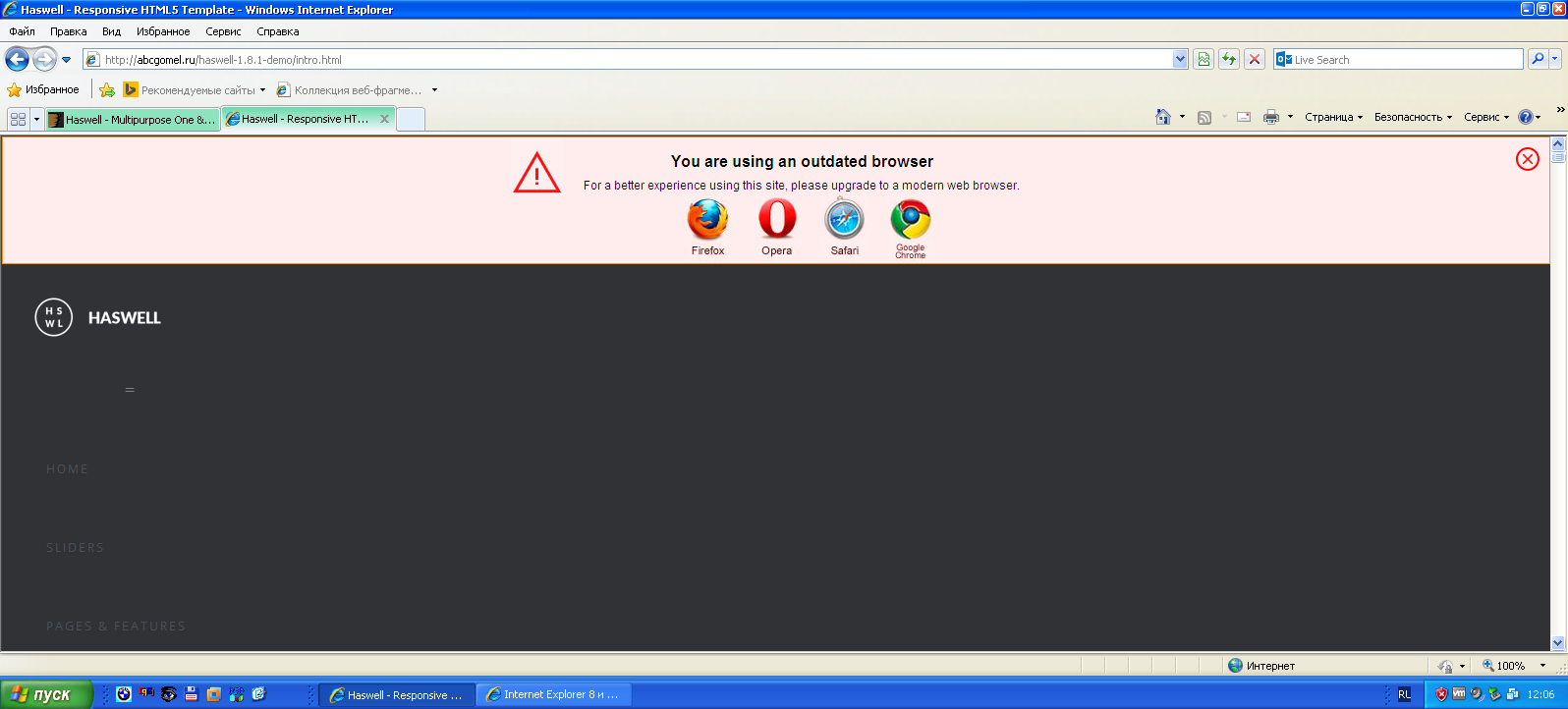
After Update. This Template doesn’t work with IE well. We get the message. If you want a better expierence please use Firefox, Safari or Chrome. What is with the IE users???
Hello
Update did not affect the work with Internet explorer. Everything remains as before
Please note that IE8 is not supported, this is indicated in the template description. IE8 is very outdated browser, even themeforest.net does not support it. Support IE start from IE9 and newer IE. Also supported all modern browsers.
Also in the template presented alert for users who use older browsers, the user receives a message.
Microsoft Edge
http://prnt.sc/e03bub
Hey, where exactly is the about-me.html page? I couldn’t find it in the zip file when I was notified that the site was updated.
Oh, nevermind…
Hello. It’s located where located all template files, in main package, in folder “HTML”. Thanks
Hey, Map is still not working. Even your contact page doesnt work. any fix?
Hello
Thanks for purchase.
This is strange. I just checked, and it works. Google maps works. You can see this in the contact page http://abcgomel.ru/haswell-1.8.1-demo/contact.html or any other pageInstructions for configuring Google maps, you can read in the documentation. Also on the item support page https://themeforest.net/item/haswell-multipurpose-one-multi-page-template/12087194/support page
Contact form also works. Here are screenshotsInstructions for configuring Contact form, you can read in the documentation.
Kind regards
Hi, how can I have a different logo when the site loads to the one in the sticky header? Is this possible please?
Hi
Thanks for purchase.
Unfortunately, I do not quite understand your question. Do you mean, how to replace the preloader (symbol when the page loads)? If yes, for this you need to customize preloader css styles and edit html, insert a preloader picture.
Kind regards
Hi there, no I mean the logo that it top left here http://abcgomel.ru/haswell-1.6-demo/index.html
How can I get it to change to a different logo once I have scrolled down and the sticky bar is showing at the top?I want it to be so that there is no logo there when the site loads and the logo only appears once the user starts scrolling down and the sticky header bar shows.
For that you need to customize css styles and html for the logo. For example, when loading header has class “affix-top”, when it becomes to fixed, it changes class to “affix”. You place 2 logo, and change their opacity rate according to state of the header. Or you can use any other algorithm or a script, unfortunately, in stock template this not presented
Kind regards
The hole Script doesn’t work with Microsoft IE. A lot of issuers in Java….
Hello
Thanks for purchase. It is very strange. Please email with what problem you encounter in more detail. What exactly do not work? The template does not use the Java language, it uses Java script. I just checked everything and everything is working well http://prnt.sc/dig6iiKind regards
Pleas find the errors:
Webpage error details
User Agent: Mozilla/4.0 (compatible; MSIE 8.0; Windows NT 5.1; Trident/4.0) Timestamp: Tue, 13 Dec 2016 05:45:50 UTC
Message: ‘Element’ is undefined Line: 11 Char: 1 Code: 0 URI: js/isotope.pkgd.min.js
Message: ‘Element’ is undefined Line: 9 Char: 1 Code: 0 URI: /js/masonry.pkgd.min.js
Message: Expected identifier, string or number Line: 121 Char: 7 Code: 0 URI: /js/main.js
The same Problems are in all IE Versions
In case of this, the Page is not working
It is very strange. Do you have this problem in the live demo – http://abcgomel.ru/haswell-1.8.1-demo/index.html? Please send me a link or a screenshot.
Please note that IE8 is not supported, this is indicated in the template description. IE8 is very outdated browser, even themeforest.net does not support it. Support IE start from IE9 and newer
Also in the template presented alert for users who use older browsers, the user receives a message.
I checked once again, there are no errors. Here are screenshots
IE9
IE10
IE11
Microsoft Edge
Kind Regards
Hi! Does this template support SASS? How I could change template colors to introduce my company ones? Thanks!
Hi, Thanks for your interest. Unfrotunately, template does not include SASS/LESS. In fact, it is not entirely necessary here, use sass will be difficult for most users. For most users easier use the principles of “ctrl + c / ctrl + v” and “find & replace” The template was created that users with small knowledge of CSS and HTML can easily custmomize it.
You can easily change the color of the template using the principle of “find & replace” in the style.css file.
Kind regards
Hi, When using the Modal option the modal pop-up window is the same gray color as the background. Can you please help.
Hi
Thanks for purchase. Please, send me email with a more detailed description of the problem, that I could help you. Also you can, try too add “z-index:9999;” in style.css to ” .mfp-3d-unfold.mfp-ready .mfp-with-anim “
EXAMPLE
.mfp-3d-unfold.mfp-ready .mfp-with-anim {
  opacity: 1;
  -webkit-transform: rotateY(0deg);
  -moz-transform: rotateY(0deg);
  -ms-transform: rotateY(0deg);
  -o-transform: rotateY(0deg);
  transform: rotateY(0deg);
  z-index:9999;
}
Thanks
Kind regards
Hello abcgomel! I love this template, very well built… I have only ONE question…on the SHOP pages, how do I link the QUANTITY to my cart? No matter how many I select in the quantity section, when it makes it to my cart, the quantity is still “1”...can you help? Thanks in advance!!
Hello
Thanks for purchase. Thanks, I’m glad that you like my template. This HTML template, unfortunately, it does not have this functionality. For this shop functionality you need to use the CMS or js/php plugins. From this HTML template, you can create theme for any CMS, but it requires a knowledge of HTML / PHP / CSS / JS
Kind regards
hello I ant to buy this theme but there is no update for the last 5-6 months … your support is discontinued or what?
Hello
Thanks for your interest. Theme update is comming soon. Support provided for customers. Standard support is 6 months from the date of purchase, enhanced support for 12 months. For more information about the support you, please, read – https://themeforest.net/page/item_support_policy updates are ready.
Kind regards
Before I purchase, does this have a gallery which you can navigate with the left and right arrow keys? Or only the gallery shown in the demo?
Hello
Thanks for your interest. All the pages in the live demo included in the main download. Lightbox gallery can also be navigated using the keypad buttons (left, right) an example here – http://abcgomel.ru/haswell-1.6-demo/shortcodes.html#lightbox
Kind regards
I’m having trouble including the jpegs photo into the revo slider of the one-page-index html file. Can you just direct me on what I’m doing wrong?
First image in revoslider – slide_1_1.jpg, just replace it in html I sent you an email with instructions.
Kind regards
I’m having trouble changing the image background for the one page template in the revo sliders. I’m talking about the “corporate 1” aka the one-page-index html page. Any thoughts about how I can change it?
I have the API key for my Google map. But, how do you implement the desired location pinpoint in the gmap3.js file?
Where is the PHP file to alter the code in the contact form for messages being sent to personal email? Or is that an option? Or is the coding set up for your customers to just type in their email for users to message them?
Hello
Thanks for purchase.
I sent you an email with instructions and working example.
Kind regards
Thank you so much for the assistance with the contact form, google map, and portfolio addition!
Is it possible to place the portfolio-boxed-5col into the one-page-index file as the portfolio link? I’ve tried 3 times and the site becomes completely inactive afterwards
Hello
Thanks for purchase.
I sent you an email with instructions and working example.
Kind regards
I’m having a little trouble customizing the website with different blocks.I’m utilizing the Corporate 1 (one-page-index). I know HTML and CSS, but I’m having some serious trouble with your video tutorial. There’s no sound or caption to even follow what the author is doing! Why is that? I’m trying to delete the clients page, work process page, and blog without damaging any of the parallax. On top of that, I’m trying to add portfolio-boxed-3col page and contact 2 to the main index file. Any thoughts?
Hello
Thanks for purchase.
Video tutorials is an addition to the documentation, examples of how to customize the template, this is not an instruction which should be followed exactly. Unfortunately, the full record lessons on HTML and CSS very expensive.
If you have a problem while editing, please send me an email, I will try to help you.
Kind regards
Is it possible to place the portfolio-boxed-5col into the one-page-index file as the portfolio link? I’ve tried 3 times and the site becomes completely inactive afterwards
Hello
Thanks for purchase.
I sent you an email with instructions and working example.
Kind regards
Hi there, can you tell me how to make the map normally looking, not dark?
Hi
Thanks for purcchase.
In order to disable the additional google maps styles, simply delete or comment out the line
styles: [{stylers: [{invert_lightness: true}, {saturation: -100}, {lightness: 10}]}]
in main.js file in google maps plugin initialization section.
In more detail, I wrote you in email.
Kind regards
Hey Guys 
something happen to the map. The map is invisible. I’ll try with your unchanged template as will. It’s invisible. I get this error:
Error: "MissingKeyMapError"

The script element that loads the API is missing the required authentication parameter. If you are using the standard Maps JavaScript API, you must use a key parameter with a valid API key. If you are a Maps API for Work customer, you must use either a client parameter with your client ID or a key parameter with a valid API key.
Can you please update the template files?
best regards Dario
Hello Dario,
Google update 22.06.2016 requires API keys to be used from now on. For more information please read this post – https://googlegeodevelopers.blogspot.com.by/2016/06/building-for-scale-updates-to-google.html
It’s a Google requirement. You simply need to input an API key for your Site Google Maps widget and it’ll work 100% as desired. To create an API key please navigate to this page – https://developers.google.com/maps/documentation/javascript/get-api-key and press the blue “Get a Key” button and follow the prompts.
EXAMPLE
Change this
<!--GOOLE MAP-->
<script type="text/javascript" src="http://maps.google.com/maps/api/js?sensor=false"></script>
To this
<!--GOOLE MAP-->
<script  type="text/javascript" src="https://maps.googleapis.com/maps/api/js?key=YOUR-API-KEY" ></script>
Please see Support tab, FAQ
Kind regards
Thanks for you fast answer. I did what you said and get a API through your hyperlink and
changed
<!- GOOLE MAP ->
<script type=”text/javascript” src=”http://maps.google.com/maps/api/js?sensor=false&language=de”></script>
<script type=”text/javascript” src=”js/gmap3.min.js”></script>
to
<!- GOOLE MAP ->
<script type=”text/javascript” src=”https://maps.googleapis.com/maps/api/js?key=AIzaSyDESv-ZxxxXXXXxxxx6onlMXxxxXXXxxx2fo”></script>
<script type=”text/javascript” src=”js/gmap3.min.js”></script>
But there is still no more map like before.
anything more to do?
It is very strange. Please do everything strictly according to instruction. Google maps working, you can see that here – http://abcgomel.ru/haswell-1.6-demo/contact.html If you will have problems please send me html page
If I buy your product (Regular License), then can I publish a website of my own using your product tools.
Hello
Thanks for interest.
Information about the licenses you cann’t read here – https://themeforest.net/licenses/standard https://themeforest.net/licenses/faqBut can I publish a website for my company using your tools.
s
Hello
Do you have a question?
Thanks
Hello, great theme. I’m having trouble with the static-video.html page. When the “be creative with haswell” play panel is clicked the lightwindow opens, but there is always an error ‘file or directory not found’. No matter wether it’s a youtube or vimeo link. I’ve tried running directly from the source files, without any modification and the error is there too. On the demo online it works though. Which file is missing please? Thanks J
Hello
Thanks for purchase
Strange. I just checked, it works, and in the live demo and localhost, too.
To lightbox video using plug – jquery.magnific-popup.js – http://dimsemenov.com/plugins/magnific-popup/
Please, make sure that you’re running a web site in server environment (local server or hosting), because if you run a html file from the file system url will be taken “file: //” instead of “https: //” or “http: //”. Therefore, plug-in can not find a video, it try to find the video on your computer, but not in the interenet.
You can read more about this here – http://stackoverflow.com/questions/16917624/magnific-popup-error-when-opening-a-you-tube-video/17319478#17319478
If you need that video work in the file system without a local server and hosting, please send me an email, I’ll send you the code
Kind regards
Thank you, worked perfectly.