122 comments found.
This is the worst theme I’ve used in ages. I would like a refund. You take way too long to contact when we have issues and these issues are costing me money and clients.
Hi,
Sorry for any convenient you got. But could you check it again? You only contact us via ThemeForest by posting a comment here. We replied and supported with every comment you post instantly.
If you got any other issues or any question, you can contact us via our forum in http://arrowpress.net/forums/ or send an email to our email arrowpress@arrowhitech.com. It will be easier for us to help and manage your problem. We also suggested that previously.
Thanks,
ArrowPress Team

I noticed that when you hover over the options at the top of the screen, sometimes the window will disappear before your mouse can get there to select a category. Can this be fixed?
Hi,
Thank you for interesting our theme.
Could you give more detail? Also, you can provide purchase code to our email arrowpress@arrowhitech.com and we will check it for you.
Thanks,
ArrowPress Team
Is this theme compatible with the Dokan plugin?
the $199 version?
Hi,
Thank you for interesting our theme.
As Dokan plugin works with Woocommerce and Franco theme uses default functions of Woocommerce so it is compatible with Dokan plugin too.
https://docs.wedevs.com/docs/dokan/getting-started/installation/Thanks,
ArrowPress Team
HI, I have a pre purchase query. Please let me know if this theme is compatible with the dokan plugin? I want to build a marketplace website using franco theme and integrate dokan plugin to it. Let me know if this is possible.
Hi,
Thank you for interesting our theme.
We installed and tested the Dokan Multivendor Marketplace plugin (free version) in our local site and it works normally.
Regards,
ArrowPress Team
Hi,
Thank you for your questions.
For the mobile menu, you should assign a menu to Menu Handmade location in Appearance > Menu. For search, cart, and my account icon, you can hide it in Theme Options > Header > Select header you use and turn off the options. http://prntscr.com/eeajnuRegards,
ArrowPress Team
Hi header 14 does not show hide options for cart, search & my account. Also i set the Menu Handmade in appearence/menu option, nut i am still not getting the mobile navigation
Hi,
Sorry I though it is header 16. For header 14, you should assign a menu to Menu Jewelry location to display mobile menu.
For mini-cart, you can select header type 1 to see the option to hide it. After turn off mini-cart, you can switch back to the header type you use.
Options for search and my account is not available now. We will update for that soon. But for a quicker fix, we can help you to hide it with CSS if you can provide an admin account to our email arrowpress@arrowhitech.com.
Regards,
ArrowPress Team
I’ve purchased the theme but installing Demo content seems to be impossible. The following message has been showing for over 2 hours now:
Importing Demo Content…
Duration of demo content importing depends on your server speed.
Hi,
Thank you for your purchase.
It seems the import demo process got stuck somewhere. It could be some problems can cause this. Is it possible for you to provide your site link with WordPress admin account to our email arrowpress@arrowhitech.com? We will check it for you.
Waiting for your reply.
Regards,
ArrowPress Team
Hello, I’ve managed to resolve that issue, however now I’m having difficulties getting any of the customisations to work. For example the header types, I click, it loads but nothing changes at all.
Also not all elements are showing when I install demo content. Such as the email subscription bar on the homepage.
Hi,
If you changed header type in Theme Options and the only homepage can’t change the header, you should edit homepage, scroll down the page and select header type to Default in Layout Options. Because the selection in each page will have higher priority than general selection in Theme Options.
For email subscription bar, you should config the MailChimp plugin to work. Please see http://demo.arrowpress.net/franco-gui/#toc14
For other issues, you can create a new ticket in http://arrowpress.net/forums/ or send an email to our email arrowpress@arrowhitech.com to get a quicker response.
Thanks,
ArrowPress Team
Hi,
Thanks for your question.
By default, button color of banner style 4 will be black. If you want to change it, you can add the following style to bottom of wp-content/themes/franco/style.css or wp-content/themes/franco-child/style.css if you use child theme.
.banner_style_4 .banner-desc .btn{background:#000; color: #fff !important; }
If you can’t change it, you can provide an admin account to our email arrowpress@arrowhitech.com and we can change it for you.
Regards,
ArrowPress Team
Thank you!! And do we follow the similar css for Banner type 1,2,3…..? Because i tried this for banner type 1 .banner_style_1 .banner-desc .btn{background:#000; color: #fff !important; } But its not reflecting
Hi,
With banner type 1, you can only use .banner-desc .btn. With banner type 2, 3, it will be .banner-type-2, .banner-type-3. Banner type 5 (banner_style_5) will be the same structure as banner type 4.
Thanks,
ArrowPress Team
Thank you for your quick support Can you clarify the above please. Its a bit confusing. Also how do i change the sticky menu color
Hi,
You can use the following style to change button color for franco banner.
- Banner type 1: .banner-desc .btn{background:#000; color: #fff !important; }
- Banner type 2: .banner-type-2 .banner-desc .btn{background:#000; color: #fff !important; }
- Banner type 3: .banner-type-3 .banner-desc .btn{background:#000; color: #fff !important; }
- Banner type 5: .banner_style_5 .banner-desc .btn{background:#000; color: #fff !important; }
For sticky background menu color, you can use:
.header-v14.site-header.is-sticky{ background: #2a2a2a}
For further discussion, please contact us via our email arrowpress@arrowhitech.com or create new support ticket in our forum arrowpress.net/forums/
Thanks,
ArrowPress Team
Thank you!! You guys are awesome!
Hi,
If you like our theme, could you rate our theme 5stars?
Thanks,
ArrowPress Team
Done!
Hi I am unable to install the demo content. Tried all 3 methods. 1st method is not able to import demo content. 2nd method hangs at 58%
Hi,
Thank you for purchasing our theme.
You can provide the website link and WordPress admin account to our email arrowpress@arrowhitech.com and we will check it for you.Regards,
ArrowPress Team
sent you the details. I am looking to set up the jewellery theme
Hi, i notice i can’t access Home Default ( http://demo.arrowpress.net/franco-plus/ ) among other in the theme i bought, please how do i access it thanks
Hi,
Thank you for purchasing.
In order to get the latest home layout, you need to get latest theme version and import demo content. You can provide the website link and WordPress admin account to our email arrowpress@arrowhitech.com and we can check it for you.
Regards,
ArrowPress Team
is it possible to the remove page title and breadcrumb in the single product view page ?
Hi,
Thank for your question.
There is no option for that yet but you can hide it with stylesheet. You can add the following line to the bottom of style.css file.
.single-product .side-breadcrumb{ display: none;}
Make sure to clear cache to see the changes.
Thanks,
ArrowPress Team
hi where do i change the overlay settings for franco-banner (extra class name – banner-jewelry-1, banner-jewellry-2 & 3)
Hi,
Thank you for liking our theme.
You can change it by adding the following stylesheet to bottom of wp-content/themes/franco(franco-child)/style.css file. https://www.dropbox.com/s/easdm2yh45ipmzd/changing-overlay-bg.txt?dl=0You can replace the color (#2a2a2a) with the color you want. You can find the hex color value in link http://www.colorpicker.com/
If you don’t know how to do it, you can provide your website link with an admin account as well as the color you want and we can change it for you.
Regards,
ArrowPress Team
sorry ignore it. I forgot to add the dot in the css. its working fine thank you
Hi,
Actually, it is missing . symbol before banner-jewelry-2 in your CSS file.
Thanks, ArrowPress Team
Thank you again!!
You are welcome!
Hi, I need some help with the category pages. For some reason, they will not display more than 8 products per page. I adjusted the theme settings but it didn’t change anything. Please help 
Hi,
Thank you for your purchase.
Could you send your website link with an admin account to our email arrowpress@arrowhitech.com? We will check it for you.
Regards,
ArrowPress Team
why is my popup / newsletter subscribtion form appearing and disaeppering real quick ? http://crowneyelashes.com/
Hi,
I have replied to your email.
Please check inbox.
Thanks,
Regards,
ArrowPress Team.
Hi ArrowHiTech,
whenever I access my site which is using franco theme, it appends a parameter on my URL like this ?v=a25496ebf095. Is there a way to remove this? Thanks.
Hi,
Thank you for interesting our item.
It is weird. Is it homepage link? Could you give your site link with an admin account to our email arrowpress@arrowhitech.com? We will check it for you.
For other issues, you can create a new ticket in http://arrowpress.net/forums/ or send an email to our email arrowpress@arrowhitech.com.
Thanks,
ArrowPress Team
I found out what caused the issue and it’s linked to my woocommerce settings. Thank you for your immediate reply and assistance.
Hi, is this theme compatible with PHP 7?
Hi,
Thank you for your purchase.
It is compatible with PHP version 5.4 or higher. http://demo.arrowpress.net/franco-gui/#toc4Regards,
ArrowPress Team
Hi,
I want to purchase your theme. Have you updated the issues discussed in the comments?
Hi,
Thank you for interesting our item. Of course, all the issues are fixed.
Regards,
ArrowPress Team
Hello how can I change the price of the items? Thanks.
Hi,
Thank you for interesting our item.
In order to change product price, you can read this instruction for the regular product. http://www.inmotionhosting.com/support/edu/woocommerce/how-to-change-product-prices-in-woocommerce
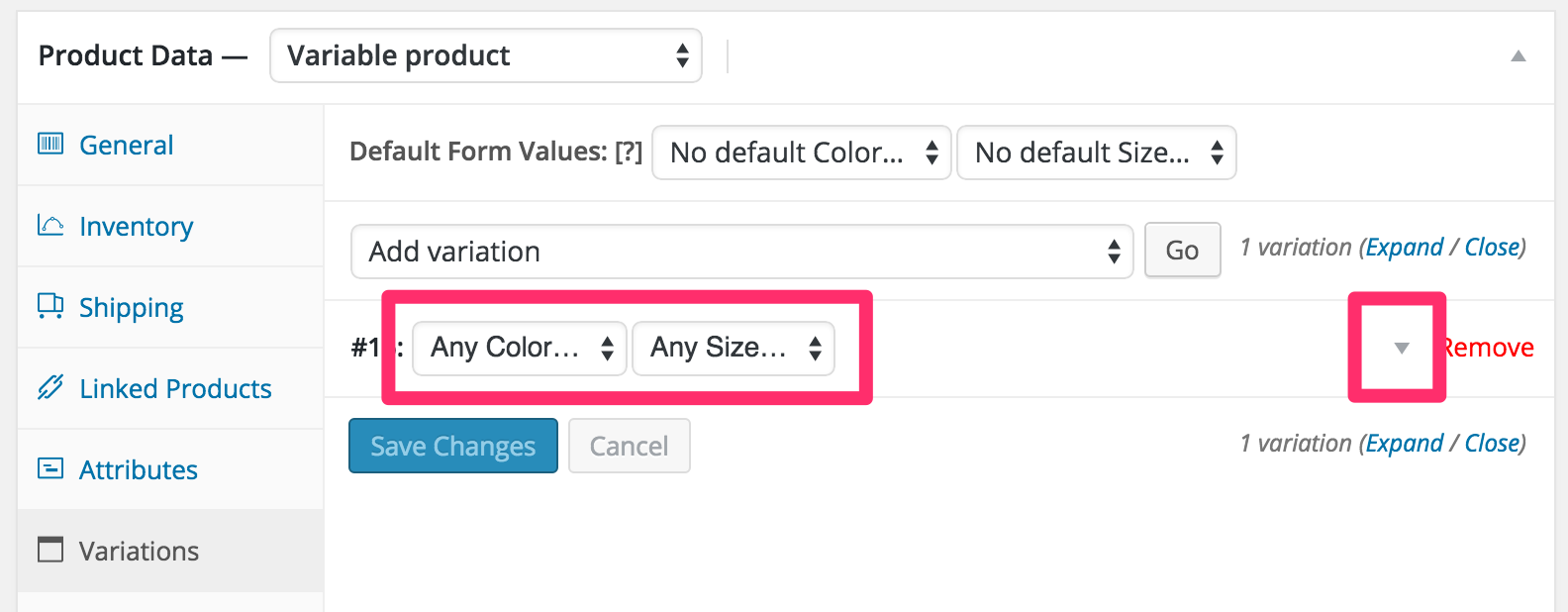
For variable product, you should click on a drop-down button in the variable tab. https://docs.woocommerce.com/wp-content/uploads/2013/05/any-color-any-size.pngRegards,
ArrowPress Team
hi , great theme you have here i just have one this question : is you theme supports poedit and translations ? Thanks
Hi,
Thank you for interesting our item.
Our theme includes pot file for translation. So you can use plugins to translate such as Loco translate.
Regards,
ArrowPress Team
Hello, can someone set this up for me for a fee? Please let me know how. Thanks!
Hi,
Thank you for purchasing.
We can install and import demos for you free. Please send your website link with admin account via our email arrowpress@arrowhitech.com. We will set up the theme for you.
Look forward to hearing from you soon.
Regards, ArrowPress Team
hi i have some questions
first seems 1 little bug here http://demo.arrowpress.net/franco/product/vintage-bandeau/try to open mega menu and see the men category aftera that hover on women and try to hover with the mouse on the subcategories
it suddenly changes and shows the man subcategories without hovering man category.
2) i like the home2 http://demo.arrowpress.net/franco/home-2/ can i have subcategories in the menu in the home page? and also can i have call to action button to both pictures?3) can i use 2 pictures like 2 kcategories without the color scheme? i do not want any color overlay in the main 2 screens and i want the m to be like 2 different main categories of my shop
thank you
Hi,
Thank you for interesting our item.
We will fix quickly and update it in next version soon.
Of course, you can change the menu, add subcategories and use mega menu to add two pictures you want for the menu item in Appearance > Menu.
Regards,
ArrowPress Team
the 2 pictures i mean for the main slider (banner) or slideshow whatever it is. it has 2 big pictures with a call to action button but
only the left picture has the button 1) can the right picture also have call to action button? 2) only the left picture has overlay color (can this be removrd? thnx
Hi,
Of course, you can change it by editing page. You can remove overlay color by un-check the option “Add overlay” in vc_column. http://prntscr.com/cysxnd
For the button, you can easily add it by using Franco button shortcode or you can copy button on the left side to the right and change text and link.
Thanks,
ArrowPress Team