107 comments found.

Does this theme offer the ability to charge a customer an application fee – perhaps through Paypal? If not, is this something that an arrangement could be made to augment? Thanks!
Hello, thanks for asking!
Such functionality isn’t available, though you can use a third party plugin for this purpose, we just can’t recommend any at the moment as we haven’t implemented needed tests.
Please feel free to ask any further questions should you have any, we’ll be happy to answer them! Thank you!
my client really likes the icons and vectors you used on the demo. can we use them or should we buy our own icons/vectors?
Hello, thanks for contacting!
Payday Loans theme comes with the following icons that you can use for your site: Brandico; Simplelineicons; Fontawesome;Entypo.
Yet please note that all the images in demo content are replaced with placehoders, as the license does not allow us redistribute them.
Kindly let us know if you have any questions or any assistance is required. Thank you!
A couple of presale questions
First of all, congratulations on putting out this beautiful theme. Really nice job!
My first question is if this theme is compatible with the polylang plugin in case you have tried it?
You confirm that in the profile page, it is possible to add other shortcodes in the sidebar next to the profile picture for example the google map shortcode?
Does this theme comes with po and mo files in case I want to translate some of the strings in the original demo? For example the word “categories” in the profile page if I want to translate it to spanish?
Thanks in advance,
Pablo
Hello Pablo, thanks for contacting! Our support team works Monday to Friday, that’s why we didn’t get back to you earlier. Appreciate your patience and understanding.
We can’t guarantee Polylang plugin compatibility with the theme, as we haven’t implemented such compatibility tests, but WPML plugin should work absolutely properly.
Sure, you can add needed shortcodes easily, please check the result.
It will be rather easy to translate the theme, as in comes with a .pot file. Basically, this is a list of all words and phrases that are present in the theme, and you will need to go through it and add translations for them. Theme documentation has a rather detailed instruction on translating your website, quite sure it will be helpful.
Please feel free to ask any further questions should you have any, we’ll be happy to answer them! Thank you!
Ok, many thanks for coming back with the detailed answers  !
!
You’re always welcome! Please don’t hesitate to contact us in case of need.
Hello, could you please tell me, is there a way to make homepage calculator work in such way:
x – entered in field 1 y – entered in field 2 r – result
Formula in calculator:
r = ((constant * x) – (y * x))
Thanks!
Hello, thanks for contacting!
Sure, the calculator can be set in such way.
Please note that Calculated form on the homepage is created with the help of Calculated Fields Form plugin. Please see the following article about the Form Builder features. Here you can find all documentation for the plugin.
Hope it will be helpful. Kindly let us know if you have any further questions. Thank you!
Thank you very much!
You’re always welcome!
Please don’t hesitate to contact us in case of need.
what are the settings for the calculator on the fron page
Hi, thanks for contacting!
The matter is that Calculated Fields Form plugin doesn’t allow to export and import the forms, that’s why there is a necessity to create forms manually.
Please see how the form on the homepage is made.
If you still experience any problems with the form set up, please submit us a personal request here with relevant WordPress credentials and our support agents will be happy to help you.
Thank you!
One quick question before buying!
What are the premium plugins that we need to buy to get the same functionality and looks like in the demo?
Hi, thanks for being interested in our theme!
We used the following plugins for the demo: CMSMasters Contact Form Builder, CMSMasters Content Composer, CMSMasters Mega Menu, Contact Form 7, Calculated Fields Form, LayerSlider WP, Slider Revolution, MailPoet Newsletters. All these plugins don’t need to be purchased separately, they’re included in theme package for free or can be easily taken from the WordPress repository. Our theme will offer you to do that, all plugins can be installed quickly.
Kindly let us know if you have any further questions. Thank you!
editing the .htaccess file … whenever I try to do this it fails and crashes the site. Do you have any more info you can share with me on this please? Thank you.
Hi, thanks for contacting!
Some servers don’t allow to implement any changes in .htaccess file, but still the theme can be successfully installed and demo content uploaded even without edits. We’d advise you to proceed without adding the code.
Please keep us informed about the results on your end. Thank you!
i need help to set up theme to my website
Hi, thanks for contacting!
If you experience any hardships with the theme installation and demo content uploading, please feel free to send us a message here. Our support agents will gladly assist you.
Thank you!
Hi, may i know if this theme supports Paypal express checkout? Like is it already integrated in the theme?
Hi, thanks for your interest!
Paypal express checkout isn’t integrated in the theme.
Thank you!
Hi, thanks for contacting!
No, the theme you’re referring to wasn’t elaborated by our team, we don’t relate to it any how.
Please let us know if you have any further question. Thank you!
Is there a PSD file I could buy to see how my website would look like with this theme?
Hi, thanks for your interest!
We don’t have PSD as a separate product and don’t include PSD files in the theme package. Appreciate your understanding.
Should there be anything else you wanted to ask please do so. Thank you!
Hello, presale question – is there a way to change calculator formulas and fields description on the home page? (How much do you need?)
Hi, thanks for your interest!
Sure, fields’ labels and formulas can be changed according to your requirements in in Calculated Fields Form plugin settings.
Should you feel like asking anything, please don’t hesitate to do so! Thank you!
Thank you! Could you tell me is there a way to make this calculator more “visual” with sliders, and live calculations? Like here – http://iespejukredits.lv/
Hi again!
Calculated Fields Form plugin doesn’t include such features at the moment.
Thank you!
is it possible to display percentages and other formula information to the customer? For example, I want my customer to be able to change percentage himself, is that possible? Or maybe display formula in a form
(digit1+digit2) + 15% = (result)
so customer can see all calculation steps
and is it possible to add popups, as on my example here – http://iespejukredits.lv/ there are short links on the calculator which trigger popups.
Sorry for so many questions, I really love the theme and try to convince my client to go for it, but they are not satisfied with calculator so far
Thanks for your questions, we’ll be glad to answer them!
There’s a possibility to enter information in field label, so you can add the formulas there. Besides, you can add a special field with description if required. Here’s an example taken from the test form, showing formula explanation in calculator’s settings. And yes, percentage can be optional as well, a user can define it by himself. But as much as we’d love to help, popups can’t be added.
Thank you!
Thank you so much! And hopefully last question – do I have a possibility to replace default calculator with another one? Does it work like a widget or shortcode?
Calculated Fields Form plugin allows to use shortcodes to insert forms. You can surely use another plugin, we just can’t guarantee compatibility with other similar add-ons, as we haven’t implemented tests to check it. Though we can’t deny that such plugins might work properly with our Payday Loans theme.
Thank you!
I mean – if its possible to put another plugin on a front page of your theme, same like you have on demo, but another calculator in place of yours
Theoretically it’s possible, we just can’t guarantee compatibility with another plugin. Which means if any problem occurs with such add-on, we won’t be able to examine and eliminate it, as it’s beyond our support policy. We can only state full compatibility, when a plugin has been tested with our theme and we’re ready to provide you with assistance when problem (concerning it) occurs.
Thank you!
Sure, all understood.
Do you use Visual Composer or your own composer? Thank you very much!
Thanks for the question!
Visual Composer (Page Builder by wpbakery) isn’t included in the theme package, we used our own Visual Content Composer with a huge custom shortcode collection. Please check this video demonstrating how easily shortcodes can be managed. It’s taken for another product from our portfolio, but general idea for Payday Loans theme is the same. You can find even more videos under Features menu item.
Thank you, please feel free to ask any further questions!
Thank you very much!
You’re always welcome!
Warning: Invalid argument supplied for foreach() in /home/pmittal/public_html/sledgefunds.com/home/wp-content/themes/payday-loans/framework/function/template-functions.php on line 922
I am having this error on my website sledgefunds.com/home. Please help
Hi, thanks for contacting our team!
We didn’t see anything similar on our end, and we would be really thankful if you submitted us a support ticket with the needed credentials so that the support team could investigate the issue on your end and help you. Our support will be glad to help you.
Thank you!
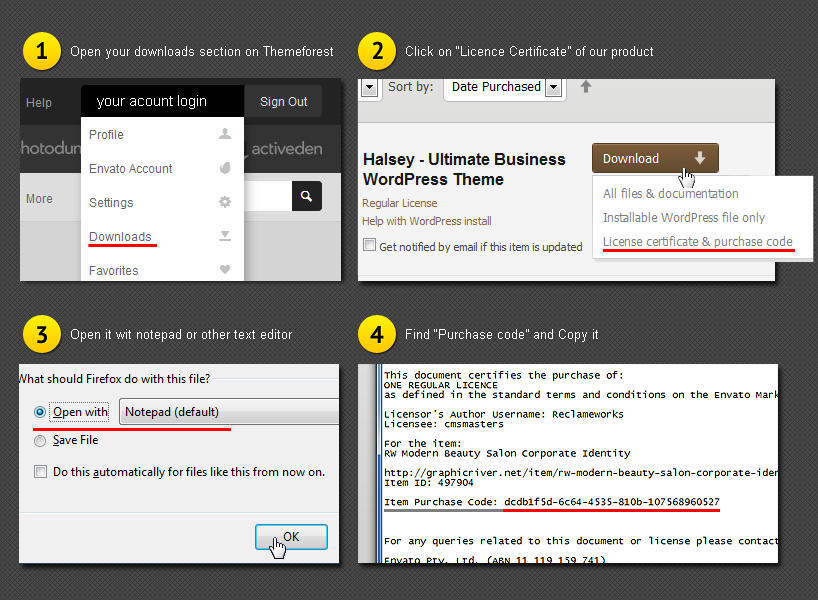
Where do i find my “purchase code” that is requred on your website to submit a support ticket ?
Hi again!
You can find purchase code in this file within the “Downloads” tab of your Envato account.
Thank you!
I’m getting a white space on the header and footer http://prntscr.com/ccj48t , when I inspected I found a
tag has came between header and slider. Can you help me?
Hi, thanks for contacting our team!
Please use the following code in Theme Settings – Elements – Custom Codes – Custom CSS:
.middle_inner > p {
padding:0;
}
And save changes. Jjust in case spacing still can be seen, please send us a link to your website.
Please let us know about the results. Thank you!
I purchased the theme but I didn’t get the images with it. Are images included in the theme or not? Because from other sellers I always got the images and videos with the template
Hi, thanks for asking!
As stated in product description, images aren’t included in the theme package, they are substituted with placeholders. According to the license terms, we can’t distribute them. Appreciate your understanding.
Should there be anything else you wanted to ask please do so. Thank you!
Theme images not uploading. I have tried many time to import data but image not loading as your demo.
Hi, thanks for contacting!
Please note, that images aren’t included in the main download, they are substituted with placeholders as we have no rights to distribute photos. We aware our customers of that on the product details page.
Please let us know if you have any further questions. Thank you!
Hi. The design of your theme is very beautiful but you need to create more homes, show more what your theme can do. It’s just a hint.
Hi, thanks for contacting us and for your suggestion!
Amazing Work, GLWS 
Thank you!
Congrats!! Amazing Work, GLWS
Thank you for the feedback!
is it possible to import dummy content
Hi, thanks for contacting!
Yes, sure, for demo content import just please find our documentation and follow the instructions from Demo Content chapter. How-To is located in Docs folder, that’s index file, please open it with your browser.
Should there be anything else you wanted to ask please do so. Thank you!