696 comments found.

Hello! I have just purchased the template. I have imported the content.xml #8 but instead of the veterinary clinic one, I have a furnitures shop. Can u tell me which number is the veterinary shop? Thank you in advance
Hello,
You have imported the content manually, right? We have one-click demo importer that takes care of everything – Customize (menu) -> Demo Import
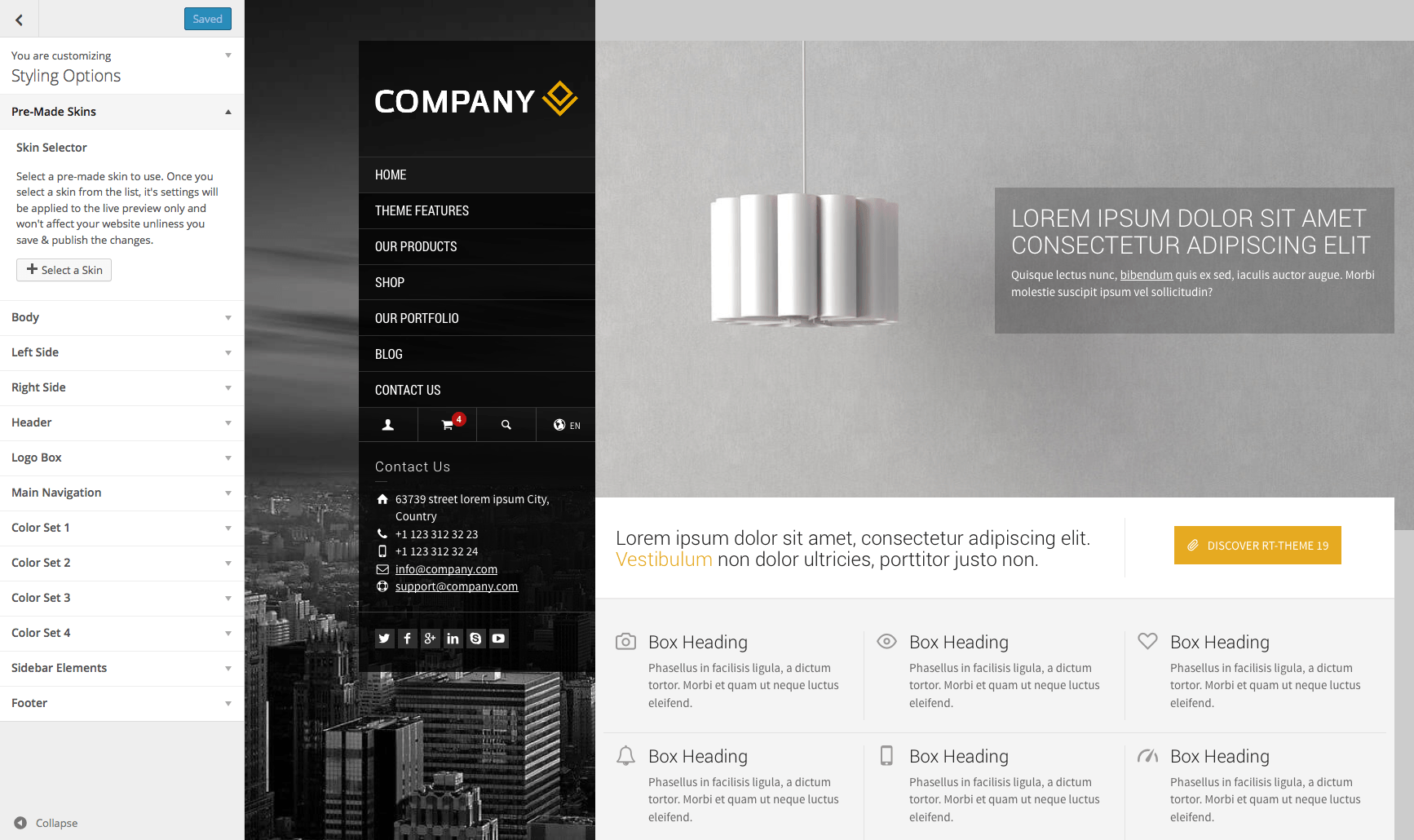
You can still use the tool to import widgets and themes settings of the demo you like. Or just open Customize (panel) -> Styling Options -> Pre-made skins and apply the #8 http://rttheme19.rtthemes.com/wp-content/uploads/sites/5/2015/03/customizer-premade-skins.png
If you have any further questions regarding this theme, please let us know by opening a support request on our support forum at http://support-rt.com
Thank you for purchasing our themes.
Best Regards
Oh yes! It is wonderful. Thank you very much and congrats for the template.
Sorry, but I have one more problem. When using the “Demo import” I get “Importing contents: 10/10” but then it is frozen (more than one hour) in “Importing widgets”... I have already restarted the process twice but it’s not working.
Hi,
We need to check your website to investigate the issue. Can you please provide us a temporary account via this form https://themeforest.net/user/stmcan#contact or our support forum at http://support-rt.com Thank you.
I´m working in localhost…
There is also a manual import method available for the demo widgets as well. You can find the widgets inside the /Demo Contents/Widgets/ folder and import them by using the “Widget Importer & Exporter” plugin https://wordpress.org/plugins/widget-importer-exporter/
Hello
I have pre-order questions about build-in catalog. I don’t need WooCommerce. I’m just looking for a possibility of presentation products. Is it possible to add any custom field with features of products like e.g. color, size, brand etc? And then use them in searching and filtering? Has the theme a built-in widget with advanced sorting mechanism (by price, date, name – asc and desc)? And the same about searching and/or filtering – by any phrase, by tags, categories (by selecting from the combo box specific feature of product)?
Thanks
Hello,
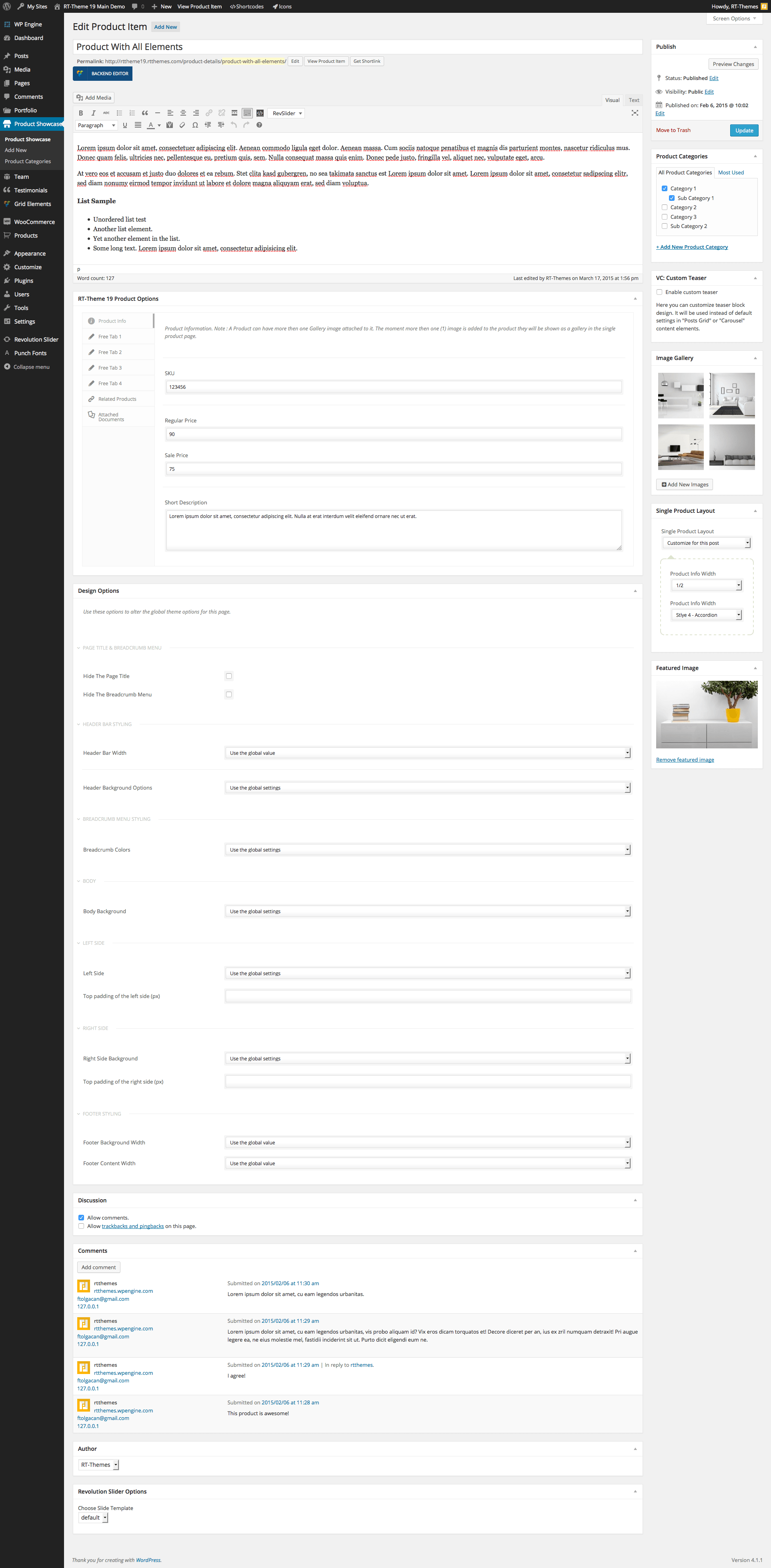
The theme has only categories for the built-in catalog. There is no option for custom search with filters like you mentioned. This the edit screen of a product post http://rttheme19.rtthemes.com/wp-content/uploads/sites/5/2015/03/edit_product_showcase.png you can check others from this page https://rttheme19.rtthemes.com/admin-panel/ You can use categories like this http://rt19-demo7.rtthemes.com/products/product-category-1/ and also a category list element/shortcode is available with custom images to create a category index page.
Please feel free to ask if you have any further questions. Thank you for interesting in our themes.
Best Regards
Hello, I just started to use Revslider, was trying to import a free template which is “Web Product Dark Hero”, but every time after I clicked on the button “install slider” – then “online”, I got a pop-up window saying “Plugin Activation Required”, and then had to give up, I tried other free templates, too, no luck. Could you let me know what I’m supposed to do to import the free template? Thanks a lot for your time!
Hello,
Unfortunately, they are limiting the access of that section and allow their registered users only. We have an extended license for the plugin and you are free to use the plugin with the theme.
You can still import the sliders we created for theme demos. To get them download the “All files and documentation” package of the theme from your account -> downloads page. They can be found inside the ”/Demo Contents/RevSlider” folder of the package.
If you have any further questions regarding this theme, please let us know by opening a support request on our support forum at http://support-rt.com
Thank you for purchasing our themes.
Best Regards
Hello, I want to translate the Language and Search fields in the main menu. I use the horizontal menu option of the theme. I can not find those strings in Polylang. Do I have to use another wpml plugin?
Cheers!
Hi,
Those are part of the language file (.po) cannot be translated via Polylang plugin. You can use Loco translate https://wordpress.org/plugins/loco-translate/ for them along with Polylang plugin.
If you have any further questions regarding this theme, please let us know by opening a support request on our support forum at http://support-rt.com
Thank you for purchasing our themes.
Best Regards
Hi there. I’m working on optimising a client site using your RT-Theme 19 WP theme. I was wondering if there’s a good reason why you included jQuery (1.12.4), jQuery Migrate (minified 1.4.1), jquery.themepunch.tools.min.js and jquery.themepunch.revolution.min.js in the header rather than loading them in the footer? Also, is there an option in the theme settings where these can be moved to the footer or should I create a child theme and do it in the child theme’s functions.php file? Thanks!
Hello,
It is coming like this with WordPress as default. You can use a plugin like https://wordpress.org/plugins/autoptimize/ to move to the footer. But be careful as it would cause some compatibility issues.
If you have any further questions regarding this theme, please let us know by opening a support request on our support forum at http://support-rt.com
Best Regards
hello – nice theme – i am wondering if it would support a secondary menu – say above the main menu for language selection. thank you.
Hello,
Yes, there is a top bar option as seen on this demo http://rt19-demo13.rtthemes.com/ By the way, there is also an option for language selection.
Please feel free to ask if you have any further questions. Thank you for interesting in our themes.
Best Regards
hello,
i am not seeing anywhere in the options to add a top bar. is this a recent addition as i am using 2.02
thank you.
Hi,
It is only available for design layouts 3 and 4 http://docs.rtthemes.com/rt-theme-19-documentation/#section-64
Hi,
How can I force specify page in mobile view ? Thank you
Hi
You cant force a page into mobile view. The css detects the mobile device and presents it in the correct layout for that device.
If you have any further questions please create a account at our forum with your purchase key.
http://support-rt.comBest regards,
Theme support
Possible to reorder the Products inside a Product Category? I have the Taxonomy Order for the Product Categories, but is there something for the Products? When Products are listed I need to put some of them into the first row. I have still 4 sites to make and this is some kind of pre-order question.
You can try and use the post types orders plugin. But it will disable all sorting abilities in all the prodcust shortcodes.
https://wordpress.org/plugins/post-types-order/They also have a taxonomy ordering plugin
If you have any further questions please create a account at our forum with your purchase key.
http://support-rt.comBest regards,
Theme support
I tried that already but it did not help
Hello,
If the Post types order plugin didn’t help you can try to change post dates then your “list order by” method as “date”.
Thank You – That was easy  Looking forward for the next project with this theme!
Hi
I am glad the issue has been resolved. Thank you for the feedback as that is always highly appreciated.
If you have any further questions please create a account at our forum with your purchase key.
http://support-rt.comBest regards,
Theme support
circle slider
Possible somehow to add Metadata to Product Categories? I am using Yoast SEO.
Hi
As far as i know Yoast seo allows you to add meta data to categories. Enable it in the yoast settings for the cpt taxonomies.
If you have any further questions on this please consult the yoast seo documentation or support on that plugin.
If you have any other further questions please create a account at our forum with your purchase key.
http://support-rt.comBest regards,
Theme support
Hi, Do you have new topics in development for corporations? I’m looking forward to themes like the RT series.
Hello,
Yes, we are woking on a new theme! Please follow us to get notified when it is available. Thank you for asking.
Best Regards
Hello,
How can i change you social media account in the product page?
Best wishes
Hi
You will have to recode the social share function which is part of the shortcodes in the rttheme19 extension plugin.
rt19-extentions\inc\shortcodes\rt_social_mdeia_share.php
If you have any further questions please create a account at our forum with your purchase key.
http://support-rt.comBest regards,
Theme support
Possible to integrate the Product Showcase Category into the actual Product url like it is in the breadcrumbs?
Hello,
The permalinks follow WordPress permalink system, it is not possible to create a URL like this with the default options.
If you have any further questions regarding this theme, please let us know by opening a support request on our support forum at http://support-rt.com
Thank you for purchasing our themes.
Best Regards
Hi. Purchased the theme some time ago and need to make changes to a website. I need access to the forum to access a few fixes but for some reason everytime I try register on the site I get an error stating “Sorry, but that item purchase code has already been registered with another account. Please login to that account to continue, or create a new account with another purchase code.” How can I fix this . Please respond asap. This is urgent.
Hi
You can contact us through the forum if you have registration or access issues by following the link in the forum entry page http://i.imgur.com/NY5aCXz.png
Please in your remail provide the following info:
1) your purchase key
2) the forum username used to register
3) the email address used to regsiter on the forum.
Best regards,
Theme support
Hello, I can’t find the way to translate the tabs named “Free Tab 1” “Techical Info”, “Free Tab 2” “Order Enquiry” etc.. Any suggestion?
Hi
The Free tabs title can be set in each post. There is no need to translate these. The default strings can be translated using poedit or loco edit or the say what plugin. The answer to this question is in our forum as wel as in the online documentation
link http://support-rt.com/forums/topic/translating-themes-by-using-po-files/ link http://docs.rtthemes.com
Please feel free to ask if you have any further questions in our forum which you access with your theme purchase key.
Best regards,
Theme support
Hi, I am thinking of buying your template – two questions – on the Demo 5 – is it possible to reduce the height of the main image on the home page? Also, can I not include a blog page? Thank you!
Hi
The height can be set in the row or slider element. And yes you can include a blog element or leave it out.
Please feel free to ask if you have any further questions.
Best regards,
Theme support
Hi, I’ve try to update the rt19-extensions plugin, but our site get down when I try this. The message is: Fatal Error rt19-extensions in line 135
Hi,
Please try to delete the plugin and install again. If you have any further questions regarding this theme, please let us know by opening a support request on our support forum at http://support-rt.com
Thank you for purchasing our themes.
Best Regards
Hi,
I am using Homepage 2 for Demo 11. I’m trying to change the background image but I can’t find where to edit. Can you please advise?
Thanks
Hi
Background images can be changed in the row or column options. see http://docs.rtthemes.com/#article-764 11)
If you have any further questions please create a account at our forum with your purchase key.
http://support-rt.comBest regards,
Theme support
I want to change the header height, but I can’t find where to set it. How to do that? Thank you!
Hi,
You can change it in the customizer -> styling options -> header settings. Its documented in our online documentation available for you at http://docs.rtthemes.com
If you have any further questions please post them in our forum with your forum account you already created. Thank you for doing so..
http://support-rt.comBest regards, Theme support
your theme 19 seems block the frontend editor function of Visual Composer, how to fix it?
Hi
I answered your question in the forum. Thank you for posting in there.
Best regards,
Theme support