696 comments found.

Hello, I would like to change the background of city.jpg but I can’t find the way. Where can I do it?
Hi,
You can change the left side background via Customize > Styling Options > Left Side. For more details, you can check http://docs.rtthemes.com/rt-theme-19-documentation/
If you have any further questions regarding this theme, please let us know by opening a support request on our support forum at http://support-rt.com
Thank you for purchasing our themes.
Best Regards
Hi, I would like to buy this theme for a website which need to have a product catalogo a product pages, as this themes already provides in demo. But it will not be a online shop. So my question is: can I deactivate the online shop and cart functionality and still preserve the catalog and product page options? Bests Alma
Hi
Thank you for our interest and excuses for the delay in answering. We had a local holiday…. 
The theme comes with its own sustom post type products. You can build the same looking like a shop demo without the shop ability.
feel free to ask any further questions.
Best regards,
Theme support
Hi, I have update the themes and woocommerce, but the woocommerce status say “content-single-product.php version 1.6.4 is old”. When you update it?
tnx
Hi
Delete the existing theme woocommerce folder by ftp and then update the theme,
If you have any further questions please create a account at our forum with your purchase key.
http://support-rt.comBest regards,
Theme support
Hi, tnx for reply. I have download from themeforest the last version of theme, and in woocomerce folder the template ontent-single-product.php is old version.
rob
I have a question before buying the theme: can I sent the width of content+sidebar to 980px width? Now it is too wide and not easy to arrange the content.
who can answer me?
Hi, It is only possible with custom css coding. There is no option for it. Please feel free to ask if you have any further questions.
Best Regards
can customs css coding do this perfectly? I just want to make content+sidebar=980px, the header keep full width like the current design.
can you confirm this please?
Hi, i have problem with demo install (contents). I succesfully install demo widgets and theme options, but when install demo contents, i wait 30 min and nothing happend. Trying few times. Something is not working, help please.
Hi
Can you please create a user account on our forum with your purchase key and post your question(s) / issue(s) in there?
http://support-rt.com/That way you can provide a url and wp-admin logins in a secure environment.
Thank you.
Best regards, Theme support
Hi, I tried using contact form 7 for some additional features, but can’t figure out how to have it full width in the contact page like the original, included contact ‘widget’. How to do this?
Hi
You can set the row to full width that contains the contact form in the row settings in the visual composer,
If you have any further questions please create a account at our forum with your purchase key.
http://support-rt.comBest regards,
Theme support
I have used the RT19 and I have been very happy because it is highly customizable. Since version v2.2, I use your custom CSS in the theme options to insert icons in pseudo-elements (:: before and :: after) via CSS.
However, in the last update, I realize that Custom CSS is no longer reading backslashes.
Example:
- v2.2 - home-menu::before { Content: ”\ f015” Font-family: FontAwesome }
It worked perfectly well before. Appears next to the selected class, the icon in question.
But, what happens now:
- v2.3.1 - home-menu::before { Content: “f015” <- * // Even when you save with backslash, the browsers will not read them Font-family: FontAwesome }
As a result, my entire menu gets completely shuffled with unrecognizable codes …
Please, could you check this? It is essential for me it works properly. Thank you!
You can check it in this page: ASCPAS Register
(This is a copy from my original message in your forums, just in case)
Hi, Just replied this question on the forum http://support-rt.com/forums/topic/problems-in-custom-css-after-theme-update/#post-90643
Hi! Is there a reason why the Visual Composer isn’t wokring anymore? It is linked to the manufacturer site as if not purchased!
Hi, It may be a plugin conflict, try to disable plugins except the composer then try again. For further assistance please register to our support forum at http://support-rt.com with your purchase key. Thank you.
Hi, will the product catalog work with multisite?
Hi, Yes it will work. The demo is also multisite.
If you have any further questions regarding this theme, please let us know by opening a support request on our support forum at http://support-rt.com
Thank you for purchasing our themes.
Best Regards
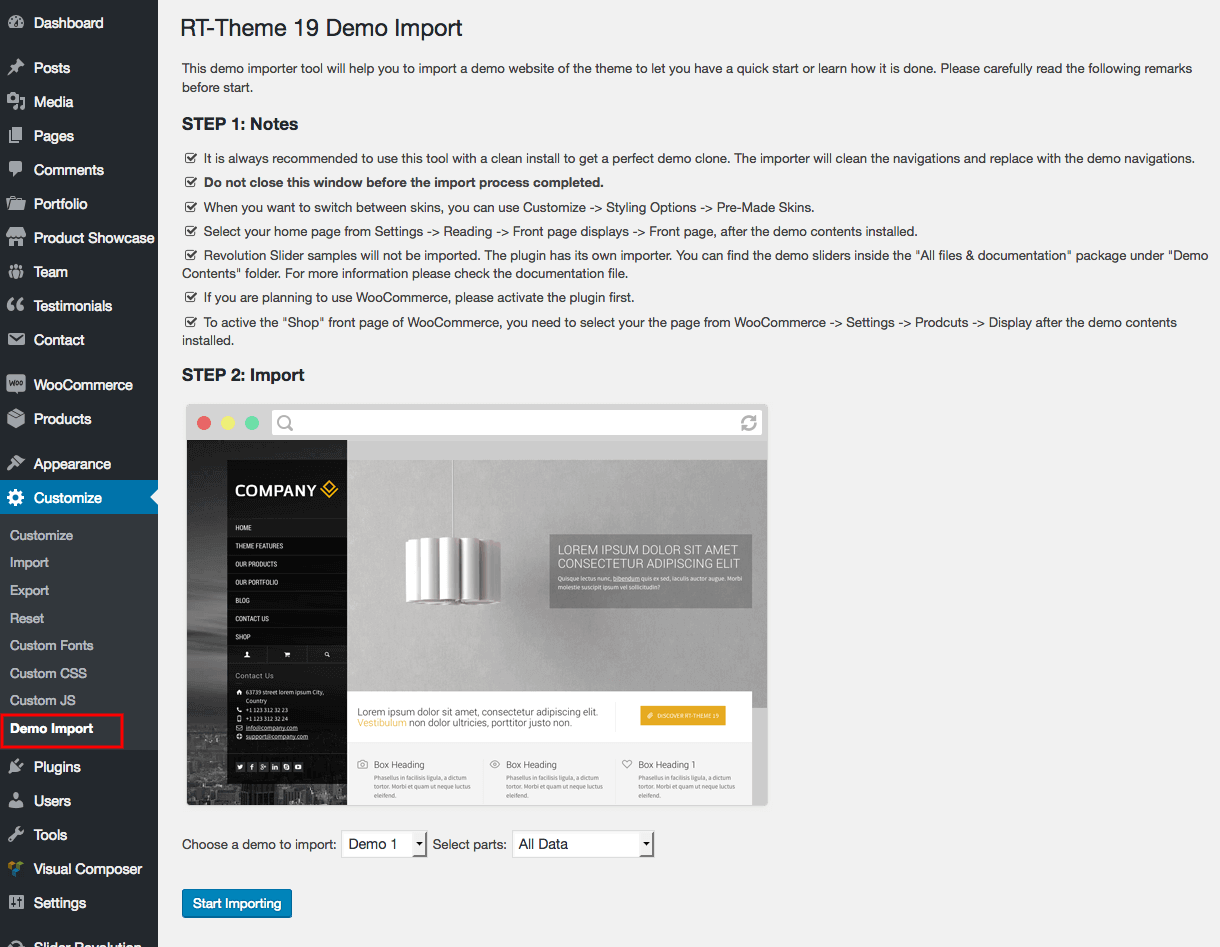
Hi stmcan, I contacted you on FB to ask whether it’s possible to import the demo overview theme, you said it was possible. Can you please show me how to import the main demo theme? (https://rt19demos.rtthemes.com) Thank you!
Hi,
You can install via this page http://docs.rtthemes.com/wp-content/uploads/sites/2/2015/01/rt19-demo-import.png for more details please check http://docs.rtthemes.com/rt-theme-19-documentation/#article-35
If you have any further questions regarding this theme, please let us know by opening a support request on our support forum at http://support-rt.com
Thank you for purchasing our themes.
Best Regards
Hi stmcan, I appreciate your fast response, thank you. But I don’t want to add one of the 13 demos, I wanted to add the main page! (https://ibb.co/jBzvQk) Thanks for responding.
Hi, I have just replied you through the support forum http://support-rt.com/forums/topic/demo-overview-page-instal/
Hello, theme has been working well for some time now. just one minor issue around the logo, it seems normal in the Google Chrome but blurred in Internet Explorer (IE). Not sure why but my website link: http://brite.sg/
Hello,
Your logo image is too big ( http://brite.sg/wp-content/uploads/2016/02/Brite-logo-v1-trasparent-base-.png ) Make sure it’s height smaller than 90px. Also, you can switch to the Layout 3 ( Customize > Styling Options > Design Options ) to be able to set different image for retina devices.
If you have any further questions regarding this theme, please let us know by opening a support request on our support forum at http://support-rt.com
Thank you for purchasing our themes.
Best Regards
Hi, is it possible to import some external icons? And if I can,How can I? Thanx! Marco
Hi Marco,
Yes, you can follow this tutorial http://support-rt.com/forums/topic/tutorial-adding-custom-font-icons/
If you have any further questions regarding this theme, please let us know by opening a support request on our support forum at http://support-rt.com
Thank you for purchasing our themes.
Best Regards
How do I make the body layout from demo 5, similar to demo 11? I need the body of demo 5 to be full with, as it is breaking on large screens.
Hello,
There are two related setting for it; - First of all, you make sure the “Content Align” has been selected as “Centered” via “Customize > Styling Options > Content Rows”. - The width of a row can set via Visual Composer -> Row settings and it can be different for each row, there is no global setting that controls all rows. Note that, the Demo 11’s home page rows are “Fullwidth”
If you have any further questions regarding this theme, please let us know by opening a support request on our support forum at http://support-rt.com
Thank you for purchasing our themes.
Best Regards
i have problem when i upload photo gallery images.i click and choose image and then when i clicked “choose” button image not comes.not seems.
Hello,
Can you please give us more details about the issue! Are you working on Visual Composer? ( Bu arada isterseniz https://themeforest.net/user/stmcan sayfasindaki form araciligi ile de iletisime gecebilirsiniz)
In the demo 13, when I click on the cart icon, a side panel appears:
But the button linking are going to home, where can I edit it?
Well, it seems it works on your demo site, but it just not working on my test site.
Hi,
Please make sure that you have set the checkout page via WooCommerce settings http://cloud.rtthemes.com/2017-03/woocommerce-checkout-settings.png
If you have any further questions regarding this theme, please let us know by opening a support request on our support forum at http://support-rt.com
Best Regards
(Y)
Oops, it works now, my mistake.
Hello, I purchased this theme recently and I would need a bit more customization for the product or portfolio page. I would like to be able to have filtering/sorting option on the basis of subcategories but with selection boxes and dropdown. There are product categories in the sidebar now, but all the subcategories are visible at all times by default. If you could have selection boxes then you could have more subcathegories selected at the same time (like one or more in each category) and search with all selected. Is this possible? If not, could you recommend a plugin that can help me customize the product of portfolio page and that would work well with rt-theme? I am not interested in selling anything straight from the website I just need filtering for my projects page. Something like this https://www.bb-shop.ro/ceasuri-de-mana.html, or this http://altex.ro/laptop-desktop-it/laptopuri
Hello, Please use the account you purchased the theme and post to our support forum at http://support-rt.com Thank you.
Merhaba, Temaların gerçekten çok güzel. Bu güzel çalışmalarından dolayı tebrik ederim. Bu temadaki ürünleri içeri aktarmak için nasıl bir yol izlemem lazım.
Merhaba,
Öncelikle teşekkürler! WordPress Admin Panel -> Customize (menu) -> Demo Import sayfasından bir demoyu “import” edebilirsiniz ya da “All files and documentation” zip dosyasında “Demo Contents” klasöründe XML dosyalarını bulabilirsiniz. Başka sorunuz olursa http://support-rt.com a üye olabilirsiniz. Saygılar.
Hello, I have purchased and implemented this template’s Construction theme. I have an image Gallery where I need the Description, and Caption’s font sized increased for better visibility. Do you know where I can make these adjustments?
On a side note, in my WordPress dashboard – my links for ‘Customize’ under Appearance does not load anymore.
Could this be where I can increase my Image gallery’s font size? Thanks for any help.
Hello,
1) You can use this CSS code for the gallery font size;
.photo_gallery {
    font-size: 1.3em;
}
Put the CSS code into the box inside the Customize (menu) > Custom CSS box.
2) It might be a plugin conflict or PHP memory issue. I recommend that try to increase the memory first https://codex.wordpress.org/Editing_wp-config.php#Increasing_memory_allocated_to_PHP
If you have any further questions regarding this theme, please let us know by opening a support request on our support forum at http://support-rt.com
Thank you for purchasing our themes.
Best Regards, Tolga
Hello! I got a job. The products can be transferred woocommerce products?
Hello,
Thank you! First of all, the theme supports WooCommerce as well. But WooCommerce and built-in Product Showcase are different post types and can not be transferred from each other. There are some “Post Type Switcher” plugins available but they only work for basic data like text, title and featured image.
Please feel free to ask if you have any further questions.
Best Regards
Thanks! Can you suggest anything which can be solved?
Hi, As I mentioned before 100% transformation is not possible as they are different post types but you can transform the basic info Post title, text and featured by using a “Post Type Switcher” plugin.
Hi, been searching for a while but didn’t find how to manage the breadcrumb. So first, where can I change the page title for a post, e.g. now it shows “Articles” as the page title on some pages, but I’d like to change it to “News” or “Case Studies”, etc. Also, when I created a post, where can I set the parent page for it, so that it could show correctly in the breadcrumb hierarchy. Thanks very much!
Hello,
- You can find the breadcrumb menu options inside Customize -> General Options -> Breadcrumb Menus. Set your start pages for post types. - Breadcrumb menu, follows the category order if it is a post ( product, portfolio, blog post ) if it is a page, it follows the parent page relations. - “Articles” is probably a category on your website. If a post has been published under that category, it’ll be visible in the breadcrumb menu, too. You can create new categories for “Case Studies” and “News” and assign your related post to them. - Also, check Customize -> Blog Options -> Single Post Page to change the post title inside the sub-header if you don’t want the post title duplicated.
If you have any further questions regarding this theme, please let us know by opening a support request on our support forum at http://support-rt.com
Thank you for purchasing our themes.
Best Regards