5013 comments found.
Can this theme be set up so that user must be registered in order to apply for jobs? I’m sure you have answered this question in your FAQ but I can not seem to find it.
Hello there,
Out of the box, any user can apply for a job.
An option is using the Resume Manager plugin you can force users to create a candidate profile. From there they can submit their resume/profile only when applying for the job.
Hope this helps!
If you have any questions or if I can be of any further help, please let me know!
Kind regards,
Fernando

Can this theme okay with woo-commerce payU?
https://wordpress.org/plugins/woocommerce-payu-india-payment-gateway/screenshots/also, oo-commerce PayTM option?
https://wordpress.org/plugins/paywith-woocommerce/installation/Hello there,
Our theme is able to use all Woocommerce supported payment gateways found here.
You can find here the PayU Payment Gateway.
Hope this helps!
Cheers! Fernando
I think I’ve found a bug in Jobify, when using it with resume manager. On the extended demo, if I set the “Hide filled positions” in Job Listings settings, the Featured Candidates Widget on the home page won’t show up. I found that to be due to line 35 in jobify/inc/integrations/wp-job-manager/class-wp-job-manager-spotlight.php, where it adds another query which is supposed to only apply to Job Listings and not resumes.
The solution is to simply add a condition: $args[ ‘post_type’ ] == ‘job_listing’ and it works again.
An update would be great as I have to change the theme core because integrations can’t be overridden.
Thanks
Hello there,
Thank you for letting us know we will look into this and take necessary action to resolve this.
Cheers! Fernando
Thanks! is there a better way to override integrations, or integration functions? Listify makes this very easy as there are filters and hooks everywhere. Jobify however has very few. For example, I’m trying to add a random image for featured listings in jobify (based on job category), so users don’t have worry about uploading images, but I see this is done in jobify/inc/integrations/wp-job-manager/template-tags.php, which has no overrides.
This was very easy in Listify using the listify_cover_image hook. On Jobify I will have to change the core and lose it on the next update.
Unfortunately, this would be a custom feature for our Jobify theme. We don’t offer custom work right now or provide consulting on how to customize your theme. However, we are partnered with and highly recommend WP Curve, Envato Studio or Codeable if you need help customizing your website.
We apologize for any inconvenience this may cause.
Cheers! Fernando
Hi, I’ve been playing with the demo and I intent to buy the theme and the optional plugins too except Restrict Content Pro but I have a few questions before buying:
- Will I have to follow a particular procedure, for plugins, or other, to get the same website I can see on demo? I’m a joomla expert, but totally newbie to WP and on joomla there are some packages called quickstarts, that includes the CMS + Theme + Sample data. There also are some cases in which you only have the Theme and so you have to download and install separately the CMS, then import modules and plugins, and finally follow a guide that shows you how to place them to get the same website that customers can see on the demo. So, how will be “hard” to start my project, getting a website, identical to your demo?
- Another question is : Is there a way to export all candidate resumes / job offers in a excel file? Surely it’s possible through database, but I’m sure I’ll have a clean excel file, on which an human can works on. I don’t know if WP Job Manager does include a feature that allow to export in excel/other so I thought to ask it directly to you, since you obtain the complete WP Job Manager, and since you are an expert developer.
- I thing that’s all at the moment, anyway, is there the ability to see the backend of Jobify just for make a rapid summary of the whole website before to proceed to purchase?
Waiting for an answer. Thanks in advance. Regards.
Hi there!
Thank you for your questions today!
1) You can simply follow our setup guide to set your website up like one of our demos in no time. Simply follow our Getting Started with Jobify
2)By default, WordPress has a default export feature you can use to export int XML. You can also use plugins to export should you wish.
3)You can try out our theme by testing our hosting platform. You get a 7-day trial no credit card required. Please visit: https://astoundify.com/hosting/
If you have any questions or if I can be of any further help, please let me know!
Kind regards,
Fernando
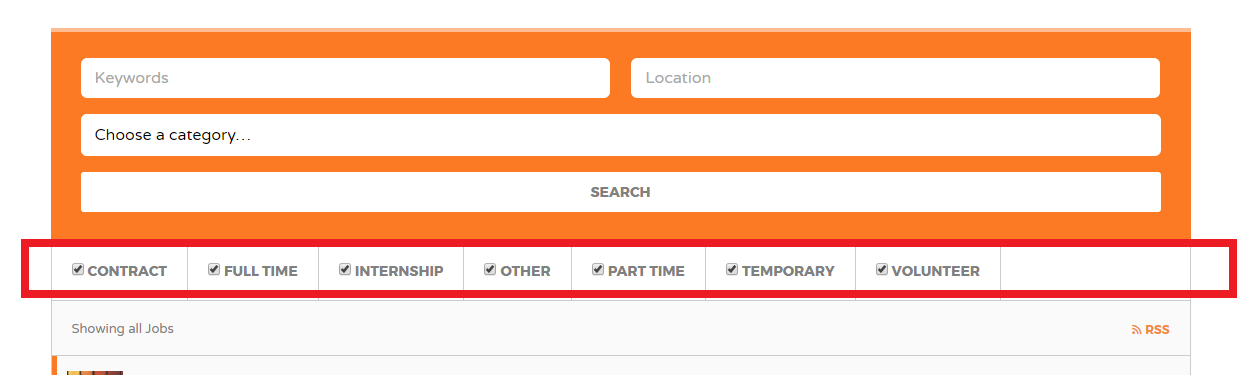
Hi would it be possible to put those check box options from job listing page into a drop-down field? https://snag.gy/wWNsuU.jpg
Hello there,
Hope you are doing well!
Job Types are displayed as checkboxes by default. Unless you customize how they are generated using custom code, it can’t be altered, unfortunately.
Hope this answers your question.
Let me know if you have any other questions.
Kind regards,
Fernando
The theme customizer seems to be missing some intuitive customization options, such as, font customization for navigation menu fonts, body fonts others, etc.
I suppose we could use a menu plugin to get our effect; just thought your theme would have a full set of customization options.
Btw, this is a pre-sale inquiry. Thank you 
Hello there!
Thank you for your question.
Our next theme update will have such a feature. Allowing users to customize the Font of their website.
Hope this answers your question!
If you have any questions or if I can be of any further help, please let me know!
Kind regards,
Fernando
ETA for the next theme update?
Should be soon. If you purchase the theme and submit a support ticket, we can give you an early version of the theme.
Cheers! Fernando
Dear, I have 2 questions where I’m stuck with. Looked in the manual but without any luck.
1) How do I change the color of my header menus and links in the footer widget.
I already changed all the colours to the ones I want in the “Customize” section. But the menu’s in the header still stay white while I selected a different color in the “Customize” section. The same issue for the link color in my footer widgets.
2) As I’m changing all the colours on my site, could you tell me where I can get the same icons that you use? I’m talking about the search icon on the homepage, the factory icons you use in the price list. I want to change the blue color to my color of choice.
Thank you
Hi there!
I saw you submitted a support ticket and have replied back to you. Should you have any additional questions, let me know through Support!
Cheers! Fernando
hello i just bought the theme i cant seem to get google maps to work. i installed api by following the video instruction but then i go to find a job page and the map doesnt load it say’s
“This page didn’t load Google Maps correctly. See the JavaScript console for technical details.”
One thing i did notice was in the video it says to enable ” google places api webservices” however when i set up api using “astoundify.com/go/api” the option for that doesnt show up. it only shows “google places api Android” “google places api IOS”
However if i try to create api normally directly through google link it does show up.? however i have used the exact methed in video accept couldnt enable ” google places api webservices” as i said doesnt show on the list.
Any help would be appriciated
www.getheadsrecruitment.com
thank you ozzie
Hi Ozzie,
I saw you submitted a ticket a little earlier and reached out to you!
If you have any additional questions let me know through our support channel!
Kind Regards,
Fernando
- Is there a way to have a free plan?
- Can access to resumes or find candidate section be restricted to some plans?
- Is there a way to let the user choose his or her own password at the moment they’re signing up?
- Do job listings have an expiration date? Can that be set differently for each plan? What happens on expiration? Can a listing be renewed?
- Can employers edit listings after publishing from the job dashboard?
- Where can employers see their bookmarked candidates?
- Can max file size for photos and resumes be modified?
- Can candidates edit their resumes from the Candidate Dashboard?
Hello there!
Thank you for your questions today!
Question: Is there a way to have a free plan?
Answer: Yes, by default users can submit Listing for free. You can also create a Free Listing Package.
Question: Can access to resumes or find candidate section be restricted to some plans?
Answer: Not necessarily plans, but you can set up a resumes visibility as explained here, under Resume Visibility: https://wpjobmanager.com/document/resume-manager/#section-2
Question: Is there a way to let the user choose his or her own password at the moment they’re signing up?
Answer: If you create a Signup page you can. If it is through the Job Submission form, there is no option by default.
Question: Do job listings have an expiration date? Can that be set differently for each plan? What happens on expiration? Can a listing be renewed?
Answer: You can set the duration for each Package. Once it expires the Job post is hidden, but it can be renewed if the user wishes to renew it.
Question: Can employers edit listings after publishing from the job dashboard?
Answer: Yes, they can edit the job post at any time.
Question: Where can employers see their bookmarked candidates?
Answer: You will need to create a page for bookmarks. See here for more information: http://jobify.astoundify.com/article/1046-how-do-you-setup-favorites
Question: Can max file size for photos and resumes be modified?
Answer: Not out of the box but it is possible: https://wpjobmanager.com/document/limit-file-upload-size/
Question: Can candidates edit their resumes from the Candidate Dashboard?
Answer: Yes, they can from the dashboard.
Hope this helps!
If you have any questions or if I can be of any further help, please let me know!
Kind regards,
Fernando
Thanks for your comprehensive answers. Last one: any known issues with WPBakery Visual Composer? planning to use that plugin.
At this time our theme offers no support for the plugin, unfortunately.
Cheers! Fernando
Very slick theme. I have a couple questions though. (1) Do you have Apply with LinkedIn? This is important to me. (2) With the Indeed Backfill… do the jobs also get injected into the Google Map on the Search results? i.e., If a user searches for “Graphic Designer” in “Fargo, ND and 3 Indeed job results come up… will those 3 jobs show on the Google Map?
Thnx for your time. Paul
Hi there Paul,
Hope you are doing well today.
Question: (1) Do you have Apply with LinkedIn? This is important to me.
Answer: At this time there is not Linkedin add-on available by WP Job Manager.
Question: (2) With the Indeed Backfill… do the jobs also get injected into the Google Map on the Search results?
Answer: Indeed Results with a valid location will definitely display on the search map.
Hope this answers your questions, Paul.
If you have any questions or if I can be of any further help, please let me know!
Kind regards,
Fernando
Hi Fernando. Thank you for the response. I just have a couple more questions. Do you also support Social Media Login and what are some of the Enhanced Search Filters other than Keyword, Category, Location and Job Type (Full-Time, Part-Time, etc.)? Thnx again
Hi again,
You can integrate social login using the WooCommerce Social Login plugin.
Regarding search filters, at this time there are no additional filters that come with the theme.
If you have any questions or if I can be of any further help, please let me know!
Kind regards,
Fernando
HELP!!! My homepage isn’t showing anymore. Please what could be the problem? The site is live. Someone help
Hey there,
Let’s keep the conversation going through support. I can further assist your through there!
Cheers! Fernando
Hi, I have submitted the support ticket but 48hrs sounds ridiculously long for the support. I have installed the theme and all the plugins and I am trying to import the demo but it does not work. It gives me “The parent theme is missing. Please install the “jobify” parent theme.” and there is no pages imported nor menu items or anything else. the litle progress circles show like it has completed the import but nothing is imported. i have no idea why is this so complicated to make it work.
This has been solved by your support. Very nice support. Sorry for an alarm. Thanks
Hi there!
Glad to help! We do apologize for any delay but should you have any further questions we are happy to assist you!
Cheers! Fernando
HI…i need to translate the “Keywords” and “Location” in the job search home
Hi there!
I can suggest you use the SayWhat plugin and use the “jobify” domain. See here for more information: Various Text Changes.
Should you need further assistance, contact us through support!
Kind Regards,
Fernando
hi, have you backend demo login?
Hello there!
Hope you are doing well today!
We do not have access to our demos back-ends, but I can recommend you try our Hosting platform. Try it out, you get 7 days, free trial, no credit card required! Allowing you to try our themes!
Please visit our website: https://astoundify.com/hosted/
If you have any questions or if I can be of any further help, please let me know!
Kind regards,
Fernando
Does your theme do “matching” based on the resume and job requirments? ie sending an email to employers suggesting qualified candidates, or sending an email to jobseekers suggesting jobs they are qualified for in their area?
Hello there!
Hope you are doing well today and thank you for reaching out!
The theme does not have a feature like this. I can suggest looking at the Job Alerts add-on. This alerts a user if a job is posted that matches their saved searches.
Hope this helps!
If you have any questions or if I can be of any further help, please let me know!
Kind regards,
Fernando
Is there an option to turn off posting jobs?, just have site show jobs available.
Hello,
Hope you are doing well!
Yes, you will need to delete your Job Submission page. This will prevent users from submitting jobs.
Cheers! Fernando
Hey there! Trying to use the MAP widget to show listings – the default import listings load fine. but in the backend when I go to edit the location field of a listing, changing it to Sydney, NSW for example the won’t load on the map view. Any ideas?
Also should it work if we type in a full address? eg. 123 Fake Street, Sydney, NSW, Australia – thanks!
Hello there!
Hope you are doing well. Entering a valid address on the Location field is what determines where the Job Posts is displayed on your map.
Sounds like you need some theme support! Kindly submit a ticket over at our support portal so that we can help you out with this issue as quickly and efficiently as possible.
This section is for pre-sales only and it is much more efficient for us to provide support over at our support portal!.
We are looking forward to helping you over on our help desk!.
Cheers! Fernando
Hi, the theme seems great so far. Is there a way for the Employer profile to contain the company description and logo at all times when adding a job listing from Admin with the employer ID? Currently when you select the Employer ID it only connects the name/user but any logo or company description added will not show up on new job listings if i’m correct.
Hello there,
At this time this information will need to be filled out by the user each time. Assigning the Employer ID will only assign the Job post to a user and not add the companies description and image. This will need to be added manually.
Sorry for any inconvenience.
Cheers! Fernando
I am trying to finally get my site up and running. I have everything formatted, but when I do a run through to test a payment, I get an error message “Invalid Package” when I hit “Submit Listing.”
I have the site setup to ask for package prior to entering job information. I enter the information, but after reviewing it and trying to submit, I get that message. HELP!!!
FYI, I got it to work by having the purchase option setup after the ad is submitted.
Glad to hear you sorted it out!:)
Cheers! Fernando
Hi Fernando, I dont plan to add woocomerce since i have no need for paid listings and such. What are other alternatives to creating a popup login window?
Most plugins I tried such as Login With Ajax, Ultimate Member, when embedding to a page and calling it from class popup, have issues with validating their ajax since your theme is already being served with ajax.
I just need something simple and lightweight. Any help?
Hello!
Hope you are doing well today!
At this time we only recommend using WooCommerce for this. Although there are many alternatives, we do not have any other recommendations. There are many plugins out there that can be used at your discretion.
Hope this helps.
Cheers! Fernando