2017 comments found.

Hello, I would like to know if the theme has a content manager per user registered because I will set the theme for a city hall and several people will put content in specific pages and a person can not change the content of the other person, it would be a CMS.
Best regards
Hi,
sorry, but such functionality is more like plugin territory. I doubt you will find a theme which does this out of the box.
Lubos
When will you be updating to WPBakery Visual Composer available version 5.1?
Hi,
please update the theme to the latest version, deactivate and remove your current version of VC. You will be prompted to install it again which will instals its latest version bundled wit the theme (currently 5.1).
Lubos
I already did that and I still get the old version message.
Please advice
I stand corrected… the version I updated was not the latest one. Now it works. Sorry and thank you.
Glad you’ve sorted it out!
Dear Author,
After updating to the latest town press theme the left menu sub menu does not respond to mouse over. Please let me know if you have a fix for this problem.
Thanks in advance,
Allen
Hi,
this is not a common issue, so I will have to take a look at your site. Please share your URL.
Lubos
Here is the URL: http://www.dedc.org
There is a JavaScript error, but I am not sure what is causing it. Try to deactivate all 3rd party plugins to see if it changes anything. If yes, then start activating one by one to see which one is causing it. Otherwise we will need to investigate further.
I have just upgraded to the latest version of townpress. After the upgrade I am no longer able to download any of the documents that were previously there and used to work.
I get an internal server error as follows Internal Server Error The server encountered an internal error or misconfiguration and was unable to complete your request.
Hi,
please share your URL.
Lubos
Hi Lubos, apologies but it would appear this isn’t down to updates but in fact down to moving from dev server to live. It would appear the full url for each document was stored in the database. Thanks for getting back though
Yes, that’s indeed true. Glad you’ve sorted it out!
One more quick question….how do I change the font in the main left menu? I don’t want it to be all caps but I want it to be bold…is there documentation on this?
Hi,
there is no documentation for all style changes. I mean, it is not technically possible to have an option for every change. However, it can be achieved using following simple CSS you can place under Theme Options / Custom CSS:
.side-menu nav > ul > li > a { text-transform: none; }
By default the bold font is used only on an active item. You can use the following CSS to make them all bold, but there won’t be any indication of the active item then:
.side-menu nav > ul > li > a { font-weight: bold; }
Lubos
Thank you so much for responding. The bold is not really a big deal as the main problem : The lettering is in all CAPS and how do I change the font? http://ebmastp.com
I’ve already gave you the CSS code to disable caps in my previous reply, it doesn’t seem you’ve put it into your Theme Options / Custom CSS.
Thank you kindly, I do not know css and did to realize that the first code was referring to the caps. Lubos, is there a way to change the font? eek
You mean like font family? If so then you can do it under Theme Options / Typography. If you mean something else then please be more descriptive, because “how to change the font” is a very vague question.
Great great theme but I’m only seeing about 4 or 5 visual composer shortcodes (row, single image, map, text section, blank space). How do I get the other features for visual composer to show??
Hi,
you mean you only see those 4 or 5 default VC elements, right? Because there should be also several custom ones. Most of the default VC elements are disabled, here is how you can enable them. However if you don’t see any custom ones (like Accordion, Articles etc.) then there is something else going on. Make sure you have all required plugins installed and activated, especially LSVR Toolkit plugin which contains all custom shortcodes for VC.
Lubos
You’re the Best! Quick response.
Hi. Do you offer installation services for your theme?
Hi,
unfortunately no, but you can hire someone at studio.envato.com
Lubos
Hi
I love your theme and am hoping to purchase a couple more licences in the future. I have a couple of issues though that i was hoping you could help with. Most Town Councils in the UK require websites to conform with accessibility standards, and I have come across a number of things that stop the site from achieving WCAG 2.0 a.
I would be more than happy to assist with coding these changes if you would like. :
- Lsvr plugin - When showing the articles, the tags. Would you consider swapping to instead?I appreciate this may not be possible and respect your decision
Kind regards
Jon
Hi,
I can definitely try to help with this, but I don’t understand the issue you described – “When showing the articles, the tags. Would you consider swapping to instead?” That sentence doesn’t make any sense. I guess there are missing character or something like that. Some characters may be stripped down when submitting a comment, so try to write the character name instead of the character itself. Also, try to be more descriptive please. I need to know whether you talking about archive page or article detail or both, what should be swapped for what etc.
Lubos
Hi Lubos, thanks for the reply , it was meant to say swapping i tags for span tags. However I will try and put together a more detailed response over the coming days with additional info. Thanks, I really appreciate your quick and helpful responses
Sure. You can use PM for that.
Are there any plans to add support for other wordpress forum plugins? Like BuddyPress or wpForo
Hi,
sorry, but there are no plans for that.
Lubos
hi. I need support to optimize my website. Even after following these instructions,, https://www.keycdn.com/blog/google-pagespeed-insights-wordpress/, I couldn’t increase my website speed . The website speed is only 48, I want to get at least 90 at google page insights.
this is my website http://www.primariaeforie.ro/
Hi,
I am sorry but there are many things affecting site speed than just a theme. Like your server speed, 3rd party plugins, caching etc. The speed insights of the demo itself is 72 / 100 for desktop, but I didn’t really put much effort into optimizing the content.
The biggest issue on your site are obviously the images, which has nothing to do with the theme itself.
Lubos
Hello again…
Is it possible to display a thumbnail before each title in the Articles list?
Thanks in advance
Hi,
open your front page for editing, show Articles element settings and change “Highlight first x posts” option.
Lubos
I will try to explain myself better:
In Articles Settings we have configured:
Number of posts: 10
Highlight first x posts: 2
This shows the image (relatively large) of the last 2 articles.
The other 8 articles show only the title, it is possible to show a small THUMB of those 8 to the right of the title?
Sorry but that’s not possible without custom coding.
Hello again
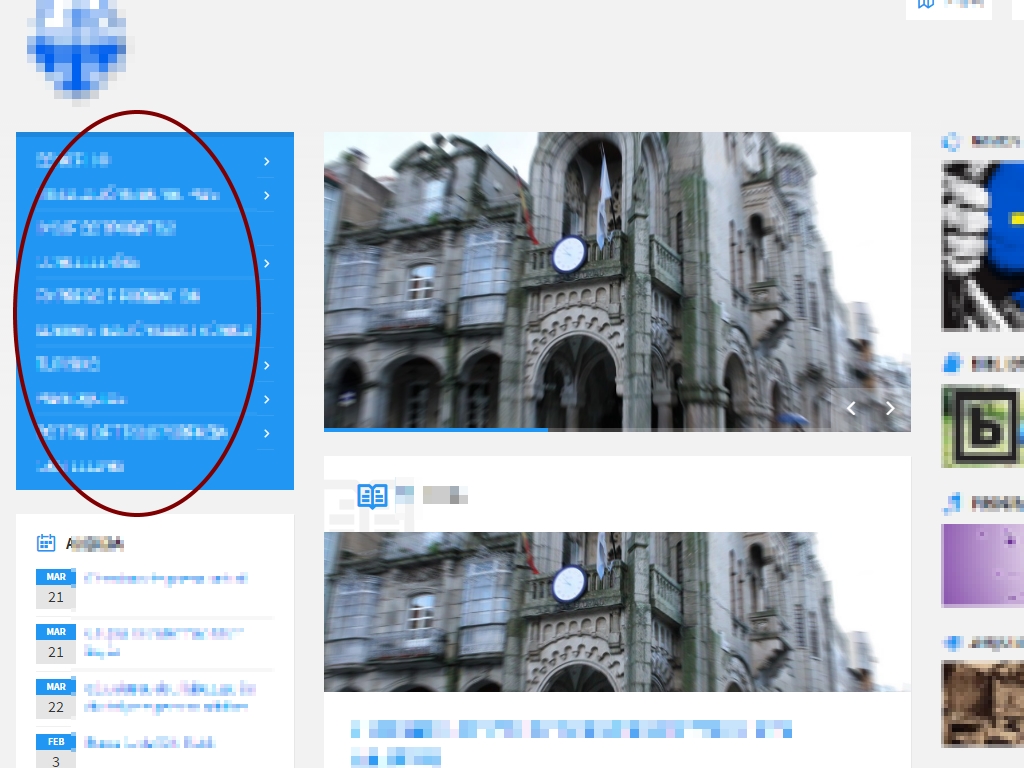
I have some problems with the side menu … On the cover the menu always appears FOLDED, but on the pages appears DEPLOYED.
I need the MENU cover to be DEPLOYED too.
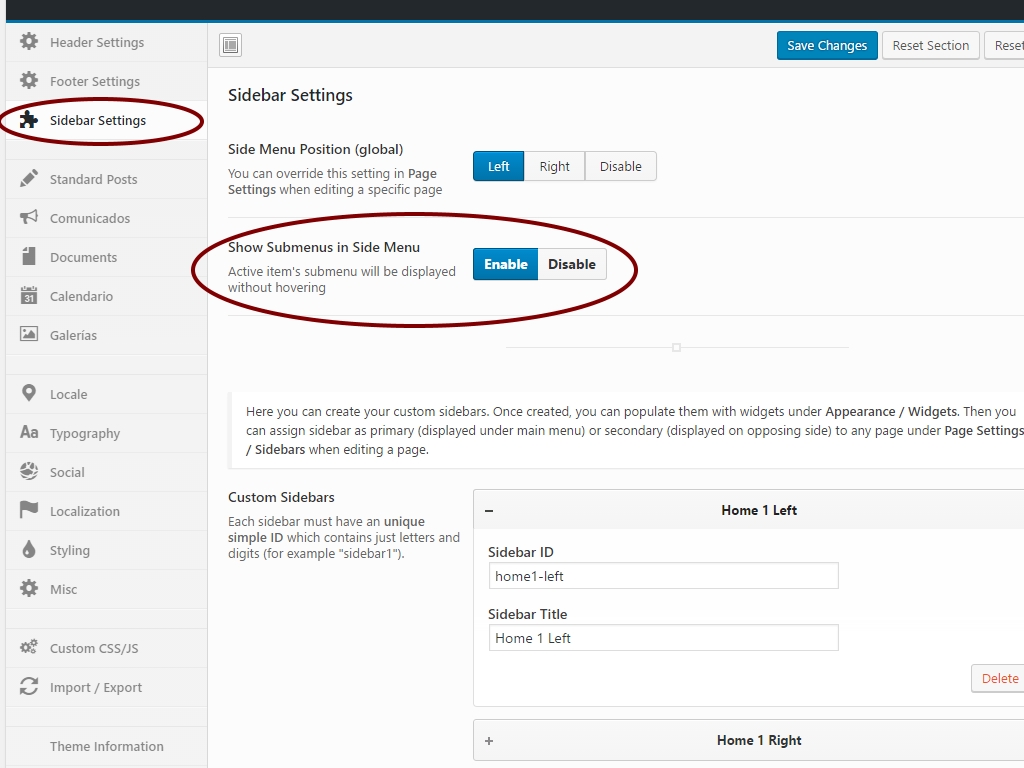
I have already checked that in THEME OPTIONS> SIDEBAR SETTINGS> SHOW SUBMENUS IN SIDE MENU is ENABLE
What is the problem? Where is it set up?
Hi,
sorry but I don’t understand. Please share your URL and try to be more descriptive.
Lubos
Right now the web is closed. I share the url, by private.
My question is what effect does this setting have?: http://v1g0.com/1.jpg About this menu?: http://v1g0.com/2.jpg(My intention is that the submenus appear deployed / visible)
Check out this example. If you turn that option off, the side menu won’t be expanded.
Understood and resolved  thanks
Still VERY much loving your theme and great it is responsive. Is there a way I can turn off the sidebar for some posts and not for others?
Hi,
unfortunately, that’s not possible without some custom coding. A very basic version can be achieved via custom CSS like this:
/* Disable left column */
.post-123 .left-column { display: none; }
/* Disable right column */
.post-123 .right-column { display: none; }
“123” is the ID of the post to which you want to apply this. However, there will remain a blank space after the sidebar. Stretching the content would require more advanced code and you will have to hire a freelancer for that.
Lubos
Hello. I am working on website: consort.ca – using TOWNPRESS
1. I cannot get the top right dropdown map feature to populate on the homepage, nor will the map area populate on the contact page.
I have added the api, gps coordinates… no luck. I need some guidance please.
2. My client wishes to import outlook calendars to the events or to its own calendar page. Is this possible with this theme? Can this be done with existing theme or must I install a unique plugin?
Please let me know if you would like login details.
Please email response to Sarah Hagens – site manager: sarahjeanhagens@gmial.com
Thank you. Sarah
Hi,
1.) you need to configure your API key under your Google account. You current key is not allowed for this domain. This has nothing to do with the theme. This is the error for your reference:
"Google Maps API error: RefererNotAllowedMapError https://developers.google.com/maps/documentation/javascript/error-messages#referer-not-allowed-map-error
Your site URL to be authorized: http://consort.ca/"
2.) Importing is not supported. You will have to use some 3rd party events plugin if you want such feature.
Lubos
BTW, there are lot of server errors on your site. I advice you to check out the developer console to see them.
Event page not working correctly please advice regards
Hi,
I will need more details and your URL.
Lubos
i can send you the login credentials can you give me your email thank you
Please send me a PM and don’t forget to describe what exactly is not working.
It seems the newest version ofTownpress wipes out all my widgets. It also does not seem to update Visual Composer to the latest version. I even tried to deactivate and delete Visual Composer first and that did not make a difference.
Hi,
there weren’t any changes concerning widgets so I am not sure why it caused that.
Visual Composer 5.1 was not available when I submitted the update, I will include it in the next update this week.
Lubos
Hi again, could You give me advice about events calendar in widgets , which displays your section events on sidebar , something like this one: http://amcham.bg/events/regional-roundtable-usa-bulgaria/
Hi,
sorry, but calendar view is not supported. You will have to use some 3rd party events plugin for such functionality.
Lubos<=p>
Hello,
Is it somehow possible to display a random image from any gallery in the LSVR Featured Gallery widget? Or at least a random image from a single gallery? Thanks in advance…
Hi,
sorry, but that’s not possible without some additional custom coding.
Lubos
Hi,
I read documentation about update and pretty much all is clear.
Just wanted to ask few technical questions.
I have renamed townpress theme folder name. I have also renamed child theme folder to “myname”.
Now when updating do I need to replace new files that I download with names that are now on website? I have also changed textdomain names as well inside files.
How do I update theme considering that?
Should I compare old and new files and change new files to match old names?
Thanks,
Marko
Hi,
I am sorry but you will have to do all those changes again. Changing parent theme files (including its name) is really not recommended at all and from my point of view you are basically voiding your warranty so to speak.
Theoretically you can just overwrite changed files as per changelog, but again, any change to the parent theme files is on your own responsibility. Issues caused by that are not covered by support.
Lubos
Thanks Lubos,
I will revert files to original names that are in theme files and activate theme again.
For some reason upload document dont work. Whats happening ?
Hi,
I will need more info. Did it worked before? Are you using latets version of the theme (1.4.7)?
Lubos
It worked before, and just stopped. Looks like that button is not clickable. I updated theme to latest ver. Same issue. Funny thing. Sometimes work. E.g. Tested 20 times in past 24hours only 2 times worked. there are no rules when it works.
Well, if it worked before than something started causing it. Have you installed any new 3rd party plugin? Try to disable all except those required by the theme.
Nope. All plugins are default. for e.g. last 2 days worked fine, after update new ver of theme. And today it’s not working at all.
Please send me your wp-admin credentials via PM, I will take a look at it.