992 comments found.

Hello,
I find some warnings in my wordpress (by plugin Querry Monitor). You can check it here: http://i66.tinypic.com/mvrk75.jpg . It doesnt make problem, Just for fixes 
Hi mirco261.,
Thanks for letting us know. We will note down this issue and update it in our next version. Thank you.
Regards., DesignThemes Support.
I am using Wordpress version 4.7.4 with the version of the KidsZone 3.5 theme (2017.04.27), and the Visual Composer does not save the contents of the pages. When i disable the “DesignThemes Core Features Plugin”, I can update the content. But I need the “DesignThemes Core Features Plugin” for the theme to run.
Hi.,
Thank you for contacting us.
The Visual composer page builder works with only newly created pages and not with the dummy pages that are created using the “Import Option”. Only our default page builder will work with dummy pages created with Import Option. Thank you, we look forward to helping you!
Regards., DesignThemes Support.
Hello, It displayed me error in WooCommerce product categories widget : ” Catchable fatal error: Object of class WP_Error could not be converted to string in /nfsmnt/hosting1_2/e/7/e7853963-403f-4d87-b702-8f92bade6205/nekoranec.sk/web/wp-content/themes/kidszone-3.4/framework/register_public.php on line 67”. I have displayed hierarchy and Hide empty categories settings.
Hi mirco..,
Please mail us your site credentials (WP & FTP access logins) immediately via the right bottom form located @ http://themeforest.net/user/designthemes.So that, we can check and have a clear look from our end. Then we’ll help you get rid of it ASAP !!
Regards., DesignThemes Support.
Hi! We have some problems with template when move it from one server to other. All the template settings are lost. Could you help us with that, please?
Hi Ekipnis.,
You mean you have lost the buddha panel/theme options settings? If yes, then those settings will not be lost while server transfer. There is a backup option in the buddha panel settings, have you used that?
Kindly mail your WordPress and FTP Login Credentials through the right bottom form @ http://themeforest.net/user/designthemes of both your old server and your new server so that we will check the issue.
Regards., DesignThemes Support.
Hi, when transferring the demo content, we used the backup option in the Buddha Panel settings, but the the issue remains. So do you know any other variants? Tank you
Hi ekipnis.,
Kindly mail your WordPress and FTP Login Credentials of both your old server and new server through the right bottom form @ http://themeforest.net/user/designthemes so that we will check the issue.
Regards., DesignThemes Support.
WP 4.7 compatibility?
Hi.,
Yes, Our theme is compatible with WP 4.7.
Regards., DesignThemes Support.
iframe video in facility item not showing at correct width. I have included a video embedded on this page: http://wicklowmusicdrama.com/tutors/ but it’s showing full width along the top instead of 400px wide and aligned right (per iframe code) – how do I get it to show correctly aligned right of text? (this theme was bought by my client so it’s not showing up as purchased under my name)
Hi.,
Kindly, Confirm your purchase code through the right bottom form located @ http://themeforest.net/user/designthemes
If you need your Purchase Code you may download it from your ThemeForestaccount>Downloads>choose the necessary product>Download>License certificate & purchase code.
Kindly refer the following links for getting clear idea.
http://wedesignthemes.com/support/knowledge-base/purchase-code-where-to-download/Regards., DesignThemes Support.
I believe I submitted this to you before as you answered previous support requests – I cannot find it at the moment as the previous designer purchased the theme. See previous answered comments here : https://themeforest.net/item/kids-zone-children-kids-wordpress-theme/6787343/comments?filter=all&page=41#comment_10712243
Hi outsource.,
You need to remove the following code from wp-content/themes/kidszone/style.css file line #185 (approxmate)
iframe { width: 99.7%; }
Refer : https://snag.gy/G0Jpjf.jpg
Regards., DesignThemes Support.
Hello, i want to buy this theme, my hosting service is Linux with Cpanel and my wordpress version is 4.7.1. Is it compatible?
Thanks!!
Hi.,
Thank you for the interest in our theme and contacting us.
Yes it is compatible with wordpress version is 4.7.1.
Let us know, if you have any other queries!
Regards., DesignThemes Support.
Good news!! Thanks at lot! we really like this theme!! it doesnt matter that our hosting service is Linux with Cpanel, right?
Hi.,
Thank you.
Yes, You can use Linux hosting server as well.
Regards., DesignThemes Support.
hello i lost my setup file how can i download again
Hi.,
You can download the theme files from the download section of themeforest. Please have a look at it.
Your support has been expired. Please purchase the support item to move further.
Check this link for renewing the support : http://wedesignthemes.com/support/knowledge-base/how-to-extendrenew-your-support-period/
Regards., DesignThemes Support.
Hi,
We purchased this theme quite some time ago, installed on a test site we planned to launch, and let it sit until now.
In the beginning, we wanted to create new pages for different subjects, and in order to copy the demo page you had, we had to copy the HTML and paste it into new pages.
Fast forward to now. We tried to edit those pages and got really strange results. If we open the page, the Visual tab appears blank. We have to go to the Text tab then back to Visual before it will show up. Then we edit the text on the Visual tab and update the page and our changes don’t save.
If we instead edit the raw HTML in the Text tab then update page, it will save the changes, but we can’t be editing everything in HTML. Something is wrong.
We tried to make a new page from scratch. Used Default Template or Full Width Template. 1. If we use the Kidzone page builder and go to the General tab and drag an Add Any Content Here module, then click the pencil to edit, it will not let us type anything in the editor window on either the Visual or Text tabs. 2. If we use the Wordpress page builder, it will let us type on both the Visual and Text tabs, but it ignores anything typed on the Visual tab. It sometimes won’t open the text tab, and sometimes it makes the editing window very short or even closed. When I first go to the Wordpress editor sometimes the Visual and Text tabs don’t even show.
In this video I first create a new page from scratch and demonstrate 1 and 2 above, then I take you to a previously created page that we copied/pasted the original code into the Text tab from the subject page you had in the theme. You will see I can only edit the Text tab and not the Visual tab, and I can’t even create pages like this any more.
http://screencast.com/t/bv03ryaWyDWe are wondering what we can do about this. 1. Is it a bad install? 2. Have you heard of this before and know a fix for it? 3. Is it an outdated version of the theme? Our original purchase on 12-15-15 included all future updates, so is there an updated version we can install?
Any help or insight you can provide is greatly appreciated. You can see that we have never used the theme yet, but we are getting ready to launch and would like to use it now. Once we get the test site working correctly we will migrate it and launch.
Hi.,
It seems that you are using a very older version of our theme. Please update our theme with latest version 3.4 to fix the issue. Please follow the instructions in the below knowledge base link for updating the theme.
http://wedesignthemes.com/support/knowledge-base/steps-to-update-the-theme/If you still have any issues, please mail your WordPress and FTP Login Credentials through the right bottom form @ http://themeforest.net/user/designthemes so that we will check the issue.
And also it seems that your support has expired on 15/06/2016. Please renew the support if you need any more help from us. Please follow the instructions in the below knowledge base link for extending the theme support
http://wedesignthemes.com/support/knowledge-base/how-to-extendrenew-your-support-period/Regards., DesignThemes Support.
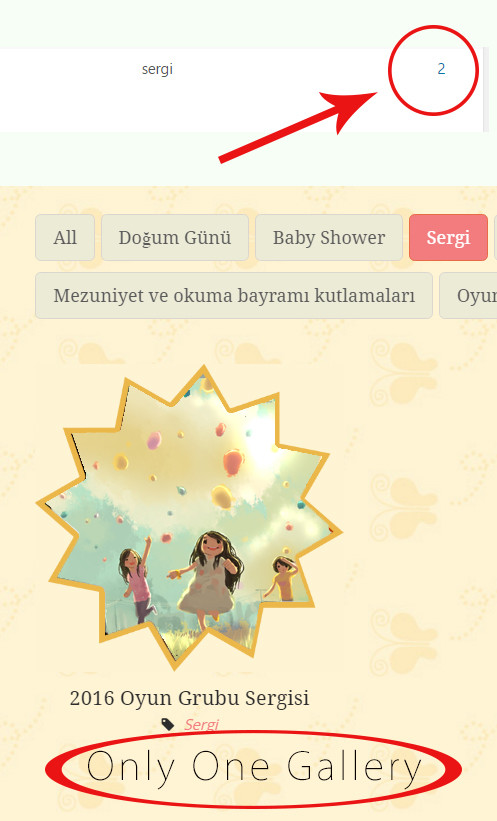
I’m filtering the gallery, but some categories are empty.
Hi Avanta.,
Please be more specific about your query with some screenshots, so that we can help you better.
It seems that your support expired on 11/06/2016. Please renew the support to get more help from us. Please follow the instructions in the below knowledge base link for extending the theme support
http://wedesignthemes.com/support/knowledge-base/how-to-extendrenew-your-support-period/Regards., DesignThemes Support.
The problem may be caused by a fault in the theme. Please see the screen shots.
http://i.hizliresim.com/MoJVpN.jpg http://i.hizliresim.com/QvMLBk.jpgThank you.
Hi.,
Kindly mail your WordPress and FTP Login Credentials through the right bottom form @ http://themeforest.net/user/designthemes so that we will check the issue.
Regards., DesignThemes Support.
I send mail. Thank you
Hi AvantajWeb.,
Your FTP details works fine. But your wordpress admin login causes the password error. So, kindly resend your correct admin login details.
Refer the screenshot: http://prntscr.com/dk118r
Regards., DesignThemes Support.
Does this theme support RTL languages as Arabic ?
Hi.,
Thank you for your interest in our theme. Yes, our Kids Zone | Children & Kids WordPress theme supports RTL languages like Arabic,etc.,
Regards., BuddhaThemes Support.
Hello, we are unable to translate the “Navigate to …” item in the mobile menu. Even hiding the item with css, it appears as main when we access any page that isn’t in the main menu. The option to translate this item in the .po file of the theme doesn’t exist. Could you help us? Thanks.
Hi Omgdigital.,
When we visit your site you have already hide the “Navigate to…” option. And if you want to translate the word get into the file path /wp-content/themes/kidszone/framework/js/public/custom.js at line number 81(Approx) there you can directly give the translated word there.
Refer the screenshot: http://prntscr.com/d9u09q
Regards., DesignThemes Support.
I had already translated both the custom.js file and the jquery.mobilemenu.js file. It continues to appear “Navigate to …”. I was able to hide the item in css but when I navigate to a page that is not on the menu it appears anyway! This is a problem that needs to be corrected, I need to publish the site and I can’t because I have not been sent a viable solution! This translation option should be in the .po file or in the site settings.
Hi Omgdigital.,
When we visit your site on smartphone browsers there is no “Navigate To..” option. Kindly send us the screenshot/video, so that we will help you better.
Regards., DesignThemes Support.
Other detail, in the cart page, the product name is center aligned but your variations not, I would like that all texts were center aligned. How can I do this? Thanks.
URL: http://www.awesomescreenshot.com/image/1844582/3dfff2f4c3b174677a9e86a9ac5f68b5
Hi.,
Kindly mail your WordPress and FTP Login Credentials through the right bottom form @ http://themeforest.net/user/designthemes so that we will check the issue.
Regards., BuddhaThemes Support.
Message with credentials sended. Can you please reply with a copy to contato@ubiquatech.com? Thanks.
Hi Omgdigital.,
The issue has been resolved. Please have a look.
We have added the below custom code under the option Buddhapanel > Integration > Custom CSS for aligning the recent products horizontally and aligning the variation text to center.
.woocommerce .cart_item td.product-name dl.variation dd, .woocommerce .cart_item td.product-name dl.variation dt, .woocommerce-page .cart_item td.product-name dl.variation dd,.woocommerce-page .cart_item td.product-name dl.variation dt { float: none; }
Regards., DesignThemes Support.
Hi, in the single product page the related products are getting displayed vertically. How can I solve this? Thanks.
Hi.,
Kindly mail your WordPress and FTP Login Credentials through the right bottom form @ http://themeforest.net/user/designthemes so that we will check the issue.
Regards., BuddhaThemes Support.
Message with credentials sended. Can you please reply with a copy to contato@ubiquatech.com? Thanks.
Hi Omgdigital.,
The issue has been resolved. Please have a look.
We have added the below custom code under the option Buddhapanel > Integration > Custom CSS for aligning the recent products horizontally and aligning the variation text to center.
.woocommerce .product.first .column { clear: none; }
.woocommerce .cart_item td.product-name dl.variation dd, .woocommerce .cart_item td.product-name dl.variation dt, .woocommerce-page .cart_item td.product-name dl.variation dd,.woocommerce-page .cart_item td.product-name dl.variation dt { float: none; }
Regards., DesignThemes Support.
Thank you so much!
Hi.,
OK, Thank you.
Let us know, if you find any issues in future.
Regards., DesignThemes Support.
Hello, I’m customizing the site with the client’s visual identity. At the moment I’m having trouble changing the color of the triangle “sale” that appears in the upper right corner of the product. When I use the css selector to change the color of the triangle it turns a square, could you help me please? Thanks.
CSS:
.onsale {
    border-color: #ec7d25 !important;
    color: #ffffff !important;
}
Hi.,
Get into the option Dashboard > Kidszone > Integration > Custom CSS > Enable Css > Yes > Pasted the below css code inside the text area > Save All.
ul.products li .onsale { border-top-color: #ec7d25 !important; color: #fff; }
Regards., DesignThemes Support.
Hello, we are working with Kids Zone and using Visual Composer to assemble the pages. We include some items and they are fleeing from the margin of the site: http://bulibuli.com.br/new/. We tried the theme builder and the same thing happened! We would like the elements to follow the same line as the logo and the menu as in the demo. If I choose the boxed layout the slider is also limited, which we don’t want. Could you help us?
Hi omgdigital.,
Please watch following video for better understanding about default and fullwidth template page
- https://www.dropbox.com/s/krc568bnxs8i893/fullwidth-sec.swf?dl=0
Regards., DesignThemes Support.
This theme support has expired, you mean this?, I will not receive help on your part to a problem with the theme? will I not have the ability to update it? can you explain me?.
Hi Latitut.,
You can always update the theme for free and it is lifetime. For getting any help from our support team, you need to renew your support. Please follow the instructions in the below knowledge base link for extending the theme support.
http://wedesignthemes.com/support/knowledge-base/how-to-extendrenew-your-support-period/Regards., DesignThemes Support.
Hi,
I sent an email 9 days ago, but there has been no reply.
I can not add the url link in the shortcode using link attribute.
[dt_theme_service icon=’icon_name’ type=’custom’ link=’URL Address’]
Refer the screenshot : http://prntscr.com/c0z3ax
after save page, nothing happen.
how to fix it?
thanks
Hi.,
Sorry for the late reply, we have been on leave for the 3 days due to local holidays. Also we have not received any emails before 9 days from you.
Please follow the instructions in the below knowledge base link for how to link the icon image.
http://wedesignthemes.com/support/knowledge-base/kids-zone-how-to-add-link-for-the-service-icon-box/Regards., DesignThemes Support.
We need to use the font Libel Suit, this is not in the typography of the template, as can be installed?
Hi.,
Please follow the instructions in the below knowledge base link for how to add the custom font type.
http://wedesignthemes.com/support/knowledge-base/how-to-add-new-fonts/For point C you can add your font to wp-content/themes/KidsZone/framework/google_fonts.php
Regards., DesignThemes Support.