669 comments found.
The Navigation Menu is not showing on the mobile menu. could you please advice?
????

Hello there,
Thank you for purchasing our theme and for reaching us. We used different menu for desktop and mobile menu. Please assign menu for hand held menu from Appearence -> Menus -> Manage Location -> Handheld menu.
Thanks, Farook
Hi would be able to use stripe as an option with paypal for payment
Hello there,
Thank you for interest with our theme. You can use stripe as payment gateway with this theme.
Thanks, Farook
Guys where is the support??? 3 days since since a basic reply and still 2 weeks and I have a broken theme. Bought over 400 themes on here, and never had the issue so would appreciate a reply and resolution as a matter of urgency.
Hello there,
Apologies for not getting back to you earlier. We are in vacation last week now we back to work. We finished installation and responded your ticket.
Thanks for your patience.
Thanks, Farook
Hello there ! I am trying to get rid of the “Add to cart” button in the list-with-no-image page. My Catalog mode in on. Can you please point me where to look ?
Thanks !
Hi there,
Thank you for purchasing our theme and for reaching us. Please use code from below link in your child theme’s functions.php file to remove “Add to cart” button.
add_action( 'wp_loaded', 'pizzaro_child_remove_cart_button' );

function pizzaro_child_remove_cart_button() {
    remove_action( 'pizzaro_product_item_hover_area', 'woocommerce_template_loop_add_to_cart', 20 );
}
Thanks, Farook
Thanks Farook !
Is there a way also to remove the link to the product page on each item ?
Hello there,
You can try below code to remove link from product listing.
add_action( 'wp_loaded', 'pizzaro_child_wp_loaded' );

function pizzaro_child_wp_loaded() {
    remove_action( 'woocommerce_shop_loop_item_title', 'woocommerce_template_loop_product_link_open', 3 );
    remove_action( 'woocommerce_after_shop_loop_item', 'woocommerce_template_loop_product_link_close', 5 );
}

add_action( 'woocommerce_shop_loop_item_title', 'pizzaro_child_template_loop_product_link_open', 3 );
add_action( 'woocommerce_after_shop_loop_item', 'pizzaro_child_template_loop_product_link_close', 5 );

function pizzaro_child_template_loop_product_link_open() {
    ?><span class="woocommerce-LoopProduct-link"><?php
}

function pizzaro_child_template_loop_product_link_close() {
    ?></span><?php
}
Thanks, Farook
I have problem to see product add-on. i actually set a group with 4 option labels, but it seems that it shows only 3, in woocommerce css i saw that was display:none. should i change in there or otherwise can you tell me how to fix it?
Thanks
Hi there,
Thank you for purchasing our theme and for reaching us. Can you please email our support with help of screenshot? I will take a look this issue.
Thanks, Farook
Hi there,
where can i find the dummy-data.xml.gz?
the import of dummy-data-xml doesnt work. I stuck on >> wp-admin/admin.php?import=wordpress&step=2 <<
screen on browser is white nothing happens…. do you know this problem?
Thanks Pegarox
Hello Pegarox,
Thank you for getting back. The white screen during import usually means that the importer has encountered a fatal error.
This is mostly due to memory exhaustion or execution time out. The reason is because there are lots of images imported and it takes time. You simply have to reimport it again ( images imported already will be skipped ).
You can find the dummy-data.xml.gz inside the dummy-data folder of the downloaded package.
Hope this clarifies. Let us know if you have any other questions.
Thanks, Ibrahim
Hi shaikrilwan! Theme is Beautifull, 1- The Navigation Menu is not showing on the mobile menu. could you please advice? 2- Is it possible to fit the telephone number at the top because our phone number is 14 digits? 3- when i set the product variation i get it as a drop down. i need it to look like the one on your demo, https://demo2.transvelo.in/pizzaro/product/apricot-chicken/ how can i achieve that? 4- we do create your own pizza. is there a way to have an option to choose toppings in a radio button and prices adds to cart.
Thanks!
Beatiful theme by the way! Well done!
I have found the mobile menu is working ok. I did not select it on the menu settings, my bet.
Hi there,
Thanks for reaching us.
Please share your site url we will provide custom css to fix the header phone number issue.
Regarding the “Create your own” button you can link a product to this button from Pizzaro > Shop > Create your own button link.
Thanks, Farook
Hello Farook, why does the support take so long to respond? I can’t give the url Credentials, I am working on my local server, i would appriciate if you could give me the custom css code to fix the header phone number, this is my email… bfaweis@gmail.com – 2) I know i need to link a product to the create your own button. But how can i get the product page to look like yours where it says select your topping. like here https://demo2.transvelo.in/pizzaro/product/hawaii-vegetarian-pizza-3/, its on the bottom. i need this urgent. thank you in advance
i misstyped the link. here its again
https://demo2.transvelo.in/pizzaro/product/hawaii-vegetarian-pizza-3/Hello there,
Thanks for reaching again. We created a support ticket regarding above issues and responded to you. Please take a look now.
Thanks, Farook
is it possible to disable multiselect on the checkboxes so the customer can only choose one option? Thanks
Hello there,
Thanks for reaching us. You cannot disable multi select with checkboxes however you can use radio buttons instead of checkboxes.
Thanks, Farook
Can the radio buttons be re styled with some custom css so the text appears to the side of them like regukar radio buttons as some options will be a few words in length thanks
Hello there,
Thanks for reaching again. Please email to our support regarding this issue. We will provide custom css for you.
Thanks, Farook
Is it possible to make variable products work with product add-ons?
Hello there,
We used YITH Product add-ons plugin which does not work with variable products however YITH Product add-ons premium version is work with variable products.
Thanks, Farook
Hi can i change the Red color of the theme to a blue one ?
Hi there,
Thank you for reaching again. You can change color of theme from Pizzaro > Styling.
Thanks, Farook
Hi can i customise it for french & arabic ?
Hi there,
Thank you for reaching us. Please use Loco translate plugin to translate theme. Here the documentation link: https://localise.biz/help/wordpress/translate-plugin/beginners
Thanks, Farook
Hello, very nice this thema, congratulations. I can use header v1 with the cart that has the top using header v2 style. That cart when passing the mouse showing the items.
Can you?
Hi there,
Thank you for purchasing our theme and for reaching us. Please email to our support with your FTP and WP Admin details and we’ll look into this.
Thanks, Farook
I was promptly attended by the support that after confirmation of purchase data, I received help and codes for the change I needed. Very good.
Hi there,
what a beautiful template. i install it, but what i cant find is the demo install documentation, i want exactly the look of demo2, but i just can not find it… Please help me with this issue.
thanks a lot and also for the great work…
Pedro
Nevermind i found your video on youtube…...
But another question, is there any/more icons where i can find…
po po-pizza, po po-salads
for example i need pasta, kids, asia and hindu icons…
THANKS A LOT
any/more icons where i can find…??
Hello there,
Thank you for purchasing our theme and reaching us. You can found list of available icons in this link: https://transvelo.github.io/pizzaro/pizzaro-icons/
You can also generate custom menu icons from websites like IconMoon ( https://icomoon.io/ ), Fontastic ( http://fontastic.me/ ). Once you’ve generated the icons, you can then follow the video here to add them to the theme : https://www.youtube.com/watch?v=hkCO2fWT7Sg
Thanks, Farook
Great theme, i am interested in buying it and i want to know if your theme have a multiple language selection ( cause i can’t see on your demo any menu to change the language) and when i select the Arabic Language the theme turns to RTL and i am not just referring to text i mean the whole content : menu and other elements , in few words does this theme have a RTL.css ?
Hi there,
Thank you for your interest with our theme. We can achieve this feature using WPML Plugin. Our theme is compatible with WPML.
Thanks, Farook
I’m also going to buy these beautiful theme, but I’d like to test it before. Please, could you send me a demo access please? ... I have also a question about the licence: I’m going to use this them for building a website for my pizza delivery service with an online payment option. Do I have to bay the commercial licence for that?
Hello there,
Thank you for your interest in our theme. Please email our support from the support tab here : https://themeforest.net/item/pizzaro-food-online-ordering-woocommerce-theme/19209143/support and we’ll setup a trial for you.
Regarding license there is no need for separate commercial license. There is only one regular license required to run the website on one domain.
Hope this clarifies.
Thanks, Ibrahim
great! Thanks a lot!
Hello.
Can you tell me please, will i be able to set up this theme in different languages?
Thank you
Hello there,
Thank you for your interest in our theme and for purchasing it. By default wordpress supports one language only. However there are plugins that allow you to setup wordpress in multiple languages. You can read about it here : https://codex.wordpress.org/Multilingual_WordPress
If you are looking to translate the theme you can use a plugin like Loco Translate. Instructions here : https://docs.woocommerce.com/document/woocommerce-localization/#creating-custom-translations-with-loco-translate
Hope this helps. Let us know if you have any other questions.
Thanks, Ibrahim
Hi, having some issues installing as per the demo. Any help here?
Hello there,
Thank you for purchasing our theme and for reaching us. Can you please clarify what are the issues that you are facing ?
Thanks, Ibrahim
I can’t setup the theme as per demo with sample import. Can you hlep?
Hello there,
Please email to our support with your FTP and WP Admin details and we’ll look into this.
Thanks, Farook
how to change the picture in the menu? want not pizza’s and something else))) Thank you!
Hello there,
In menu we used icons. You can add icon class from Appearence > Menus. Here the documentation link: http://transvelo.github.io/docs/pizzaro/setup/megamenu_dropdown.html#adding-icon-class-to-a-menu-item
You can found list of icons from below link: https://transvelo.github.io/pizzaro/pizzaro-icons/
You can also generate custom menu icons from websites like IconMoon ( https://icomoon.io/ ), Fontastic ( http://fontastic.me/ ). Once you’ve generated the icons, you can then follow the video here to add them to the theme : https://www.youtube.com/watch?v=hkCO2fWT7Sg
Thanks, Farook
Hi! Awesome theme, the king composer license is included on the buy? i can´t find the license code 
Hello there,
Thank you for purchasing our theme and for reaching us. Kingcomposer is free plugin that is available in wordpress plugins repository: https://wordpress.org/plugins/kingcomposer/
Thanks, Farook
Hi i have a problem. In demo page 6 on mobile menu have a problem. Handheld menu is opening but its corrupted. Its not working on your demo too. How can i fix it?
Hello there,
Thank you for reaching us. I am not able to reproduce the issue with home v6 header in mobile. Can you please explain what is the issue with the help of a screenshot?
Thanks, Farook
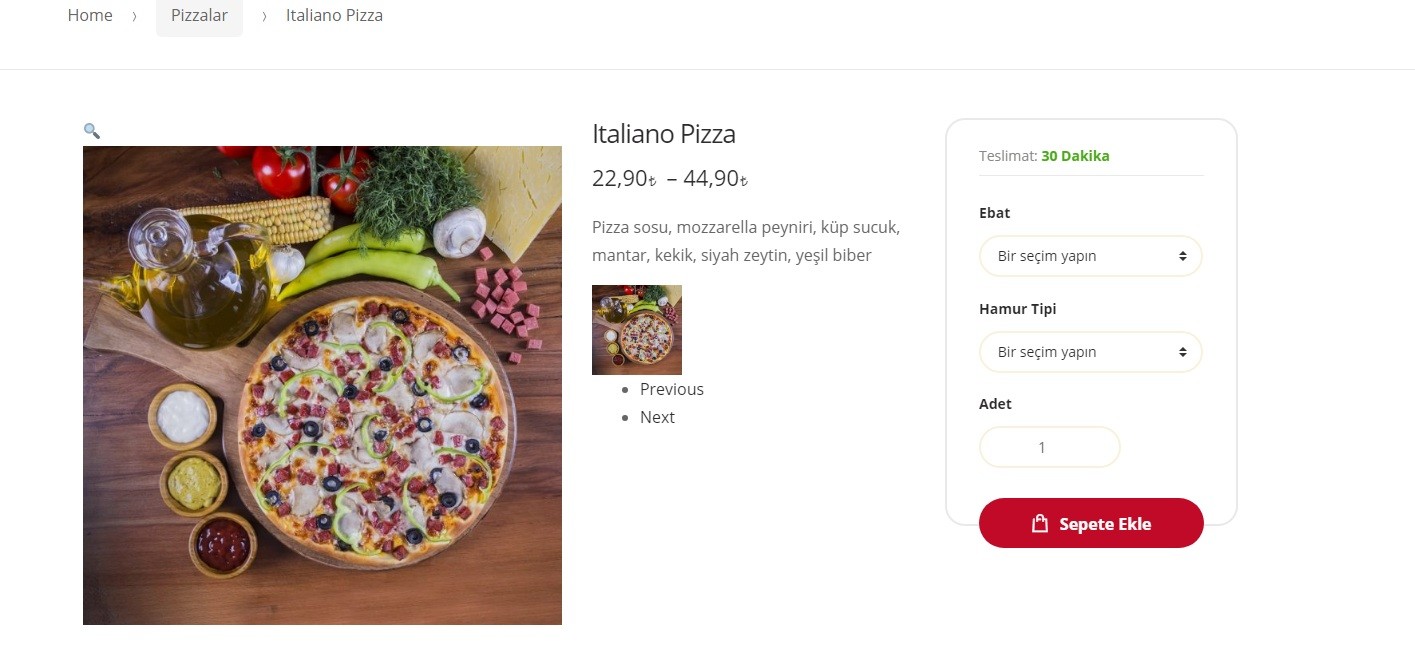
Hi, i was update the theme but there was a problem. The next and previous buttons shows when i update the theme (and thumbnail photo).
How can i remove thumbnail and next buttons? Thanx.
http://i.hizliresim.com/69bljv.jpgProblem solved. I import demo content again.
Hello there,
Thank you for purchasing our theme and for reachign us. Glad your issue is resolved. Let us know if you have any other questions related to the theme.
Thanks, Ibrahim
Hello,
I am trying to see your demo pages, however, the all the links are throwing error message “Error establishing a database connection”.
Thank you,
Hello there,
Our server just stopped owing to traffic. We’ve restored it. Thank you for noticing and reporting. I appreciate it.
Thanks, Ibrahim