154 comments found.

Hi, I just bought this theme and when I install and activate all the plugins all of the sudden i got HTTP ERROR 500
Hi, did you check php setting before install theme? Please read requirement system in our document first and compare it with your server to matched then install theme. This is online document: http://lion-themes.net/documentation/hermes/
yes my server exceeded the requirement though i set it all on 128MB I’ll try reinstalling it again
Ok, If is still reach this error, please create a support ticket and attach your server and website info we can help you check and install.
Hi, how many products can actually your theme handle ? I want to create an online catalog based on WooCommerce.
Awesome design – I like it !
Hi, Thanks for interested our theme, We think about 1000 products. Best Regards.
Dear..
I have problem with importing widget. after import, the widget are still same look.
When Imported, All Widget already exists, except this :
orphaned_widgets_2 Widget area does not exist in theme (using Inactive)
I have already contact you, please replay my message ASAP, the detail of login already sended through contact support.
Thank you
Ok, we received your ticket, and we will help you via emails.
Dear.. sorry for late response.. please take a look your email. I send you a more details about what I need.
Thank you..
Thank you..
Hi I want buy your Hermes Themes, but before I needo to know if it’s supported by SEO and what’s the difference with Hermes – Multi-Purpose Premium Responsive Magento 2 & 1 Theme ?
I’m sorry I’m French and my english it’s not good 
thank you
Hi, Does it have RTL Support?
Sorry, our this theme not support RTL.
Does your template support GBP £ ?
Hi, Yes. Our theme support GBP £. Thanks.
hi, i bought your theme hermes. i would like to know is your latest update ready for php 7? how can i download the latest update? thx and best regards!
All our theme version worked fine with php 7. You can find latest theme version in here: https://themeforest.net/downloads
Good morning, I have some problems that I need help with.
1: The product thumbnail in the shopping cart does not appear. How and where do I access to check if there is any problem in the photo?
2- Where can I translate the word “sale” at the top of the product screen and “quick view” in the center when the products are highlighted
Hi,
Please send a support ticket (support tab above) we will give you some solution and check your site for thumbnail problem, it may be come from different causes, also send your site url and admin account in email we will review for you. For the translate Sale text please use Loco translate plugin to translate all theme text, that is popular,free and easy to use.
Thanks for information, is there a way to go direct (afeter click on buy) to checkout? without go to the cart?
That is not standard of woocommerce, but possible to customize it by this question: https://stackoverflow.com/questions/15592633/woocommerce-add-to-cart-button-redirect-to-checkout
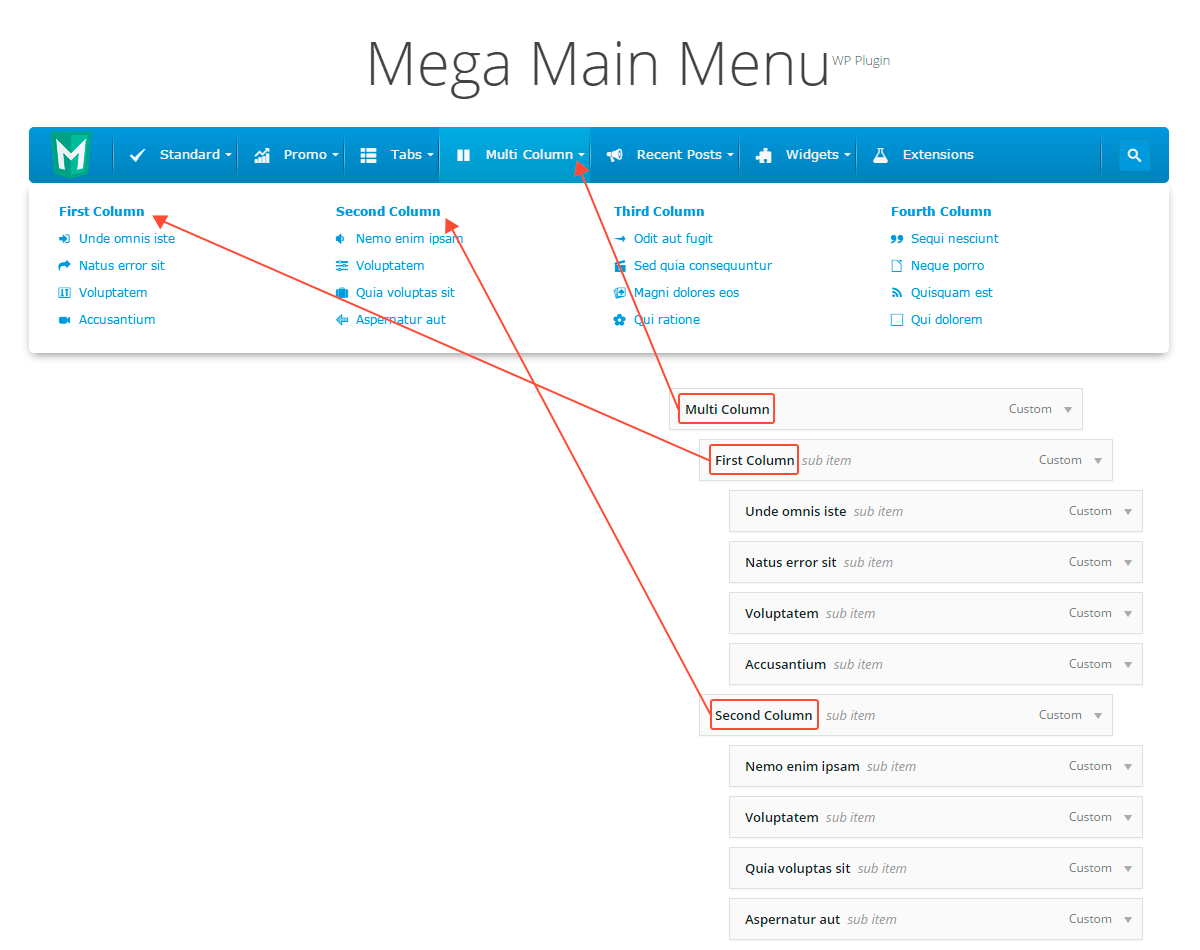
Hi, how can I make the mega menu dropdown container full screen width? I would like to have 6 columns, but wit the current setup the col items are hyphenated and looks ugly? Thank you
First, please make sure you enable fullwidth option for mega menu: http://prntscr.com/g2c5fb
Second, you can tick on that option to make sub-menu area fullwidth with container : http://prntscr.com/g2c5vw
Hi, this is not what exactly I was looking for. By full-width I mean not container fit, but something like fluid-container full width so it would be large in fluid-container block, not a container. Please suggest
Hmm, Mega menu have no option to make full fluid container. Can you send your site url and also discuss your idea in support email ticket not in here only for comment.
Hmm, Mega menu have no option to make full fluid container. Can you send your site url and also discuss your idea in support email ticket not in here only for comment.
I’ve not published yet. It has http://manual.menu.megamain.com/src/img/sh_multicolumn_instruction.png But would be very good if you workout the solution and make an update.
That is correct what I suggest your setting from last comment. http://prntscr.com/g2d3vg The full-width option is apply full menu container but in our theme menu container may be not matched with main fluid container for design. So we need check your header setting use which our demo to give a solution for you.
I am using home 1. Can you confirm if i modify the layout to fluid in the header it will work?
Yes if you modify menu wrap to fit with main container, the setting will work. Please modify in child theme as well it is not effect to next theme update version.
Hi, I’m checking this theme, It has multiple languages and multiple currency pre installed or I need to buy extra plugin? I need 2 languages and currency on my Shop. Thanks
Hi, yes you need buy or use free two extra plugins for that functions, we only demo in design for location put them. Thanks!
Its possible make AUTOPLAY for Testimonial ? And how show filled BYLINE on Testimonial ?
Yes, possible. please create a support ticket, we will update for you first then put it in new theme version. About Byline you can edit each testimonial in back-end to fill that field in there.
I get filled BYLINE – but its not showing 
Ah, we did not put it in layout of testimonials, so we must modify it to show on. If you want to show, send FTP account in support ticket. We can update for you.
Great support! Theme A++
Hi, you can make a rating with 5 stars for our theme and service to have more people like us same as A++ point
Hello, how to change the Quick View button text when on hover. Thank you !
Hi, We use product title in there, if you want to change it as static text, you need copy some files to child theme to inherit them to modify.
Thank you very much !
Hello, how can we translate Projects, Testimonials and theme custom texts with WPML? I installed WPML, but I don’t find any option for these sections. Thanks.
Supported.
Great support,thanks!
If you are happy, please make a rating with 5 stars. Thank you!
Hi, disable row in visual composer not work. Please help
Hi, Thanks for purchased our theme. Please send ticket via our mail: lionthemes88@gmail.com. We will support for you. Best Regards. Lion Teams.
Hello team! Just two questions: -The cart icon is shown in black, how could we change it? - We are trying to use the newsletter pop up. But the image is not shown in the background. We have modify it even with the same size that the demo one. Could you help? our web is: http://muerevacio.es/
Regards!
Hi, please send your request via support ticket. We will help you.
Hi,
I purchased your Hermes theme for wordpress and installed the theme as well as sample content. I’ve had no problem customizing at all, and everything works very well except for an error message ” failed to parse passed in variable @popup_bg_img: ” which appears at the top of the each page.
Can anyone advise on how to fix this? Thanks
Sorry, may be we did not set default that variable, if you need to use popup newsletter please setting background for it in here: http://prntscr.com/f0281c if not in use you can turn off it. If still display that notice, please send your site url and FTP account via ticket email we will solved it.
Hello team!!!! We want to use the theme in a web that is already built. The problem is, we just need to import from the demo data the home page 1, contact, about us and faqs. If we import all the demo data we will lose the post and pages that we already have. Where can we find this folders in XML field? They are not in this format in “sample data” folder. Could you help? regards!
thank u very much! perfect theme! regards!
Hi, Actually, I have 2 items on the website are not working. 1- The first problem is on the top bar for social media, the skype link will not work, how to let the client once he presses on skype icon transfer him to call me, how to put the username of my skype to activate the skype call. 2- The top bar for the currency and language converters are not working while are clicked. so please I would like to ask you for support to fix my technical problems. thank you in advance Best Regards
replied via email
dear lionthemes, i´m using hermes-theme with skin 3. unfortunately my header comes with a white background (ok!) & white menue-color (bad!). your demo works fine with white header and black menue-color! could you please advice me, whats my mistake!? thanks & best!
HI.pls send ticket via our mail: lionthemes88@gmail.com We will support for you. Thanks and Regards.