

1306 comments found.

Hi There,
I want to add other colors to my header – main navigation(blue,green etc.) instead of dark and light colors.
Thank you in advance.
Custom color for the header is not available in the theme settings. You have to manually add custom CSS to set it.
Here’s the custom CSS to change the background color of the dark header. You can add it into Theme Options -> Advanced -> Head Content:
<style type="text/css">

    #header.w-dark:before {
        background: #0775ff;
    }

</style>
Also, the code above will affect only dark header, please make sure you’re using the Dark version of the Header Background.
Hi There,
I should have elaborated myself. I want a different header nav color for every page in my website. Home page – Blue, Blog Page – Yellow, About Page – Red etc.
Also I want to add a secondary navigation on my about page.
As you know this is not available in the theme features and design.
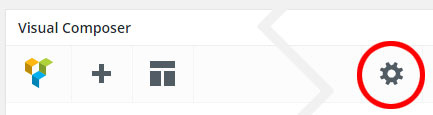
Anyway, to work around this you should add custom CSS to the Page Settings instead so you can set different background color for each page.
When you edit the page, click on the settings icon, see the picture below:
#header.w-dark:before {
        background: #0775ff;
}
Regarding the secondary navigation, try to use a Custom Menu widget to see if it works.
1. Go to Appearance -> Menus to create new menu.
2. Edit your About Page, add a WP Custom Menu to the page and then choose the menu created from the first step.
Hi There,
I updated the my wordpress to 4.8 and I lost all my content. Even after I made all the changes in the overlap child theme. Please help!
Thank you in advance.
I can’t even restore my backup as it is very old. Now when I reworking from scratch I can’t override the parent theme. Please help!
Usually, updating WordPress won’t affect your current content and settings.
Also, we have tried this theme on WordPress 4.8 and it’s working properly.
I guess that this is a compatibility issue of the plugins. There may be some plugins on your site are not compatible with the latest update of WordPress. Try to deactivate your plugins one by one to find the problematic plugin.
If it still doesn’t work, there may be something wrong while you update your WordPress site. Try to re-install the new update to see if it works.
The latest version of overlap is not getting installed properly on wordpress 4.8 :- contact form 7 won’t get activated, demo content – sliders, widgets and media would fail.
I installed 4.7.5 and installed an earlier version of overlap theme. It worked fine and then I updated wordpress to 4.8. Now I can’t override the parent theme of overlap.
I have made a lot of alterations in my child theme and have lost all of it.
I believe I’m making errors in panic. Please help as I was going to upload my portfolio site this weekend.
Is there a way to send you my login credentials.
If you’d like you can send me your login credentials in the contact form: https://themeforest.net/user/wyde#contact
Anyway, if you’d like to import demo content in the latest update of the theme, you have to install the new update of Overlap Demo Content plugin (1.0.4) that’s included in the main downloaded zip file.
Hi Guys… I have just updated the theme and there is a problem with my website.. loads of info and images missing.. the blog and testimonials too… does this have something to do with Visual Composer? Please can you advise what is the problem… I can’t have the website showing what it looks like once updated as my client will not be happy…. so I had to do a restore on it to what it looked like before the update. Do I send you the access details so you can fix it for me and what email address do I use please? Thanks….
Please make sure you have updated all bundled plugins. The latest update of this theme requires the latest update of Wyde Core plugin. You can see more details on how to update bundled plugins in our documentation.
Thanks for this however I have done all necessary plugin updates with the update of the theme…. the problem is the same.. still pictures missing.. sliders… testimonial.. blog section (just titles show)... are all missing… pretty much half the website does not show… can you send me your email address so I can send you the access details to see for yourself definitely a problem once it’s updated and plugins as well….?
You can send me your site credentials in the contact form on the profile page: https://themeforest.net/user/wyde#contact
THank you.. have just emailed you!
Thank you for the email!
However, now you’re using the old version of the theme and all bundled plugins so everything seems to be working fine. I couldn’t find what exactly problem. Could you please update the theme and all bundled plugins to the latest update?
I was going to leave you to do this because my client does not want their website looking like it does when I update  ... I have updated it for you but please may I kindly ask you to have a look at it and please sort problem urgently…. Thank you again!
This is a browser caching issue. Normally WordPress appends a file version as a querystring to the link of the file to force browsers to load the new files from the web server.
However, you have a plugin called “MainWP Child” that removes all querystrings from the files. Although you have updated the theme, the browser is still using the old file from the cache instead since the version of the file was removed.
You should deactivate MainWP Child plugin to solve this issue. Also, if there is anything wrong after you update the theme, try to press Ctrl+F5 (Command+R on Mac) to refresh your browser caches and to make sure your browser is using the new updated files instead of the old files from the caches.
Thank you so much!
Hello! I recently purchased this theme and I absolutely love it. I would like to make a couple changes that I cannot seem to find in the Theme Options. 1. I would like to enable transparency on the Header for blog archives (category & tags). To see an example go to: http://www.followthatluggage.com/category/life/ 2. I would like have the sidebar on my single posts to be “sticky” when it comes to the last widgets so that the sidebar side doesn’t have a blank white area when scrolling down the article.
Here is my purchase & license info: http://www.followthatluggage.com/category/life/Sorry, here is my purchase code: 0132970b-3698-4474-8ab0-58adced874dc – 13 May 201
1. Unfortunately, there is no option to enable transparency on the header for blog archive pages in the current version. In the next update, when you enable the Transparent Header on the blog page, it will affect the blog archive pages too. Thank you for reporting this issue.
2. I’m sorry, this feature is not included in this theme as you can see it is not available on our demo sites.
Hi,
I’m using a child theme and trying to override typography styles in overlap-child-theme/style.css. However, any changes here are overridden by main.css as presumably this is being called after the child theme’s stylesheet. Is there a fix for this?
Thanks,
Alex
font-weight: 700 !important;
Also, you can change the typography settings in Theme Options -> Typography for some elements and sections without using custom CSS.
Hey,
Thanks for the reply. I can overwrite the styles using !important, but as I’m doing extensive customisation, this is not a good solution.
function overlap_child_theme_enqueue_styles() {

    wp_dequeue_style( 'overlap' );
    wp_deregister_style( 'overlap' );
    wp_dequeue_style( 'overlap-main' );
    wp_deregister_style( 'overlap-main' );

    // Add main stylesheet
    wp_enqueue_style('overlap-main', get_template_directory_uri() . '/css/main.css', null, null );

    // Add child theme stylesheet file
    wp_enqueue_style( 'overlap', get_stylesheet_directory_uri() . '/style.css', array('overlap-main'), null );

}
add_action( 'wp_enqueue_scripts', 'overlap_child_theme_enqueue_styles', 100 );
If you already have that function in your child theme, you can edit and replace with the new one above.
Oh yep. That’s exactly what I as looking for. Thanks! And to make sure the child/style.css is enqueued after shortcodes.css? I’m trying:
function overlap_child_theme_enqueue_styles() {

    wp_dequeue_style( 'overlap' );
    wp_deregister_style( 'overlap' );
    wp_dequeue_style( 'overlap-main' );
    wp_deregister_style( 'overlap-main' );
    wp_dequeue_style( 'overlap-shortcodes' );
    wp_deregister_style( 'overlap-shortcodes' );

    // Add main stylesheet
    wp_enqueue_style('overlap-main', get_template_directory_uri() . '/css/main.css', null, null );

    // Shortcodes
    wp_enqueue_style('overlap-shortcodes', get_template_directory_uri(). '/css/shortcodes.css', null, null);

    // Add child theme stylesheet file
    wp_enqueue_style( 'overlap', get_stylesheet_directory_uri() . '/style.css', array('overlap-main'), null );

}
add_action( 'wp_enqueue_scripts', 'overlap_child_theme_enqueue_styles', 100 );
But I must have something wrong as it’s not working.
function overlap_child_theme_enqueue_styles() {

    wp_dequeue_style( 'overlap' );
    wp_deregister_style( 'overlap' );
    wp_dequeue_style( 'overlap-main' );
    wp_deregister_style( 'overlap-main' );
    wp_dequeue_style( 'overlap-shortcodes' );
    wp_deregister_style( 'overlap-shortcodes' );

    // Add main stylesheet
    wp_enqueue_style('overlap-main', get_template_directory_uri() . '/css/main.css', null, null );

    // Shortcodes
    wp_enqueue_style('overlap-shortcodes', get_template_directory_uri(). '/css/shortcodes.css', null, null);

    // Add child theme stylesheet file
    wp_enqueue_style( 'overlap', get_stylesheet_directory_uri() . '/style.css', array('overlap-main', 'overlap-shortcodes'), null );

}
add_action( 'wp_enqueue_scripts', 'overlap_child_theme_enqueue_styles', 100 );
Hrmmm. That doesn’t appear to be working.
I’ve tried it before I provide the code, it works fine on my end. Please carefully check the code again.
The code below will add style.css after main.css and shortcodes.css
wp_enqueue_style( 'overlap', get_stylesheet_directory_uri() . '/style.css', array('overlap-main', 'overlap-shortcodes'), null );
If it doesn’t work, please PM me your site URL: https://themeforest.net/user/wyde#contact
Oh apologies. That has worked. Excellent. Sincere thanks for your help!
Download the Overlap theme, but everything is difficult for me. Inquiries: 1- Promises 70 templates, where are they? 2- How to put the normal horizontal menu on the home page? 3- How do I activate my Visual Composer account? Thank you
1. You can import demo content in Theme Options -> Home so you will receive all pages/content as seen on our demo site.
2. Actually after you import demo content you will also receive all menus and settings. Anyway you can change the top menu layout in Theme Options -> Navigation ->
3. The Visual Composer plugin is included in the theme, you can normally use it without activating the product purchased code. The activation option is available for direct customers only to get the automatic update feature but when it was bundled with the theme, it needs to be updated by the theme author instead.
Also, you can see more details of all above questions in our documentation.
Hi there, love the theme!
I have a few issues though:
1. Google map seems to have a problem. Or the icon is not showing, or the address is shown incorrectly. Looks like a bug.
2. Responsive design -> ‘hide on mobile’ does not work. Whenever I select ‘hide on mobile’, the column is still shown on that device
Could you please look into these issues for me?
Looking forward to your respond.
Could you please provide me your site URL and admin login? You can PM me in the contact form: https://themeforest.net/user/wyde#contact
Hi There,
Sorry to bother you again. All your previous help has worked out flawlessly. Thank you once again.
I have a question – Blog section has pagination. Can I remove the pagination for the blogs?
Thank you in advance.
Hi There,
By default the blog page always displays the pagination, you couldn’t remove it.
However, if you’d like you can create a custom blog page by using Blog Posts element so you can hide the pagination for the blog posts:
1. Go to Settings > Reading, do not set the Posts Page so you have to choose “-—Select--” (the first option).
2. Go to Pages to edit your blog page with the page builder, and then add a Blog Posts element.
3. In the Blog Posts Settings window, choose “Hide” for the “Pagination Type”. You can also choose any options for your blog page in the Overlap Options box at the bottom of the page (i.e. Page Layout, Sidebar, etc.).
4. Go to Theme Options -> Blog -> Blog Single Post, choose “Custom” for the “Blog Home Page” and then set the blog page URL.
HI There,
I have selected infinite scroll as my pagination in Theme Options as well as the blog page. I have also removed the number of posts displayed on the page-that field is blank; but still after the 10th post, the next post(11th) looks like the first post it does not flow with the masonry grid.
Please help.
Thanks once again.
Once I added the number of posts to 10. It solved the issue. Thanks once again for all the help.
<style type="text/css">
.pagination {
display: none;
}
</style>
Hi, for activate the shop is necessary to instal the woocommerce plugin?
Yes, you will need to install and activate WooCommerce plugin to enable the shop on your WordPress site.
hi there nice theme you made i wanted to purchase but my friend bought this theme and had an issue with featured image on blog he said that this theme has featured image on left while heading of post is in center position this cost his Blog to be weird looking i am wondering will i get in same problem as he is right now after buying the theme?
Hi there,
Thank you for your questions!
All you will get are exactly the same as you see on our demo. This theme comes with 3 different blog layouts as you can see here: http://wydethemes.com/overlap/blog/blog-masonry/
Actually both featured image and heading are in the center of the page as you can see here: http://wydethemes.com/overlap/unlimited-choices/
Anyway, you can set the styles of the post heading so it can be in the left or right.
i think you did not get my point overlapping style Post with Heading and Image About Size of 590×300 is in that post it will not be the same as in demo the image itself will be on the left and heading in center feature image needs to be same size as original but should be in the center like heading and the rest of the post
there must be some CSS codes for this people are doing blogging on this topics and i have no knowledge in CSS that’s why i am not satisfied enough to buy this theme but it is amazing
Actually when you have small image, it should be in the center of the page, I just add new blog post with 900px of the width to show you how it would be: http://wydethemes.com/overlap/blog-post/
Also, you can enable sidebar on your blog post if you have small image: http://wydethemes.com/overlap/at-some-point/
Thank you I have just Solved his problem now i will buy this theme in a few days its perfect for me everything is ok
Hi and many thanks for a great theme! Could you please help me out with the portfolio grid? I been trying forever and seem to be unsuccessful making it work.
Is there a problem that you know of? I installed the demo and have been uploading pictures into the portfolio posts, but still nothing shows in the grid.
Could you please PM me your portfolio page URL: https://themeforest.net/user/wyde#contact
Hi! I just managed to figure things out myself. Thank you, it is working perfectly. Could I ask for help to find how to (if possible) change the headlines in portfolio from “Client” to something else?
All static words are included in POT file, you can translate or edit them by using a translation plugin like Loco Translate: https://wordpress.org/plugins/loco-translate/
You can also use the POEdit to translate the POT file via your child theme, you can see more details on how to translate the theme in our documentation.
Also, there is another way to change it. Copy the template file from your child theme “wp-content/themes/overlap/templates/portfolio/widget-clients.php” to your child theme “wp-content/themes/overlap-child-theme/templates/portfolio/widget-clients.php”, and then edit the template file in your child theme to change that word.
Thanks again!
I’m having issues where the shop pages that are auto-populating like categories and such – they aren’t showing up properly in their rows?? See http://8ae.c57.myftpupload.com/product-category/tabletop/
This is a bug of the theme when you choose “Show subcategories” for the “Default category display”. To work around this, go to WooCommerce -> Settings -> Products -> Display, in “Default category display” choose “Show products”.
Anyway, thank you for reporting this issue, we will fix it in the next update.
Hi Wyde, using CF7 in the footer to get newsletter email is a nice way of integrating such a function without use of any plugin, but it has downsides too :
1- Contact form is spammed from robots 2- It does not have all the advantage of the mailchimp plugin that let you have double confirmation, auto-add to the list and so on.
In previous theme you supported that, and it’s a shame imo that was discontinued. i understand that you couldnt make it compatibles with all mailing plugin, but it would be so great to have it back someday 
Regards.
I’ve never tried but I think this theme should be compatible with MailChimp too. You can try it if you’d like 
Hi There,
I was wondering on the blog masonry layout can I replace the the facebook icon to a phrase “Share on Facebook”? As I have only 1 social media link. The sole icon looks very odd.
Thank you in advance.
Actually that is just the icon to allow the visitors to share your post on their social media websites, even you have only 1 social media link (Facebook) but you should allow the visitors to share your post on other social websites like Twitter and Google+ too.
Anyway, if you’d like to change that icon to the text, you have to edit the template file in your child theme.
1. Install and activate overlap-child-theme.zip
2. Open cPanel File Manager to copy “wp-content/themes/overlap/templates/blog/meta-shareicons.php” to your child theme “wp-content/themes/overlap-child-theme/templates/blog/meta-shareicons.php”.
3. Edit the template file in your child theme to replace the whole code in the file with:
<div class="post-share">
    <a href="<?php echo 'https://www.facebook.com/sharer/sharer.php?u='. urlencode( get_permalink() ); ?>" target="_blank">Share on Facebook</a>
</div>
Thank you very much.
Hello Wyde,
I’m a french user, please scuse my english… I’m trying to solve a problem for me.
in http://wydethemes.com/overlap/blog/blog-overlap-full-width-right-sidebar/
i see the fourth post (if you can imagine…) in F12->CSS code i find “format-quote”, instead of standard-format how can i define the format-quote in my post edit ??
i check all the post options in the content demo, but i can’t find the solution…
could you help me please ?
best regards
Hello,
The Post Format is a build-in WordPress feature, you can choose the post format in the Format box in the right hand side (below the Publish box) when you add/edit the post.
Hi Wyde, i try to change header opacity, but it change also opacity of sticky menu, so i try those line of code, but seems that everytime i change header opacity it change sticky too, can you help me on that ?
header:before{
background:rgba(255,255,255,0.3); } #header.w-sticky{ background:rgba(255,255,255,0.7) }
Hi,
Here’s the custom CSS to change the header background opacity without changing the sticky:
#header:before {
opacity: 0.3;
}
However, if you enable the Transparent Header option, it will set the opacity to 0, if you’d like to change it, here’s the code:
#header.w-transparent:before {
opacity: 0.3;
}
So simple, so easy, like always. Thanks you
Hi there,
LOVE this theme.
I’d like to know what css or html is needed to ensure that my mobile site resizes back to the original size, rather than zooming out. I would like to keep the option for website users to zoom in though.
http://www.viragocreative.com/Does that make sense?
This is a website I found where the of html/css allows the website user to zoom in, but not zoom out past the original size: https://www.thenatives.com.au/
Thank you
Hi there,
Thank you for the detailed explanation and the links.
By default this theme doesn’t allow you to zoom out past the original size since the minimum scale of the ‘viewport’ meta tag was set to 1.0 (original size). I just tried it on our demo site, everything is working fine, when I try to zoom out, it always displays the original size automatically. If you’d like you can try it here: http://wydethemes.com/overlap/
Try to update the theme to see if it works. If it doesn’t work, there may be some plugins on your website disable this feature. You should deactivate other plugins one by one to find the problematic plugin.
Thank you, I tried removing all plugins but didn’t have any luck so I’ve just deleted the border.
Could you please tell me how to remove the top-padding on all pages on mobile. I’ve tried the below CSS in the ‘additional CSS section’, but had no luck.
/* @media all and (min-width: 800px) { .w-section.w-overlap-box { top-padding: 0px!important; } } */
Thanks!
1. As I mentioned above, you should update the theme first. If you’re using the old version of the theme that is different from our demo site so I couldn’t find the exact problem and couldn’t provide the right solution for you.
2. You don’t need to add custom CSS to remove the padding. But you should set the “Padding Size” in the column settings to “No Padding”. Of course now you’ve set the “Vertical Padding Size” for the row but you have to edit the column settings to set the “Padding Size” to “No Padding” too.
Thanks, I’ve updated the theme. Could you please assist me with the below, for my website: http://www.viragocreative.com/
1: I’d like to know how to delete borders from viewport on mobile. I tried this CSS but it didn’t work:
@media all and (min-width: 800px) { .vc_custom_14948410694 { border-top-width: 0px; border-right-width: 0px; border-bottom-width: 0px; border-left-width: 0px; } }
2: The Search Engine Optimisation icon box is a bit lower than all of the others on this page. I’d like to know how to make the icon boxes even: http://www.viragocreative.com/expertise/
3: How/where do you add a favicon?
4: I’ve added my email to my mobile menu, but I’m unsure how my mailto URL. At the moment, it’s unclickable.
Thanks, Bianca.
@media screen and (max-width: 991px) {

.vc_custom_1495243738215,
.vc_custom_1495243346406 {
    border-top-width: 0 !important;
    border-right-width: 0 !important;
    border-bottom-width: 0 !important;
    border-left-width: 0 !important;
}

}
2. You have set the padding for the row container of the “Search Engine Optimisation” box so it’s lower than others. You should edit the row of that box, change the “Vertical Padding Size” to “Default”.
3. You can set it in Customize -> Site Identity -> Site Icon. This is a built-in setting from WordPress, you can see more details here: https://codex.wordpress.org/Creating_a_Favicon
4. You can set it as below:<i class="ol-mail" /> <a href="mailto:email@domain.com">email@domain.com</a>
Thanks for that. Everything worked except number 1, the border. It’s not working.
I’ve put the custom CSS code in the ‘Customize’ section, is there anywhere else this code should go?
Thanks.
<style type="text/css">

@media screen and (max-width: 991px) {

.vc_custom_1495243738215,
.vc_custom_1495243346406 {
    border-top-width: 0 !important;
    border-right-width: 0 !important;
    border-bottom-width: 0 !important;
    border-left-width: 0 !important;
}

}

</style>
No luck with that either
When you set the borders in Design Options, Visual Composer will add custom CSS to the bottom of other CSS codes so it will override others.
Here’s the new code that will override the CSS from Visual Composer:
<style type="text/css">

@media screen and (max-width: 500px) {

#content .row.vc_custom_1495243738215,
#content .row.vc_custom_1495331489646 {
    border-top-width: 0 !important;
    border-right-width: 0 !important;
    border-bottom-width: 0 !important;
    border-left-width: 0 !important;
}

}

</style>
HI Team you can give a email support Thanks!!!
Of course you can send your questions in the contact form: https://themeforest.net/user/wyde#contact so we will reply to your email directly.
Hi There,
I’m getting a javascript error on the blog page Uncaught TypeError: Cannot read property ‘addEventListener’ of null
Due to which the blog (masonry grid) page is not getting displayed properly on safari and firefox browsers.
Please Help! Thank you in advance.
There may be a plugin conflict on your site. Try to deactivate other plugins to see if it works.
If it doesn’t work, please PM me your site URL: https://themeforest.net/user/wyde#contact
Thank you. It works great!
I have another question for you. In the blog post comment section-I do not want website input. can i remove that or even replace that with a an address field or provide their social media presence link?
Thank you once again in advance.
You can add custom filter to your child theme to remove the website field.
1. Please make sure you have installed and activated overlap-child-them.zip.
2. Go to Appearance -> Editor to edit the Overlap Child theme.
3. Add the custom filter below to Theme Functions (functions.php):
function overlap_child_comment_form_fields( $fields ){

    if( isset( $fields['url'] ) ) {
        unset( $fields['url'] );
    }

    return  $fields;
}
add_filter('comment_form_default_fields','overlap_child_comment_form_fields', 99);
Also, here’s the custom filter to replace it with the Social Media field:
function overlap_child_comment_form_fields( $fields ){

    if( isset( $fields['url'] ) ) {
        $fields['url'] = '<p class="inputrow"><input type="text" name="url" id="url" value="'. esc_url( $commenter['comment_author_url'] ) .'" placeholder="'. esc_html__('Social Media', 'overlap').'" size="22" tabindex="3" /></p>';
    }

    return  $fields;
}
add_filter('comment_form_default_fields','overlap_child_comment_form_fields', 99);
Hello, I have an issue uploading the demo content, I increased the php settings but still obtained the same result. I want to import the corporate demo but the only homepage I get is “travel blog”, and a few other pages.
I just wanted the home pages, can you a copy/paste in a text file the code in the backend editor? I’ll copy it and switch to visual composer and get what i need
Can you send me the code for these homepages : - Corporate - Food stylist
...and the pages : - portfolio overlap - about me
Best regards,
Yann
Hello,
Could you please send me your email? So I will send the code directly to your email. You can PM me your email here: https://themeforest.net/user/wyde#contact
The “read more” option isn’t working for me. It just displays [...] as un-linked text or nothing at all, whether I choose to display “[...]” or “link to full blog post”.
I just tried it and it’s working for me. If you’re working on the blog page (the posts page), please make sure you have set the blog settings in Theme Options -> Blog.
If it doesn’t work, please PM me your site URL and admin login: https://themeforest.net/user/wyde#contact


