

1508 comments found.

- sorry wrong developer
Hi, still a great theme! Two things I hope you can help with: 1) it seems that the VC masonry post grid is disabled under the Vela theme. I guess it’s not supported. How can I enable this at my own risk?  2) How can I change the color of the preloader background color and preloader animated image? Thanks!
1) Default masonry grid from VC was disabled and it doesn’t support since we have custom masonry layout for both blog posts and portfolio.
To enable it you will need to edit the code in the main shortcode class directly but, when you update the theme your changes will be lost. That means you will no longer be able to update the theme. So, this is not recommended.
Anyway, if you’d like you can edit the file “shortcodes/class-shortcodes.php” in the theme folder to remove the codes below from that file:
Line 85:add_action( 'init', array($this, 'deregister_grid_element'), 100);Line 182-185:
vc_remove_element('vc_basic_grid');
vc_remove_element('vc_media_grid');
vc_remove_element('vc_masonry_grid');
vc_remove_element('vc_masonry_media_grid');
2) You can change the background color and animated image in your child theme as below:
- Please make sure you’ve installed and activated Vela Child theme. - Go to Appearance -> Editor to edit the Vela Child theme. - Add custom CSS below to Stylesheet (style.css) to change the background color:
#preloader {
    background: #000;
}
- Add custom filter below to Theme Functions (functions.php) to change the image (replace the image path with your GIF image):
function vela_get_page_loader( $loader ){
    $loader = '<img src="https://www.google.com/images/branding/googlelogo/2x/googlelogo_color_272x92dp.png" />';
    return $loader;
}
add_filter('wyde_page_loader', 'vela_get_page_loader');
Hi, thanks for the comprehensive response. Very helpful. The only reason I need to use another grid format other than yours is filters. Or to be precise I need to be able to use drop-down grid filters given the categories used on custom post types and how I want to present those.
Meaning something like this: http://preview.codecanyon.net/item/advance-post-gridlist-with-custom-filtering-for-visual-composer/full_screen_preview/8712997?_ga=2.54447904.966251639.1497506073-1307686621.1496824250
However I’m running into problems with 3rd part grids / filters under the theme. Things go a bit haywire.
We have never tried that plugin and it’s not included in the plugin support list so I couldn’t answer why it doesn’t work.
Anyway, try to disable AJAX Page Transitions in Theme Options -> Page -> AJAX Options to see if it works.
Sadly with Ajax on or off all grids tried thus far go nuts when trying to display anything with a dropdown filter. So the search continues. Would be great to have such a dropdown filter on the Vela grid, but alas no.
Thank you for that useful information!
Hi Guys,
I’m trying to update our site but can’t work out one thing:
On this page there is a “image gallery”. I want the images to be responsive, so there is no blank part on the right side of the images (so the images are always from left side to right side.
Can you please advise how to achieve this?
http://www.blueclickphotography.com/pin-ups/
Thanks in advance!
Hi,
I couldn’t find any Image Gallery on the page you provided.
Anyway, try to update the theme to see if it works.
Hi, yes sorry – I have solved it in another way. However I just updated the site as you recommended and now it doesn’t load – the loader just spinning and spinning… http://www.blueclickphotography.com/ Any idea what to do? Thanks!
Please make sure you have updated all bundled plugins. After you update the theme, you will see a notification message to update the bundled plugins too. You can find more details on how to update bundled plugins in our documentation.
If it doesn’t work, try to deactivate other plugins to see if it works.
Ahh worked it out – needed to update the Wyde core plugin
Hello,
I would like to make the header logo larger. Is this possible?
Thanks!
<style type="text/css">

#header #logo img {
max-height: 95%;
}

</style>
Thank you for the prompt reply. I added that and nothing seems to change. When I inspect the page, I see that it is loading the version of the logo that is 50px high. In that case, sizing it up may not make a difference. Is there maybe a way to load a larger image file for the logo header?
Thanks for your help!
That sounds like the width of your logo is larger than 200px so it will shrink to fit the logo area. By default the maximum width of the logo is 200px.
Try to edit the custom CSS as below to see if it works:
#header #logo img {
max-height: 95%;
max-width: 500px;
}
However, the height of logo won’t be larger than the height of the header menu (85px).
Tried, still nothing. URL: http://xpdemo.slimbaby.net/
The theme displays the logo as you uploaded. The original size of your logo is 71×50px. Even you add custom CSS to set it bigger, it’s still displaying in 71×50px. Try to choose new bigger one to see if it works.
Hi i would like to know if you could offer customization? i would like to intergrate Eventbrite events automatically to my theme while using the same design. https://github.com/Automattic/eventbrite-api This is the application i am using. Thank you
We’re sorry but we don’t have customization or modification services. You would find someone on Envato Studio: https://studio.envato.com/explore/wordpress-customization
Hi I have a problem with the size of the text in my menu and social media icons. They are normal sized on the left (the phone number and the logo) and on the right the text is massive – the social media icons are almost 5 times bigger than the text on the left
How do I rectify?
Hi,
There may be a plugin conflict on your site. Try to deactivate other plugins to see if it works. If it doesn’t work, please PM me your site URL: https://themeforest.net/user/wyde#contact
Hello, may I know how to remove the “white spaces” between different pages? From page 1 to page 2 (scroll downwards), there is a bigger white space in between and how to remove it?
Secondly, I tried activating Google Analytics but there is an error. May I know what’s wrong?
Error: Last Error: 2017-05-30 14:52:01: exception ‘Google_Auth_Exception’ with message ‘Error fetching OAuth2 access token, message: ‘invalid_grant: Code was already redeemed.’’ in /home/raf10000/public_html/wp-content/plugins/google-analytics-dashboard-for-wp/tools/src/Google/Auth/OAuth2.php:126 Stack trace: #0 /home/raf10000/public_html/wp-content/plugins/google-analytics-dashboard-for-wp/tools/src/Google/Client.php(128): Google_Auth_OAuth2->authenticate(‘4/09Y9WH4xNubQh…’, false) #1 /home/raf10000/public_html/wp-content/plugins/google-analytics-dashboard-for-wp/admin/settings.php(1077): Google_Client->authenticate(‘4/09Y9WH4xNubQh…’) #2 [internal function]: GADWP_Settings::general_settings(’’) #3 /home/raf10000/public_html/wp-includes/class-wp-hook.php(298): call_user_func_array(Array, Array) #4 /home/raf10000/public_html/wp-includes/class-wp-hook.php(323): WP_Hook->apply_filters(’’, Array) #5 /home/raf10000/public_html/wp-includes/plugin.php(453): WP_Hook->do_action(Array) #6 /home/raf10000/public_html/wp-admin/admin.php(222): do_action(‘toplevel_page_g…’) #7 {main} ResponseHttpCode:400
Please contact us from the account that purchased this theme to make sure you’re currently in the correct product page that corresponds to what you have purchased.
Is it possible to change the main menu navigation font size?
Here’s the custom CSS to change the main menu font size. You can add it to Theme Options -> Advanced -> Head Content:
<style type="text/css">

#header .nav-wrapper > #nav > ul > li > a {
font-size: 16px;
}

</style>
How to I add Google Tag Manager to Vela? I am using the Vela Child Theme. Thank You
Actually you don’t need to use the Vela Child theme but you can add Google Tag Manager code directly to Theme Options -> Advanced -> Body Content.
Hi! I want to hide the pagination in a VELA Blog Post, so I choose Pagination -> Hide in the settings, but the pagination is still visible. Any ideas to solve this?
The Blog settings in Theme Options -> Blog is available only for the posts page. Please make sure you’ve set your blog page as Posts page. Go to Settings -> Reading, choose your blog page for the Posts Page option.
Anyway, if you’re working on custom blog page where you’re using the Vela:Blog Posts element to display the posts, you can edit the blog settings in the Vela:Blog Posts on that page directly.
Thanx for the quick reply. I’m using the Vela: Blog Post feauture on a page, our home page. There I can choose between numeric, next/prev, scroll and hide. Everything works fine, but when I choose hide, the next/prev buttons are still visible, whatever I choose in the theme options …
My apology! Actually this is a bug of the theme. Thank you for reporting this issue, we will fix it in the next update.
Is it possible to set the pagination to “display: none;” via CSS just on this single (home) page?
Of course you can add custom CSS to the Custom CSS settings in the Page Settings window:
1. Edit that page with the Backend Editor, click on a Page Settings icon, see the picture below:
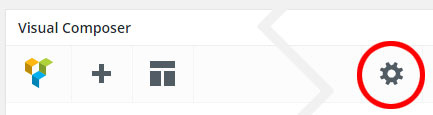
.pagination {
    display: none;
}
Thanx! That helps until the bug is fixed!
Hi. I think this is still my favourite theme from ease of use, great work.
One minor problem seems to be with displaying multiple google maps in one page. I have a VC section with an accordination. there are 2 sections in that accordination, one showing one office location, and the other another office location. Each with a Vela Google Map component. The first map displays as expected, the second is blank. When viewed in edit mode, the second map shows the location of the first map. So changing the address in the settings has no effect.
Just in case you are wondering, I have a valid API key for Google Maps Java script API (set in the them options) and the theme version is 1.9.
Is there a workaround to get both maps displaying?
Thanks!
Hi,
Actually you can add multiple maps on the same page.
However, the map works only when it’s active and displaying on screen. If you add the maps into the Accordions. Only one section in the Accordions will display when the page loaded, other sections won’t so only one map will work in the Accordions.
You should add them outside the Accordions, and let them all show up on the page.
Hi. Thanks. I understand. However I’ll look at another way of doing it as I want to use the accordinations.
And as a “by the way” on this, using 2 Vela maps outside of any accordination or tab on the same page results in the same address being shown for both. Despite using different addresses and the data-maps= source.
Here’s a sample page to show you that it works: http://wydethemes.com/vela/google-maps/
Please make sure you always update the theme and all bundled plugins.
Hi. The issue was that the second map does not refresh when the new address is entered in the Vela google map settings, it kept pointing to the first map address. Only when I switched the map type to a different type did it reload the address properly. So the solution was to enter the address in the second map, switch map type (from RoadMap) and back to RoadMap. Then all was good.
Thank you for the detailed explanation! We will look into this so if there is any issue, of course it will be fixed in the next update.
Hi :
I have purchased the Vela theme – is it possible to add the “Equal Height” function back to Visual Composer. Most of the themes I use Visual Composer with it is a radial button and you click it.
I have tried to select middle for vertical content and other fixes you have listed in support and nothing is working. My site is www.reatahomes.com
I have columns that need to be equal height on almost every page.
Thank You
Hi,
Thank you for the site URL!
In the current version of the theme, the Equal Height doesn’t work on child row. We will fix it in the next update.
It doesn’t work on your site because you’ve set it for the child row. You should set the Vertical Content Alignment for the top level row. Actually if you’d like to display 2 columns in a row, you don’t need to add child row inside the row but should set the row layout for the top level row to 2 columns and then set the “Vertical Content Alignment” to “Middle” as you can see on our demo site: http://wydethemes.com/vela2/our-services/
Hi, This template works on WordPress 4.7.5 ?
Hi,
Yes, our demo sites are also running on WordPress 4.7.5.
hey, is there a way to make the ‘send your message’ font bold in contact form, thanks!
<style type="text/css">

.wpcf7 input[type="submit"] {
font-weight: bold;
}

</style>
How can I make the size of the logo much larger without making things look broken? Currently the logo will overlap the header if made bigger, and if I increase the height of the header, it overlaps the content underneath.
<style type="text/css">
    #header #logo img {
        max-height: 100%;
    }
</style>
If it doesn’t work, you can PM me your site URL if you’d like: https://themeforest.net/user/wyde#contact so I can inspect the code on your site to provide another solution.
Hi
We’re running WordPress 4.7.5 running Vela theme. and Visual composer version 4.12 and have a major error when trying to use Visual composer with posts. – Is Vela theme designed to work with Visual composer with posts?
It breaks our site with a series of error messages in the server logs like this:
Tue May 16 12:26:27 2017 [client 31.54.54.99:34330] AH01215: PHP Fatal error: Allowed memory size of 134217728 bytes exhausted (tried to allocate 122880 bytes) in /home/sites/websitenamehere.com/public_html/wp/wp-content/themes/Vela/shortcodes/templates/vc_row.php on line 88: /home/sites/websitenamehere.com/public_html/index.php websitenamehere.com
We’ve extended the memory and updated the PHP on the server but this problem (pages featuring posts not displaying at all) only goes away when the post is converted back to classic mode.
Please can you advise? Thanks Pal
Hi,
It sounds like this is a server memory limit issue, if you have other plugins installed, try to deactivate them to see if it works, this will reduce the memory usage on your web host.
If it still doesn’t work, please PM me your site URL and admin login: https://themeforest.net/user/wyde#contact
Hello,
I have a question. I bougth your template and I think it is great. I have just one problem. If I use modal cart option it shows $ currency sign in prices in cart instead of € sign. How can I fix this?
Thank you!
Best regards, Simon
Please contact us from the account that purchased this theme to make sure you’re currently in the correct product page that corresponds to what you have purchased.
How do I get the full bio or read more button to show on tablet/mobile for each team member? Once the size shrinks down, you cannot click on the team member for the full bio!
<style type="text/css">

.team-member .member-content {
height: 100px;
}

</style>
Hello, I am trying to figure out why the team members do not show the “More” button when in tablet/mobile. Is there a way to make the photo clickable so the bio expands? Not sure how to see the full bio unless there are 3 or more in a row and it is on desktop.
c66b2537-2bf4-44c0-8737-9cc0be4aeb13
<style type="text/css">

.team-member .member-content {
height: 100px;
}

</style>
I’m not able to import Widgets through Import Demo.
I’m using PHP7.
Basically, I’m getting following error messages:
[09-May-2017 23:57:18 UTC] PHP Fatal error: Uncaught Error: Cannot use object of type WP_Error as array in /var/www/www.linuzer.net/htdocs/wp-content/plugins/wyde-core/importer/class-wyde-importer.php:38 Stack trace: #0 /var/www/www.linuzer.net/htdocs/wp-content/themes/Vela/admin/importer/class-wyde-ajax-importer.php(45): Wyde_Importer->import_widgets(‘https://www.lin...') #1 /var/www/www.linuzer.net/htdocs/wp-includes/class-wp-hook.php(298): Wyde_Ajax_Importer->data_importer(’’) #2 /var/www/www.linuzer.net/htdocs/wp-includes/class-wp-hook.php(323): WP_Hook->apply_filters(’’, Array) #3 /var/www/www.linuzer.net/htdocs/wp-includes/plugin.php(453): WP_Hook->do_action(Array) #4 /var/www/www.linuzer.net/htdocs/wp-admin/admin-ajax.php(91): do_action(‘wp_ajax_wyde_im…’) #5 {main} thrown in /var/www/www.linuzer.net/htdocs/wp-content/plugins/wyde-core/importer/class-wyde-importer.php on line 38
Our sites are also using PHP7 (7.0.2), we can import Widgets without any issue. Actually the theme uses WordPress importer to import demo content in Theme Options -> Home.
Could you please let me know what exactly version number of PHP on your server. If you’re using PHP7.1, I would recommend you to change it to 7.0 instead because, not only the importer but the Theme Options panel that based on Redux Framework is not compatible with PHP7.1.
If it still doesn’t work, please PM me your site URL and admin login: https://themeforest.net/user/wyde#contact


