2022 comments found.

Hello,
I have a problem: the header map is not working well. When i put in the Google API, everything goes blank (error 500). I tried to disable-enable all the plugins, but nothing changes. I tried to change to the parent theme instead of the child and still blank.
The website is http://site.comune.vedano-olona.va.it and it’s on the maintenance mode right now.
Curiosity: are you planning to add a event calendar in the future?
Thank You, Grete
Hi,
are you running the latest version (1.5.3)? Try to enable debug mode. This will display an error message instead of just white screen. Share that error message.
I may add some kind of event calendar in the future, but I don’t have ETA for it.
Lubos
Hi, Yes, i’m using the latest version and i’ve updated also the child theme. In the debug mode it tells me:
Fatal error: Call to undefined function wp_add_inline_script() in /home/comunev/public_html/site/wp-content/themes/townpress/functions.php on line 281
Thanks
That’s a weird bug because that function is a WP function. Are you running the latest version of WordPress (4.8.1) as well?
Thank you! I updated my Wordpress version and now everything is running ok. Thank you very much!
Hi. All going well, love the theme but just having trouble with the weather widget.
I can only get it to display one day (today) of weather. I have set the location and checked it exists on OpenWeatherMap. Set forecast length to 3. Added an API key. Cleared the cache.
Purchase code: a108be36-4752-41e6-8248-c9f6acb4ed85
Cheers, Gary
Hi,
you can try some common location, like New York just to test it.
Lubos
Tried that, same result (the weather changes so it seems to have taken effect). On page refresh it tries to load three lines for a moment then the bottom two disappear just leaving today’s weather.
Please share your URL.
Hi,
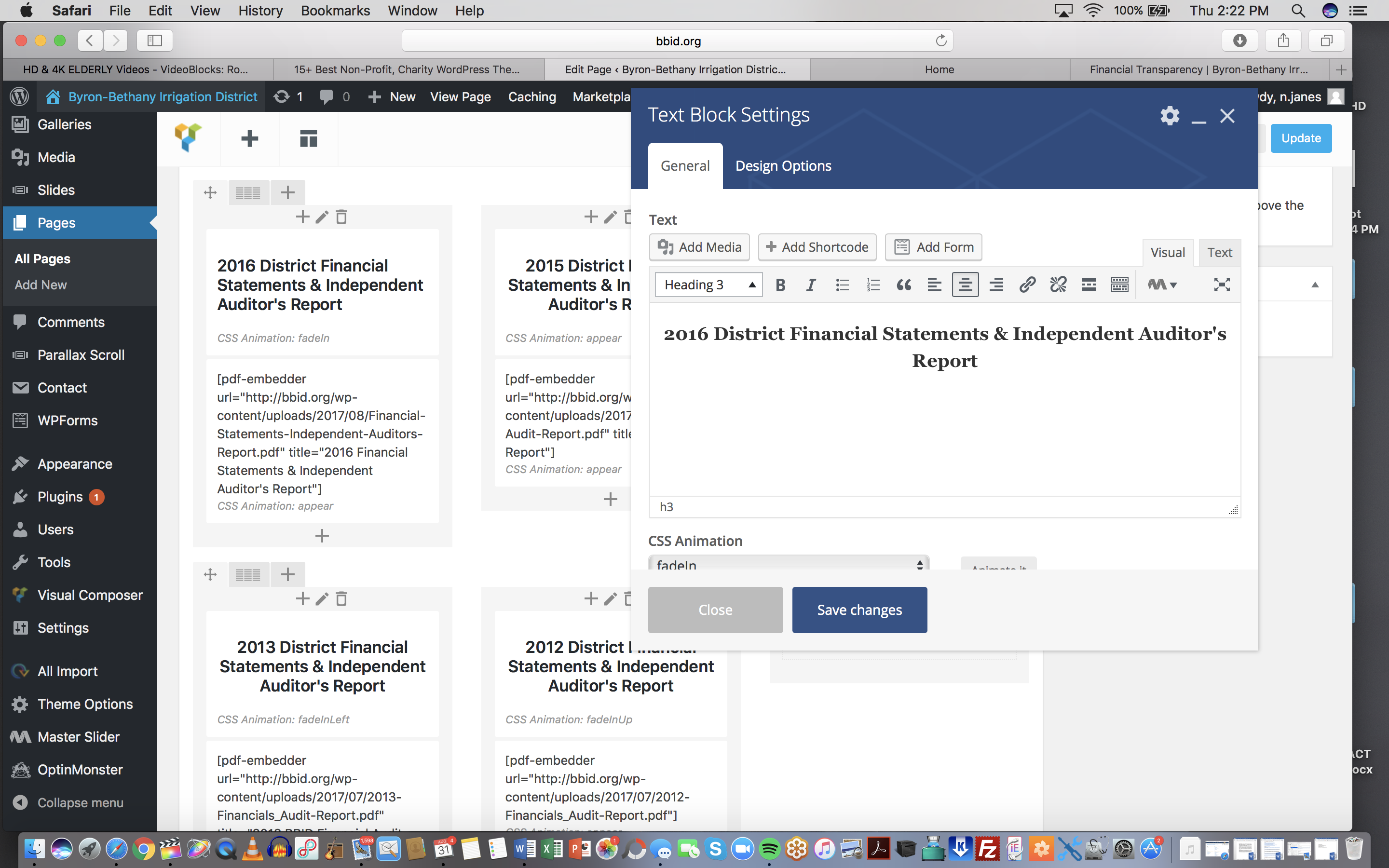
I have had an odd problem pop up: I am no longer able to use the dropdown menu to change font size. This seems to happen whether I am using the default text box or the Content box provided with the theme. I can still code it and the font size will change, but the menu no longer functions. Any ideas on this?
Thanks! Nick
Hi,
not sure I understand. Can you share URL where I can see the issue please?
Lubos
Sorry, this is hard to explain. When I create a post, I can access the dropdown menu to change the font size as normal.
However, when I’m working with a PAGE and create a text block, the dropdown menu to change font size doesn’t work. I have to manually go into the text tab and insert a tag like
, for example.
It’s hard to screenshot this, but here is a URL: http://bbid.org/wp-content/uploads/2017/08/Screen-Shot-2017-08-31-at-2.22.46-PM.png
When I click “Heading 3,” instead of the menu with font sizes popping up, nothing happens.
Ok, I wasn’t sure which dropdown do you mean. The problem is that this whole interface is created via Visual Composer, the theme itself has nothing to do with it. But just to be sure, try to switch to a default theme like Twenty Seventeen and then try to use Text Block element to see if it work. If it won’t work, then the problem lies somewhere else. Try to disable all plugins (except Visual Composer) and then try it, or try a different browser (although I am using Safari myself and never run into such issue).
Hi Just about to purchase your theme but wanted to check, is it possible to rename sections like the following to suit our need. We are looking at using the theme to replace this website http://www.fosjp.org.uk/ anso would need to change some of the names to suit …
Many thanks in advance
Jerry
GOVERNMENT COMMUNITY ABOUT OUR TOWN RELAX
Hi,
sure, you can rename them, those are just examples.
Lubos
Import demo does not work. I tried it from the menu of the theme, it says that it’s importing, that everything went well. But nothing changes.
Hi,
so you don’t have any new pages, events, etc. in your admin? Please note that importing the demo content won’t immediately make your site looks like the demo. There are additional steps involved. Make sure to read the whole documentation.
Lubos
Hi I have a small problem with the notices . this is the site http://paroisse-rosenmeer.fr/ as you see under the main slider there are the event box on the left and notices on the right in the notices box. I have 2 problems The extrait doesn’t not show (in the home page the box ‘Show excerpt’ in the notices element as bein activeted) and I don’t need the publishing date show next to the notices title (is misleading for me people think is the date of the notices) thanks for your help
Hi,
ad excerpt: have you defined the excerpt in the Excerpt field when editing the notice? If you don’t see the field you can display it in upper right corner in Screen Options (when editing notice post).
ad date: you can hide it with this Custom CSS:
.widget.lsvr-notices .notice-date { display: none; }
Lubos
yes the Excerpt field is showing and I wrote in the excerpt but dosn’t show. and what do you mean for Custom CSS ?
Ad excerpt: I’ve just tested it and it does work for me. Can you share a screen from your admin?
Ad date: you can add the custom CSS under Theme Options / Custom CSS
Ok, I’ve found the issue. I will fix it in the next update. Meanwhile, you can temporarily fix it yourself by editing wp-content/plugins/lsvr-toolkit-townpress/notices.php and remove lines 140 and 136.
ok thanks
wp-content/plugins/lsvr-toolkit-townpress/notices.php ? dosn’t exist are y sure isn’t wp-content/plugins/lsvr-toolkit-townpress/widgets/notices.php
sorry, my bad, I meant wp-content/plugins/lsvr-toolkit-townpress/widgets/notices.php
Your editor opened it in a very weird way. It should look like this. Just search for “notice-excerpt” and you will find this block of code. Remove the first and the last line of the block (see image).
Hello,
I am developing a website using your theme, locally through xampp. By no means an expert, I do my best to combine my limited knowledge with googling to come up with a satisfying result.
http://imgur.com/a/NWQBLA couple of questions: - How do I make the image widget backgrounds transparent e.g the visitkumanovo or Е-Даноци white blocks behind the image to dissapear or atleast be transparent?
- Changing the LSVR Locale text color from white to black (And translating the “today” and “nextday” to Cyrilic?)?
-Is it possible to extend the main background picture to at least half of the website?
Thank you very much.
Hi,
I am sorry, but you will have to contact me via an account with which you have purchased the theme to get support.
Lubos
Hello,
is there any chance for having recurring events in this theme?
Hi,
I am currently working on a massive update which will bring recurring events and much more. However, I am still only in early stages so I don’t have any ETA, but it will take couple of weeks.
I plan to do a beta test before official release, so if you are interested to test it, send me a PM and I will write to you once it will be ready.
Lubos
Hello!
I have one category in documents that contains 2 files. My problem is that I can’t reach the 2 files via document category widget:
It says: The page you are looking for is no longer available or has been moved.
http://porrog.hu/dokumentumtar/hirdetmeny-vadaszteruletek-kijelolese/I also have an other question:
How can I translate/modify in news section the “in” expression:
“2017-02-14 in Hírek”
http://porrog.hu/35-ik-borkostolo-porrogon/Thank for your help in advance and thanks for your great job with this theme!
Hi,
1.) try to resave your permalinks under Settings / Permalinks. BTW, you URL does not work for me.
2.) you should translate the theme and LSVR Toolkit plugin. Either using a plugin like Loco Translate or POedit software (recommended).
Lubos
Hi,
1.) Sorry! Now I deactivated WP Maintenance Mode, so please take a look at again! I tried to resave permalinks many time without any success.
2.) I use Loco Translate for translating, and I found/translated many expressions successfully but when I type expression “in” in the filter translation field there’s no match neither in “theme” nor in “LSVR Toolkit plugin” section.
Thank you for your quick reaction!
Balázs
Ok, I am in.
1.) I do not really understand the issue to be honest, what you mean by that you cannot reach them? I see four documents in the widget and all of those links work.
2.) I’ve checked the code and found a bug. Will fix it in the next update. Meanwhile you can translate it directly in the code in article.php file on line 52 (this file should be accessible via Appearance / Editor in your admin, if not, you will have to use FTP).
Thank you!
So, please open this link:
http://porrog.hu/dokumentumtar/After you opened it you can find “Dokumentum kategóriák” widget (document categories) on the right corner. Please try to click on “Hirdetmény – Vadászterületek kijelölése”. This is the one and olny document category I have so far. And my problem starts here, coz when I click on it I get “Page not found! The page you are looking for is no longer available or has been moved! as a result!
Thank you very much again!
I tried to modify this line:
<?php echo sprintf( ’%s in %s’, get_the_date(), $categories_html ); ?>
Into this:
<?php echo sprintf( ’%s ebben a kategóriában: %s’, get_the_date(), $categories_html ); ?>
But nothing happened. Did I do something wrong?
Sorry, I forgot that that will change it only on post detail. For post archive you need to do it on line 207 as well.
Thank you!
Could you help me please in this case as well?
So, please open this link: http://porrog.hu/dokumentumtar/After you opened it you can find “Dokumentum kategóriák” widget (document categories) on the right corner. Please try to click on “Hirdetmény – Vadászterületek kijelölése”. This is the one and olny document category I have so far. And my problem starts here, coz when I click on it I get “Page not found! The page you are looking for is no longer available or has been moved! as a result!
Thank you very much again!
You have something wrong with URLs, because category archive should have a ”/document-category/” in URL but your category archive URL has ”/documents/” (“dokumentumtar” in your case). Check out Theme Options / Documents and make sure Document Category URL Slug is different from Documents URL Slug.
Hi! This was the problem, so thank you very much again for your support!
Hi there! I have a couple questions:
1. Is it possible to insert just one particular document into a page (rather than all docs in that category)?
2. I’m seeing some weird breadcrumb behavior with notices—instead of home/[category]/[name of file] I’m getting home/[name of file]/[name of file], with the first [name of file] hyperlink actually linking to all notices. Any idea why this might be happening and/or how to fix it?
Thanks in advance!
Hi,
1.) Unfortunately not.
2.) Have you created a base page for your notices archive (and every other custom post type)?
Lubos
Thanks! I’ll check to make sure my base pages are all set up correctly!
Hello,
I am getting below error in my error log whenever I access the site -
WordPress database error You have an error in your SQL syntax; check the manual that corresponds to your MySQL server version for the right syntax to use near ‘1’ at line 1 for query 1 made by require(‘wp-blog-header.php’), require_once(‘wp-includes/template-loader.php’), include(’/themes/townpress/404.php’), get_template_part, locate_template, load_template, require(’/themes/townpress/components/page-content-after.php’), get_template_part, locate_template, load_template, require(’/themes/townpress/components/sidebar-primary.php’), dynamic_sidebar, call_user_func_array, WP_Widget->display_callback, Wp_StatsMechanic->widget
Hi,
does it work when you are using a default WP theme such as Twenty Seventeen?
Lubos
Also, it seems that you’ve purchased the theme a while ago, have you installed it for the first time right now?
Hello, I do not get any error for default themes. I also installed latest version of Townpress but get the same error.
Please make sure you are running PHP 5.6 or higher, MySQL version 5.6 or greater OR MariaDB version 10.0 or greater.
Also, you haven’t answered my second question. You have bought the theme a while ago, have you installed it just now or have you been using it for a while and only now encountered this error?
I checked in cPanel and the server matches the specification you have given. I am using this theme since a month now but never checked the log file.
Well, to be honest, you are the first buyer reporting this issue and I don’t really know what is causing it. I am currently working on a big update, I am basically rewriting the whole theme from the scratch so hopefully it will fix this error as well.
Hello, I have to change the color of the theme but no predefined color are liked by the client. He wants this color : #af2a7f instead. I tried to modify it by “Custom Color Scheme” but all the other colors are modified. What css script have I to insert to replace a predefinted color ? (by example the “orange” by my rose : #af2a7f) Thanks a lot, Serge from France.
Hi,
please follow the tutorial on how to create a custom color scheme. Just change the $accent variable to your color of choice.
Lubos
Thanks !!! I didn’t dare, but it’s working great !
How can I translate the theme messages (Search this site… Comments(0), In the breadcrumbs : Home, and so on)
Thanks again…  Serge – Amiens – Picardy
You need to translate the theme and LSVR Toolkit plugin. Either via plugin like Loco Translate or using POedit software (recommended).
Thanks ! I have instaled “Loco Translate” and I can translate only the word I need. Very happy about you and your theme ! Serge
Hi, can you tell me how to remove NEWEST and OLDEST post navigations at the bottom posts?
I’ve tried this css in the Customize area with no luck:
blog-pager {
display: none; }
Thanks, -Roy
Hi,
try this:
.article-single-page > .c-content-box { display: none; }
Lubos
#lsvr_locale_info_widget-5 > .widget-inner.m-has-bg > .widget-content > ul > li:nth-child(4) > .row-title > h4
Screenshot: http://prntscr.com/g7s1t8
Hi,
check out Theme Options / Locale and remove any Custom Fields there.
Lubos
Do you know of any subscription plugins that support the extended post types found in town press? That way subscribers could get emails notifying when content anywhere on the site is added or changed.
Thank you, Roy
Hi,
unfortunately, I don’t know about such plugin. You can search for it in plugins repository.
Lubos
Just updated to the latest version of the theme and wasn’t able to get Visual Composer to update. Just thought I would post.
Hi,
try to deactivate and remove your current version of VC, then you will be prompted to install it again which should install the latest version bundled with the theme (5.2.1). Let me know if it worked please.
Lubos
This worked. I think I’ll just have to remember to always do this. Thanks.
After you update the theme which contains new VC version you should see a similar prompt which should allow you to update the VC. But if that does not work for you, the process described in my previous reply is the bullet-proof solution. Basically it is the same, it just requires few clicks more.
I seem to have lost the “Visible” or “View” buttons for the Widgets – this is a feature that lets you Show or Hide a widget on a specific page. Can you help me get the buttons back? Thanks!
Hi,
not sure what do you mean. Is this some sort of 3rd party plugin which allows this? Also you are saying you lost them, so didi you had them inn the past? Have they disappeared after the theme update? I just need much more details about the issue as I am not aware about this functionality.
Lubos
There was a button next to the “Save” button on many widgets … this “Visible” [not sure of the exact word] button then gave you opportunity to show/hide the widget based on page/conditions… i am not imagining this … i thought it was part of the theme
Maybe it was something in the Jetpack plugin which i had added then removed…
yes, I can confirm it is part of Jetpack as I’ve reinstalled it. Sorry for the trouble!
I never said you are imaging this:) But that’s definitely not a standard functionality of the theme nor WordPress. It has to be some kind of 3rd party plugin which did this. You can switch to Twenty Seventeen to see if those buttons will be there, if not then it has nothing to do with the Townpress.
The drop down map at the top of the homepage shows error. My API code and co-ordinates are correct?
Hi,
please share your URL where I can see it.
Lubos
Hi I have a JavaScript:void (0) error when I try to edit the content and header they are all inactive. Help me with the solution please.
Hi I have a javascript:void (0) error and the content and header editing options are inactive. How can I go about that. Its limiting my editing options.
Hi,
I see that you’ve been using the theme for a while, so I assume you haven’t experienced that error before, correct? Have you installed any new plugins or did any code modification?
Lubos
Yes I had not experienced that error before but sometime back I was just looking around and trying different functionalities then I tried to change the layout of the theme at once I realized my site was distorted. So I got someone who helped me fix it but since then I have not been able to use that option normally..
Try ti reinstall the theme to the latest version (1.5.2). If that won’t help, send me you wp-admin credentials via PM and I will take a look at it.