630 comments found.

Hello, I tried to contact with you through email but no success. I have two problems with the theme. The first is that my pages have duplicate titles. The only way I can remove one is to go to every single page and click “Edit” and from the “display option” located on the right side click “don’t show”. Is there other way to fix it? The second problem I think related to the first one: my blog page doesn’t display “Blog” title. Instead, it shows the title of the last post. Please help me!
Hey,
Thank you very much for your comment.
We have just sent you e-mail with solution.
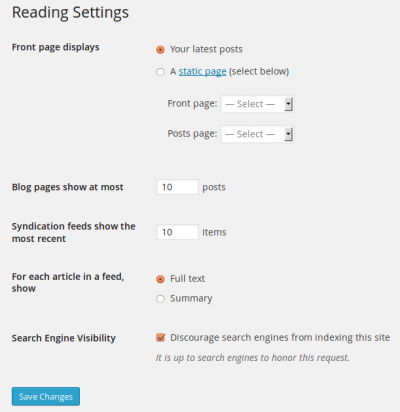
Please go to “WP admin > Settings >Display options” and please make sure that “Posts page” is not assigned, like here:
https://codex.wordpress.org/images/thumb/2/25/options-reading.png/400px-options-reading.pngThen please create your blog page manually this way http://www.thememotive.com/converio-doc/#howtoaddblog (if you didn’t make it already this way).
Then you can control title of your blog page by changing title of the created page.
You can also change additonal title settings in WP admin > Appearance > Customizer > General
Hope this helps!
Could you please write e-mail to support (at) thememotive (dot) com if you need further assistance? Our support team will be happy to help you.
Kind regards,
ThemeMotive
Hi, is there a way to link the projects to an external link instead of creating project pages? Thanks!
Hey,
Thank you very much for your comment.
In the current theme version there is option to link to internal pages only, however you can link to external page from project page (like on our demo).
Hope this helps!
Could you please write e-mail to support (at) thememotive (dot) com if you need further assistance? Our support team will be happy to help you.
Kind regards,
ThemeMotive
Dear Converio Team, is there any possibility to make the logo in navigation to float and overlap the navigation bar. Reference: http://heidenreich-von-braun.de/
Best Mika
Hey,
Thank you very much for your comment.
If you want to make the logo overlap like on the demo then custom CSS is needed.
Hope this helps!
Could you please write e-mail to support (at) thememotive (dot) com if you need further assistance (code sample)? Our support team will be happy to help you.
Kind regards,
ThemeMotive
The landing page form doesn’t send emails or notifications anywhere and when using the shortcode generator on post/page editor the menu keeps going away because of a small gap between the menus. Pretty frustrating.
Hey,
Thank you very much for your comment.
As for mail – please try to check your yous “spam” in mail and check if your hosting supports PHP mail functions.
As for shortcode menu please just update the shortcode plugin to the latest version and then it will work fine again. It looks like you updated WP to the latest version, but still using older version of Converio shortcodes plugin.
Hope this helps!
Could you please write e-mail to support (at) thememotive (dot) com if you need further assistance? Our support team will be happy to help you.
Kind regards,
ThemeMotive
Is it possible to set a custom link in the “recent works” slider for each work/project?
Hey,
Thank you very much for your comment.
You can change the slug for all projects in Customize > Portfolio settings. The second part of URL of each project can changed using default WP feature (like for posts).
Hope this helps!
Could you please write e-mail to support (at) thememotive (dot) com if you need further assistance? Our support team will be happy to help you.
Kind regards,
ThemeMotive
I get this on the map when I pushed my site live: “This page didn’t load Google Maps correctly. See the JavaScript console for technical details.” Any ideas?
Hey,
Thank you very much for your comment.
It’s required by Google to register Google API key if you need to use Google maps on your domain. You can then put the API key in “WP Dashboard > Appearance > Customize > Maps > API Key” then map will work fine.
Please have a look here for more details.
Hope this helps!
Could you please write e-mail to support (at) thememotive (dot) com if you need further assistance? Our support team will be happy to help you.
Kind regards,
ThemeMotive
Hi, there is no “Maps” option in my “Customize” menu?
It sounds like you are using older version of the theme. Please just update the theme and then it will appear.
Hope this helps!
Could you please write e-mail to support (at) thememotive (dot) com if you need further assistance? Our support team will be happy to help you.
Kind regards,
ThemeMotive
There is no option to update the theme anywhere?
Also, how come it still works fine on my proofing site?
There are two options: manual or automatic update. Please have a look here for more details.
Hope this helps!
Could you please write e-mail to support (at) thememotive (dot) com if you need further assistance? Our support team will be happy to help you.
Kind regards,
ThemeMotive
Hey, I have been trying to add some additional fields to the form on the Landing slider and I would also like to translate those but I did not find a way to make that happen. In addition I want the “send-button” to redirect customers to another side where they have to fill in some more information. Could you please help me solve my problem?
To edit the contact form 7 seems fairly simple but the Landing slider form is hidden somewhere.
Thanks
Hey,
Thank you very much for your comment.
Then you need to replace the form to Contact Fomt 7. Could you please write e-mail to support (at) thememotive (dot) com, so that our support team can send you direct solution to copy and paste?
Kind regards,
ThemeMotive
I have already written a mail two days ago and have not received an answer yet? What shall I do?
Could you please check the spam folder, we responded the same day we got the message from you?
Kind regards,
ThemeMotive
Hi!
How can I update the theme? And how can I make faster because it is extremly slowly. Googel page speed is 31/37.
Thanks,
Pallas
Hey,
Thank you very much for your comment.
As for update – plase have a look here.
As for speed improve – it depends what kind of plugins you are using, but you can improve it using tips from here.
Hope this helps!
Could you please write e-mail to support (at) thememotive (dot) com if you need further assistance? Our support team will be happy to help you.
Kind regards,
ThemeMotive
I created a page as portfolio, but I can not link the projects. create all the projects but when i click the link from projects page it shows the All Category but no projects? thank you very much again
Hey,
Thank you very much for your comment.
Please just make sure that each project has got featured image. Perhaps they don’t display, becuase there isn’t image added to each of them.
Hope this helps!
Could you please write e-mail to support (at) thememotive (dot) com if you need further assistance? Our support team will be happy to help you.
Kind regards,
ThemeMotive
Hello,
I purchased the theme some months ago, I’m building a website (www.sapel.es) and I had some issues
For example, something strange is happening…., some days pictures are ok, but some days, watching the website on my phone, pictures don’t look with enough quality. It is strange, because some days pictures look better than other days
I hope you understand what I mean
Do you know the reason of this problem?
Many thanks in advance!
Hey,
Thank you very much for your comment.
If it is not regular then perhaps it could be related to your interent connection or size of images (not compressed images slowing down the loading time and they might not look sharp while they are loading). We recommend you to optimize your images (especially used in the sliders) using for example https://tinypng.com/ or https://compressor.io/ and reupload. For example this image can be compressed from 301.44 KB to 87.93 KB (71%) using https://compressor.io/ .
You can also consider to reduce numer of slides (if it is possible for your business) to speed up loading. In general we checked your website on few devices and it loads the same images every time, so also it might depend on internet speed connection/browser, etc.., but optimizing the images might help in your case.
Hope this helps!
Could you please write e-mail to support (at) thememotive (dot) com if you need further assistance? Our support team will be happy to help you.
Kind regards,
ThemeMotive
Theme looks great on 99% of the pages but periodically I get some funky <li></li> showing when it should not. I think I once saw a setting to control that but I can’t find it now.
Hey,
Thank you very much for your comment.
Could you please write e-mail to support (at) thememotive (dot) com wit URL and shortcodes you are using on that page? Our support team will be happy to help you. Perhaps just little change is needed in your text editor related to shortcode code you are using.
Hope this helps!
Could you please write e-mail to support (at) thememotive (dot) com if you need further assistance? Our support team will be happy to help you.
Kind regards, ThemeMotive
Hi team, will this template be updated to support WooCommerce 3? Thanks.
Hey,
Thank you very much for your comment.
We just checked it with latest WooCommerce and latest theme and it works fine. We also didn’t have any reports about issues related to WooCommerce 3.
Hope this helps!
Could you please write e-mail to support (at) thememotive (dot) com if you need further assistance? Our support team will be happy to help you.
Kind regards, ThemeMotive
Dear Theme Author!
Quick question: I am using your contact page template with the contact form. Where am I able to change the receiver email adress? I am searching for hours now but I can´t find the settings.
Please let me know.
Thanks in advance, Chris
Hey,
Thank you very much for your comment.
Please go go “Appearance -> Contact Page” and then fill in the form. We recommend you also to set the text for custom messages to have the fully working form on contact page.
Please also have a look here.
Hope this helps!
Could you please write e-mail to support (at) thememotive (dot) com if you need further assistance? Our support team will be happy to help you.
Kind regards, ThemeMotive
Does this site have a way to have the background image on certain pages and not others?
Hey,
Thank you very much for your comment.
It depends where exactly the background needs to be places. You can use for example fullwidth shortcode with different background on ech page.
Hope this helps!
Could you please write e-mail to support (at) thememotive (dot) com if you need further assistance? Our support team will be happy to help you.
Kind regards, ThemeMotive
Hey,
Thank you very much for your comment.
Please go go “Appearance -> Contact Page” and then fill in the form. We recommend you also to set the text for custom messages to have the fully working form on contact page.
Please also have a look here
Hope this helps!
Could you please write e-mail to support (at) thememotive (dot) com if you need further assistance? Our support team will be happy to help you.
Kind regards, ThemeMotive
hi sir i pruchase the theme bur problem think is theme youse in site but site mobile frindly not buecaus menu bar not show is hide
help me
Hey,
Thank you very much for your comment.
It sounds like your server is not supporting SVG images by default.
You can enable it easily depends on your server (IIS or Apache) or contact your hosting provider to enable it.
More details: https://mid.as/kb/article/00134
Hope this helps!
Could you please write e-mail to support (at) thememotive (dot) com if you need further assistance? Our support team will be happy to help you.
Kind regards,
ThemeMotive team
is there any way to control the sorting of events? where it would only make sense to have your future events listed in order, wouldn’t it only make sense to have your previous/past events listed in reverse order?
it would seem to be a very easy coding tweak, but my coding skills can’t quite dial that in correctly. could you guys provide a coding tweak to fix that and/or update that for future releases?
Hey,
Thank you very much for your comment.
In general for events there is separate plugins, so customization will require changes in that plugin. Could you please write more details about the new features you need to e-mail support (at) thememotive (dot) com , so that our support team could investigate it further?
Kind regards,
ThemeMotive team
Hi,
I’m looking into purchasing a new template for my website and I just want to know if this template offers a lead generation tool that i will be able to use on the home page? Also, if i am able to use a lead gen, can it be supported if there is a video playing on the home page? Thanks!
Hey,
Thank you very much for your comment.
You can use lead page template as on our demo. Could you please write more details about the tool or features you need to e-mail support (at) thememotive (dot) com? Our support team will be happy to help you.
Kind regards,
ThemeMotive team
I have exactly the same problem, as treizedepique, as shown here: https://drive.google.com/open?id=0B52od8nzqADGQmRjOFZ0ck9CcVE I tried different levels of zooming in and out on chrome and firefox and still the same issue. On Edge it won’t even show the orange menu at all on the tool bar. Can anybody advice. Thanks
Hey,
Thank you very much for your comment.
Today we will release update for this. At the moment could you please try Firefox (we tested it in latest WP and plugins and it works fine on Firefox).
Hope this helps!
Could you please write e-mail to support (at) thememotive (dot) com if you need further assistance? Our support team will be happy to help you.
Kind regards,
ThemeMotive team
Still doesn’t work on Firefox, then I was send an email from support to install a newer version of the theme 1.0.31 but there is no new version that wp recognizes of the theme. Answers to questions are very vague and not detail enough. I am very disappointed with the theme support, specially since is about a bug on the theme.
Could please download the latest version from ThemeForest and update Converio Shortcodes plugin? Then it will work fine with latest WordPress. We just send you additional instruction and links to files you can download it (if needed).
Hope this helps!
Could you please write e-mail to support (at) thememotive (dot) com if you need further assistance? Our support team will be happy to help you.
Kind regards,
ThemeMotive team
Hello, apparently I have a bug to use pairs of shortscode. On the dropdown menu which is not accessible. See video to understand us better. Impossible to reach or under columns(sections).
thx.
https://drive.google.com/open?id=0B52od8nzqADGQmRjOFZ0ck9CcVEHey,
Thank you very much for your comment.
Today we will release update for this. At the moment could you please try Firefox (we tested it in latest WP and plugins and it works fine on Firefox).
Hope this helps!
Could you please write e-mail to support (at) thememotive (dot) com if you need further assistance? Our support team will be happy to help you.
Kind regards,
ThemeMotive team
Hello, thank you for your answer. I will leave you some hours of maintenance, because at the moment I still have the same problem. And I have not updated the template. It seems to me that this is essential if you have to fix the bug, right? Currently my version is the following ConverioVersion: 1.0.30. Thank you for your return and your work
Please just update “Converio Shortcodes” plugin to the current version 1.0.12 and it will work fine on all browsers. Latest version of “Converio Shortcodes” is available with the current theme update. You can update it from your theme dashboard if you use the latest theme version (1.0.31) or update manually (files are included in converio/plugins/converio-shortcodes.zip)
Hope this helps!
Could you please write e-mail to support (at) thememotive (dot) com if you need further assistance? Our support team will be happy to help you.
Kind regards, ThemeMotive team
Hello, i’ve moved a website to a VPS but the mails do not work anymore. On other websites I use php mail() to send messages. Is it possible to make it work with this team as well?
Hey,
Thank you very much for your comment.
Yes, but you would need to enable PHP mail() on your VPS – then it should work. In other case there would be needed alternative custom colution.
Hope this helps!
Could you please write e-mail to support (at) thememotive (dot) com if you need further assistance? Our support team will be happy to help you.
Kind regards,
ThemeMotive team