12793 comments found.

Hello,
Pre sale questions, does the theme support custom tabs so that there can be a custom tab per product page?
Is there a way to demo the theme options and back end of the website before purchase?
Thanks
Hello,
Thank you for being interested in our theme.
Unfortunately, there is no custom tabs per product and backend demo in our theme.
Kind Regards
Hello,
Ok no problem, the custom tabs that are there at the moment are these set globally?
Thanks
Yes, there is one global custom tab option in our Theme Settings.
ok thank you.
Hi xtemos,
When you try to modify an attribute like here : http://prntscr.com/h4s45o The button that the image show doesnt work, so the only way to add an image is to delete and redo the attribute (because the button work at creation), this is not really conveniant at all.
Hi,
Please, provide us your admin access on the support forum so we can check it https://xtemos.com/forums/forum/woodmart-premium-template/
Regards
Just bought your theme.
As i said in a previews comment.
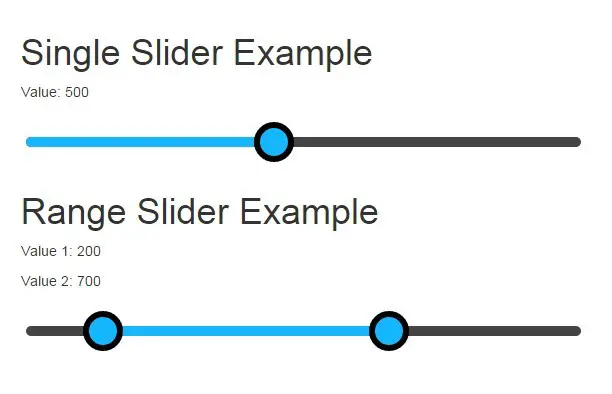
Try to make the price slider more touch friendly and load via ajax.
Also. Can you make the filters on the top right shop page to be sticky? If you set pagination as load more or infinite, the user will have to scroll back up to change the filters.
Thank you.
Hello,
Thank you for purchasing our theme.
We will consider your suggestions for our future updates. Could you please provide us your website link so we can prepare a code snippet to increase price slider buttons and make them more touch friendly.
Regards
No need, i add some custom CSS and our site is in development mode now. Just consider making these changes in future release. Especially the sticky filters.
You can check an example from here:
https://www.gucci.com/us/en/ca/men/mens-ready-to-wear/mens-sweaters-cardigans-c-men-readytowear-sweaters-and-cardigansThank you.
Sure, we will consider them.
Hi,
I would like to show 2 columns of product per row on phone mobile for “related product” on single product page. The 2 columns of product per row only shows up on the shop page and homepage. Thanks.
Hi,
Try to add this code snippet to the functions.php file in the child theme
    function woodmart_get_owl_items_numbers( $slides_per_view ) {
        $items = array();
        $items['desktop'] = ( $slides_per_view > 0 ) ? $slides_per_view : 1;
        $items['desktop_small'] = ( $items['desktop'] > 1 ) ? $items['desktop'] - 1 : 1;
        $items['tablet'] = ( $items['desktop_small'] > 1 ) ? $items['desktop_small'] : 1;
        $items['mobile'] = ( $items['tablet'] > 2 ) ? $items['tablet'] - 2 : 1;

            $items['mobile'] = 2;

        return $items;
    }
Regards
thanks.
You are welcome!
Good day
I’m interested in buying your theme. I just want to know how does the shop filters work – can I use my own fields/criteria to create those filters?
Thank you.
Hello,
Thank you for being interested in our theme.
Sure, you are able to create your own product attributes and add filters for them to your shop page.
Regards
Hi, I have pre-buy question! That’s my first time buying a template, sorry if it’s a dumb question. I’m going to use the theme for a Brazilian store, can I adapt to another language easily? Do you guys have any tutorial on how can I do that? Or any heads up on how to work with the theme in another country? Thank you so much! (Btw, the theme is fantastic! Good job!)
Hello,
You can translate our theme texts to Brazilian via WordPress PO files translations. Here is a video that demonstrates how to translate strings with Loco Translate plugin https://www.youtube.com/watch?v=D3NsDdMzsls&index=3&list=PLMw6W4rAaOgKKv0oexGHzpWBg1imvrval
Regards
Oh, thank you! Just one more question – I’m free to use any payment plugin that I want, right?! Again, thank you so much.
Sure, you can use any plugin you need for the payment gateway.
Good morning, I need a modification. including the fancy Product Designer Plugin for WooCommerce, I will use the theme for custom packaging
Hello,
Unfortunately, there is no such functionality in our theme by default. Probably, you will need to find some additional plugin for this purpose.
Regards
the fancy Product Designer Plugin
We didn’t have a chance to test our theme with this plugin and are not aware of any incompatibility issues that may happen.
Hi, I have pre-buy question. Any problem with WPML Multi currency ? I saw only in description multilanguage WPML support thats why I asking.
Hello,
There are no any issues with WPML Multi-currency and our theme. Our theme is fully compatible with WPML and its base addons.
Regards
Hi,
Do you include the PSD files or do you have it for sale? Thanks in advance!
Hello,
Sorry, but we don’t have a PSD version of our theme for sale.
Regards
Hi, Is your theme include any switch currency plugin?
Hi,
Unfortunately, our theme doesn’t include any switch currency plugins.
Regards
Hi, could you help me how to fix facebook login. Please see this screenshot @ http://prntscr.com/hezc23, My website is https://www.bayrepenterprise.com/my-account/
Regards, Mary
Hi,
You need to specify your account link as a redirect URL in Facebook login options while editing your APP. Also, your APP domain field should be empty and strict mode turned off.
Regards
Hi, thanks for your quick response, I fixed the issue. Now i can login with facebook. 
Regards.
Great, you are welcome!
Hello, is there other way to closed description in compact, please see this screenshots http://prntscr.com/hf26uv, http://prntscr.com/hf27i8. My website https://www.bayrepenterprise.com
Regards,
Mary
Hi,
By default, WooCommerce opens first tab when the page is loaded. You can try to close it manually right after page loading by adding this code snippet to the Custom JS section in Theme Settings
setTimeout(function() {
    var $tabs = jQuery( '.wc-tabs, ul.tabs' ).first();
    $tabs.parent().find('#tab-basel_additional_tab').hide();
    $tabs.parent().find( '.basel_additional_tab_tab' ).removeClass('active');
}, 10);
Regards
Unfortunately, It don’t work is there other way how to close it.
Regards
Mary
Hi, I try to solve it i put the code on Global Custom JS & On document ready and it works. Can it cause any problem to my site?
Toink…my site is broken in firefox browser & IE, I remove the code in custom js & on document ready.
Please, provide us your admin access on our support forum and we will help you https://xtemos.com/forums/forum/woodmart-premium-template/
Hi, Thanks for your quick response & support, right now i have no problem i fixed some little issues on my own.
We are glad to hear it You are welcome!
Hi, I have a problem with label, after I post a new product I don’t see a word “NEW” Badge label, Could you help me how to fix it. My website is https://www.bayrepenterprise.com/
Regards
Mary
Hi, I have problem with new label badge, I post new item but, I don’t see the word “NEW” badge label in the items. Could you help me how to fix it. My website is https://www.bayrepenterprise.com/
Regards
Mary
Hi,
You need to use “Add “New” label” option when you create new products to display this badge.
Regards
Hi, thanks for the quick response. Got it!. I have suggestion if you don’t mind is there any way to put expiry date on the “NEW” label than to uncheck manually after 3 or 5 days that’s my opinion only.
Regards
Mary
You are welcome!
Hi, I want to change the color of sold out badge background to red color? Please see this screenshot for reference http://prntscr.com/hk2s8j
Thank you
Mary
One more thing if you don’t mind, I hope you can add expiry date on the “NEW” label rather than to uncheck manually after 3 or 5 days on your next update, see this screenshot for reference http://prntscr.com/hk4rdk
My website https://www.bayrepenterprise.com
Thank you
Mary
Hi,
Use this code snippet to change the label color
span.product-label.out-of-stock {
    background-color: #dd3333 ;
    color: white;
}
We will consider adding the date for new products for our future updates.
Regards
Hi, Thanks for the quick reply. Got it! Looking for your next updates.
Regards
Mary
You are welcome!
Hi, I got this error sometimes in the cart “illegal offset name” please see this screenshot for reference: https://www.bayrepenterprise.com/wp-content/uploads/2017/06/Screenshot_1.jpg. Can you help me how to fix it.
Regards
Mary
Hi,
You can create a topic on our support forum and provide us your FTP access and we will check what is this problem caused by.
Regards
Hi, thanks for the quick reply. I don’t see the problem after deactivated one plugin i suspect. I will let you know if the problem occurred again.
Regards
Mary
First of all, great theme!
In your theme you got a “woocommerce message/notice” that pops up in a bar in bottom of the screen. This create some trouble with some of my plugins, the content isn’t showing all message text. Can I turn it off and go back to the standard layout of woo messages? (placed in a bar below the title)?
Like this: https://www.skyverge.com/wp-content/uploads/2014/10/wc-checkout-notice.pngHello,
Thank you so much for choosing our theme!
Could you please provide us a link and describe the steps to reproduce the issue on your website? We will take a look and try to prepare a custom solution for you.
Thank you in advance
Hello,
How can I change the “Add to cart” text?
Thank you!
Hi,
Here is an article from WooCommerce documentation that should help you to change this text https://docs.woocommerce.com/document/change-add-to-cart-button-text/
Regards
Hi there,
Can you tell me how the theme is handlying brands ? I did not find a way of reproducing the brands like on your demo.
Regards.
Hello,
You can create your brands as a regular product attribute and terms in Dashboard -> Products -> Attributes. Once you create the attribute, you need to select it to be a brand entity in Theme Settings -> Shop -> Brands. Then, you will be able to attach brand terms to your products as any other product attributes.
Kind Regards
Hi.
I have this error when I try to activate the theme
Fatal error: Call to undefined function vc_map_integrate_shortcode() in /homepages/.../wp-content/themes/woodmart/inc/vc-config.php on line 1519
Thks
Hi,
Please, create a topic on our support forum and provide us your admin and FTP access so we can check what is wrong here https://xtemos.com/forums/forum/woodmart-premium-template/
Regards
Conflict with an installed plugin. It’s fixed.
OK, we are glad that you have found the solution!
Regards
Hi, I just purchased this theme and so far so good. Can you please assist me as I am trying to make the logo bigger in height and length, though I can’t seem to find the option to change this.
Thanks.
Hi,
Thank you very much for choosing WoodMart.
Logo width can be increased in Theme Settings -> Header -> Logo. And the height is limited by header height that in turn can be changed in Theme Settings -> Header -> Header layout.
Regards
Hello,
I just noticed that I do not see the H1 catgeory title (Page heading) with the background anymore? Can you please advise how to switch it on? Thank you!
Screenshot: https://ibb.co/eQyr86
Hello,
You can turn on/off your page heading section in Theme Settings -> Page heading.
Regards
Hello,
I checked, on back end everything is turned on. Ive noticed that the title shows on wordpress pages, but doesnt show on woocommerce product categories only.
Thanks
In this case, please provide us your admin access creating a topic on our support forum https://xtemos.com/forums/forum/woodmart-premium-template/
Regards
Hello, how to uninstall or hide the size guide from the view of the products. Thank you
Hi,
You can disable it in Theme Settings -> Product page.
Regards
Hello,
On the product page, is there any way to make the video button more visible?
Thanks
Hello,
What do you mean by more visible? Could you please provide some screenshot for better understanding?
Regards
Hello,
The button for youtube video i meant, it is not clearly visible. Is there any way to maybe make it more visible or something?
Thank you
screenshot link: https://ibb.co/d9Gakm
If you want, we can provide you with a CSS code to change its color and size if it would be better for you. Or maybe you have other wishes regarding its style?
Yes, it would be fantastic if we could change colour to #af7ce2, and make the button have text “Play Video” if that would be possible of course. thank you!
Hi,
Try to add this code snippet to the Custom CSS section in Theme Settings
.product-additional-galleries .product-video-button>a {
    background-color: #af7ce2;
    color: white;
}
.product-additional-galleries .product-video-button>a:hover {
    color:white;
    background-color: rgb(137, 92, 183);
}
.product-additional-galleries .product-video-button>a span {
    padding-right: 25px;
    max-width: 250px;
}
Regards
Thank you so much! You are a legend!!!!
You are welcome!
Hi guys
Can you please tell me where to setup the Size Guide. I enabled it in Theme Settings > Product Page but cannot find where to actually set it up. And there is nothing in the Documentation about it.
Please help.
Thanks
Hello,
We will add a documentation for this topic soon. As for now, you should be able to find “Size Guides” in your main WordPress Dashboard navigation menu.
Regards
That’s what I thought but I don’t have Size Guide in the Dashboard Menu. I just submitted a support Ticket.
Thanks
We just answered your ticket.
Can you make in the future a more touch friendly, Ajax instant filter, Filter by Price Widget like the rest the widget you have?
Hello,
Thank you for contacting us. Could you please describe what do you mean by more touch friendly? Maybe you have some examples for better understanding?
Regards
I mean the filter instead of vertical lines at each end, make them for example round. It is hard to press the current filter on my phone from your demo sites. And add instant ajax filter like the rest of your widgets.
Something like this
https://angularscript.com/wp-content/uploads/2015/02/Native-AngularJS-Directive-For-Range-Slider-Input.jpgThanks.
OK, we will improve this widget in our future update to make it more touch friendly.