360 comments found.

Hi my support expired a while back but I’ve just installed SSL on my site and in some of the css there is a non ssl url (http://factory.commercegurus.com/wp-content/uploads/2015/10/glass_bg.jpg?id=70876) which is being loaded into the head css under <style type=”text/css” data-type=”vc_shortcodes-custom-css”> How can I remove this or replace the http:// with // so that the entire site loads as secure?
It sounds like you’re loading in a background image on a row using an image pulled from our old demo site.
Ensure that all the row background images have been uploaded to your own domain and are referenced correctly.
Regards
Simon
Thanks Simon. Exactly that. I think I imported the demo data originally and must never have removed those background images. Cheers!
mega menu available ?
Hi there
Yes, that is possible.
Regards
Simon
will you help us to implement mega menu after purchasing them ? or we need to install 3rd party plugin ? i dont want to install any 3rd party plugin .
No plugin is required. Yes, we can show you how if you submit a support request via the ‘Support’ tab at the top of this page after purchase.
Simon
i bought your theme , now please help me
Can you tell me how to get “Browse” (see screenshot) on page? I’ve download and testimonial buttons but “Browse” is not visible.
Screenshot Link: http://www.mittikala.com/wp-content/uploads/2017/12/Theme_SS.png
It uses the ‘Advanced Sidebar Menu’ plugin to do this. The plugin needs to be active (Appearance > Install Plugins) – and then the Advanced Sidebar Menu widget is dropped into Appearance > Widgets > Pages Sidebar
FYI – Your theme support period expired over a year ago – November 2016 – if you can renew it for any future support requests – thanks.
Simon
Hi there, i click on “go to item support” but ask me user and pass. I don’t know how to register to ask for the support that i need withFacto – Industrial Business Template
This is not the same theme.
Hello, am having Structured Data hatom Errors in my Google search console, and this is a fault from the theme. The “author” and “Updated”.
Are you planning to fix this in the theme update ? Or you want to tell me which files to edit ?
Thank you
Hi there – can you submit a link to the page you experience this via the ‘Support’ tab at the top of this page – and we’ll take a look.
Simon
Planning on upgrading site using Factory shortly to WP 4.9. Any known issues with WordPress 4.9?
Hi there, As 4.9 has literally just come out a few hours ago the short answer I don’t know. The longer answer is that the theme is fine (our demo site is already running 4.9) but I don’t know how well plugins like Visual Composer/LayerSlider work with 4.9 yet. We plan on testing those early next week. My recommendation as always is to first update on a staging/dev site and extensively test prior to updating your live site. If those plugins need an update a theme update will be released in due course. Best, Colm
Hi!
Is there a way to show different logo showcases in each page?
Great job, by the way.
Hi there,
You’d need to use a different carousel solution for something like that – perhaps something like this:
https://wordpress.org/plugins/wp-carousel-free/Regards
Simon
Hi,
I like your theme and I want to buy it but first I have a question: can I add multiple filters on products page based on additional information attributes as color, size etc.?
Thank you Alin
Hi Alin
I’m not quite sure what you mean by filters. We use the WooCommerce plugin for the Shop section and that does support variable products. You can set up any kind of variation such as colors and sizes.
https://docs.woocommerce.com/document/variable-product/If you have further questions on Woo, you could contact them directly.
Best
Simon
I want to add filters like “Filter by Price” but for other atributes like colors, on the category pages.
I’m not sure about that – there may be a plugin to do this. I’d get in touch with woocommerce.com with your question.
Simon
Hello. Your theme is incredibly beautiful and interesting. I now choose the theme for the new site and I have a few questions. Your theme supports mega menu with ability to add widgets in the menu column? Is it possible in your theme to change the menu so the logo was split menu in half? The answers to these questions will help me to choose WordPress theme. Thank you very much! I will be waiting for your reply.
Hi Sergey
Thanks for the kind words but sorry, those features aren’t available. For theme customization requests such as those we recommend these guys – http://www.commercegurus.com/go/customization
Best
Simon
Hi – my client purchased the factory theme and has been using it (v 1.6.0) and I am tasked with migrating the site to a new host. Can I export the theme settings? I am concerned there is serialized data in the theme that will break when I move the files/database. Any best practices to migrate the Factory theme?
Thanks, Jay
Theme Options > Import/Export
For any other queries, you can submit a ticket via the ‘Support’ tab above, including your client’s purchase code as this username isn’t a registered buyer.
Regards
Simon
Hi, how to change title place to above image in service plugin link: xchangepress.com, please help me
Thank you in advance
Hi there,
you’re not showing up as a Factory customer.
Can you please submit a ticket at the link below and confirm your purchase code. https://commercegurus.freshdesk.com/support/tickets/newBest,
Colm
Hi, On one of our pages, we have an image on the left and text on the right in 2 columns. Can we change the stacking order for display on mobile phones so that the Text shows first and the image shows 2nd? Thanks
Hi there
The bootstrap implementation used by Visual Composer doesn’t allow for column flipping I’m afraid. Everything will collapse under each other, reading from left to right.
Regards
Simon
Hi.
I just bought the theme and when activating the LayerSlider plugin, it says the purchase code is invalid. Not sure if there’s another purchase code apart from the theme’s one?
Thanks
Hi Andrea
Despite the notice, you do not need to enter a key for LayerSlider. We purchase an extended license for the plugin on your behalf. You can safely ignore this message. We periodically update the plugin when new versions are made available and once we’ve tested them to make sure they work well with the theme.
Best
Simon
Oh, ok cool. Thanks
Hi there
If you have a support query, submit it via the ‘Support’ tab at the top of this page, including your theme purchase code.
Thanks,
Simon
HI, Is there any way to change the preloader icon and/or colour? Thanks
Hi there
The preloader color is taken from the Primary Color you have set (Theme Options > Colors – Primary Theme Color). Ensure also that ‘Color Skin’ is set to ‘No skin – use custom’.
You can’t change the icon but you can disable the preloader via Theme Options > Global Settings
Best
Simon
hi there , If I change name of page (Services , Projects) content on that page is gone away . so in short if my slug change to service to any other name . content not show below it . so how can I change name of my services and projects page . please advice me .
Hi there
This username isn’t registered as a purchaser of the theme. Submit a ticket via the ‘Support’ tab above, including your purchase code and a site link.
Regards
Simon
Hi, They are some problems with text editor in Visual Composer with new version WP. When will be update VC to ver 5.2.1 (03.08.2017)?
best reg.
Hi there,
Can you please send us some examples of the issues you’re having via a support ticket here https://commercegurus.freshdesk.com/support/tickets/newBest, Colm
but it Does not work with differents themes – this is problem between VC and latest WP version.
Hi, We see an update to Visual Composer was released a few days ago – it’s a national holiday here today so we’re out of the office. We’ll look at this tomorrow and will issue an update asap this week if this fixes the issue.
Best, Colm
Hi,
When I replace the header image with my own (Hide Page Title), the sidebar image shows on the right of the side bar (side bar goes all the way to the top).
What should I do to make the sidebar start from below the image like it does if the header image is ON?
Thanks
Hi there
Can you submit a ticket via the ‘Support’ tab above, including a link to the page in question.
Thanks
Simon
Hi.
I’m interested in this product, it looks great. Is this compatible with polylang and other woo plugins for woocommerce?
Thanks, Andre
Hi there,
We’ve not tested it with Polylang but we do support WPML. Re: other Woo Extensions – yes they should be fine as we don’t override any Woo templates. Best, Colm
Hello, I’m sorry, I do not know English, I’m writing this with the google translator.
I bought your plantilla and it was excellent, my client now asks me for a couple of changes that will not be done, can you help me?
The first is the logo should be longer, not so square and can not do it, it should measure 630px long ….
The other is that in the pages only the same image perimited me and I should put dissitintas. You help me? It is important. Thanks and sorry for the writing.
Regards
Hi there
1) 630px seems far too big for the logo – you’d need to remove the header widgets to make space if you’re going to add an image of that size. Appearance > Widgets > Header Details
You can upload the logo via Theme Options > Logos
There are options in there on also adjusting the ‘logo container width’ – needed for one that wide.
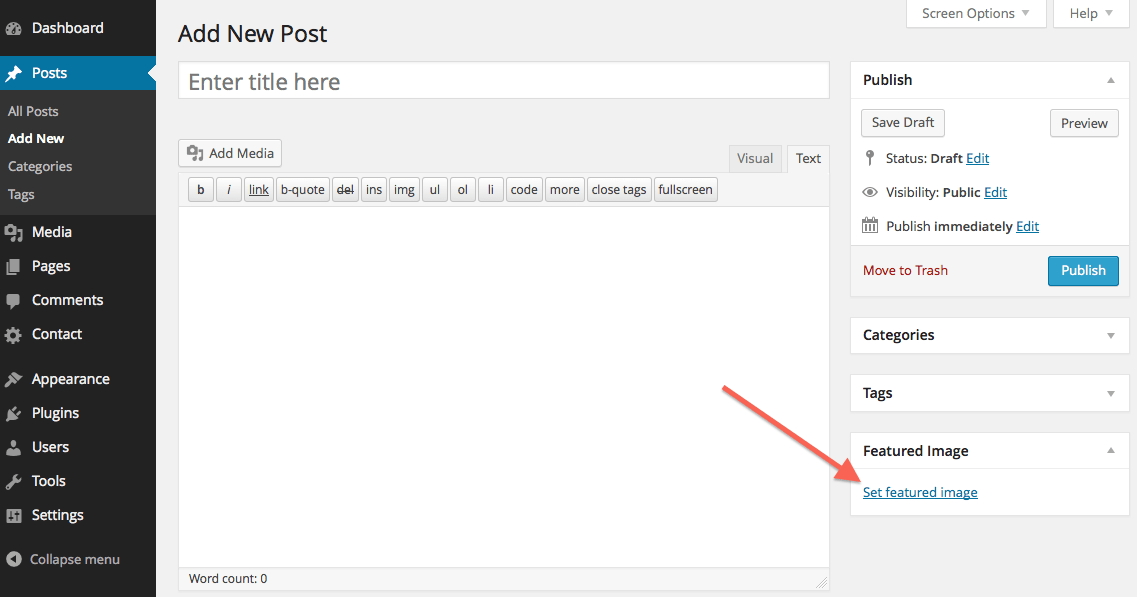
2) For a unique heading image on each page – add it to the ‘Featured Image’ section. (I think that’s what you mean)
https://createandcode.com/wp-content/uploads/2017/02/Set_Featured_Image.pngRegards
Simon
Thank you so much! The highlight image was obvious … sorry!
The url is www.dunlop.com.ar/web so you can see the logo … remove the widgets from header details, but it does not allow me to place it bigger than it is. It also includes Logos but I do not know how to make it appear in its place.
Hi there
Try increasing the logo height.
Theme Options > Logos – ‘Logo Height’. It seems to be set to 50px – try making it 100px.
Simon
Thank you! Thank you! Thank you! Thank you! I will try not to bother you any more! A million thanks! 
Good day! One more query …
On the pages the photo above is very high, I want it to be smaller, where you can touch that size, but that is not so high? I also want the text to be aligned to the left, is it possible? Do you know what I mean?
Greetings, thank you very much
Take a look within Theme Options > Page Options
There are settings for both of these queries I believe.
Simon
Perfect!
Thank you very much



)