7929 comments found.

Good day, When I try to update the theme using the Envato Market plugin, I get the following failed message:
“Destination folder already exists. /home/diatekco/public_html/wp-content/themes/electro/
Theme installation failed.”
How can I resolve this, as I desperately need to update the theme due to incompatibilities with the new version of Woocommerce.
Thanks
Hello there,
Thank you for purchasing our theme and for reaching us. This means you are trying to install the theme instead of update.
The theme can be updated in 3 ways :
1. Automatically : You can use Envato Market plugin to update the theme automatically. Instructions here : https://ibndawood.com/how-to-update-a-themeforest-wordpress-theme-or-a-codecanyon-wordpress-plugin/
2. Semi-Automatically : Sometimes (1) does not work. You should install this plugin : https://wordpress.org/plugins/easy-theme-and-plugin-upgrades/ , download the latest installable WP theme zip file from your Themeforest downloads page and then upload it via Appearance > Themes > Add New > Upload Theme and upload the zip file. The “easy upgrades” plugin will backup the old theme and install the new one.
3. Manually : You should download the latest installable WP theme from your themeforest downloads page, rename your current theme folder in wp-content/themes folder, unzip the downloaded WP theme from your Themeforest downloads page and upload it to wp-content/themes folder.
Please note that updating a theme will override any custom changes that you make to the parent theme. Hence we recommend using a child theme. A child theme is not meant to be updated and should contain only your custom changes.
Please try method 2 or 3.
Hope this helps. Let us know if you have any other questions or need further help.
Thanks, Ibrahim
Hello, when I click ‘Add to cart’ from under a product in the main page or from the categories, it send me directly to the cart, I want the customer to be able to continue browsing and not be sent automatically to the cart
Hello there,
Thank you for purchasing our theme and for reaching us. Have you enabled “AJAX” add to cart here in this setting : https://docs.woocommerce.com/document/configuring-woocommerce-settings/#section-7 ? Please confirm.
Thanks, Ibrahim
Hello, I want to change product filters display style in sidebar for example like dropdown. can you please help me to find which file i have to edit to achieve this.
Hello there,
Thank you for purchasing our theme and for reaching us. There is an option in the widget to choose “List” or “Dropdown”. You can choose that.
Hope this helps. Let us know if you have any other questions or need further help.
Thanks, Ibrahim
Hello how i can update the theme in v1.4.20 to solve the problem of the product categories are empty after the Woocommerce plugin update
Hello there,
The theme can be updated in 3 ways :
1. Automatically : You can use Envato Market plugin to update the theme automatically. Instructions here : https://ibndawood.com/how-to-update-a-themeforest-wordpress-theme-or-a-codecanyon-wordpress-plugin/
2. Semi-Automatically : Sometimes (1) does not work. You should install this plugin : https://wordpress.org/plugins/easy-theme-and-plugin-upgrades/ , download the latest installable WP theme zip file from your Themeforest downloads page and then upload it via Appearance > Themes > Add New > Upload Theme and upload the zip file. The “easy upgrades” plugin will backup the old theme and install the new one.
3. Manually : You should download the latest installable WP theme from your themeforest downloads page, rename your current theme folder in wp-content/themes folder, unzip the downloaded WP theme from your Themeforest downloads page and upload it to wp-content/themes folder.
Please note that updating a theme will override any custom changes that you make to the parent theme. Hence we recommend using a child theme. A child theme is not meant to be updated and should contain only your custom changes.
Hope this helps. Let us know if you have any other questions or need further help.
Thanks, Ibrahim
Thank you becoup Ibrahim for your support as usual I followed the tutorial n1 but after activating the token when I click on Update Available nothing appears after is the update does not install
Hello again,
Thank you for getting back. Did you try updating from Dashboard > Updates. If you are facing issues with Envato Market update, please try method (2).
Hope this helps. Let us know if you have any other questions or need further help.
Thanks, Ibrahim
Dear sir i am using latest version of the theme but i cant see the (add to cart) icon in every grid with products.I tried to enable-disable catalog mode but nothing changed .When i enable catalog mode i can see the (arrow) icon.
Its ok was a conflict with (yith request quote0 plugin
Hello there,
Thank you for purchasing our theme and for reaching us. Glad your issue is resolved. Let us know if you have any other questions.
Thanks, Ibrahim
Hello. how i can manage “Recommended Products” in pages ?
Hello there,
Thank you for purchasing our theme and for reaching us. The “Recommended Products” is a static block assigned as a jumbotron in Electro > Shop > Shop Page Jumbotron. You can edit this block in “Static Blocks” page of your admin panel.
Hope this answers your question. Let us know if you have any other questions.
Thanks, Ibrahim
Good day, after the latest wordpress update, the theme is not working. I think redux framework and woo commerce has some conflicts.
Hello there,
The errors are caused by WooCommerce 3.3.1. We have released an update – v1.4.20 which is compatible with WooCommerce 3.3.1. Please update the theme to v1.4.20 to resolve this issue.
Thanks, Ibrahim
Thank you very much. I’ve done it, but still site is not working. any hints please ?
Please email our support from here : https://themeforest.net/item/electro-electronics-store-woocommerce-theme/15720624/support with your website details, I will check why it is not working.
Thanks, Ibrahim
How do i upgrade the theme???? My site doesn’t works since woocommerce was upgraded!!
Hello there,
Thank you for reaching us. The errors are caused by WooCommerce 3.3.1. We have released an update – v1.4.20 which is compatible with WooCommerce 3.3.1. Please update the theme to v1.4.20 to resolve this issue.
The theme can be updated in 3 ways :
1. Automatically : You can use Envato Market plugin to update the theme automatically. Instructions here : https://ibndawood.com/how-to-update-a-themeforest-wordpress-theme-or-a-codecanyon-wordpress-plugin/
2. Semi-Automatically : Sometimes (1) does not work. You should install this plugin : https://wordpress.org/plugins/easy-theme-and-plugin-upgrades/ , download the latest installable WP theme zip file from your Themeforest downloads page and then upload it via Appearance > Themes > Add New > Upload Theme and upload the zip file. The “easy upgrades” plugin will backup the old theme and install the new one.
3. Manually : You should download the latest installable WP theme from your themeforest downloads page, rename your current theme folder in wp-content/themes folder, unzip the downloaded WP theme from your Themeforest downloads page and upload it to wp-content/themes folder.
Please note that updating a theme will override any custom changes that you make to the parent theme. Hence we recommend using a child theme. A child theme is not meant to be updated and should contain only your custom changes.
Hope this helps. Let us know if you have any other questions or need further help.
Thanks, Ibrahim
I made everything you said in the option 1, created a new token, inserted, saved, but the option to update doesn’t appears.
Hello again,
Please try to update from Dashboard > Updates. If the updates still doesn’t happen, please use 2nd or 3rd method.
Hope this helps. Let us know if you have any other questions or need further help.
Thanks, Ibrahim
Thanks a lot!!!!! The second option fixed!!!
Hi, how sku and product tags do not show up on product page?
Hello there,
Thank you for purchasing our theme and for reaching us. Product tags and SKU will appear at the bottom of “Description” tab.
Hope this answers your question. Let us know if you have any other questions.
Thanks, Ibrahim
hi it doesnt show up
Hello again,
From the screenshot I don’t see a description. Have you added a description ?
Thanks, Ibrahim
Do i need to add a description for SKU to appear??!!
Hello again,
Please add this custom PHP code to your child theme’s functions.php to :
1. Add SKU in product summary instead of product description tab https://gist.github.com/ibndawood/08e7cfd21458d9a7e7d1cda431326057 2. Display SKU below availability https://gist.github.com/ibndawood/8f41ccf483e58c7ff2a3ee0e783e72fdCopy style.css to your child theme’s style.css. Once you’ve added the style to your child theme please make sure you load it by enabling it in Electro > General > Load child theme’s style.css.
Hope this helps. Let us know if you have any other questions or need further help.
Thanks, Ibrahim
Since last UPDATE the mobile Top Menu is NOT WORKING or reacting anymore on my iPhone or Android?
Display location: I have 1 menu set to
-Handheld Navigation -Top Bar Right
FIXED! Never mind, seemed to be an javascript/css/cache OPTIMIZING conflict
Which script controls the Menu?
Trying to optimize, and need to know which script to exclude, so it keeps working…
Hello there,
Thank you for purchasing our theme and for reaching us. Glad your issue is fixed.
Menu dropdowns are achieved using bootstrap.
Hope this answers your question. Let us know if you have any other questions.
Thanks, Ibrahim
Hello there,
Thank you for purchasing our theme and for reaching us. Please add this custom CSS to remove height limitation :
.products-carousel .owl-item .product .product-short-description, .section-onsale-product .onsale-product .product-short-description, .section-onsale-product-carousel .onsale-product-carousel .onsale-product .onsale-product-content .product-short-description, li.product .product-short-description { height: auto; }Hope this helps. Let us know if you have any other questions or need further help.
Thanks, Ibrahim
Hello, this custom CSS code does not change the text limitation in the shop itself, the image I attached is still happening when people browse categories
Hello there,
I am not sure why the custom CSS that we share with you does not work. I think its most likely due to a mistake in adding the CSS. Can you please email our support your WP admin details ? I will check.
Thanks, Ibrahim
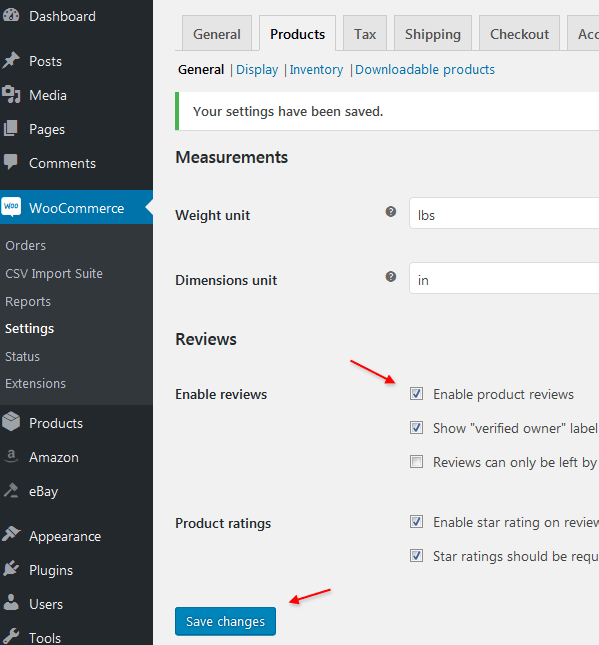
Hey, is there any way to disable the review system at all? I dont want the review tabs in my products
found it, sorry 
Hello there,
Thank you for reaching us. You can disable reviews in WooCommerce settings. Ref : https://www.h3xed.com/blogmedia/woocommerce-disable-product-reviews.png
Hope this helps. Let us know if you have any other questions or need further help.
Thanks, Ibrahim
Hello there,
Thank you for reaching us. The errors are caused by WooCommerce 3.3.1. We have released an update – v1.4.20 which is compatible with WooCommerce 3.3.1. Please update the theme to v1.4.20 to resolve this issue.
Hope this helps. Let us know if you have any other questions or need further help.
Thanks, Ibrahim
Hello,
I would like to know if the theme is compatible with WPML, and if it is compatible with Multi-currency support for WooCommerce.
Hello there,
Thank you for reaching us. Yes, the theme is compatible with WPML and multi-currency for WooCommerce.
Let us know if you have any other questions.
Thanks, Ibrahim
Hey, awesome theme! Would it be possible to reset all test orders, when we are ready to launch our site? We need to begin from order number 0001.
Hello there,
Thank you for purchasing our theme and for reaching us. The order IDs are generated by WordPress based on post IDs as order is a post. You need to use a plugin like this to change that : https://wordpress.org/plugins/woocommerce-sequential-order-numbers/
Hope this helps. Let us know if you have any other questions or need further help.
Thanks, Ibrahim
Hey, loving your team! the more I work on it and get to know its features the more Im happy with the purchase
I wanted to know, is there a way to put a product that is not on sale in the “OnSale” Block in Homepage v1, and to have a COUPON option there, so instead a discount there’s a normal product with a woo coupon row that will activate the discount instead?
Also, I’ve seen a custom code Farook wrote that makes the product names full on the homepage, but they are still shortened in the store itself, if people browse categories sometimes not the full names appear and its very important
Hello there,
Thank you for purchasing our theme and for reaching us. Glad you are liking our theme. To answer your question :
1. The Onsale block uses shortcodes, you can use any of the shortcode to display products. You can use “Products” shortcode and choose the IDs of products you want to display.
2. Please add this custom CSS to your child theme’s style.css to remove product title height:
https://gist.github.com/ibndawood/ebab4e7dc5373b9a7bae3df1980e198e Once you’ve added the style to your child theme please make sure you load it by enabling it in Electro > General > Load child theme’s style.css.Hope this helps. Let us know if you have any other questions or need further help.
Thanks, Ibrahim
Hello, 1. I am using specific product ID for the OnSale block, my question is if I can have a place to use a discount coupon code in the Block itself (like I have the option to use a code in the cart)
2. I’ve used this code already, it does display full name on the homepage, but not in the shop itself. so when peoiple browse categories the names are shortened
Hello again,
Thank you for your clarification.
1. Unfortunately it is not possible to use a coupon code in the block itself.
2. Can you please email our support from here : https://themeforest.net/item/electro-electronics-store-woocommerce-theme/15720624/support with your website details I will check why the code does not work.
Thanks, Ibrahim
PLEASE NEED HELP AFTER UPDATE. My header style disappear (all icons gone) and web site got an error: Warning: sprintf(): Too few arguments in /public_html/wp-content/themes/electro/inc/structure/footer.php on line 342 please help me
Hello there,
Thank you for purchasing our theme and for reaching us. Please email our support from here : https://themeforest.net/item/electro-electronics-store-woocommerce-theme/15720624/support with your WP admin details I will check.
Thanks, Ibrahim
Canceled upgrade to WordPress 4.9.3 WooCommerce 3.2.6 Electro 1.4.19
There is a feeling that new updates slow down the site.
Prompt a stable version?
WooCommerce? Electro? WordPress?
Hello there,
Thank you for purchasing our theme and for reaching us. WordPress 4.9.4, WooCommerce 3.3.1 and Electro 1.4.20 are stable.
Thanks, Ibrahim
Used these versions. The site worked more slowly. Especially when moving to categories.
Do you have a test server with these configuration ? Email our support with the test server details, I will check what is it and compare with the live version.
Maybe I need to increase the WP memory limit? now 64 MB. In general, how much do you recommend?
64 is very low. It should be at least 256M.
except memory_limit everything else is not related to performance. I’d suggest you to use PHP 7+ and a good cache plugin like WP Rocket.
I changed the version of PHP to 7.1.5, really, the site works faster. memory_limit = 3G
With the plugin “WP Rocket” the site works super fast!
Are there any other plugins that you recommend?
Glad you are able to achieve speed. To improve speed, I’d use imageoptim software to optimize all my images. I don’t really recommend any other plugins. The more you add, the more it slows you down.
I don’t see the following:
‘Column Settings > Responsive Options’
within WPBakery Column Settings. Is it disabled somewhere?
Hello there,
Thank you for purchasing our theme and for reaching us. No, its not disabled, I can see it in columns. Can you please post a screenshot ?
Thanks, Ibrahim
Hello there,
The width of the mega menu is set by adding a special class to the parent menu item of the mega menu item. We have documented the special classes here : https://transvelo.github.io/docs/electro/setup/advanced_megamenu_dropdown.html#6-making-the-megamenu-dropdown-as-3-half-of-the-width
Hope this helps. Let us know if you have any other questions or need further help.
Thanks, Ibrahim