

394 comments found.

The “request membership” for groups does not work with this theme. Is there a fix for this? This is a very important feature for my application.
Answered in ticket system.
Hello, is it okey that the theme support woocommerce vp3.x.x and the latest one version is 4.x.x , i mean i can only install the latest version!
Hi.
I don’t understand you. https://wordpress.org/plugins/woocommerce/ version 3.4.4
sorry , i talk about buddypress, its latest version is 3.1.0 and this template supports only v2.5.x. Can i use this template with v3.1.0? If not, what should i do?
Hi.
Yes, the latest BuddyPress supported. Forgot to change attributes in the description.
Alright ,thank you !
One final question, does the support include how to install the theme on wordpress ?
What included in support you can see here – https://themeforest.net/page/item_support_policy#whats-included-item-support
Documentation for Youplay – https://nkdev.info/docs/youplay-wp/installation/
Alright , and which php version this theme support ?
The theme should work with PHP 5.4+
That’s mean it’s works on php 7.2 ?
Yes, it works, but there are some deprecated notices. We are using PHP 7.1.x
Alright thank you
How can i delete or hide the Date at the NK Recent Post Widget from Visual Composer?
Hi.
You can try use this custom CSS:
.youplay-news .entry-header .date {
    display: none;
}
Regards, nK.
Is there a way to center the logo on the non mobile version of the site? Everywhere I try to do it, it just ends up breaking the other portions of the nav-bar.
Hi.
Yes, I think it is possible with custom CSS. I can help you with it in https://nk.ticksy.com/
Regards, nK.
Hey! I would like my text to wrap around an image carousel like the one you have here: https://wp.nkdev.info/youplay/bloodborne-first-try/ How?
I mean.. image not carousel.
Hi.
You can do this by adding custom class name on the image shortcode: ‘pull-left’.
Hey nk, me again, so about the comments. Right now if i set maximum display comments 5 per page, and i get a 6th comment, what happnes is the first 5 go on 2nd page and only 1 comment is displayed on the current page. people have to click check previous to display the other 5. Is it possible to make it always display last 5 comments, so if i got option to display 5 and there are 6, only the first goes in prev page, and last 5 are always displayed ? If i need to do some coding can do that too just let me know what to add.
Talkinga bout this, https://gyazo.com/a727bb6e30e6ee61e0f6df8bbf59ae88 would really like to have last x comments always displayed, instead having situation where only one comment is displayed although there are like 30+, some people actually thought it is only 1 comment and didnt bother clicking that previous etc…
Hi.
This is default WordPress behavior. To change it, you need to use 3rd-party plugins or custom code. Unfortunately, I can’t help you, because I have never changed it and don’t know how.
Regards, nK.
Hi, after owning this youplay theme for a while, I activated the theme today and I did an update sucessfully. Then, everytime I click on Option (so I can change footer etc..) it brings me to my website instead. Is that a bug? I can’t have access to the youplay options anymore, and I need to do some change since it added stuff I didnt want when I updated. thank you! Oh and I have the NK Themes Helper activated.
Hi.
Could you provide a temporary admin login and URL of your site, I’ll take a look. You can create a private ticket here https://nk.ticksy.com/ in “Bug Reports” category.
Regards, nK.
ok ticket submitted! I don’t know how to create temporary admin so I gave you my info. thanks
Resolved and answered in the ticket system.
Hi again:) I can’t change the Favicon in the option section. Even the one by default doesn’t show up in the left top of the website like in the demo website. Any idea why? I’m not using a menu plugin. Thank you!
Hi.
I see favicon showing ok on your site:
Hi, I meant the picture next to the menu on the left. On your demo site, we see the remove and it says Youplay next to it. I can’t add it back. thank you!
Hi.
This is Logo. You can add it in wp_admin > Youplay > Options > Navigation > Show Logo, then set Logo image.
Regards, nK.
Again, thx for my previous question got another one: So i had website trasnfered to another host and am running pingdom tests now, the website domain i am testing is d3hell.com On the resaults for say, this page: https://tools.pingdom.com/#!/S9WrW/https://www.d3hell.com/diablo-hellfire-paragon-other/
and any other i tested, this issue caught my eye: https://gyazo.com/389a2019c5f5b440ca200591e82f37b7the circle.css which should be in this path: https://gyazo.com/aa0432552d87adab6d9cedcc643b5c03
does not exist. i checked my backedup version of my website, and that circle.css file does not exist in that folder (in current, or backed up versions of the website) as you can see here: https://gyazo.com/8d2f3b07e91b7cbd8112c8d33f0b712bhow do i resolve this ? that error causes like 4 seconds wait time, you can test this on tools.pingdom for any other page. please help again.
Hi.
The theme doesn’t add and use this file. Please, look at 3rd-party plugins. Deactivate them one by one to find which caused this.
Regards, nK.
ty, resolved
it used to be in the top left part area i cant find it now pls help. i had transfer to another host and i need to edit some stuff.
and also the preloader botton circle is red, would like to change that color as well towards greenish.
Hi.
Theme dashboard works only with installed nK Themes Helper plugin.
You can change theme colors here:
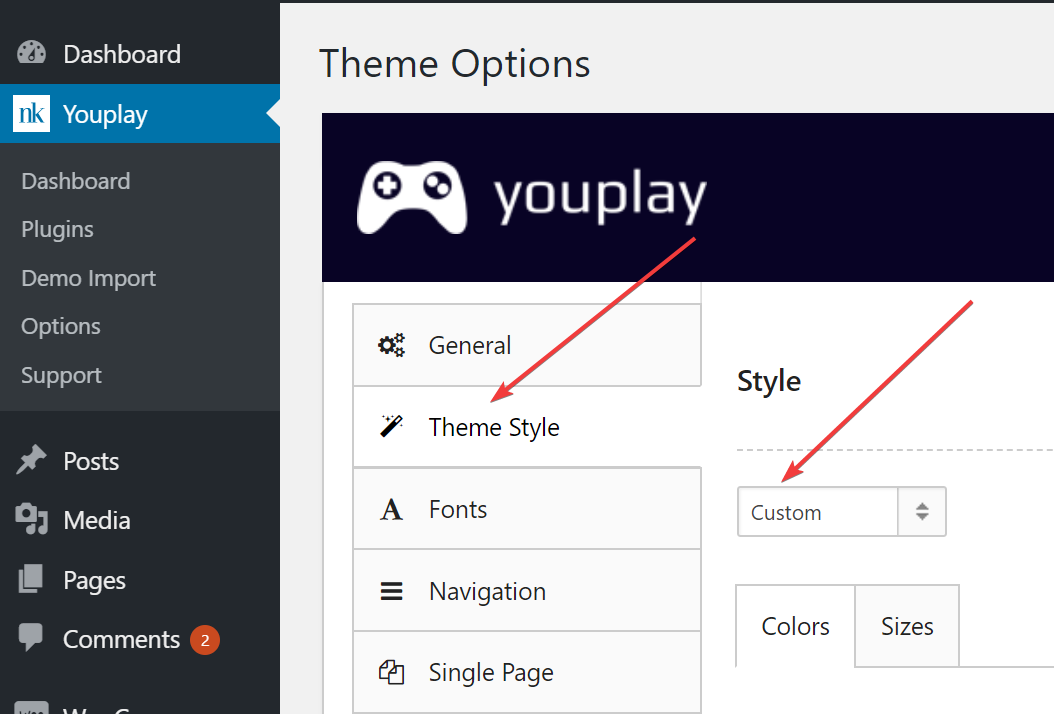
Regards, nK.
ty, awesome as always  resolved it.
How do I remove the social media widgets and add mine ? they dont seem to be removable
Hi.
You can change it in Theme Options https://nkdev.info/docs/youplay-wp/theme-options/options-panel/ Footer section.
Regards, nK.
im getting an error named “Error 2” while importing demo content. Here’s screenshot of it https://drive.google.com/file/d/1rLN3D0SmjHfWZmVg0-q4KpMlSHzy6RYw/view?usp=sharing
Hi. All support provided in https://nk.ticksy.com/
Question, can we use only two items in carousel 50:50?
Hi.
Yes, you can change the carousel size from 1 to 6 items.
Regards, nK.
hello so about the cart/checkout page. sometimes customers put multiple products or one product has a lot of text and the proceed to checkout button is not isntantly visible they need to scroll down. well some people dont relaise that and they just click the product image and are again taken to the product page ( rinse and repeat). is there any way i can put the proceed to checkout button in the top most area above the product so they can see it immediately ?
like here, right next to the title, or below it, but above any products in the cart. https://gyazo.com/5caab0f1f5ae58bc177d145aedbcc4a6Hi.
You can edit Basket page and place any content before/after cart shortcode:
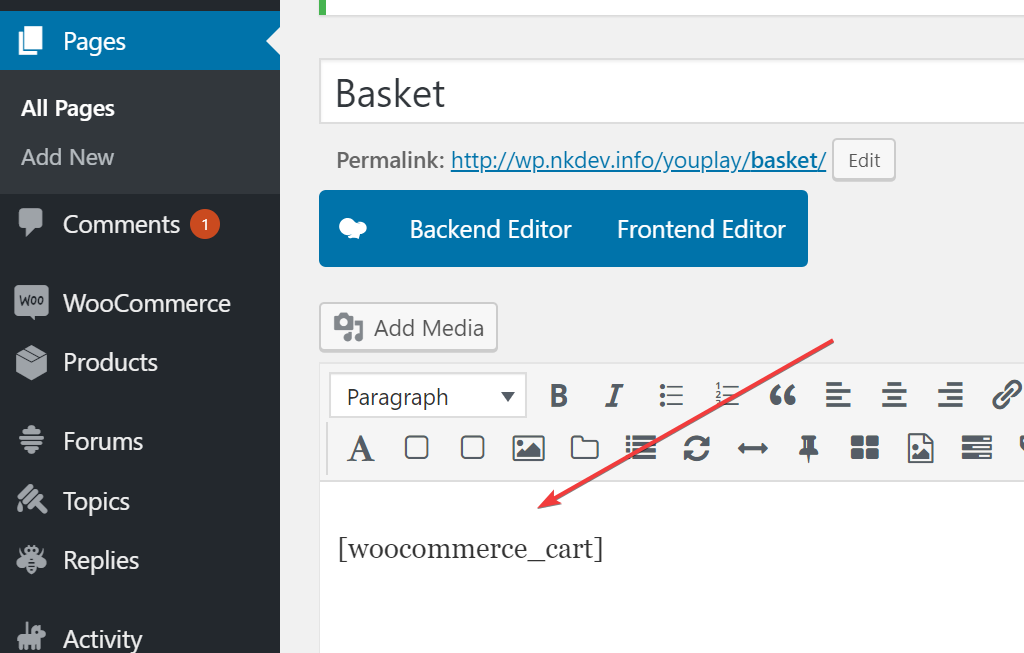
You can also customize the WooCommerce templates in /themes/youplay/woocommerce and copy it to the child theme.
Regards, nK.
um. So i was just wondering if there is an easy fix, but i did an update for the theme and all my banner images are very zoomed in now. Changing the banner size on the youplay options does nothing… is there something i missed?
Hi.
Banners parallax effect was changed in 3.5.0 update. You can change parallax speed and reduce “zoom” effect. Option you can find in wp_admin > Youplay > Options > Single Post (or any other post type) > Banner > Parallax Image Speed (the same for page metaboxes).
Full changelog list you can find here – https://nkdev.info/downloads/youplay-gaming-community-theme/#changelog
Regards, nK.
Changing the speed did not change the zoom level that i noticed. However, disabling the parallax entirely put the banners up correctly. I would prefer to keep the parallax effect, but I will leave disabled if this is the best option.
Followed installation instructions. Will not activate. Takes me to envato page where the license shows but it stays there. When I go back to WP dashboard in my host – it is still not activate.
Hi.
Please, try to click on activation button again. You should be redirected back to your site if activation succeed.
If nothing helps, please, create a private ticket in https://nk.ticksy.com/ with login details to your site, I’ll take a look.
Best regards, nK.
I saw in a screenshot where Visual Composer was listed as a required plugin. Does this theme work with Beaver Builder and Beaver Themer? Thanks!
Hi.
Any page builder will work fine, but all shortcodes available only in Visual Composer. Also, these shortcodes are not documented, so you will need to look at theme code to work with it.
Best regards, nK.
The nK specific shortcodes are only available in Visual Composer?
[yp_alert color="primary" dismissible="false"]Lorem ipsum.[/yp_alert]
hello, not sure if theme change or something in my settings, but i lost the top bar area where it said youplay and you click it and edit the theme functions. like general font size, and the various general appearance options such as boxed or full width pages, fotter area and so on ( hope you know whati mean by now). That being said where do i find and edit the footer area of my website, want to add my twitter page in addition to the already exisiting facebook button.
Hi.
Yes, we removed the Youplay admin menu item from the theme (it is not allowed now by the rules of Themeforest and WordPress).
We moved it to the plugin nK Themes Helper which is bundled with the theme. You can install it in Appearance > Install Plugins. But top menu item still will not be available, you can only find it in the left admin menu:
Best regards, nK.
hello, thanks in the end I could solve the sliders, what I have found with another problem in the posts, if you could help me solve it I would appreciate it, the problem I have is that when you put an image in the post that will be the header this image is so enlarged that I can not find out if it is due to a problem with the dimensions of the image or if it is due to a template failure, but the header image would be like this, I leave image
https://www.dropbox.com/s/s1tqw7zapouwsyh/Captura%20de%20pantalla%202018-04-06%20a%20las%200.36.46.png?dl=0but when entering the post the header looks like this…
https://www.dropbox.com/s/kgfnqen4p2hvhea/Captura%20de%20pantalla%202018-04-06%20a%20las%200.30.43.png?dl=0apart from that it looks bigger happens as what happened to me with the slider, which gets inside the menu, and I’ve been touching these settings without actually showing the image
https://www.dropbox.com/s/ouak76l3o9utbtm/Captura%20de%20pantalla%202018-04-06%20a%20las%200.42.04.png?dl=0If you could help me how to solve this, I would appreciate it, greetings and thanks.
Hi.
This is because of Banner Parallax option is enabled. You can try to disable it in theme options or in page metaboxes.
Best regards, nK.
thanks, it looks much better now
Upgrade it from there https://github.com/nk-o/jarallax , what the problem?





