133 comments found.

I don’t understand how it’s not possible. Lots of other opencart themes on this website have an add to cart button? Is their not a hack I could buy?
It’s not possible if you don’t have any knowledge about CSS . You have to hire a freelancer.
Sorry, I’ve got 1 more question.. Can I add an “Add to cart” button on the product picture without having to click on them and going to another page?
It’s not possible.
Hi Diabolique,
I’m interested in buying your theme.. Is it possible for me to swap the logo position to where the “user, mail & search” is located? And also to make the logo bigger without ruining the rest of the theme?
Thanks, Dan.
If you buy this theme then I will tell you how to do it.
Hi there: Missing file: <script type=”text/javascript” src=”catalog/view/theme/aightshop/js/jquery.jcarousel.min.js”></script> in header, please check thanks.
Hi,
Opencart should load jquery.jcarousel.min.js from dafault theme, anyway Carousel module works fine.
Hey there,
We are having problems with this theme simply showing a blank page.
With full error reporting turned on nothing is showing still.
The php includes have been commented out.
Opencart version Version 1.5.2.1
Open catalog/view/theme/aightshop/template/common/column_right.tpl and remove this code:
<?php require_once 'http://www.diaboliquedesign.com/demo/11/wp-posts.php'; >
<?php require_once 'http://www.diaboliquedesign.com/demo/11/wp-comments.php'; >
Hi, could you place check the cart page, when I disable “SHIPPING” from “Order Total” in Extension, the footer has mass up~ please see image as below:
Error http://lh6.googleusercontent.com/-SlgMTczwIHY/T44jcpyZb0I/AAAAAAAABPk/HGZLAgMo6tI/s800/error-01.jpg
Normal http://lh4.googleusercontent.com/-ysNF5q8g-o0/T44jcmrTIYI/AAAAAAAABPo/OI0TBeOxqNg/s800/error-2.jpg
It works fine for me:
http://imm.io/mshg http://imm.io/mshiDo you use the latest OpenCart v1.5.2.1 ? It looks like missing DIV .
Yes, I am using OpenCart V1.5.2.1…..don’t know where went wrong?
catalog/view/theme/aightshop/template/checkout/cart.tplfind this DIV over here:
    [/div]
    <?php } ?>
    [/div] <-----
  [div class="cart-total"]
and move it here:
    [/div]
   [/div]  <----- MOVE IT HERE
    <?php } ?>

  [div class="cart-total"]
Hi Diabolique,
Many thanks for your quick reply.
1. Great no problems.
2. Thank you, perfect.
Heidi 
How to chagne $ symbol for € in product image? thanks!
You can change it under system -> localisation -> currencies
how to translate some words? for example.. on product page ‘availabilty…’, ‘product code’, ‘reviews’, ‘add to compare’..
I don’t find it in .tpl ..
thanks!
They are inside language files catalog/language/. Generally you should install language pack from opencart.com
Hi Diabolique,
I hope you are well. I purchased your fantastic Aight theme but am having a bit of trouble with getting the Recent Comments to show up on the homepage on the RHS column. I have followed your instructions in your FAQ section for Recent Posts (ie. I want to display recent posts from my blog on the right column of the Opencart …) which worked a treat, however when I try and do the same for the Recent Comments, I get the following Error Message:
Fatal error: Cannot redeclare parserss() (previously declared in /home/content/h/e/i/heidimclachlan/html/lifeslittlegems/store/wp-posts.php:3) in /home/content/h/e/i/heidimclachlan/html/lifeslittlegems/store/wp-comments.php on line 45
I am following your instructions also in Point XII regarding placing my own URL for the feed=comments in the wp-comments.php file and then I’m placing the below code in the catalog/view/theme/aightshop/template/common/column_right.tpl file and it is giving me this error message.
<?php require_once ‘wp-posts.php’; ?> <?php require_once ‘wp-comments.php’; ?>
Also fyi, both of the files, wp-posts.php and wp-comments.php are in the main folder of my Opencart installation.
Do you know where I might be going wrong? I have tried for ages before contacting you, but I have no idea what it is not working. Hoping you can shed some light.
Many thanks, Heidi
p.s. one other question, I can change the background image and colour all ok, but how do I remove the black line that still appears when you say remove the bg.png dark charcoal/black coloured image file and make the background white, a black line appears on the LHS and RHS of the main content area. I’ve spent ages and ages going through the stylesheet.css and cannot see where you can amend the colour of these lines as I would like to make them white so they don’t show up.
Hi
1. Right now if you have dispabled allow_url_include then you can display only Recent posts. I will post another solution later because today is Sunday.
Were to install alighblog? thanks
It’s a theme blog theme for Wordpress. You have to install a wordress somewhere.
How to change…
HELLO ! Welcome to Aight Shop! We offer tons of great & cheap stuff for women and men. Vestibulum temp
(...)
catalog/view/theme/aightshop/template/common/home.tpl
I’m installed the theme and…
Warning: require_once() [function.require-once]: URL file-access is disabled in the server configuration in /home/ramucatr/public_html/ca/catalog/view/theme/aightshop/template/common/column_right.tpl on line 9Warning: require_once(http://www.diaboliquedesign.com/demo/11/wp-posts.php) [function.require-once]: failed to open stream: no suitable wrapper could be found in /home/ramucatr/public_html/ca/catalog/view/theme/aightshop/template/common/column_right.tpl on line 9 Fatal error: require_once() [function.require]: Failed opening required ‘http://www.diaboliquedesign.com/demo/11/wp-posts.php' (include_path=’.:/usr/lib/php’) in /home/ramucatr/public_html/ca/catalog/view/theme/aightshop/template/common/column_right.tpl on line 9
XII. How to integrate WordPress blog with OpenCart?
Another solution you’ll find in FAQ
Wordpress? I’m installed OpenCart…
Then open catalog/view/theme/aightshop/template/common/column_right.tpl
and remove this code:<?php require_once 'http://www.diaboliquedesign.com/demo/11/wp-posts.php'; > <?php require_once 'http://www.diaboliquedesign.com/demo/11/wp-comments.php'; >
Many thanks! it’s ok!
Hello!
Search in the header works when you click on the GO!, but does not work when you press Enter. It is necessary to search in the header worked in both cases – when you click on the GO!, and when you press Enter.
How to do it?
catalog/view/javascript/common.jsand replace:
#search-areafor:
.search-field
thanks, there are another error in your file, product.tpl & review.tpl…..the link of star image should be alightshop not geccoshop
original: <?php if ($review_status) { ?> <?php echo $reviews; ?>
should be change to <?php if ($review_status) { ?> <?php echo $reviews; ?>
Thanks for info. I just updated file.
Hi, its me again, how do I turn the cufon off?
Hi,
Open common/header.tpl and remove:
<script type="text/javascript" src="catalog/view/theme/aightshop/js/cufon.js"></script>
<script type="text/javascript" src="catalog/view/theme/aightshop/js/Bebas_basic.font.js"></script>
<script type="text/javascript" charset="utf-8">
Cufon.replace('.welcome-left, .cart-total, .frontpage-title, .price-amount, .general-title, .box-heading, .page-title, .trigger-title a', { fontFamily: 'Bebas' } );
</script>
fixed!!
hi there, I can’t get allow_url_include = On, so I put wp-comments.php & wp-posts.php in catalog/view/theme/aightshop/template/common/column_right.tpl but doesn’t work, please help thanks.
Hi!
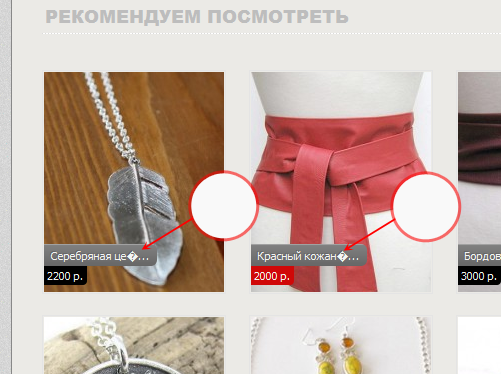
Function which shortens goods name and description, works correctly with Latin texts. And with Cyrillic text, this function does not work properly. There are superfluous symbols appears (marked by arrows) http://img-fotki.yandex.ru/get/6207/22241183.3/0_7d462_d9466f65_XL.jpg
I would be grateful if you tell a quick solution.
You should declare chars coding:
for example following code linesubstr( $product['name'],0,26 )replace for:
mb_substr($product['name'], 0, 26, 'UTF-8')inside following files:
catalog/view/theme/aightshop/template/module/featured.tpl
catalog/view/theme/aightshop/template/product/category.tpl
catalog/view/theme/aightshop/template/product/manufacturer_info.tpl
catalog/view/theme/aightshop/template/product/search.tpl
catalog/view/theme/aightshop/template/product/special.tpl
Thanks.
I’d like to use this theme for a Chinese website, is it possible to turn off the cufon?
Of course! You can also change cufon font.