600 comments found.

Hi,
In my website, I rent and sell cars. At the moment there is only one page listing both sell and rent cars (I add rent cars using the Purpose option).
How can I have a separate page for rent and buy car?
Hi. Answered in your ticket . Thanks
Thanks very helpful
You are welcome 
Hi, The theme seems to be very slow on WP 5 even on my development computer
Hi. We did not find any changes in performance, the theme works well after the update . Please create topic here http://support.templines.com/ and our support team will help you . Thanks
Hi, We have our own bespoke car dealer management system which manages our inventory, this has a live XML feed published on the web. Can your Wordpress theme pull from a URL which contains the XML feed of our inventory? Can this be done automatically on a schedule? Is it included or an extra? Thanks
Hi. Please send me a link to email:info@templines.com so I can check . Thanks
Hi there,
i was trying to login to the support forum using my envato account but i keep getting an error message “error creating user”. i tried to register a new account but is still failed.
Is there any problem with my account?
Thanks
Hi.Please check email. Thanks
Can’t seem to login to support. It gives me an error like “error creating user”. I am trying to login through Envato. I have logged in many many times before.
Hi. Could you please record a video and send it to me on email:info@templines.com ? Thanks
I emailed it
Unfortunately I didn’t get anything . Thanks
Please check spam.
I checked spam , nothing . Thanks
Can you provide change log of your recent updates?
Hi. Please check Appearance – About AutoZone – Changelog . Thanks
we want to know the changes before updating to the latest version. It would be the best if you make then log public at the theme page like other theme authors do. Or put it in the update notification email.
Yes I understand but unfortunately this is not the best way in terms of security , but thanks for the suggestion we will add this task to the list of future updates . Sending mails makes envato .
Hi.
In the new version we have added update notification in your admin panel and information about future update in about – changelog ( all information is now available before the update ).
PS: http://support.templines.com/knowledge-base/how-i-can-automatic-upgrade-template/
Thanks
Hi, love the theme. On the vehicle listing page I have setup, for some reason I get a fatal error when I click the vehicle list button.
Here’s the page before clicking the button: http://www.1oakmotors.com/sales/ Here’s the fatal error message after clicking the button http://www.1oakmotors.com/sales/?view_type=listHave any idea what might be causing this? I disable certain plug-in that I thought might be causing this issue and replaced the loop-autos.php from the theme.
Also, the homepage browser tab isn’t display what I want it to say. I want it to say “One of A Kind Motors” but It says “Insurance. I see One Of a Kind Motors for a second but then switches quickly to the word Insurance. I’m able to have all other browser page tabs to display what I want it to say.
Hi. We are really sorry about that, please create topic here http://support.templines.com/ and our support team will help you .
How to create an account and use our support forum.
http://support.templines.com/knowledge-base/how-to-create-an-account-and-register-on-the-support-forum/Thanks for purchase
Regarding your finance calculator. I tried it in your demo but it is pulling up negative numbers. Is this something we need to configure ourselves?
Unfortunately I don’t understand your question , please attach a screenshot of the problem for clarity . Thanks
Hopefully my last question – we did translation according to your documentation using poedit, but these values are not getting translated in list view: https://miger.cz/klienti2/autozone/autozone3.png
Hi. Please also translate pix-auto-deal plugin . You can use Loco Translate . Thanks
oh right. but when using poedit, how do I name the translation files for czech language of pix-auto-deal plugin? i tried cs_CZ, pixad-cs_CZ etc. but it was still not showing the translations. When trying Loco Translate, it just says no template to be translated was found…
Please check the template file path as specified in the documentation Thanks
Okay, I did that and now Loco translate works – it can translate the plugin pix-atuo-deal. But the translations are still not displayed in list view – still seeing english 
Please update your support period and our team help you . This will save a lot of time for you and us . Thanks
Hello there, I really like this theme and the other auto theme that you have. I purchase a LOT of themes, but what I am finding with some of them is that some developers are dropping themes without notice and no longer supporting them, providing updates or support. Do you anticipate this with any of your themes?
Hi. You can use the envato market plugin to know about any updates . Autozone Last Update Thanks
No, this isn’t what I’m asking. I’m asking if you plan on discontinuing this theme or your other theme any time soon.
We plan to work with the autozone in further . Thanks
Love the look of the theme, would it be easily adjustable for other businesses outside of the automative industry?
Hi.
We try to make it available and easy for other automative businesses and add updates every week . You can use your own auto fields for your purposes . As an example, this is a new demo for selling yachts .
Thanks
Thanks & Regards,
Hi. Please download and use the latest documentation . Latest update 24 November . Thanks
Hello, I want to change the background of the static block footer, can you help me? Thanks
Hi.
Please use Customizing ▸ Footer ▸ Background image
Thanks
Hello, I want to change the background header of the different pages and it puts the same image in all pages, can you help me? Thanks
Please use Page ▸ Featured Image . Thanks
Hello, I want to change this background for each page, how can i do this? (https://gyazo.com/3a362327018525614980bb35da704589)
Please use Page ▸ Featured Image . Thanks
Hi, 1- How can i only update the sell your care that recently was added to the theme? 2- How can i update the theme since without losing any previous information or saved data?
Hi.
1. Customizing ▸ Header ▸ Elements ▸ Sell Button ▸ Off
2. http://support.templines.com/knowledge-base/how-i-can-automatic-upgrade-template/
Thanks
Hi, on the demo landning page. you have something called Sell your car, but it fails to load when you press it.
Hi, why isnt google maps working any more? I get this error where i have the google map embedded Geocode was not successful for the following reason: OVER_QUERY_LIMIT
Hi. 1. This is a link to the dealer page, please check this .
2. Please make sure that you have added the key in theme Customizing General Settings – Google Map Api Key and plugin Kaswara – Custom Settings – Google Maps Api and it has no limits .
Thanks
You can try use this plugin to create API https://wordpress.org/plugins/api-key-for-google-maps/ Thanks
Thanks, but i still get the same error when entering a new api key for google maps.
We are really sorry about that, please create topic here http://support.templines.com/ and our support team will help you . Thanks
One more problem, altought that is not happening in your demo. But when googling for the error, I found few other sites with the same problem (and they are using your template) so perhaps some bug in the template? Or something with jQuery?
By default, the vehicle listing is set to grid and that works. However if we switch to list view, we get the loading animation that never ends and the list never loads. The server gives out the following error: “Uncaught Error: Call to undefined method pixad::getlistviewfields() in wp-content/themes/autozone/loop-autos”
We found a partial solution to this. From loop-autosgrid.php we took ” getsideviewfields” and put it on line 10 in loop-autos.php instead of “getlistviewfields”.
Then we get the list view working, UNTIL you try to use the filter – then the layout collapses completely.
I can’t give you the link to our website as it is not public, but here is another (not ours) website with the same problem: http://www.raskinfo.no/vehicle-listings/ – try changing to list view.
Please update theme and all theme plugins . Thanks
Thanks, I’ve done exactly that, now I can switch between list and grid view without problem. Unfortunately once I touch the sorting or filtering (choose more cars per page, choose different sorting etc.) then the layout totally collapsses. But once i hit F5 or refresh, the layout is OK. See the attached video: https://youtu.be/n6ru7ts-b5k
We havent modified any files from your template or wordpress, all modifications were done only within wordpress admin dashboard.
Unfortunately I can’t tell you anything using the video . Please create topic here http://support.templines.com/ and our support team will help you . Thanks
Unfortunately my support period has ended, can’t even read the support forum. But I am not sure that this is problem on my side, because as I said – we haven’t modified any files. We just imported your demo and replaced/added our own cars. There are however few points worth nothing:
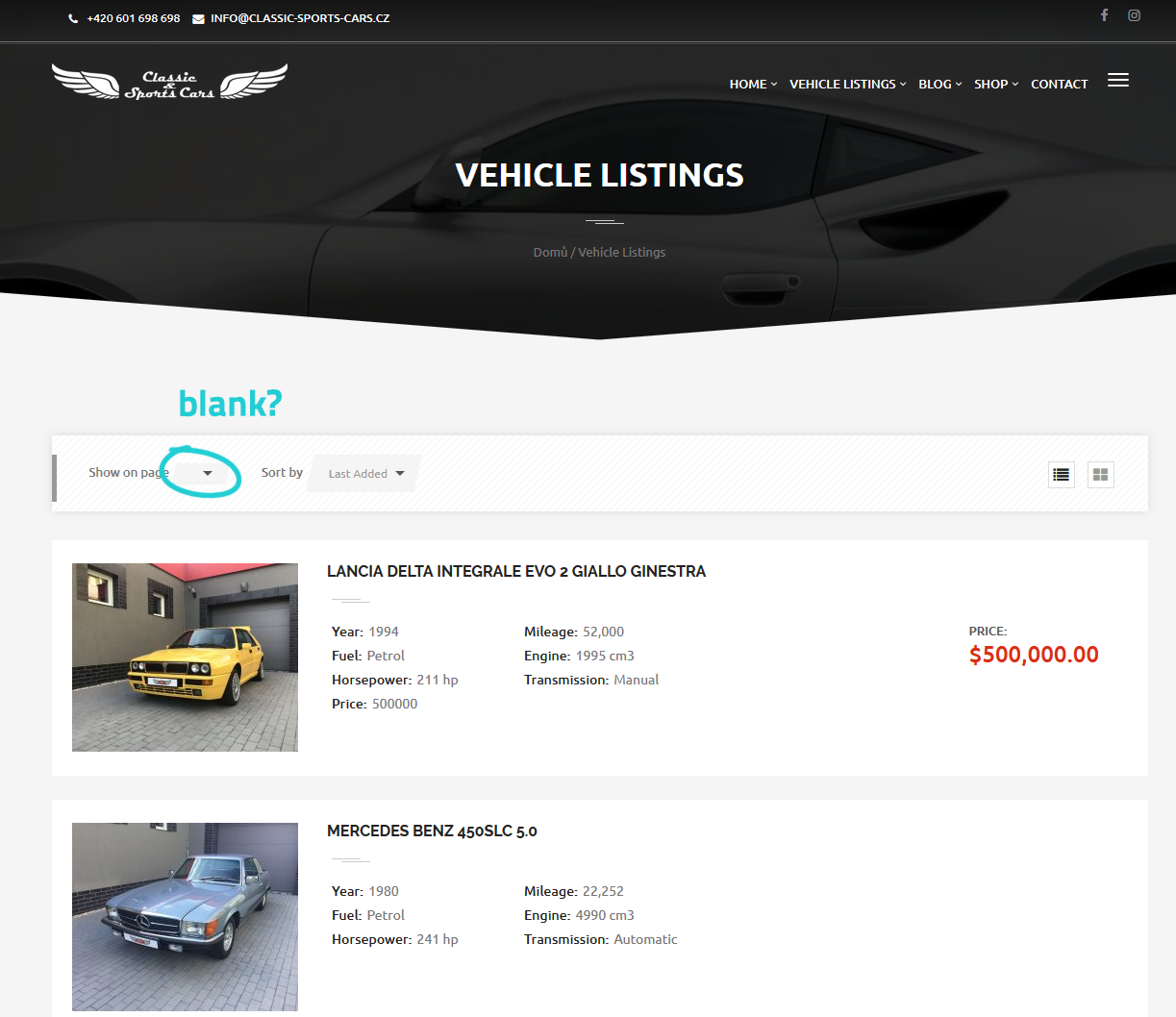
1) once I go to vehicle listing, where it should say how many cars show per page, it is blank – http://www.miger.cz/klienti2/autozone/autozone1.png
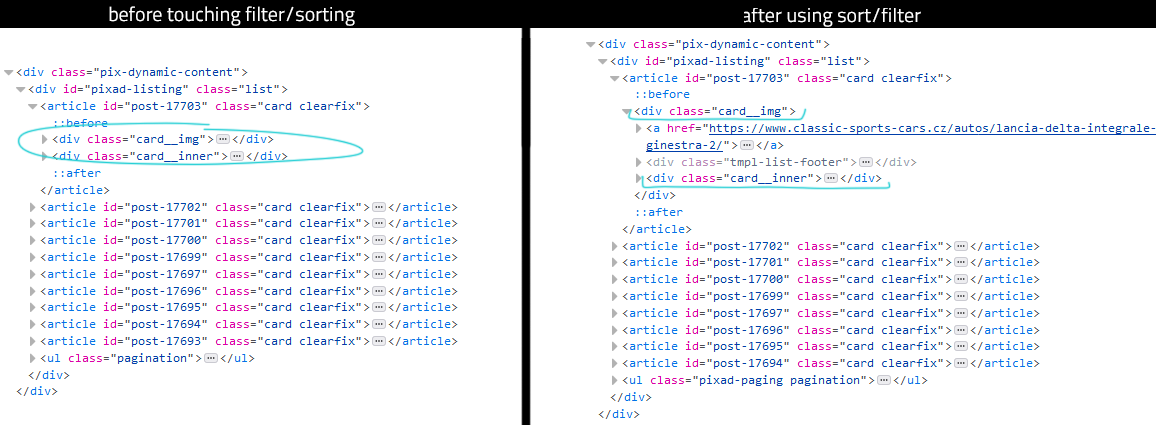
2) if I now enter any number in there, or use any other filter/sorting, the layout collapses as you have seen in the video above. However when I go into source code, I can see why it is wrong. The “card__inner” is in wrong place! It should be outside the “card__img” but for some reason it is inside. – http://www.miger.cz/klienti2/autozone/autozone2.png
3) if I now hit F5 or refresh the page, the layout loads correctly including the sorting/filtering that I previously selected.
It seems as if perhaps some script that takes care of the filtering/sorting without refresh doesn’t work properly. Some ajax/jquery/javascript thing maybe?
Dear customer , I understand your, but if you extend our support it will help us to access your site and fix all problems much faster . Also, it costs like half an hour of freelancer’s work but you get six months of warranty service if you have new problems . We make improvements our theme every week but this can cause some problems or questions that our team can answer on the support forum . If you do not want to extend the support and you like everything then do not install updates and use your stable version . At the moment I can not reproduce this problem on our side and I need FTP and admin accesses to understand what happened since you have been using our template for more than a year and it can be caused by anything . Thanks
To solve the first problem just select a new value in this field ( previously it was 10 which is not attractive for the grid ) . Thanks
Serious bug report, please fix ASAP:
Go to Vehicle listings, click on any car, click on the main photo of the car, then a lightbox with fullscreen photo opens – click the right arrow (or press right key on keyboard) to list within all the photos – it doesn’t work – you just get black screen. Only the main photo works, all other photos just display black in fullscreen listing. This happends also on your demo, so I suppose it is a general bug within the template.
And then there’s this other problem – also happening in your demo. Click on any car from vehicle listings, you see the main (featured) image and below it a small stripe with few other photos. But then you click any other car and now you only see the featured image without the small photos below it. Click the right arrow 6 times and the small photos now appear? Why is this random behaviour happening? It is demonstrated it in this video: https://youtu.be/dpNHZvuSPzU
Thanks.
Hi. 1. Fixed . Please check now. 2. this may be due to the speed of your Internet and for this reason not all pictures can be downloaded immediately . We will think about how to make it easier in future updates. Thanks
1. In your demo it is fixed. Did you upload the new version for download as well?
We will prepare some more updates and it will be available today . If you don’t want to wait, update this file yourself assets/assets.min.css Thanks
Thanks, that works.
You are welcome
Hello, is there any WordPress Dashboard demo to check all the features ? About the inventory, is it possible to add options besides the make, fuel type, model and status ? And can we use them so users can search by them ? For exemple the number of doors.
Hi.
1. Unfortunately we don’t have a demo dashboards . 2. Yes you can add your own fields . 3. Unfortunately they are not currently available for the search but we plan to add them in future updates .
Thanks
Hi, I wanted to ask, 1.can the search form for car listing be stylized differently than shown in the demo theme, like full width adn can add some field in search form 2. Can customers pay via Paypal without Paypal account only by typing their credit card number? 3. Is there a listing option to let the featured car be first in the search result and to be charged for it?
Hi.
1. This is possible but requires some knowledge of PHP and HTML from you or you can use our paid services . 2. Please contact the PayPal team about this question . 3. This is possible only with the favorite product that the buyer chose or you can use our paid services to create such an features .
Thanks
If i update my current version of the theme (2.1.x) to the latest version, then the main image on homepage (revslider) is missing the “bottom V decor” effect (even though it is selected in the settings of that row)...any idea?
Hi . We are really sorry about that, please create topic here http://support.templines.com/ and our support team will help you . Thanks
You can also check this row setting http://take.ms/5V3V0 Thanks