60 comments found.

As some previous comments have mentioned, the customer support from this author could be greatly improved. Think twice before purchasing and make sure you ask everything up front as they will not issue a refund.
Hello,
We are much concerned regarding your comment.
Unfortunately we have found no ticket request from you.
Feel free to submit your request at https://themerex.net/support/ – our Support team will be happy to help with all question or issue you have.
As the theme authors, we keep to the Envato refund policy: http://themeforest.net/page/customer_refund_policy
All the refund requests should go through the Envato team: https://themeforest.net/refund_requests/new Thank you for understanding.Hi, I am interested to purchase this theme or the Holy Church theme from you as well, may I know which theme is better in terms of SEO and google speed? Thank you
Hello,
Thank you for your interest in our theme!
The theme code is optimized for better SEO. However, for additional SEO features you may install plugins for SEO.
Website loading time depends on many factors like server response time, image optimization, caching etc. Google page speed does not actually measure the speed of your site. Speed – the loading time of your site – is the most important metric which counts for user experience and for SEO.
We recommend using GTmetrix or Pingdom services in order to check the speed.
Best regardsThank you.
and one more question, is the Main menu being built based on html and css only, no javascript involved? Thank you.
I cannot remove the homepage header (mobile version), can you help me?
Hello,
You are able to hide row on different screen sizes (including mobile) in Row settings of your header layout.
Please submit a ticket at https://themerex.net/support/ – our Support team explain you in more details.
Thank you.already submited 3 tickets, nobody answer ticket #889
Hello Tell me please, 1) Does the license for the template apply to only one domain? 2) I need to enter the license key on the my site? 3) What if I need to transfer the site to another domain (site1.com will be transferred to site2.com)?
Hello,
Thank you for your interest in our theme.
1) With ThemeForest regular license you are licensed to use this theme to create one single End Product (the final website customized with your content) for yourself or for one client.
In short: http://great-lotus.ancorathemes.com/doc/#general_information_license2) There is purchase code that is used to get support.
3) We recommend using Duplicator plugin to migrate the website. Please check this tutorial on how to use the plugin: https://youtu.be/yZ7pHmR9JC8 Best regardsThanks for the quick response!
In the third question, I had in mind how to comply with the rules of licensing when moving to another domain.
Based on the answer to the second question, I realized that the license is not tied to the domain and, accordingly, there is no problem moving the site if necessary –
it is right?
Hi there! I’ve been using the theme to sell digital audio files. When the file is free, the “download” button at the end of the free product purchase is present and the file is downloading well. When the product has a price (with the exact same product settings), it won’t show any option to download the purchase (page = /index.php/checkout/order-received/ ) .
It would only show
Thank you. Your order has been received.
ORDER NUMBER: 892 DATE: June 18, 2019 TOTAL: $1.00 PAYMENT METHOD: PayPal Checkout Order details
Product Total Pre-Lie down (free download) × 1 $1.00 Subtotal: $1.00 Payment method: PayPal Checkout Total: $1.00
//
What is wrong?
Hello,
Thank you for contacting us!
By default WooCommerce plugin is not included in theme package. You may use any third-party plugin, but we cannot guarantee the theme full compatibility with third-party plugins as we have not tested them together with theme.
If there is a need, our Customization studio can implement compatibility with WooCommerce for additional fee. To get a quote, please submit a ticket to category “Request Paid Customization” at https://ancorathemes.ticksy.com/ .
Thank you for understanding.
The theme is not working with Polylang
Hello,
We cannot guarantee the theme full compatibility with third-party plugins as we have not tested them together.
If you need multi-language website, theme is fully compatible with WPML plugin: https://wpml.org/Thank you for understanding.
Dear Team, very nice Theme! But there is a different Demo online right now, is it possible to change again?  Thank you so much in advance!
Hello,
Thank you for your interest in our theme!
Here is our demo:
http://great-lotus.ancorathemes.comSame demo is described in our documentation: http://great-lotus.ancorathemes.com/doc/
Thank you.
I cannot figure out how to edit the content of the demo pages. Where do I do this
Hello,
Please check this article or our video tutorial for more information regarding layouts customization:
https://ancorathemes.ticksy.com/article/11026 https://www.youtube.com/watch?v=wZIfqi8wTWoIf you still have any difficulties or questions, please submit a ticket at https://ancorathemes.ticksy.com/ – our Support team will be glad to assist you.
Thank you.
I’m overall satisfied with this theme, but I cannot find any documentation on how the related-posts-feature works. My problem is that this feature seem to rather display old far-related posts rather than new close-relates posts. There must be some kind of bug and I wanted to edit the files related. I found /wp-content/themes/great-lotus/templates/related-posts-2.php, but I do not understand how this template determine which posts to display under the “You May Also Like”-headline. Please tell me where to find documentation.
Hello,
Thank you for contacting us!
The Related Posts feature scans all of your posts, analyzes them, and lets you show contextual posts your visitors might be interested in reading after they’re done with whatever post they’re on. Also it ma
There is no option to edit related post display order.
Try to deactivate default related option and use plugins for Related posts that allows specify related posts manually.
Thank you for understanding.
Buy this theme, do you need to buy Woocommerce later? Woocommerce easy to install?
Hello,
We appreciate your interest in our theme! Woocommerce is not bundled with the theme. You may try to install it and use on the site. It is free plugin.
If there is a need, we may create a test theme installation for you so you could access the backend and test the theme with the plugin yourself. In order to proceed, please submit a ticket to category “Pre-sales Questions” at https://ancorathemes.ticksy.com/ .
Thank you!
One click to import the demo content jammed, manually downloaded demo, is it decompressed to the themes folder? I still don’t have a demo after I unzip it.
Hello,
Once you unzipped folder from demo.zip archive, please download it to /wp-content/themes/great-lotus/ folder and re-import dummy data in admin panel.
If you have any further questions, please submit your request at https://ancorathemes.ticksy.com/ – our Support team will be glad to assist you.
Thank you.
How do I re-import virtual data in the administration panel?
Hello,
Please navigate to Appearance > Install Demo Data
Best regards
Hi,
I’ve just downloaded and installed your theme.
The WP Bakery plugin is very out of date. It’s so old that it still installs initially as its previous name Visual Composer version 5.4.7 even though version 5.6 is available.
Can you update the plugin in the theme download please? I would expect the plugins to all be up to date when I purchase and first download a theme.
Thanks, Steven
Hello Steven,
Thank you for choosing our theme!
The latest version of WPBakery Builder will be included in next theme update, which is currently in progress and will be available shortly.
Meanwhile you are able to request the latest version in tickets:
https://ancorathemes.ticksy.com/Thank you for understanding.
Am I able to add WooCommerce to this site or can you recommend another Ancora site that has a calendar system and WooCommerce?
Hello,
You may try using the plugin with the theme. In case some additional stylesheets are needed for its full compliance with the theme, our Customization studio can create them for you.
Calendar is implemented via Booked appointments plugin. It comes bundled with theme. All the installation instructions, tutorials and any kind of guides regarding it’s functionality are available here: https://boxystudio.ticksy.com/articles/7827/
Best regards
Hello, I am wondering about customization. Will I be able to change the orange highlights and boxes to a different colour? And change the header font?
Hello,
We appreciate your interest in our theme!
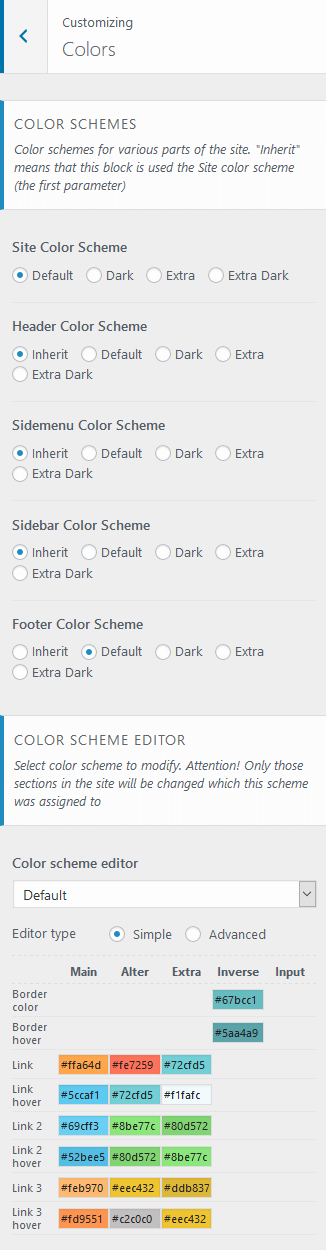
Sure, there is Color scheme editor in theme, so you can control over the default color scheme and allow specifying color scheme (default/dark) for the site and its parts like sidebar, header, sidemenu and footer. You can also use color scheme editor for more precious manipulations:
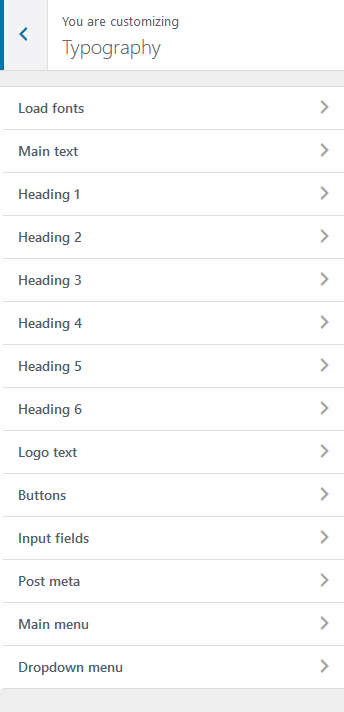
http://great-lotus.ancorathemes.com/doc/images/color_scheme_smpl_options.png Fonts can be changed in Typography section in theme also: Here you can specify font names and font families to almost every element of the theme: http://great-lotus.ancorathemes.com/doc/images/fonts_settings.pngBest regards
Thank-you! One other quick questions… am I am able to add WooCommerce to this site?
Hello,
Sorry for delayed reply – we don’t work on weekends.
You may try using the plugin with the theme. In case some additional stylesheets are needed for its full compliance with the theme, our Customization studio can create them for you.
Thank you for understanding.
Hi, .htaccess file is not getting updated because it have to be changed manually in the theme, can you fix it?
Hello,
You can update .htaccess file by re-saving Permalinks in Settings> Permalink in your WordPress admin panel.
If you have any further questions, please submit your request at https://ancorathemes.ticksy.com/ – our Support team will be glad to assist you.
Thank you.
Hi, is this theme compatibale with the latest version of WP?
Hello,
Yes, theme is compatible with WP 5+
If you have any further questions, please submit your request at https://ancorathemes.ticksy.com/ – our Support team will be glad to assist you.
Have a nice weekend!
Cannot work custom menu ... #?
Hello,
Your support ticket was replied.
Please check it.
Thank you.
Is there a way to add more payment gateways for donation like paytm or payumoney instead of paypal?
Hello,
We appreciate your interest in our theme!
This plugin works only alongside PayPal.
Adding other payment methods requires additional customization of theme source files. If there is a need, our Customization studio may implement this feature to theme. To get a quote, please submit a ticket at https://ancorathemes.ticksy.com/ to category “Request Paid Customization”.
Thank you!
Hi, I’m using your fantastic theme. I need to translate “Learn More” and “You May Also Like” into my language. How should I do?
Hello,
Thank you for your nice words!
We recommend using Poedit software for translation-related purposes:
https://ancorathemes.ticksy.com/article/9673/If you have any further questions, please submit your request at https://ancorathemes.ticksy.com/ – our Support team will be glad to assist you.
Have a nice weekend!
How to remove breadcrumbs from a specified page. Please help me this
Hello,
You can hide breadcrumbs for specific page by adding this CSS code in WPBakery Page settings:
.breadcrumbs { display: none; }
http://prntscr.com/loi2vzBest regards.
I am sorry but I want to remove this whole part from specific page https://prnt.sc/lojrok I really appreciate your response time its really awesome.
One more thing whenever I activate the W3 Total Cache plugin my ninja forms start giving errors as this:- http://prntscr.com/lok13s its with every page that contains ninja form.
Again…I want to change the photo of this section http://prntscr.com/lok13s it is the client requirement
I am sending you the ticket with all of my problems
Hello,
Thank you!
Please expect our reply to your latest comment shortly.
Best regards
Cannot create custom menu in customize area. When I click publish its not updating.
Hello,
Please provide your website details in private ticket at https://ancorathemes.ticksy.com/ – our Support team look into the issue and assist you.
Thank you in advance.
sent. Please Help fast
My issue is still not been resolved. Please provide me the solution.
Hello,
Your ticket was replied 19 hours ago. Please re-check our reply.
You’ve submitted your request at Request a Paid Customization category. This category is for paid customizations.
Please provide your purchase code in ticket you’ve submitted, we need to verify your purchase.
Thank you in advance.
Again sent.
Hello again, 1) I have to use the custom menu as the main menu and I have changed it in appearance<menu and make my custom menu and set as the main menu but it is again it is showing the default theme menu. Please Help. 2) I am using ninja form for creating the form but the select field is not showing its option. I have experienced only this problem in this theme ,I have sent the mail to ninja forms but still if this problem is from your side you can check.
Hello,
1) Header in theme is implemented using Layouts feature. So you should change Main menu specified in layouts to your custom menu.
Please navigate to Layouts> Header simple > Edit> Layouts: Menu and specify > Edit and select your menu there.
2) Please submit a ticket for support under theme’s category:
http://prntscr.com/lienziProvide URL to the page where your Ninja form is located.
Thank you.
Thank you for the mail but the code you sent is not working. Can you do it at my place? Thank you
Hello,
Please post this information in your support ticket, so our Support team re-check and assist you.
Thank you.