

394 comments found.

Hi we are having trouble in importing the demo data, after clicking on “import” the spinner keeps on loading.
Hi.
You can try these articles:
- https://nk.ticksy.com/article/11087/ - https://nk.ticksy.com/article/9693/
If it won’t help, could you provide more info in private ticket https://nk.ticksy.com/ , so we can log in and check what’s wrong?
Regards, nK.
Thanks for reply nK,
Tried both the links but no luck. The plugins mentioned to import Theme Options needs .dat file but in folder we have .txt file.
Even tried to rename .txt to .dat but still “Customizing” says “Error importing settings! Please check that you uploaded a customizer export file”
Created a Ticket for same..
Thanks, JG
Answered in the ticket system.
Shared. Thanks
^ i try to change from this location
Hi.
Seems like a bug with Options Panel. Please, use Google Fonts.
Helvetica is the system font family on Mac OS. I don’t think it will work on Windows or Android.
p.s. You can also try to use custom CSS for a system or self-hosted fonts.
Regards, nK.
Hi nK, My support has ended but am having trouble installing the required plugins so I can install demo content. It seems to be revslider that crashes it, then I have to delete the file in plugins directory for site to work again. Are there any new updates on the way? Thanks, Andy
Hi Andy.
You can enable WP_DEBUG (https://codex.wordpress.org/WP_DEBUG) to see an error message, so you can understand what exactly happened. Maybe just need to update server config, idk.
The theme will be updated in the next month.
Regards, nK.
That’s great, Thanks nK 
Hi nK, It seemed to be a problem with the installation. I started again and everything worked fine! I forgot to ask, is it possible for users to leave reviews or star ratings on posts? Thanks, Andy
Hi.
No, user can only leave comments. You can try to use 3rd-party plugins, something like this one – https://wordpress.org/plugins/wp-postratings/ or similar.
That’s great, thanks nK. I’d been looking everywhere thinking I was missing it lol.
Hi there, if I have an animation video clip, can I add it to the website, like an entrance animation movie? thank you
Hi.
You can embed videos at any place using page builder.
Could you show me an example of what do you want?
Regards, nK.
Hey, I found this article https://nk.ticksy.com/article/8065/ and wanted to ask, if its possible to: 1: Move the title down to the “Text field”: http://prntscr.com/m5qgk2
It doesnt look great this way without banner: http://prntscr.com/m5qhhl & result: http://prntscr.com/m5qrgr. Maybe a bug ?
2: Is it possible to use Slider Revolution as default banner ? (Thats why the title should be moved down). My post should later get imported by RSS fead from our forum and it’s a pain to edit them everytime manually to use our slider :/
Regards, Pierre
Hi.
You can edit `single.php` template in the child theme and change banner and title position. You can also place Revolution slider here using `putRevSlider` function.
Regards, nK.
Hey,
thank u Worked like a charm
Regards, Pierre
is the theme still optimized for the latest Wordpress and Buddypress or is it not updated anymore?
Hi.
WordPress 5 will work with the theme. Read here how – https://nk.ticksy.com/article/14098/
There are small fixes for BuddyPress (for Legacy templates) in local build, I can send it in support system to you. The theme will be updated later.
Regards, nK.
Hey I just finished creating my website to new.domain.com that I had activated the license for YP template and now I just moved the files to the root domain domain.com. However both websites now are giving a 301 Moved permanently error. Is this because of licensing? And if yes how can i fix it?
Hi.
No, license activation can’t give you an error. Something went wrong in the migration process or in configuration.
301 – this is redirect code.
Thank you, solved. It was completely irelative.
Hi, can we change the preloader or cut it off if needed ? Looks awesome btw.
Hi.
You can change logo on preloader or disable it in theme options.
Regards, nK.
Hi, the Topic View in bbpress is in the mobile version not clean. I mean the Table with the text is to far right so the text is cut off. Any solution? Best solution is to remove the table for the avatar, so the text is in the middle.
Hi. Added in bug list, will be checked in the next update.
I really like the preloader on this theme! One thing that bothers me, though, is that it shows even when changing tabs on user profiles. Is there a way to disable it on certain pages? Thank you, awesome work!
Hi.
There is no option to disable it on specific pages. You need to add code customizations by yourself or with 3rd-party help. The easy way is to edit header.php file and hide preloader on BuddyPress pages.
Regards, nK.
How would one do that? Sorry about that, I just have no idea on what to change… I never really used PHP :/
Unfortunately, we don’t provide such customizations.
Hello, i didn’t bought it yet. I just want to make sure, this theme is fully responsive for all devices? And is possible to create a shop to sell things on this theme?
Hi.
Yes, it is responsive. It is possible to create a shop using WooCommerce plugin. You can check online demo.
Hi dear, Is it normal my “coming soon” page has disappear ? https://mindcontroltech.org
Hi.
Youplay theme doesn’t have “coming soon” page.
Hi there, I just bought the theme, and despite looking everywhere in the settings for an hour, I can’t find a way to:
1. Change the homepage’s banner image 2. Remove the right sidebar 3. Add one of those slideshow-like menus displayed in the “Dark” preview
Thank you in advance.
Hi.
1. Page banner you can change in page metaboxes – https://nkdev.info/docs/youplay-wp/theme-options/meta-boxes/
2. Layout settings you can also find in page metaboxes or change it globally, using theme options – https://nkdev.info/docs/youplay-wp/theme-options/options-panel/. For example, posts sidebar you can disable in Options > Single Post > Layout.
3. If you mean carousels, they added using shortcodes. Better import demo data to start working with the theme – https://nkdev.info/docs/youplay-wp/installation/demo-import/
Regards, nK.
Hi there, nK Themes Helper is breaking my page: www.useradventure.com!
Your site is working ok for me. To get support write in https://nk.ticksy.com/
Thanks so much for the theme first, as second, it’s possible to add a Slider to my Category page? There is no such a option to edit on Category pages… Thanks so much in advance.
Hi.
No, you can’t. You only may change banner and layout options for all posts archives in theme options wp_admin > Youplay > Options > Posts Archive.
Regards, nK.
I like the theme. But today, when I updated the theme to my site using your dashboard, it removed my child theme. Until this is resolved I can only update the files by ftp of the youplay folder. What would be the reason for youplay to remove a child theme in the themes directory? This has caused me a headache of scrambling to restore the site.
Hi.
I’ve just checked the updater and can’t repeat the problem you talking about. There is no code that removes the child theme. Seems like a rare bug or something else, idk.
Could you check it again (if it possible), will the child theme removed again? If yes, please, provide a temporary admin login to your site in private ticket https://nk.ticksy.com/
Regards, nK.
Hello! The woocommerce had outdated files in the Youplay template… Are you upgrading these files?
Hi.
Templates will be updated in the next theme update. Currently, there are only small changes in templates, that not break functionality.
Regards, nK.
Hi, Is it possible to use “Visual Composer Website Builder” instead of “Wp Bakery page builder” with youplay ?
Regards Pierre
Hi Pierre.
You can use, but theme shortcodes will not be available, they are written for WPBakery Page Builder (formerly Visual Composer https://codecanyon.net/item/visual-composer-page-builder-for-wordpress/242431) only and it’s not compatible with Visual Composer (https://visualcomposer.io/).
Regards, nK.
Hi, now the nk_banner shortcodes is deprecated, any features that can achieve the same thing?
Hi.
You can use AWB plugin to add backgrounds on the Rows and Columns:
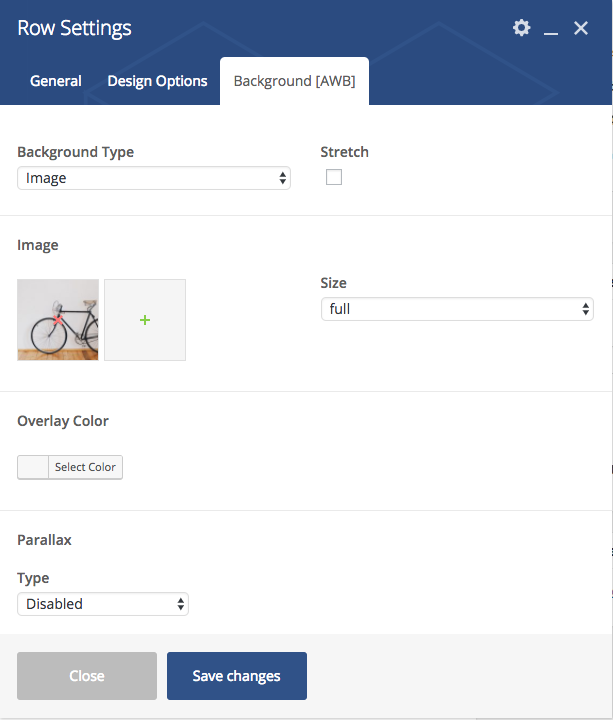
Regards, nK.
i found a bug on your website : first you have two registration system ,one on the main page ,when you click on the right menu (next to “Lost password”) and one on “https://yoursiteweb.com/register”,on this system you enter the password during the registration then you need to activate your email by clicking on the link which is sent to you (Reverse the first system), and the second bug is when you want to verify your account (activate your email) it’s says you need to enter a verification code but the problem is there is no verification code on the email message, i hope that you understand !
Hi.
Thank you, I’ll check this.
Regards, nK.
So , when it will be fixed ?
In the next update I’ll check this. If you want to get help right now, please, create a ticket in the https://nk.ticksy.com/ with your site URL and admin access, I’ll check this on your site.


