53 comments found.

Is Wordpress 5.1 supported?
Hi.,
Thank you for the interest in our theme and contacting us.
Yes, our theme is compatible with WordPress version 5.x.x
If you have any other queries, found any difficulties, please feel free to contact us. We are always ready to help you.
Regards., DesignThemes Support.
Hey, I’m facing an error (error establishing database connection) since I started my website. And Every time it happens I need to restart ‘mysql’ from ssh. it has happened to me nearly 15 times and it’s annoying. And currently I am facing another error (Error 522) and I’m unable to fix it. My server is on AWS, and it only has 1 GB RAM. Is that the problem? Or it is happening due to some other reason? I have 8-10 websites and non of them faced this issue, not even a single time. I don;t know why it is happening with this one.
Hi.,
Kindly, send us your WordPress admin login and FTP login credentials through the right bottom form located @http://themeforest.net/user/designthemes . So that, we will check and have a clear look from our end.
Regards., DesignThemes Support.
The issue was fixed after I increased the RAM of my server from 1 GB to 4 GB
Hi.,
OK , Thank you .
You are always welcome to ask us your queries and we are ready answer it with pleasure.
Regards., DesignThemes Support.
hi,
i m getting this error when i m importing your theme
The execution failed. Please check error.log
waiting for the reply
Hi.,
Thank you for contacting us.
Kindly, mail us your site credentials along with the error.log file immediately via the right bottom form located @ http://themeforest.net/user/designthemes So that, we can check and import the dummy data for you.
Refer : http://prntscr.com/mkev23
cPanel login details (Admin username and Admin password)
WordPress admin login (Domain Name, Admin username and Admin password)
FTP access login details ( FTP Host Name, FTP Username, FTP Password)
Note: Before installing the theme or demo content, please check that your server has the following limits as explained in our knowledge base link else contact your hosting support to do so.
http://support.wedesignthemes.com/knowledge-base/server-requirements/Regards., DesignThemes Support.
Hey, I just want to know, Where do I insert Google AdSense & Analytics Code on my website? And how do I change the number of blog posts shown from 5 to 10?
Hi.,
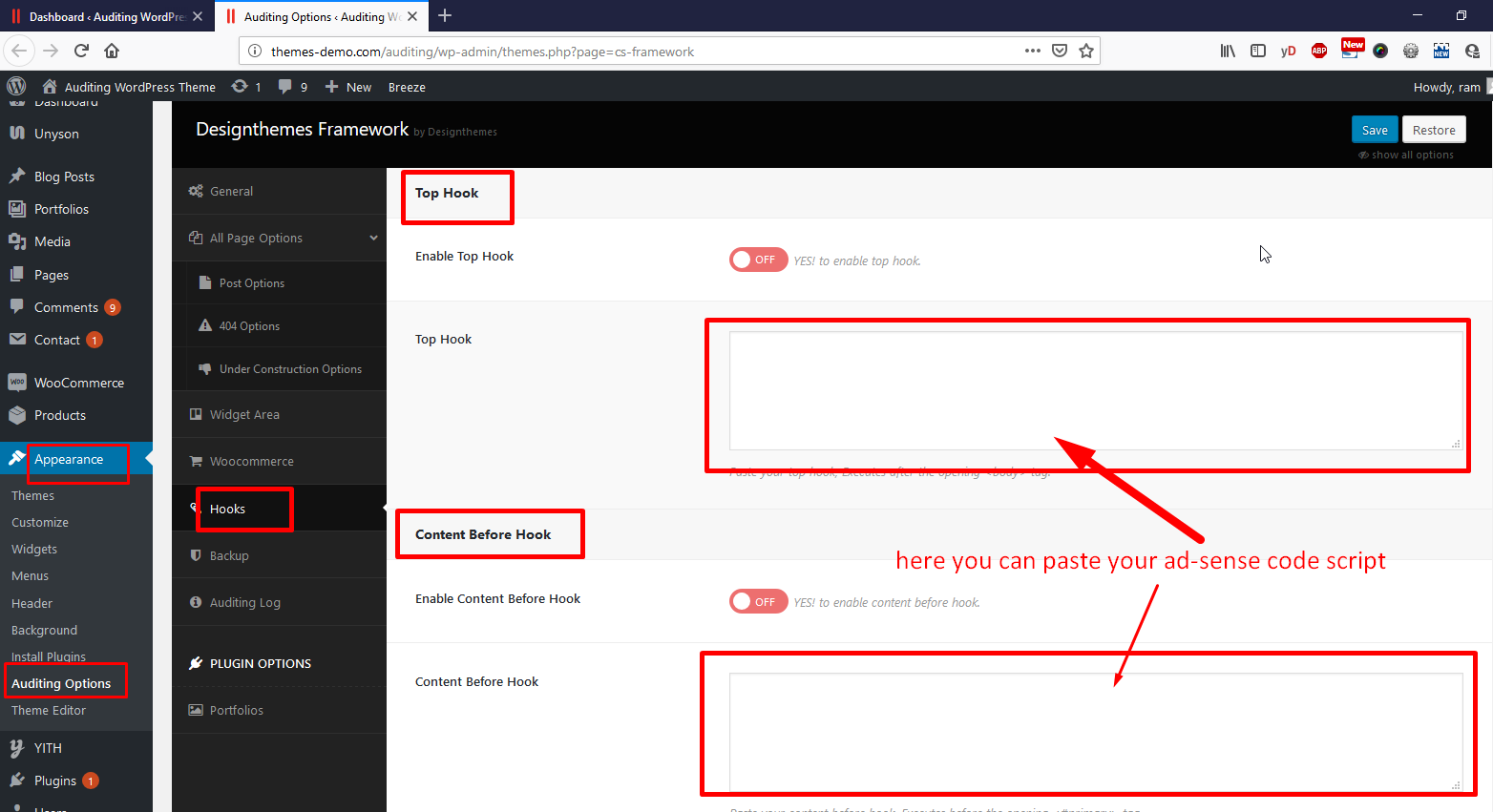
1) You can directly paste the adsense script under the Admin Panel > Appearance > Auditing Options > Hooks > there you can paste your ad-sense code script.
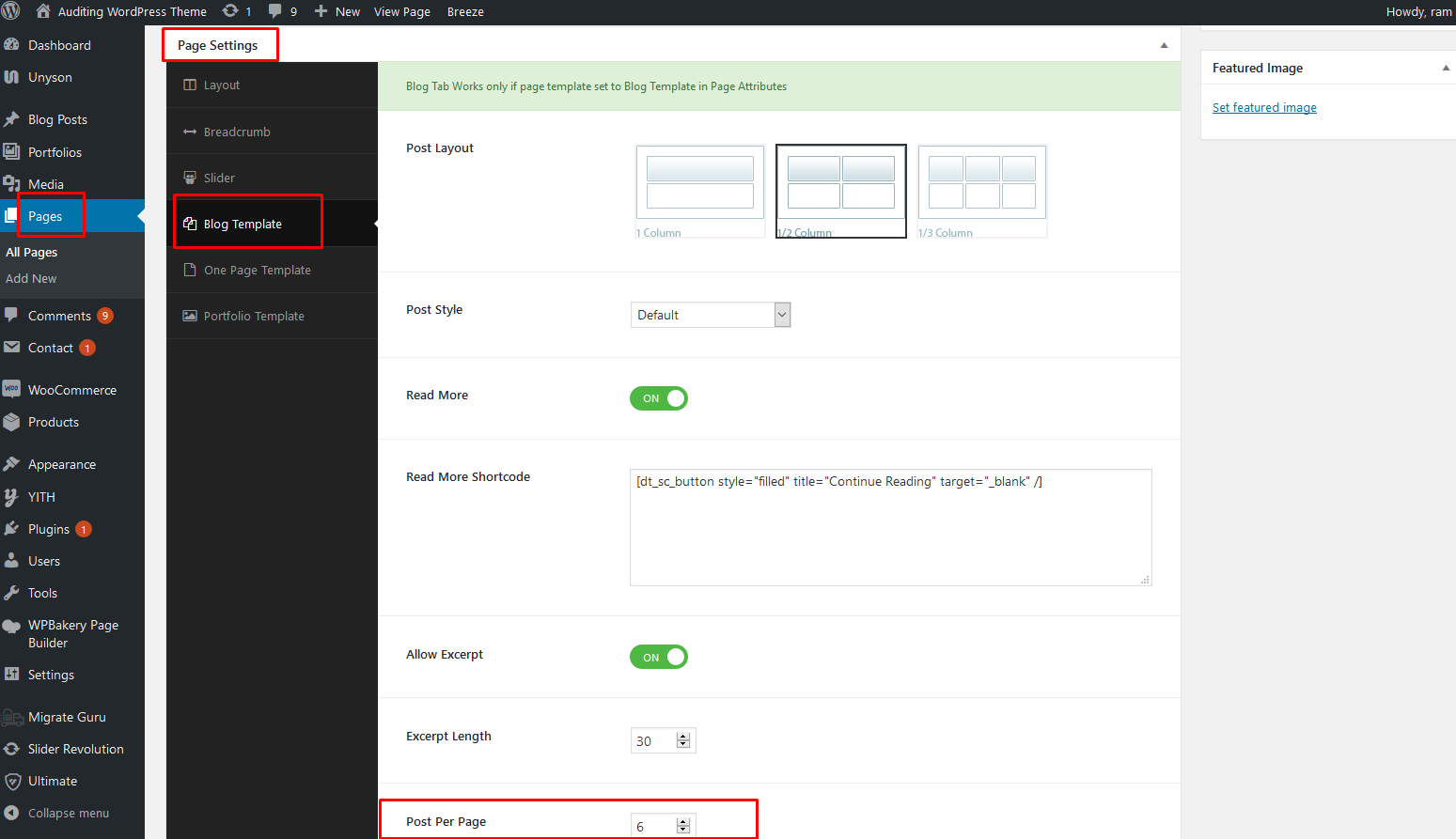
https://s3.amazonaws.com/mydonedone.com/donedone_issuetracking_4262/fc631168-3678-4112-8019-09bf862b236d_/Pasted-Image-2019-06-24-161154.png https://s3.amazonaws.com/mydonedone.com/donedone_issuetracking_4262/47788eb0-c5a4-44cb-a74a-094fc5b01452_/Pasted-Image-2019-06-24-161232.png2) Go to Dashboard > Pages > Edit the Blog page here you can find the Page settings meta box here you can Post Per Page in Blog Template tab.
https://s3.amazonaws.com/mydonedone.com/donedone_issuetracking_4262/6968a7fb-5aea-46e7-bc7a-ebd0d60dccab_/Pasted-Image-2019-06-24-161631.png https://s3.amazonaws.com/mydonedone.com/donedone_issuetracking_4262/19b6bb2e-d3e0-46ec-bf79-a74461a88fc3_/Pasted-Image-2019-06-24-161659.pngRegards., DesignThemes Support.
Hey, I really liked your theme it’s one the best themes l’ve used. I’ve been using this theme for a while now, and I wanted to know how to create a menu like the one in the screenshot I have attached. Please check support ticket
or link- https://ibb.co/bNVNk7n
and Please check https://emindsca.com/
Hi.,
Please refer : http://recordit.co/UfT2lI6Ola
Please refer the KB : http://support.wedesignthemes.com/knowledge-base/onelife-setting-up-the-megamenu/
hi i was looking forward to buy your theme
but before tht i have a question
since you have mentioned tht your theme is woocommerce friendly but i cant see the login panel or the cart.
i want the user to see his history of purchase made on the website please help me with this
Hi kunal.,
Thank you for the interest in our theme. Please have a look at this screenshot http://prntscr.com/nyc1z0 for cart and my account page link.
Regards., Designthemes Support
i get tht but does tht mean there will be no login link or cart link on the homepage
Hi kunal.,
You can add the link of login and cart page any where in the site.
If you need a login form to show in the home page, then you can use any external plugins for that feature.
Regards., Designthemes Support
ok great thank you
hi can you show me where is the product page or category page
Hi.,
Thank you for your interest on our theme .
Here you go – http://themes-demo.com/auditing/shop
Regards., DesignThemes Support.
Hi
I bought this item, however i cannot install the demo website you have which is the purpose of buying this template?
Please hlep
Hi.,
Thank you for contacting us.
You can import the demo content via the unyson plugin. Kindly refer our knowledgebase link for how to import the demo contents using the unyson plugin http://wedesignthemes.com/support/knowledge-base/how-to-install-the-demo-content-via-unyson-plugin/
If still facing any of issues Please mail us your site credentials (WP & FTP access logins) immediately via the right bottom form located @ http://themeforest.net/user/designthemes So that, We import demo data for you.
Before sending your details please check your server requirements., Please refer the below link for server requirements http://wedesignthemes.com/support/knowledge-base/server-requirements/
Regards., DesignThemes Support.
Does this theme support Google AdSense?
Hi.,
Yes., Auditing Themes Supports Google AdSense.,
Thank you, we look forward to helping you!
Regards., DesignThemes Support.
Hello there,
I have purchased this theme.
Having some issue with mobile, my page has two menu and in mobile when I click to open first menu it also opens second one. Can you please help me?
Thanks
Hi.,
Yes , we are ready to help you .
Kindly share some screenshot , along with your WordPress admin login and FTP login credentials through the right bottom form located @http://themeforest.net/user/designthemes . So that, we will check and have a clear look from our end.
Regards., DesignThemes Support.
Hello DT,
I have solved that issue, Thanks for offering the help.
However, I have two pending topic on your support forum. Could you please reply to that.
1. http://support.wedesignthemes.com/topic/help-with-breadcrumb/
2. http://support.wedesignthemes.com/topic/help-with-blog-page/
Thanks,
Hi.,
1 ) Get into the file path /wp-content/themes/auditing/framework/register-functions.php under function auditing_breadcrumbs you can modify the code .
Ref : http://prntscr.com/npbjo9
2 ) Kindly view your without login , so that it will look like our demo . When we logged in our dmeo site it will look like your site – http://prntscr.com/npbltc
If you are happy with our support, kindly rate us. Have a look at the video for the rating process. http://recordit.co/YqdTBuEJRm Hoping for a 5 star rating from your end 
Regards., DesignThemes Support.
Hi.,
Kindly, send us your WordPress admin login and FTP login credentials through the right bottom form located @http://themeforest.net/user/designthemes . So that, we will check and have a clear look from our end.
Regards., DesignThemes Support.
Please solve my problem. We sent you WordPress admin login and FTP login credentials.
Hi.,
We can’t connect your FTP ,
Ref : http://prntscr.com/no8tj8
We are from India. So, kindly unblock the Indian IP or any security features. Our IP will be changing periodically – 49.204.140.228
Regards., DesignThemes Support.
use this IP address 34.236.35.228 instead of emindsca.com
Hi.,
Now we can connect your FTP , but there is no folder . So let us know where you have installed our theme pack.
Ref : http://prntscr.com/noc4tq
Regards., DesignThemes Support.
inside /var/www/html
You’ll first have to click on the ’/’ Directory (as shown here: https://ibb.co/pzsb3NH) then you can find the var folder as shown in this image: https://ibb.co/hBgSn02
Hi.,
OK, Thank you .
It seems you have not provided full admin rights – http://prntscr.com/noqgn9 .
So , kindly deactivate our theme by renaming the folder name , and check out the issue .
Note : Kindly take a full backup before renaming the folder
. Regards., DesignThemes Support.Hey, I just want to know, Where do I insert Google AdSense & Analytics Code on my website? And how do I change the number of blog posts shown from 5 to 10?
Hi.,
1) You can directly paste the adsense script under the Admin Panel > Appearance > Auditing Options > Hooks > there you can paste your ad-sense code script.
https://s3.amazonaws.com/mydonedone.com/donedone_issuetracking_4262/fc631168-3678-4112-8019-09bf862b236d_/Pasted-Image-2019-06-24-161154.png https://s3.amazonaws.com/mydonedone.com/donedone_issuetracking_4262/47788eb0-c5a4-44cb-a74a-094fc5b01452_/Pasted-Image-2019-06-24-161232.png2) Go to Dashboard > Pages > Edit the Blog page here you can find the Page settings meta box here you can Post Per Page in Blog Template tab.
https://s3.amazonaws.com/mydonedone.com/donedone_issuetracking_4262/6968a7fb-5aea-46e7-bc7a-ebd0d60dccab_/Pasted-Image-2019-06-24-161631.png https://s3.amazonaws.com/mydonedone.com/donedone_issuetracking_4262/19b6bb2e-d3e0-46ec-bf79-a74461a88fc3_/Pasted-Image-2019-06-24-161659.pngRegards., DesignThemes Support.
Hello! Just wanted to know when you will be providing update plugins for Layer Slider, Revolution Slider and WP Bakery. Thanks!
Hi.,
Thank you for contacting us.
Due to license rules, we can only issue new plugin updates when we issue new theme updates. So anytime MountCool is updated, the latest plugin files will be included. This is according to the licensing rules enforced by Envato, and is something out of our control and must abide by.
Kindly, Send us a message through the right bottom form @ http://themeforest.net/user/designthemes so that we will send you the latest version of plug-in files.
Note : We do not provide license to any of the Plugins that come along with the theme. We just provide the copy of the licensed plug-in. You can just ignore that message in your dashboard. That message appears in your dashboard, you can get the latest version of plug-in files from us when there is an update.
If you have any queries, found any difficulties, facing any kind of issues or need any support for this theme, please feel free to contact us. We are always ready to help you.
Regards., DesignThemes Support.
Hi …,
Kindly Could you checked my Erro when I customize theme It’s got” The theme directory “smartco” does not exist.” and Where can I change the main color.
Thank you for this great theme
Hi.,
Kindly, send us your WordPress admin login and FTP login credentials through the right bottom form located @http://themeforest.net/user/designthemes .So that, we will check and have a clear look from our end.
Regards., DesignThemes Support.
Hi..,
I sent admin login but FTP login credentials I can’t now let’s try to solve this issue from wp dashboard
Thank you for your replay
Hi.,
We have checked your site all working fine .
Ref : http://recordit.co/3EA3yndMxQ
If you still have any issues, kindly send us some screenshot / video where you have the issue. So that we will help you better.
Regards., DesignThemes Support.
Hi.,
Can you check it with google chrome ….?
Thank you for your speed replay
Hi.,
We checked your site on google chrome . It working fine – http://recordit.co/8SndpN9NYP
Regards., DesignThemes Support.
Hi.., I sent screenshot for issue at http://themeforest.net/user/designthemes
Hi.,
1 ) Kindly refer this link for how to fix the error – http://support.wedesignthemes.com/knowledge-base/how-to-rectify-the-cannot-modify-header-information-warning/
2 ) We have uploaded the image without any issue ,
Ref : http://prntscr.com/lywzlh
3 ) Kindly send us some video so that we will help you better .
Regards., DesignThemes Support.
Hi! First of all great theme, very elegant.
I only have one question, can you tell me how to remove the white space between home page picture and footer? Here’s the link:
www.studio-grillo.it
I already inserted margin-top parameter in custom css and it helped reduce the space a little bit, I’m now guessing there’s another parameter that needs to be modified but I don’t know which one.
Thanks in advance!
Hi.,
Sorry , we can’t view your site.
Ref : http://prntscr.com/krpzw0
Regards., DesignThemes Support.
Hi yeah sorry i edited it shortly after, it’s a .it
www.studio-grillo.it
thanks for your patience!
Hi.,
Kindly, mail us your site credentials (WordPress admin login (Domain Name, Admin username and Admin password) & FTP access login details ( FTP Host, FTP Username, FTP Password)) immediately via the right bottom form located @ http://themeforest.net/user/designthemes So that, we can check and have a clear look form our end.
Regards., DesignThemes Support.
Hey, I tried to register at your support System, there is no Mail coming back for the activation of the account.
I got a problem with the import of the demo data. Can’t import because of a MYSQL issue. Need help, so I need your support sytem.
THX
Alex
Hi.,
1 ) We have updated your password and sent to your email id ( mildner@websulting.de ). Please have a look at it.
2 ) Kindly, send us your WordPress admin login and FTP login credentials through the right bottom form located @http://themeforest.net/user/designthemes .So that, we will check and have a clear look from our end.
Regards., DesignThemes Support.
I’m having major issues when trying to implement this theme. Please help me ASAP!! This is urgent and serious.
I tried to sign up on site and login, but am getting errors and viruses from the site.
Hi.,
Thank you for contacting us
Go to Dashboard > Appearance > Themes – > Add New > Upload Theme > Browse the actual theme zip file and install the theme.
Note: Don’t install the entire download ZIP package rather than the actual theme itself. The downloaded package contains documentation, child theme etc. So unzip package and find actual theme folder then install theme.
If your WordPress up-loader does not work. Please check that your server has the following limits as explained in our knowledge base link else contact your hosting support to do so.
http://wedesignthemes.com/support/knowledge-base/server-requirements/Please connect your server via FTP Go to WP-folder -> wp-content -> Themes – > Paste actual theme directory folder via FTP.
After Install and activate the theme. Then the notification message will appear in your dashboard for install and activate all the required and recommended Plugins.
Install and activate all the required and recommended Plugins and deactivate all the external Plugins other than the theme recommended Plugins.
For the purpose of demo content import we have used “Unyson” plug-in to import the demo contents. Note: Before installing the demo content, please check that your server has the following limits as explained in our knowledge base link else contact your hosting support to do so.
http://wedesignthemes.com/support/knowledge-base/server-requirements/Kindly note we have used unyson plugin only for demo content import not for the other addons if you use them (Brizy , page builder, slider and so on) it will affect the core builder files and Visual Composer modules.
So kindly deactivate all other extension from unyson and deactivate the plugin after import the demo content.
Please follow the instructions in the below knowledge base link for installing the demo contents using the Unyson plugin.
https://www.dropbox.com/s/kakd6zmsc4kvxpa/dt_unyson.gif?dl=0 http://wedesignthemes.com/support/knowledge-base/how-to-install-the-demo-content-via-unyson-plugin/Video:
https://www.youtube.com/watch?v=Zt33ypi2unoNote: The images which we have used in the demo are all licensed images. So, we can’t provide those images will appear in the Theme Demo, but not in the Theme package. Because of some license issue, we have not included those images. Dummy image will be present instead of original image. You need to replace your own images. If you need to use those images, we will send you the purchase links to purchase those images.
If you found any difficulties to import demo content, Kindly, mail us your site credentials (WordPress admin login (Domain Name, Admin username and Admin password) & FTP access login details ( FTP Host, FTP Username, FTP Password)) immediately via the right bottom form located @ http://themeforest.net/user/designthemes So that, we can check and import the dummy data for you.
Regards., DesignThemes Support.
which type of themes child or parents ?
Hi.,
Thank you for your interest on our theme. Our theme comes along with the both theme packages ( Child and Parent ).
Else you are referring to some other issues, and then let us know with some screenshot so that we can help you better.
Regards., DesignThemes Support.
Hi.,
Our demo site link http://auditing.vedicthemes.com/ kindly visit the site and send us your query with some clear description / screenshot so that we will help you better.
Regards., DesignThemes Support.
hi sir i am already purchase the theme, I want themes documentation Please send me my mail.
Hi.,
Thank you for contacting us.
Kindly download the theme package with “All Files & Documentation ” option in theme forest download section, then only the theme package contain theme files and documentation.
http://prntscr.com/iuq806Here is the documentation for this theme.
https://www.dropbox.com/s/rqpkruesnh9zb4i/documentation.zip?dl=0If you found any difficulties, facing any kind of issues or need any support for this theme, please feel free to contact us. We are always ready to help you.
Ratings!!
Thank you for giving us the opportunity to serve you better. If you are happy with our theme and support, Please help us by taking a few minutes to tell us about the service that you have received so far. Your 5 stars has a crucial part in our overall rating! Hoping for a 5 star rating from your end
Please visit below video link for how to rate our theme:
http://recordit.co/YqdTBuEJRmWaiting to see your fantastic 5 stars rating.
Thanks in advance.
Regards., DesignThemes Support.
Accordion sections are tough to deal with. The sections open, but doesn’t close back when clicked on titles. Also, how can I make labels/anchor links in the accordions? I tried using the normal Section on source but doesn’t seem to work either.
Hi.,
1 ) It sound like you have not used updated version of the visual composer plugins, so kindly send us the updated plugin request via through the right bottom form located @http://themeforest.net/user/designthemes so that we will send you the updated plugin folder.
2 ) Sorry as of now we don’t have link option to the accordion title. We will consider it as a future update.
Regards., DesignThemes Support.
Hello I’m having trouble with the size of the logo, I was trying to find the code to fix this problem, so i can display on a bigger size.
thanks for the quick reply, is there a css code to prevent from scaling when scrolling?
Hi.,
Kindly send us the page link,where you have issue. So that we will have a clear look from our end. Then we’ll help you to get rid of it.
Regards., DesignThemes Support.
Hi Karma..,
Kindly get into your Dashboard > Appearance > Customize > Additional CSS > Paste the below given css code.
#logo a { height: 90px; }
.is-sticky #logo a { height: 95px; }
.is-sticky #main-menu > ul.menu > li > a { line-height: 90px; }
Regards., DesignThemes Support.
Dear Customers
We will be on Holiday for Next 3 Days! (25.08.2017 to 27.08.2017) . Thank you Very Much for Understanding…Team will be back on Monday
Regards., DesignThemes Support.
Hi, can you please help me install the demo content
Hi.,
Thank you for purchasing our theme and contacting us.
Please follow the instructions in the below knowledge base link for installing the demo contents using the Unyson plugin.
http://wedesignthemes.com/support/knowledge-base/how-to-install-the-demo-content-via-unyson-plugin/If you found any difficulties, kindly mail us your site credentials (WordPress admin login (Domain Name, Admin username and Admin password) & FTP access login details ( FTP Host, FTP Username, FTP Password)) immediately via the right bottom form located @ http://themeforest.net/user/designthemes So that, we will import the dummy data for you.
Regards., DesignThemes Support.