458 comments found.

UserPro plugin and filter search plugin can work with this theme ?
Hi!
I haven’t tested that plugins, but if they are following the WP standard, should work fine. Probably with their design of course.
In the case you need to adapt that plugins to our design, it is recommended to hire a developer.
Regards!
Ad area added in the middle of post list after update is not blocked.
Hi!
Do you mean it was fixed? or it’s not working properly?
Thanks!
Put AdSense in the advertising area you enter in Advertising Area 2 … Your posts will overlap with your advertising area.
Thanks for the clarification!
I will push an update immediately.
Hi!
The update is ready to download, just ensure you have v1.4.2 and should fix that problem.
Let me know if everything works properly now.
Thanks!
After updating
I keep getting prompted to update the Breek Theme Functions plugin to 1.4.2.
It seems that it was successful at the time of the actual update, but it remains and the logo seems to have a slight problem.
Hi!
I just updated Breek functions to 1.4.2 now you can click the update button.
The problem related to Adsense was solved?
solved. thx 
i cant seem to figure out a way to add category cluster…help in this direction would be greatly appreciated
Hi!
You must update breek theme and breek functions plugin to v1.4.1: http://estudiopatagon.com/themes/docs/breek-wp/#ts-4
After that, you must create a home: http://estudiopatagon.com/themes/docs/breek-wp/#tu-3 you will see there is a new module named “Grid Category” http://prntscr.com/pg1rym
All content for that list is from this page: http://prntscr.com/pg1rkd
Hope this may help you!
Hi,
The auto update from Envato didn’t help hence i deleted the plugin and redownloaded it to have this resolved. without a plugin update the Grid categories wont show up.
Yes, that is normal. The Envato updater only work for the Theme.
Breek function plugin must be updated manually.
I love this theme and the support they provide. If you take suggestions for possible enhancements in the future, I’d love to see a slide-out menu on mobile devices. Something like “ShiftNav – Responsive Mobile Menu” but as a native option within the theme. As a mobile user, the popup menu just seems a little old-school for mobile devices. Not a deal breaker though, just a suggestion
Hi!
Yes, that’s something i will evaluate, probably i will add a mobile menu similar to Rein: http://preview.themeforest.net/item/rein-lightweight-dark-theme-for-wordpress/full_screen_preview/24487827 but as an extra option in future updates.
Regards!
Is there a HTML template version of this? i.e. a non-WordPress version?
No sorry, no HTML version of this theme.
Regards!
The content clusters are very much in focus these days in relation to SEO. like michelmorton mentions above. It’s a very good way to differentiate this great theme from the rest – especially for users that really care/goes deep about SEO (vs. the ones that ‘just’ read the headlines). Super theme – but would rock with extra functionality to support/strengthen the cluster approach with pillar and topic pages.Yes you are right @igss . I am waiting for new version of this theme with content cluster support.
@michelmorton – there is a Categories widget that shows all categories and where each Category used is linked to the Category page and shows category description and posts for that category. It’s not as good as having Categories and texts on the Homepage but the link with the category name is there. Then one can play around with a post on the front page to give extra texts etc. I am working on a site for business use in the field of Marketing, and here the Carousel seems to work best to promote stuff. But I am up for ideas .
The content clusters are very much in focus these days in relation to SEO. like michelmorton mentions above. It’s a very good way to differentiate this great theme from the rest – especially for users that really care/goes deep about SEO (vs. the ones that ‘just’ read the headlines). Super theme – but would rock with extra functionality to support/strengthen the cluster approach with pillar and topic pages.
Hi!
Don’t worry, definitely i will add a new module for categories with masonry layout to get a similar approach, probably with image, title and small description to boost SEO.
That’s is already on my to-do list, but i must upload a few new features until i add that module.
Regards!
How do i set up ads, to work with adwords? or is there another ad system that works better with this theme that you would suggest?
Hi!
The recommended way is to install ACF, Redux and Breek functions plugins and insert your ads on these sections: http://prntscr.com/p9j1g0
If you mean Adsense, that should be fine as an ad system.
The custom shortcode allow to you to insert ads on any place of the theme.
Let me know if you have any other question!
Hello, I am looking fast loading theme for my blog and I really like your theme . I want to know is it possible to show categories boxes on home page instead of blog posts so when user click on any category then it will redirect to category page and show related posts to that category? Regards
Hi!
Sorry but we have not added that module yet, probably in the future we will add a similar solution for that.
For example: http://estudiopatagon.com/themes/wordpress/reinv5/home-category-carousel/ we have a category carousel on our latest blog theme “Rein” but not pretty sure if is what are you looking for.
Maybe you want to use categories in the same layout of the masonry posts.
Regards!
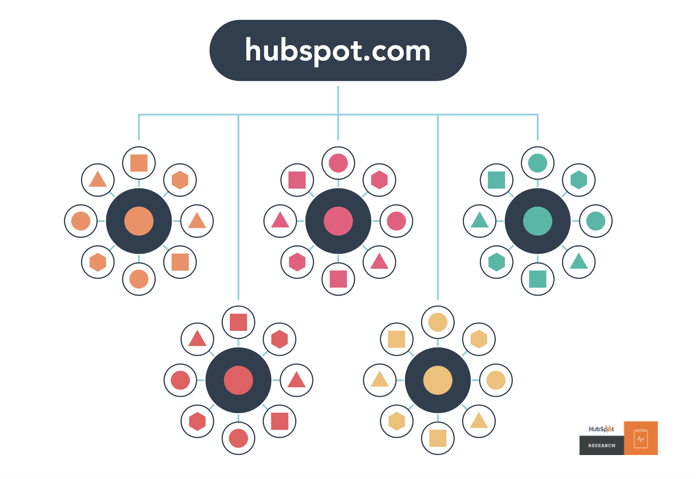
Thanks for you reply. Please read Advanced SEO Strategy #6: Content Clusters on this link https://neilpatel.com/blog/seo-strategies/ . So i don’t want to confuse google about my affiliate blog . Please check this image https://blog.hubspot.com/hs-fs/hubfs/assets/hubspot.com/research/CHARTS/Topic%20cluster%20report/New%20structure.png?width=696&name=New%20structure.png I want only categories on my home page and then posts inside categories pages. So home page pass backlinks juice to categories and then categories pass juice to posts instead of having multiple topics posts on home page. Because I notice that my home page rank for only 2 keywords but have good content on different topics.
Hi!, now i understand what you are trying to do.
In that case probably the best SEO option is to use the masonry post layout but for categories, so you can set up a title, description and a image to rank well on Google (and we don’t have that feature).
This carousel: http://prntscr.com/p5b9xz probably it will not work for you, because doesn’t include any category description which is very important if you want to rank.
I think you have a very good idea there about content cluster, so i will add this to my to-do list to apply a similar feature in future releases.
If is added, i don’t have a problem to contact you again.
Regards!
Ok, Thank you very much for considering my suggestion. I will wait next release with this feature. Regards
Hello, How much time I need to wait for this update? Regards
Hi!
Probably i will launch the new update the next week or early.
I will reply your with the demo url to so you can check if that change will work for you.
Regards!
Hi! Just FYI
I pushed a new update and you can check a demo of masonry categories here: http://estudiopatagon.com/themes/wordpress/breek/home-category-cluster/
If that feature get a good acceptance from our customers, probably i will expand the amount of options and layouts.
Regards!
Thank you very much, That is looking so good.
The latest theme update break my body background color. Re applying/resaving the setting doesn’t help either
Hi! yes we changed the background solution to a pseudo element si it will work on Android and IOS without problem.
If you are applying a custom background with CSS, for example body{ background-image: ... }
Try to replace it to:
body:before{ background-image: ... }
Let me know if that helps you.
Are you guys going to add woocommerce compatibility? Thanks!
Hi!
Not 100% sure, Woocommerce add an important load to the server, so i must evaluate if more customers want that feature, 90% of our customers are using the theme just as a personal blog.
But, if more customers ask for Woocommerce, i don’t have any problem to include that feature (customers with Woocommerce activated, could loose several points on Google page score).
Regards!
Hey! thank you very much!
Don’t forget to rate our theme if you like it.
Regards!
Hello Author. I found your theme on another website and I like this. Before I buy it I want to ask next question. On that site where I found Breek I saw in page source next code in the <head>
<!- start: Estudio Patagon Meta Tags ->
...
<!- end: Estudio Patagon Meta Tags ->
and after that there is Yoast plugin code with another meta data. So there are two places with different meta info. Is this possible to switch off meta tags from Estudio
Hi!
Yes, is it possible after purchase you can open a new ticket on https://estudiopatagon.ticksy.com/ and we will send you the instructions.
Regards!
When i add my own logo the theme doesn’t keep the quality of the picture. How can i resolve that?
Thanks
How can i change the color of the number of the page (the one that is near of the button next). Greetings
Hi! thank you for contact us!
I recommend you to upload your logo with a max width of 500px and set the half of that amount here: http://prntscr.com/p1tpwo
About your 2nd question, you can change it with this custom CSS (if you want to change only that part):
.epcl-pagination div.nav .page-number{ color: #000; }
Paste into theme options -> advanced settings -> custom CSS.
Hablo Español si prefieres hacer tus consultas en este idioma.
¡Saludos!
Really Thanks, you guys have a really good support! Last thing! How can i reduce the height of the header?
Hi! thank you for your kind words!
I think you can remove the small border below the header menu and that will reduce a lot the height, for example
#header div.border{ display: none; }
Let me know if that helps you.
It still keeps soo wide, exist another way? I would like the header and the logo be more close of the top. And with less height. But i don’t know how is the css of the header margin. Really thanks!
Hi!
Of course, just share your website and i will check what CSS must be changed.
If you are not comfortable sharing your website, just open a ticket on https://estudiopatagon.ticksy.com and i will send you the customization.
Regards!
Ticket send it! Really thanks! Good support guys!
Hey! thank you very much!
I just replied you on our ticket system.
Regards!
Will schema.org be added in the future?
Probably yes if we keep getting sales.
Full Schema support is something that we already have on our to-do list but first we need to evaluate it.
On the past lot of customers asked for Open Graph support and we added that feature, same will happen with Schema.
Regards!
Is there anyway to remove grid animation?
Hi!
Yes, you can remove it manually removing data-aos=”fade-up” here: http://prntscr.com/p02lft
It’s not totally recommended because the animation will hide the masonry width calculation.
Let me know if that helps you!
Thanks.
Hi guys!
Your theme looks awesome, and I’ve just got a couple of pre-sale questions
1. Is it possible to add the carousel to the “Home Grid with Sidebar” Homepage?
2. Can I add a sidebar to the “#Tag” page? (I guess it’s a category page, right?)
3. Is it possible to add the “About me” section (that you can find in the footer) on the sidebar?
Thanks in advance for your answers!
Have a nice day, Simone
Hi! thank you for your kind words!
About your questions:
1.- Yes, that blocks work like modules, so you can mix carousel + post lists, ads + post list, etc. The only which is not allowed is to use 2 posts lists in the same page, for example (masonry and after that, classic post list).
2.- Yes, you can change it to grid + sidebar or classic + sidebar if needed.
3.- Yes, it works like a widget, so you can add it on any sidebar you want.
Have a nice day!
Thanks for your answers, I bought your theme
Just one last question – How can I add a sidebar to a category display page?
For instance, considering your demo, this is a category display page (http://estudiopatagon.com/themes/wordpress/breek/category/solar-system/). Is there a way to add a category here?
Thanks again for your support, Have a nice day!
Hi! thank you for buy one of our themes.
About your question:
I recommend you change the layout here: http://prntscr.com/oyrfm7 and change to grid + sidebar or classic posts, both layouts will include the home sidebar.
Also don’t forget to install ACF, Redux Framework and Breek functions plugins to see all available features.
Let me know if that helps you!
Is there a $29 discount?
Hi!
Sorry, the discount is over.
Regards!
Presale question: Great looking theme, and very light! What is the difference between this one and the Reco theme? Is the framework the same, and ‘just’ changing a bit on the design?
Hi! thank you for your words!
The main differences comparing Breek are:
1.- Design style (all is inside blocks and all icons were improved).
2.- Masonry style.
3.- Lighter and faster
4.- No support for Woocommerce
5.-Tags with colors and custom pages for Author and Categories.
In terms of speed, you should get better scores on Breek, Woocommerce add a medium amount of load, so it is more complex to get higher results also we added more optimizations to the mix.
Hope this may help you!
Is there anyway to remove the pre loader? It really slows the site down.
Hi!
If you mean this preloader http://prntscr.com/otl09x ? that can be removed with custom CSS.
.pace{ display: none !important; }
But the most important thing, that loader is just an event indicator, it will not slow down the website in any case, so maybe you can share your website to check if you have any other problem.
Regards!