

2269 comments found.

¡Hola Codetipi! Todavía no pude solucionar el problema de las páginas AMP, y en las pruebas que he hecho en mi página de pruebas, el problema sigue ocurriendo y bastantes lectores se han quejado 
Solo ocurre con Zeen que las imágenes no se redimensionan, no se ven al tamaño correcto y a causa de eso no deja ver el texto de pie de foto en las imágenes que lo llevan.
Puedo proporcionarte los datos de la web de pruebas, creo que es algo que le podría estar ocurriendo a otros usuarios y sería interesante de ver, pero por desgracia no puedo abrir ticket de soporte en https://codetipi.ticksy.com/. Tengo también el problema que te comenté de “Aq_Resize.process”, que genera múltiples errores cada vez que alguien entra en una review, pero tampoco deja abrir ticket por el complemento Zeen Review (porque lo tengo, pero gracias a su integración en Zeen).
Hola Alias79,
Recuérdame por favor – probaste en la versión AMP de las páginas de las demos para ver si ocurre allí también?
Codetipi
¡Hola!
Acabo de ver una cosa que lo mismo sirve para solucionar el problema. TODO post AMP redimensiona bien las imágenes (no centra la imagen destacada, pero sí redimensiona bien las imágenes), MENOS los POSTS con imágenes que tienen leyenda, es decir, texto a pie de foto. Si borro el texto a pie de foto / leyenda de una imagen, el problema se soluciona, por lo que algo en el código de las leyendas debe ser lo que está interfiriendo.
Por cierto, he actualizado a Zeen 3.0, pero el problema persiste.
Ah interesante! No lo había probado con leyendas. Voy a investigarlo para el próximo update! Gracias por la extra info!
¡Perfecto! Entonces, ¿pudiste reproducir el error?
Si 
¡Buenas Codetipi! Ante todo, ¡feliz año nuevo!
Cada vez que sale una nueva versión de Zeen la instalo para ver si se corrigen los errores que había encontrado, y mientras tanto le digo a todos mis redactores que eviten poner pies de foto, o bien que desactiven AMP en los posts donde los utilicen. ¿Sabes una fecha aproximada de cuándo se abordará este error?
¡Muchas gracias!
Hola Alias79,
Feliz Año! Y intenté reproducir el problema localmente, y ya no lo veo. Seguro que te sigue a ti? Comparte un URL donde sale para ver que pasa y lo investigo.
¡Hola Codetipi!
Sí, sí. Cada vez que aparece una nueva versión, voy a los comentarios de la versión para ver si se ha corregido, actualizo inmediatamente, y compruebo. Y sí, todavía persiste.
La URL que siempre compruebo es esta:
https://www.nextn.es/2019/11/fire-emblem-three-houses-ventas-comparativa/amp/Qué version de AMP tienes instalado? Porque en mi sitio local me funciona bien imágenes con captions. Estás usando Gutenberg?
La 1.4.2, la última versión lanzada. Por lo general, suelo esperar un máximo de 2-3 días a actualizar plugins, por si aparecen errores, pero tengo absolutamente todo al día, incluso usamos PHP 7.3.1
El caso es que este error solo ocurre con Zeen; si cambio a otro tema, no ocurre.
Por cierto, luego también tenemos el error de Aq_Resize.process con Let’s Review, desde que se actualizó en una de las últimas versiones que ya no sirve la modificación que me diste en la web de soporte, y genera cientos de errores en el servidor.
Y como creaste la imagen en ese post? Puedes copiar/pegar el código o si es Gutenberg, que settings le pusiste.
Claro, ahí va:
href="https://www.nextn.es/wp-content/uploads/2019/11/1911-01-Fire-Emblem-Three-Houses-ventas.jpg">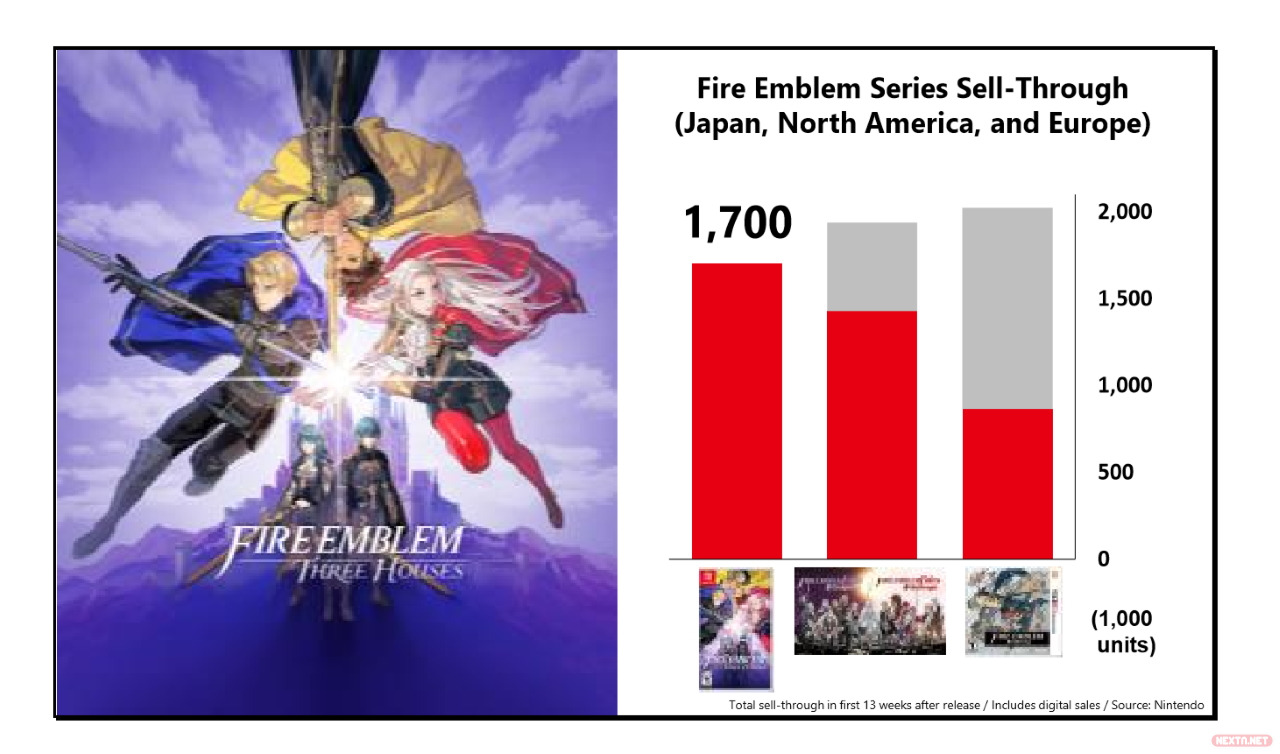 Las bandas grises son las ventas totales. A las 13 semanas, ya superó a Awakening y Fates, por lo que lo tiene fácil para rebasarlos.[/caption]
La forma que tenemos de añadir las imágenes, es con el botón de insertar imagen de WordPress. Todas las imágenes se ven bien en AMP, menos las que tienen leyenda (el apartado que inserta texto bajo la imagen). Cuando una imagen tiene leyenda, en lugar de redimensionarla lo que hace es mostrar el tamaño más grande disponible de esa imagen (en este caso, 1280 de ancho). Podríamos subir las imágenes directamente más pequeñas, pero hay algunas que interesan que el lector pueda verlas con más definición.
Editado: al poner el código, inserta la imagen en este cuadro de comentarios, no sé si así te servirá.
Ah es por el Classic Editor, ha sido arreglado ahora, estará incluido en el v3.4 update
¡Ah! Fenomenal :))) ¡Muchas gracias Codetipi!

Actualización aplicada, ¡y problema con AMP solucionado! Muchas gracias Codetipi
Can you change the type of an existing block, or must a new one be created?
Hey Idea247,
If you are referring to blocks inside the Tipi Builder, then yes you can’t convert an existing block to another one, as the settings for most blocks are different. But adding a new one to replace one should only take a few seconds
Codetipi
Good Morning, is it possible add in the next update Telegram social icon and in the Let’s Social Count widget? Thanks
Hi Gerardo,
Telegram has been added for mobile bottom social sticky bar, it can’t be added to Social Count because Telegram isn’t a social network with like counts, you can only “share” with it
Codetipi
Hi, i try to find in the mobile social button but not found it. And how can i do to add the telegram icon in the main menu? Understand the social counts, but the easy social icon? Thanks
It’s part of the upcoming Zeen v3 update
Anyone know how to get boxes like these in Zeen? https://www.brainyquote.com/search_results?q=life
Hi Idea247,
Are you wanting to recreate that literally? Because that is a really specific/niche creation, the closest you can do is add a columns block and add multiple quotes block in each one and give each one a background color to make them visually look like blocks.
Hope this helps.
Codetipi
I’ve seen it on various sites. I’m looking to create individual boxes for jokes/quotes with share button/inks on each one. I wonder if there might be a plugin to do that.
Ah I see, I think the best way to do that is actually by creating a custom post type for your jokes/quotes, and then in the Tipi Builder you can add a masonry type block and make it only show posts from your custom post type that you created. Do you think that would be a good approach? You could use this free plugin to create the custom post type and custom taxonomy: https://wordpress.org/plugins/custom-post-type-ui/
Hope this helps.
Codetipi
Thanks so much, I will try that.
You’re welcome
The edge to edge function works perfectly, however, I’m trying to achieve the same for a block background image and none of the typical sizing parameters will do the trick.
An example is the very bottom block: https://muvtest.space/
Hey Andrew,
This will be possible in v3 update, which is going to be out very soon
Codetipi
Fantastic, thanks!
No problem
Hi, i have a question about AdSense theme box. I have setting AdSense to use the automatic Ads and i don’t use extra code or other banners from adsense, it all automatic by google. Do you know how can i do to force some google Ads on the widget sidebar or in the posts? My website is: gerardopandolfi.com
Thanks
Hey Gerardo,
I’m afraid I don’t know, as the Google automatic ads are literally that, if you want specific locations, you need to manually set your ad in locations
Codetipi
Hey! I have a question. Background image set with cover style is scalable for bigger resolution screens, for example on TV browsers. Background image look ultra bad then. What I am doing wrong?
https://prnt.sc/q5is6uHey Duch,
You are not doing anything wrong, cover is a css property that stretches the image to the screen width, just set a decent sized image (around 1400px wide) and optimize it so the file size remains acceptable, and that’s all you can physically do for the background of a site.
Codetipi
Its now about 1900 px, but on larger TV screens background looks like Minecraft. Its too big?
No real visitor is going to use a large tv screen to surf the internet  You can’t optimize an image for all screens, it’s physically impossible. If you use a 5000px image, it will look good on tv screens, but will be very heavy = bad performance = bad for normal desktop users. I honestly recommend you forget about this one
Ok, thx.
No worries
Hi , I have not downloaded this, please check my refund request
Hi Yodelacuesta,
All requests are checked by Codetipi and Envato, don’t worry
Codetipi
Hi,
I have install the ZEEN theme but AMP pages are not working and giving khtml-keyframe error which is not there in page. Could you please help me to solve the issue? Link : https://styleotter.com/
Thanks.
Hi Sjo775,
Thanks for choosing Zeen. Did you install the official AMP plugin? Just remember that amp in Zeen is for posts only, as AMP pages is really unnecessary. Amp has very strict and small limits on custom css you can add, so adding style for both posts/pages (+ plugins custom AMP code), would mean you’d go over the limit and your AMP status would become invalid.
Zeen on mobile is already super fast, so the best use of AMP (if you really want to use it) is just for posts for that initial landing post for visitors, and if they want to click around the site, they can load the real site, which will be much more engaging for your visitors, and still be very fast.
Hope this helps.
Codetipi
Yes, but the post should work right? But when we go for AMP version the complete design of post got spread. You can check this link https://styleotter.com/?p=5034& Also we haven’t install any specific plugin for AMP, there is AMP default plugin with theme only.
Looking for your response.
Thanks
Hey again,
No, it isn’t possible to run AMP without installing an AMP plugin. There are essentially two main ones you’d want to choose from:
https://wordpress.org/plugins/accelerated-mobile-pages/and the official one:
https://wordpress.org/plugins/amp/Those plugins are the engines that make WordPress be able to run AMP, a theme can only add styling/compatibility on top. AMP is very complex and ever-changing, so it would be foolish (And against best practises) for a theme to try to add the AMP engine too.
Install one of those two plugins, and I think you’ll need to change your permalinks structure too, as I don’t think AMP can work well on the default WordPress one.
Hope this helps!
Codetipi
I disabled Gutenberg, and life is so much better!
Hey again,
Gutenberg really is a love-hate thing Happy you’re enjoying WordPress again
Codetipi
I already left a support message, and am asking an additional question here. All pages and posts that were already created don’t have access to the classic Wordpress editor – in fact the editor looks quite different from those on Zeen demo pages. When I past an article into a previously existing page, it chops everything into different blocks. Any thoughts on how to resolve that?
ugh… “paste”
Hey there,
I see you installed the Classic Editor to disable Gutenberg, hope you enjoy it
Codetipi
I’m thinking of purchasining Zeen, but I’m afraid it might have way more than I need.
Hey there,
I see you’ve purchased Zeen now, hope you enjoy using it!
But in case anyone else wonders the same thing, the theme is super light by nature and modular, meaning that you can use it in an ultra simple way very easily
Codetipi
Will the demo import delete the existing content?
Hey again,
Happy to hear that
If you import a demo, then the theme options will be set to the demo ones, which means some features ()depending on demo) will be activated, but you can simply go to the theme options and disable them – most are controlled via simple on/off switches, such as popups or slide in boxes, etc.
The demo will not delete any existing content though
Hope this helps.
Codetipi
Hi
I like to exclude some of the members from the author list.
Can I do it using user ID or something.
Please help.
Best.
Hey Umzikim,
You can do that in Theme options > Pages, you’ll find an option to set what authors to show on your page. So you have 100% control over who shows
In v3 (will be out very soon), the option now also allows you to choose the order the authors appear in too
Codetipi
Thanks!
But can I might be more easy if I can do it in the author box itself on the tipibuilder.
Best Jae
This theme already have “position” feature with profile with your plugin. I like to call team list by “position” each block or each page.
Please help.
The position option for authors is actually to show a subtitle in the author box (their job position) – the new option in v3 allows you to sort the order for the output, and it will also affect the Tipi Builder block
Hello, I have questions about Zeen Food. 1. Can I change the color (instead od black)? 2. Can I turn off the pictures of dishes in the drop-down menu and give the name of the dish instead? Thank you
Hey Karolina,
Thanks for checking out Zeen
1- Yes, you can set any color you want. You can even set a background image or video too! All the demos are created using the same base theme options, that’s how they all look so different. Yours can be whatever you want
2- Yeah of course, you can do that too.
Hope this helps.
Codetipi
noticed a bug in the template on mobile devices. to go to the post – need to click twice. the first for hover style, and the second for go to post. is it possible to disable it in the settings?
Hey Nicko,
That isn’t technically a bug, it’s how mobiles handle hover, however, in the v3 update it has been tweaked to bypass that, you can see it live on the demos now (they are currently running v3).
Codetipi
how do I disable this feature?
update coming soon?
It isn’t something you can easily do, it’s deep code changes, so you have to wait for the update. Yes it is coming soon
Thanks! You’re good! The best news template you have)
It’s no problem You should join the Zeen mastermind group on Facebook, as lots of new v3 demos were shared there, in case you want to see a sneak preview
Thank you)
you could put a link to Facebook
You can access it via the Zeen > Community option in the backend
Hi, I congratulate you because Zeen is a spectacular theme! I am fully satisfied …. But I have a request to ask you, if it is possible to add a third color (to create a three-color gradient instead of two) in the border of the main menu, background color of the secondary menu, buttons, etc. ... I have a strong need because my Brand has a shade of three colors as its main colors. Thank you for your attention and I wish you many beautiful things.
Andrew
Hey Andrew,
Thank you very much for the kind words, really happy you’re enjoying Zeen
Yeah you can definitely do that with a tiny bit of custom css, as adding an option with 3 variants might be a bit overkill!
Go here: https://www.colorffy.com/generator/mgradients create your 3 colored gradient, then copy the CSS value here. Then also include your site url so I can see which header design you’re using to tell you how to apply the gradient to it.
Hope this helps.
Codetipi
Perfect! Very quick in the answer.
this is the css code: background: linear-gradient(to right, #768fc7,#d1cc52,#ecc6ad);
while this is the site: http://www.creativezenofficial.comBut if in the future I want to change the colors I can do it myself or do I have to contact again?
Meanwhile thank you very much, I await answer. Mythical.
Andrew
hey Andrew,
No problem, here goes:
Copy/paste this into your theme options > Additional CSS box:
.secondary-wrap .menu-bg-area {
    background: linear-gradient(to right, #768fc7,#d1cc52,#ecc6ad);
}
Should do the trick
Codetipi
You are a wizard! But if I wanted to add the nuance (the three colors) also in the loading bar or in the various buttons?
Thank you!
Andrew
You’re welcome, happy it worked
And if you share urls and point out the exacts elements you want to apply it to, I can look at the html and share more snippets to apply it there too.
Thank you very much for your answers and interest. I don’t know what you mean by URL (sorry ignorance) since it always makes me copy the same. But I took the photos at the exact point where you want to add the gradient (the three colors). There are many points that interest me but in the meantime I send you these:
- edge above and below the main menu https://prnt.sc/q696lt
- widget border https://prnt.sc/q696wl
- line next to the texts of the Homepage https://prnt.sc/q6971y
- footer border https://prnt.sc/q6977k
- newsletter subscription button https://prnt.sc/q696cz
- general sign-up key https://prnt.sc/q695ut
You’re so nice, I admire you so much.
P.s. so that you don’t have to contact you again and waste your time, if there is a way to apply the changes, alone, I will gladly learn it.
It’s no problem, happy to help
Ah I see, so when you set those border settings, they don’t work on the frontend for you? That is strange though, because I just tested some of them and they definitely work over here. Could you try disabling all plugins and then try doing it again? I wonder if a plugin is doing something weird and stopping the theme options from saving.
Also, when you refresh the theme options, do the border options you set (color, width, etc) still show? Or do they revert to default values?
Codetipi
But then the three colors can I put them already by default? Because to me always an applicable color and not three as in the photo I sent you before.
Don’t you have to give me the code to enter in additional CSS box ?
(obviously I’m not an expert so I trust you)
Andrew
Oh I see, you want to apply the 3 colours to the borders! I’m afraid that isn’t possible though. You can’t apply more than one color to CSS border, you can only do that with background colors, such as the background of your entire footer, but not on the border of the footer.
Okay, so forgive me for wasting my time. So I can’t add my three colors (then create the gradient) in the required parts? I thought that being the creator, through a CSS code, you could make a change and add the ability to insert other colors. As you did before.
Anyway you were very kind and thank you infinitely for your patience.
Andrew
You can add a gradient as a css background anywhere you want, as I shared with your menu’s background, however, it literally isn’t possible to set a gradient for the “Border CSS property”, in CSS a border can only have a single hexadecimal value. Check this page out to see everything that is possible with a border:
https://www.w3schools.com/css/css_border.aspHope this helps!
hello
I am having difficulties speeding up a product home page, Can I have a template that is build with tipibuilder and I will import and edit it?
elementor adds slowness to my website
Also can I remove google fonts but still use Poppins? google fonts slows down my website and I only use poppins. lastly, there is a problem on your ticketing system. I am already logged in but it still asks to register.
Hi there,
Thanks for choosing Zeen, hope you enjoy using it
Elementor adds a lot of extra files, so you be feeling that. What do you mean by product homepage though? Can you share your url?
You don’t need to use Google fonts, you can indeed load your own fonts (Documentation has all the steps).
Regarding the ticket system, please try again in an incognito tab and make sure you use the correct account that purchased the theme.
Hope this helps.
Codetipi
Can you hide the sidebar only on mobile devices? Thanks
Hi Mycrof221,
Thanks for choosing Zeen, hope you enjoy using it.
Yes, you can do that in Theme options > Mobile Devices
Codetipi
HI! Nice theme!
https://applepro.newsHey Nicko,
Happy you like it, best of luck with your site
Codetipi
Hi I’m having difficulty with block post title font size. Each time I chose a size it came back to the previous one. Thank you.
Hey PatrickRene,
Can you confirm which Zeen version you are running?
Codetipi
2
Is it literally 2.0.0? Because the latest live version is currently v2.4.2
yes. ok i’ll do the update and get back to you. thank you
Hey I just verify i did have v2.4.2,
Hey Patrick,
I think the best thing to do is to update to the upcoming v3 update which is due out very, very soon. As the code has changed a bit and might influence the investigation. Let me know what happens after you update.
Codetipi

This item was featured on ThemeForest

Power Elite Author
Contact the Envato Market Help Team


